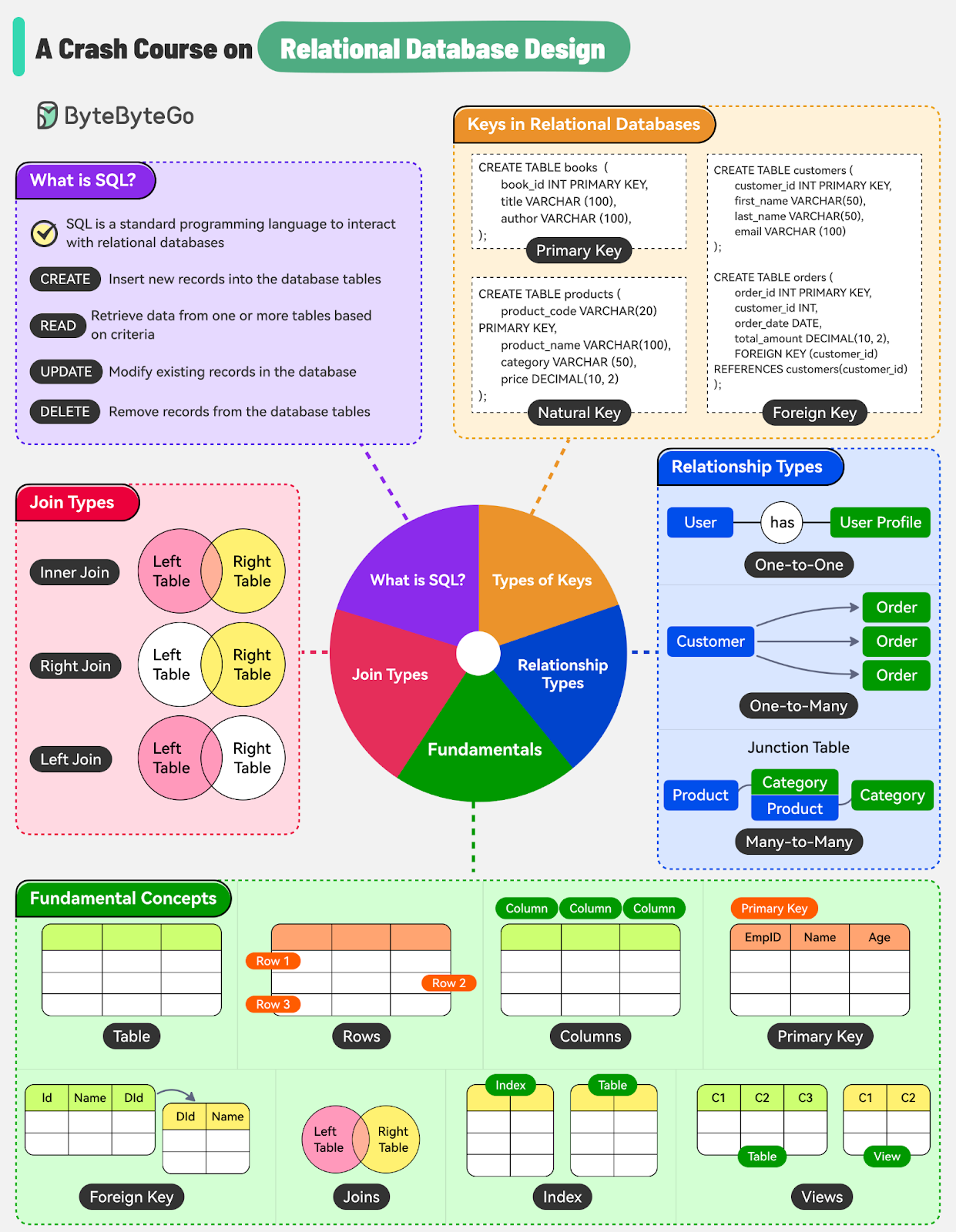
In today's data-driven world, efficient storage and management of information are critical requirements for businesses and organizations of all sizes.
Relational databases provide a robust framework for storing and retrieving data based on well-defined relationships between entities. They offer a structured approach to data management, enabling users to:
Define tables
Establish relationships
Perform complex queries to extract meaningful insights from the stored information
However, just using a relational database is not enough to gain its benefits.
Effective database design is crucial for optimizing performance, ensuring data integrity, and facilitating efficient data retrieval. The principles of database design, such as normalization, indexing, joins, and relationships, play a vital role in creating a well-structured and performant database.
In this post, we’ll look at the fundamentals of relational databases, exploring their key concepts, management systems, and the principles that underpin effective database design.
A relational database is a type of database that organizes data into structured tables, also known as relations. These tables consist of rows (records) and columns (fields), forming a tabular structure that allows for efficient data storage and retrieval.
The power of a relational database lies in its ability to establish relationships between multiple tables.
By defining connections between related tables, it becomes possible to link and combine information. This allows for complex queries and data retrieval operations that span multiple tables, enabling you to access and analyze data in various ways.
To work with relational databases effectively, we need a Relational Database Management System (RDBMS).
RDBMS is a software application designed to create, manage, and interact with relational databases.
Some key functionalities provided by a RDBMS include:
Data Definition: Define the structure of your database, including the tables, columns, data types, and constraints.
Data Manipulation: Perform various operations on the data stored in your database. This includes inserting new records, updating existing records, deleting records, and so on.
Data Integrity: The RDBMS enforces data integrity rules to maintain the accuracy and consistency of your data.
Data Security: An RDBMS also provides mechanisms for controlling access to the database by defining user roles, permissions, and authentication measures.
Query Optimization: The RDBMS optimizes the execution of complex queries to retrieve data efficiently. It employs various techniques, such as indexing and query optimization algorithms.
Several RDBMS are available in the market, each with a set of features and capabilities. Some examples are:
MySQL: An open-source RDBMS known for its simplicity, reliability, and wide adoption.
PostgreSQL: A powerful open-source RDBMS with advanced features and strong support for data integrity.
Oracle Database: A comprehensive and feature-rich RDBMS commonly used in enterprise environments.
SQL (Structured Query Language) is the standard programming language used to interact with relational databases.
One of its key advantages is universality. The syntax remains largely the same when working across MySQL, PostgreSQL, Oracle, etc.
This portability enables developers to switch from one RDBMS to another with a minimal learning curve.
SQL provides a comprehensive set of commands and syntax that allows developers and database administrators to perform various operations on the data stored within a database.
SQL supports four fundamental operations for data manipulation, commonly known as CRUD:
Create: Insert new records into the database tables, effectively creating new data entries.
Read: Retrieve data from one or more tables based on specific criteria.
Update: Modify existing records in the database.
Delete: Remove records from the database tables that are no longer needed or meet specific deletion criteria.
In addition to data manipulation, SQL also offers commands for defining and modifying the database structure.
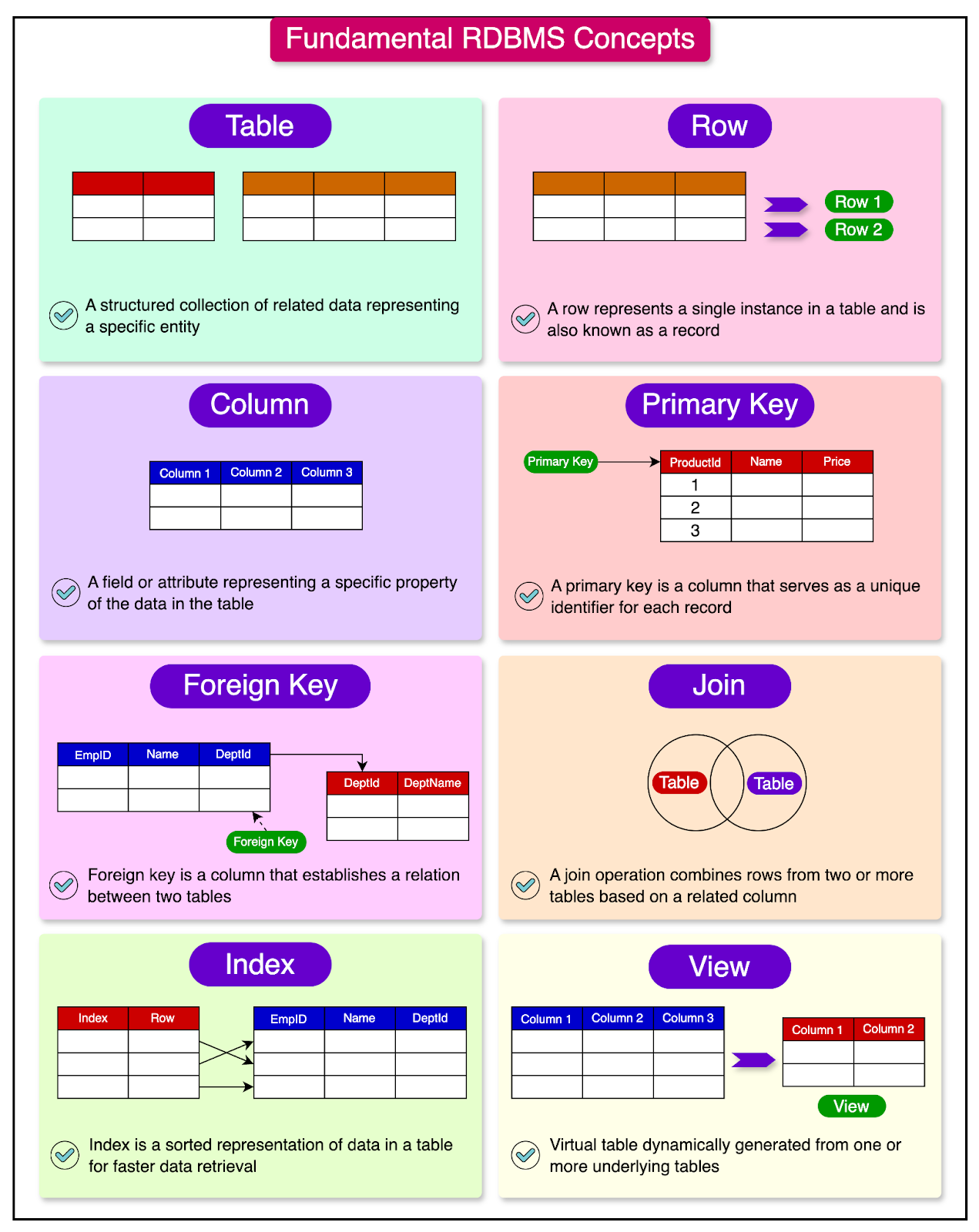
When working with relational databases, it’s essential to understand the fundamental concepts and terms.
Let’s explore some of the key terms:
Table: A structured collection of related data organized in rows and columns. Each table represents a specific entity or concept, such as customers, orders, or products.
Row: A row, also known as a record or tuple, represents a single instance or entry in a table. For example, in a “customers” table, each row belongs to an individual customer with some attributes.
Column: A column, referred to as a field or attribute, represents a specific characteristic or property of a particular record in the table. Columns are used to organize and categorize the data within a table.
Primary Key: A primary key is a column or a combination of columns that serves as a unique identifier for each record in the table. It ensures the uniqueness and integrity of the data by preventing duplicate or null values in the primary key column(s).
Foreign Key: A foreign key is a column or a combination of columns in one table that references the primary key of another table. It establishes a relationship between two tables and helps enforce referential integrity and data consistency.
Join: A join is an operation that combines rows from two or more tables based on a related column. It allows data retrieval from multiple tables by specifying the conditions under which the tables should be combined.
Index: An index is a data structure that improves the performance of data retrieval operations in a database. It creates a sorted representation of the data in a table based on one or more columns.
View: A view is a virtual table that is dynamically generated from one or more underlying tables. It provides a customized and simplified representation of the data. Views can be used for security, simplification, or data abstraction purposes.
Keys are fundamental components in relational database design and play a crucial role in data integrity and establishing relationships between tables.
They serve as unique identifiers for records, making data retrieval and manipulation more efficient.
Let’s look at the different types of keys and their significance in relational database design.
A primary key is a column or a combination of columns uniquely identifying each record in a table.
It ensures that each record is unique and can be easily located within the table. The primary key constraint enforces the uniqueness and non-nullability of the primary key column(s).
The example below shows how to define a column in a table as the primary key:
CREATE TABLE books (
    book_id INT PRIMARY KEY,
    title VARCHAR(100),
    author VARCHAR(100),
    isbn VARCHAR(20) UNIQUE,
    publication_year INT,
    genre VARCHAR(50)
);
By specifying book_id INT PRIMARY KEY, we are declaring the book_id column as the primary key of the “books” table. In other words, each value in the book_id column must be unique and cannot be null.
To improve query performance, the database automatically creates an index on the primary key column.
As discussed earlier, an index is a separate data structure that helps with faster data retrieval based on the indexed column(s). By creating an index on the primary key, the database can quickly locate and access specific records without scanning the entire table.
Keys can also be classified in two ways: surrogate keys and natural keys.
A surrogate key is an artificial key generated by the database system. It is often a sequential number or a globally unique identifier (GUID) that has no inherent meaning or relationship to the data. Surrogate keys are commonly used as primary keys because they ensure uniqueness and simplify the management of relationships between tables.
The example below shows a table named “customers” with customer_id as the surrogate key:
CREATE TABLE customers (
    customer_id INT PRIMARY KEY AUTO_INCREMENT,
    first_name VARCHAR(50),
    last_name VARCHAR(50),
    email VARCHAR(100) UNIQUE
);
In contrast, a natural key is a key derived from the data itself. It is a column or a combination of columns that naturally identifies each record uniquely based on the inherent characteristics of the data.
Examples of natural keys include an employee ID, a product code, an email address, or a combination of columns such as "first name" and "last name" for a person.
The example below shows the “products” table where product_code is the natural key. This key is an inherent characteristic of the product data. It could be a manufacturer-assigned code or a standard identifier.
CREATE TABLE products (
    product_code VARCHAR(20) PRIMARY KEY,
    product_name VARCHAR(100),
    category VARCHAR(50),
    price DECIMAL(10, 2)
);A foreign key is a column or a combination of columns in one table that references the primary key of another table. It establishes a link or relationship between the two tables.
The example below shows a “customers” table and “orders” table. The “orders” table has a foreign key referencing the customer_id from the “customers” table.
CREATE TABLE customers (
    customer_id INT PRIMARY KEY,
    first_name VARCHAR(50),
    last_name VARCHAR(50),
    email VARCHAR(100)
);


CREATE TABLE orders (
    order_id INT PRIMARY KEY,
    customer_id INT,
    order_date DATE,
    total_amount DECIMAL(10, 2),
    FOREIGN KEY (customer_id) REFERENCES customers(customer_id)
);
The purpose of a foreign key is to enforce referential integrity.
Referential integrity ensures that the data in the child table (the table with the foreign key) is consistent with the data in the parent table (the table with the primary key). It prevents the creation of orphaned records in the child table that do not have a corresponding record in the parent table.
The referential integrity is enforced by the use of constraints. The constraints define the rules and actions to be taken when a referenced record in the parent table is updated or deleted, ensuring that the relationships between tables remain consistent and valid.
Here are some common constraints:
CASCADE: When a record in the parent table is updated or deleted, the CASCADE action automatically propagates the change to the child table. For example, if a record in the parent table is deleted, the corresponding records in the child table are also deleted.
SET NULL: When a record in the parent table is updated or deleted, the SET NULL action sets the corresponding foreign key values in the child table to NULL.
NO ACTION: This action prevents the deletion of the parent row if it is referenced by any child table.
The example below shows how to define a foreign key constraint:
CREATE TABLE Orders (
    OrderID INT PRIMARY KEY,
    CustomerID INT,
    OrderDate DATE,
    FOREIGN KEY (CustomerID) REFERENCES Customers(CustomerID) ON DELETE CASCADE
);In relational databases, relationships between tables play a key role in defining how data is connected. These relationships determine the structure and integrity of the database.
Let's explore the three main types of relationships: one-to-one, one-to-many, and many-to-many.
A one-to-one relationship is a type of relationship where each record in one table is associated with exactly one record in another table, and vice versa.
This means that for every record in Table A, there is a corresponding unique record in Table B, and no other records in Table B are associated with that record in Table A.
One-to-one relationships are relatively rare in practice, as they often indicate that the two tables could be combined into a single table. However, there are scenarios where one-to-one relationships are useful, such as when you want to separate certain attributes into a separate table for security or performance reasons.
The example below shows a one-to-one relation between the “Users” and “UserProfiles” table.

Also, the SQL below shows how this relation can be created.
-- Create the Users table
CREATE TABLE Users (
    UserID INT PRIMARY KEY,
    Username VARCHAR(50),
    Email VARCHAR(100)
);

-- Create the UserProfiles table

CREATE TABLE UserProfiles (
    ProfileID INT PRIMARY KEY,
    UserID INT UNIQUE,
    FirstName VARCHAR(50),
    LastName VARCHAR(50),
    Bio VARCHAR(500),
    FOREIGN KEY (UserID) REFERENCES Users(UserID)
);A one-to-many relationship is the most common type of relationship in relational databases.
In this relationship, each record in one table (the "one" side) can be associated with multiple records in another table (the "many" side), but each record in the "many" table is associated with only one record in the "one" table.
One-to-many relationships are typically implemented using a foreign key in the "many" table that references the primary key of the "one" table. This foreign key ensures referential integrity and maintains the relationship between the two tables.
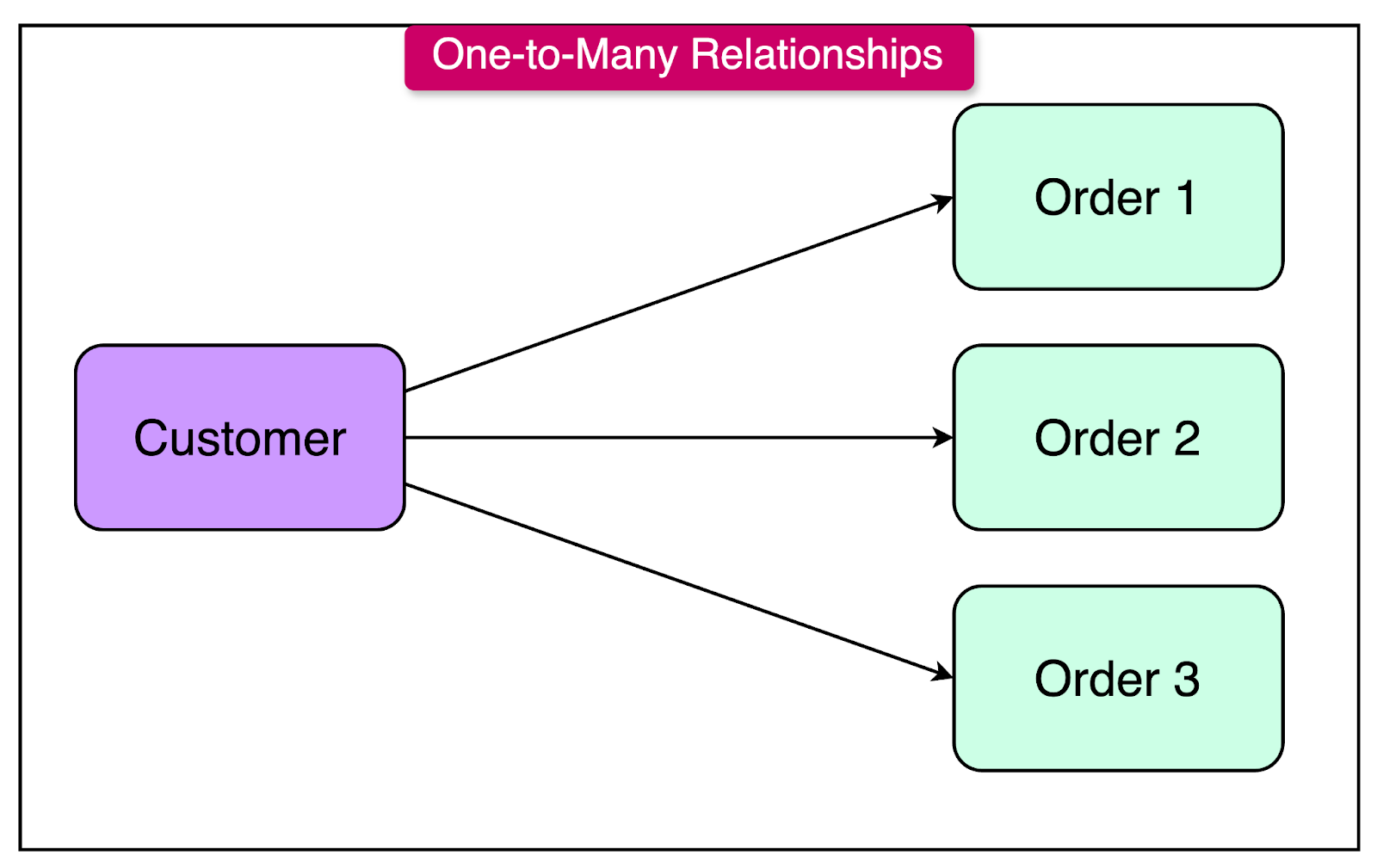
The diagram below shows a one-to-many relationship between two tables: “Customers” and “Orders”. Each customer can have multiple orders, but each order belongs to only one customer.
Here’s the SQL code to create the tables and establish the one-to-many relationship in practice:
-- Create the Customers table
CREATE TABLE Customers (
    CustomerID INT PRIMARY KEY,
    FirstName VARCHAR(50),
    LastName VARCHAR(50),
    Email VARCHAR(100)
);

-- Create the Orders table
CREATE TABLE Orders (
    OrderID INT PRIMARY KEY,
    CustomerID INT,
    OrderDate DATE,
    TotalAmount DECIMAL(10, 2),
    FOREIGN KEY (CustomerID) REFERENCES Customers(CustomerID)
);A many-to-many relationship is a type of relationship where each record in one table can be associated with multiple records in another table, and vice versa. In other words, records in both tables can have multiple corresponding records in the other table.
Many-to-many relationships are typically implemented using a junction table (also known as a bridge table or an associative table).
The junction table contains foreign keys that reference the primary keys of the two tables involved in the relationship. Each record in the junction table represents an association between records in the two tables.
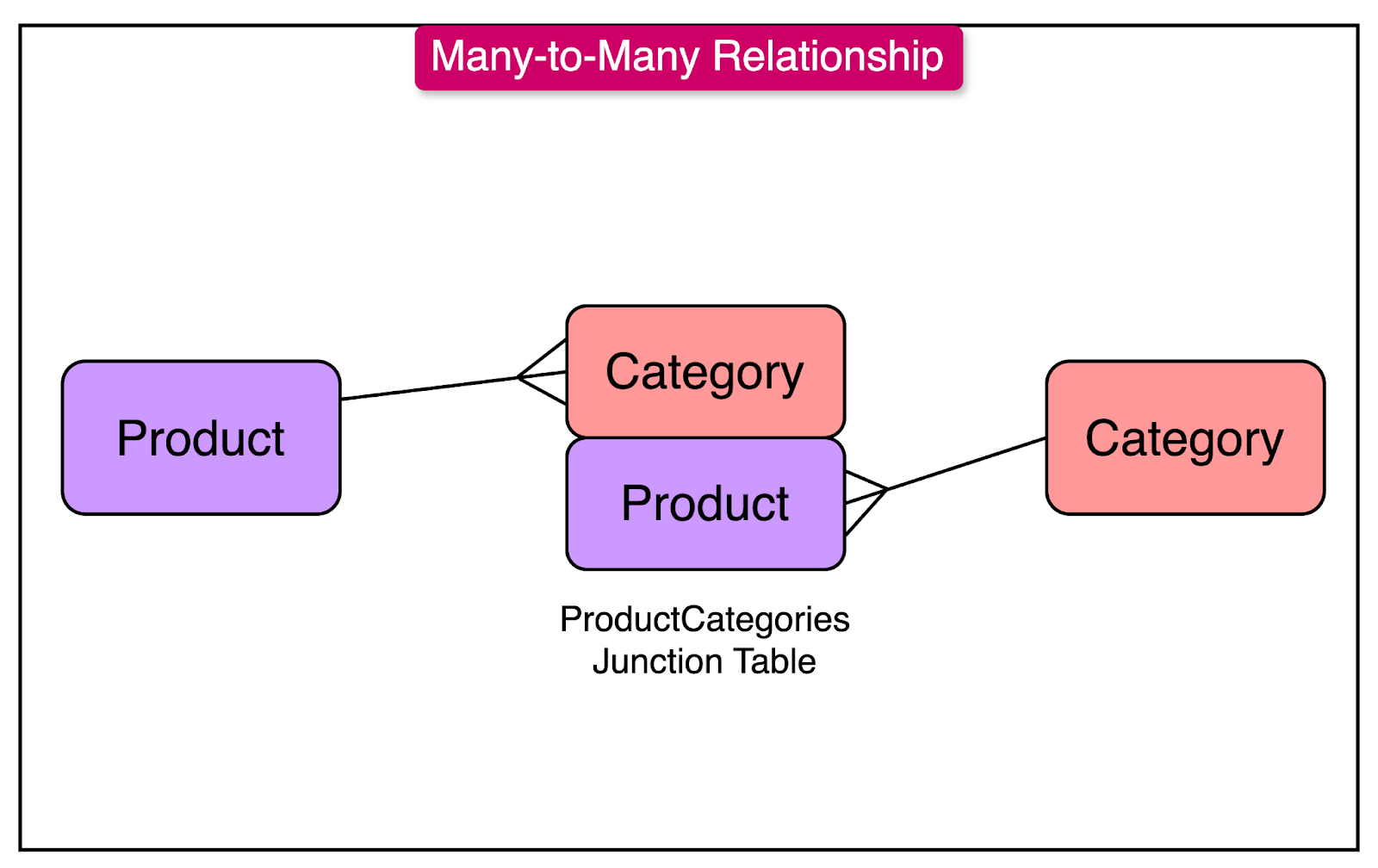
The diagram below shows a many-to-many relationship between the “Products” and “Categories” table. A junction table “ProductCategories” solidifies this relationship.
Here’s the SQL code to create the tables and establish the many-to-many relationship.
-- Create the Products table
CREATE TABLE Products (
    ProductID INT PRIMARY KEY,
    ProductName VARCHAR(100),
    Description VARCHAR(500),
    Price DECIMAL(10, 2)
);


-- Create the Categories table
CREATE TABLE Categories (
    CategoryID INT PRIMARY KEY,
    CategoryName VARCHAR(50),
    Description VARCHAR(500)
);


-- Create the ProductCategories table (junction table)
CREATE TABLE ProductCategories (
    ProductCategoryID INT PRIMARY KEY,
    ProductID INT,
    CategoryID INT,
    FOREIGN KEY (ProductID) REFERENCES Products(ProductID),
    FOREIGN KEY (CategoryID) REFERENCES Categories(CategoryID)

);
Database normalization is a useful technique used in database design to optimize the structure of a relational database.
It involves organizing data into smaller, more manageable tables and establishing relationships between them based on well-defined rules known as normal forms.
The primary objective of database normalization is to reduce data redundancy and minimize data anomalies.
Data redundancy occurs when the same information is stored in multiple places within the database. This can lead to inconsistencies and make data maintenance more challenging.
Data anomalies are of three types:
Insertion Anomalies: They occur when it is not possible to insert certain data into the database without the presence of other data. For example, if customer details and product details are stored in the same table, it may not be possible to create a new product without associating it with a customer.
Update Anomalies: They arise when updating data in one place requires updating the same data in multiple other places.
Deletion Anomalies: Deletion anomalies occur when deleting data from one table removes other related data. For example, if student and course information are stored in the same table, deleting a student record may also delete the course information.
The most commonly used normal forms are:
First Normal Form (1NF)
Second Normal Form (2NF)
Third Normal Form (3NF)
Let’s look at each of them one by one.
The key principle of 1NF is that each attribute (column) in a table must contain atomic values.
Atomicity, in this context, means that each cell in the table should hold a single, indivisible value. In other words, a table is considered to be in 1NF if it does not contain any repeating groups or arrays of data within a single column.
By adhering to these requirements, 1NF eliminates the need for storing multiple values in a single cell and prevents the creation of repeating groups of data.
As an example, here’s a table definition that violates the first normal form:
CREATE TABLE Students (
    StudentID INT PRIMARY KEY,
    Name VARCHAR(100),
    Courses VARCHAR(200)
);

INSERT INTO Students (StudentID, Name, Courses)
VALUES (1, 'John Doe', 'Math, Science, History');
In this table, the Courses column in the Students table contains a comma-separated list of courses that each student is enrolled in. This violates the first normal form because the Courses column contains multiple values in a single cell.
One way to fix this is to have a separate table to store the mapping between students and courses.
-- Create the Courses table
CREATE TABLE Courses (
    CourseID INT PRIMARY KEY,
    CourseName VARCHAR(100)
);

-- Create the StudentCourses table
CREATE TABLE StudentCourses (
    StudentID INT,
    CourseID INT,
    PRIMARY KEY (StudentID, CourseID),
    FOREIGN KEY (StudentID) REFERENCES Students(StudentID),
    FOREIGN KEY (CourseID) REFERENCES Courses(CourseID)
);The Second Normal Form (2NF) is the next step in the normalization process after achieving the First Normal Form (1NF). It focuses on eliminating partial dependencies within a table, ensuring that all non-key attributes are fully dependent on the entire primary key.
To understand 2NF, let's first define the concept of functional dependency.
A functional dependency exists when the value of one attribute determines the value of another attribute. In the context of 2NF, we are concerned with the functional dependencies between non-key attributes and the primary key.
A table is considered to be in 2NF if it satisfies the following conditions:
The table is in 1NF.
Every non-prime attribute (non-key column) is fully dependent on the entire primary key.
To understand it better, consider a table “Orders” that stores information about customer orders with the below structure:
CREATE TABLE Orders (
    OrderID INT,
    ProductID INT,
    CustomerID INT,
    CustomerName VARCHAR(100),
    OrderDate DATE,
    PRIMARY KEY (OrderID, ProductID)
);
In this table, the primary key is a composite key consisting of OrderID and ProductID.
However, the CustomerName column is only dependent on the CustomerID, which is not part of the primary key. This violates the second normal form.
To normalize this table to comply with 2NF, we need to split the table into two separate tables: “Orders” and “Customers”.
See the SQL code below for the same:
-- Create the Customers table
CREATE TABLE Customers (
    CustomerID INT PRIMARY KEY,
    CustomerName VARCHAR(100)
);

-- Create the Orders table
CREATE TABLE Orders (
    OrderID INT,
    ProductID INT,
    CustomerID INT,
    OrderDate DATE,
    PRIMARY KEY (OrderID, ProductID),
    FOREIGN KEY (CustomerID) REFERENCES Customers(CustomerID)
);The Third Normal Form (3NF) is the next step in the normalization process after achieving the Second Normal Form (2NF).
It focuses on eliminating transitive dependencies within a table, ensuring that all non-key attributes depend solely on the primary key and not on other non-key attributes.
To understand 3NF, let's first define the concept of transitive dependency. A transitive dependency occurs when a non-key attribute depends on another non-key attribute, which in turn depends on the primary key.
A table is considered to be in 3NF if it satisfies the following conditions:
The table is in 2NF.
There are no transitive dependencies.
For example, consider a table named “Employee” as follows:
-- Create the Employee Table
CREATE TABLE Employee (
    EmployeeID INT PRIMARY KEY,
    Name VARCHAR(100),
    DepartmentID INT,
    DepartmentName VARCHAR(100),
    DepartmentLocation VARCHAR(100)
);
This table violates the Third Normal Form because it contains transitive dependencies. The columns DepartmentName and DepartmentLocation depend on the DepartmentID, which in turn depends on the EmployeeID column.
To bring the table into 3NF, we need to split the “Employee” table into two separate tables: the “Employee” table and the “Department” table.
See the SQL code example below:
-- Create the Department table
CREATE TABLE Department (
    DepartmentID INT PRIMARY KEY,
    DepartmentName VARCHAR(100),
    DepartmentLocation VARCHAR(100)
);

-- Create the Employee table
CREATE TABLE Employee (
    EmployeeID INT PRIMARY KEY,
    Name VARCHAR(100),
    DepartmentID INT,
    FOREIGN KEY (DepartmentID) REFERENCES Department(DepartmentID)
);
Joins are a powerful and essential concept in relational databases that allow you to combine and retrieve related data from multiple tables.
They act as bridges, connecting different tables based on their relationships and enabling you to query and manipulate data efficiently.
Joins come into play when you need to retrieve data spanning multiple tables.
For example, you might have a "Customers" table storing customer information and an "Orders" table storing order details. While these tables are separate, they are often related through common columns, such as a customer ID.
There are 3 main types of joins.
An inner join is a type of join operation that combines rows from two or more tables based on a related column between them. It returns only the rows where there is a match in both tables being joined.
Consider two tables: "Customers" and "Orders". The "Customers" table contains customer information, including a unique "CustomerID". The "Orders" table contains order details, including the "CustomerID" of the customer who placed the order.
To retrieve the customer information along with their corresponding order details, you can use an inner join like this:
SELECT Customers.CustomerName, Orders.OrderDate, Orders.TotalAmount
FROM Customers
INNER JOIN Orders ON Customers.CustomerID = Orders.CustomerID;
In this example, the inner join combines rows from the "Customers" and "Orders" tables based on the matching "CustomerID" column.
The result set will include only the customers who have placed orders, along with their corresponding order details. In other words, it eliminates customers who have not placed orders and any orders without a corresponding customer.
A right join, also known as a right outer join, is a type of join operation that returns all the rows from the right table (the second table mentioned in the join) and the matched rows from the left table (the first table mentioned in the join).
Consider two tables: "Employees" and "Departments". The "Employees" table contains employee information, including their Department ID. The "Departments" table contains department information.
To retrieve all departments along with their corresponding employee details, you can use a right join like this:
SELECT Departments.DepartmentName, Employees.EmployeeName
FROM Employees
RIGHT JOIN Departments ON Employees.DepartmentID = Departments.DepartmentID;
In this example, the right join ensures that all departments from the "Departments" table are included in the result set. If a department has no associated employees, the result set will still include that department, but with NULL values for the employee name.
This is highly useful to identify and analyze scenarios where there are missing or unmatched relationships between the tables.
A left join returns all the rows from the left table (the first table mentioned in the join) and the matched rows from the right table. If there are no matches in the right table, NULL values are returned for the right table's columns.
Consider two tables: "Customers" and "Orders". The "Customers" table contains customer information, and the "Orders" table contains order details, including the customer ID associated with each order.
To retrieve all customers and their corresponding order details, you can use a left join like this:
SELECT Customers.CustomerName, Orders.OrderDate, Orders.TotalAmount
FROM Customers
LEFT JOIN Orders ON Customers.CustomerID = Orders.CustomerID;In this article, we’ve explored the fundamentals of relational databases and the principles that are important for effective database design.
Let’s summarize the learnings in brief:
A relational database is a type of database that organizes data into structured tables, also known as relations.
SQL (Structured Query Language) is the standard programming language used to interact with relational databases.
Keys are fundamental components, playing the role of unique identifiers for records to enable efficient data retrieval and manipulation. There are different types of keys such as primary keys, surrogate keys, and foreign keys
Relationships determine the structure and integrity of the database. Three main types of relations are one-to-one, one-to-many, and many-to-many.
Database normalization involves organizing data into smaller, more manageable tables and establishing relationships. There are three main normal forms - 1NF, 2NF, and 3NF.
Joins act as bridges, connecting different tables based on their relationships and enabling you to query and manipulate data efficiently.