
This week’s system design refresher:
What are the differences among database locks?
How do we Perform Pagination in API Design?
What distinguishes MVC, MVP, MVVM, MVVM-C, and VIPER architecture patterns from each other?
What happens when you type a URL into your browser?
How do you pay from your digital wallet, such as Paypal, Venmo, Paytm, by scanning the QR code?
SPONSOR US
Is product asking your team to build native product integrations with 3rd party services (ie. Salesforce, Slack, etc.)?
Save 70% of the engineering effort with Paragon, so you can stay focused on your core competencies.
Offload the plumbing around integrations with:
Fully managed authentication (OAuth token refresh)
Webhook triggers & API abstractions
Built-in error and 3rd party rate limit handling
100+ pre-built integrations & custom integration builder
Enterprise-ready serverless infrastructure
See how 100+ SaaS companies orchestrate ingestion jobs, real-time sync, and event-driven automations with 3rd party SaaS apps in weeks, not months.
In database management, locks are mechanisms that prevent concurrent access to data to ensure data integrity and consistency.

Here are the common types of locks used in databases:
Shared Lock (S Lock)
It allows multiple transactions to read a resource simultaneously but not modify it. Other transactions can also acquire a shared lock on the same resource.
Exclusive Lock (X Lock)
It allows a transaction to both read and modify a resource. No other transaction can acquire any type of lock on the same resource while an exclusive lock is held.
Update Lock (U Lock)
It is used to prevent a deadlock scenario when a transaction intends to update a resource.
Schema Lock
It is used to protect the structure of database objects.
Bulk Update Lock (BU Lock)
It is used during bulk insert operations to improve performance by reducing the number of locks required.
Key-Range Lock
It is used in indexed data to prevent phantom reads (inserting new rows into a range that a transaction has already read).
Row-Level Lock
It locks a specific row in a table, allowing other rows to be accessed concurrently.
Page-Level Lock
It locks a specific page (a fixed-size block of data) in the database.
Table-Level Lock
It locks an entire table. This is simple to implement but can reduce concurrency significantly.

Pagination is crucial in API design to handle large datasets efficiently and improve performance. Here are six popular pagination techniques:
Offset-based Pagination:
This technique uses an offset and a limit parameter to define the starting point and the number of records to return.
- Example: GET /orders?offset=0&limit=3
- Pros: Simple to implement and understand.
- Cons: Can become inefficient for large offsets, as it requires scanning and skipping rows.
Cursor-based Pagination:
This technique uses a cursor (a unique identifier) to mark the position in the dataset. Typically, the cursor is an encoded string that points to a specific record.
Example: GET /orders?cursor=xxx
- Pros: More efficient for large datasets, as it doesn't require scanning skipped records.
- Cons: Slightly more complex to implement and understand.
Page-based Pagination:
This technique specifies the page number and the size of each page.
Example: GET /items?page=2&size=3
- Pros: Easy to implement and use.
- Cons: Similar performance issues as offset-based pagination for large page numbers.
Keyset-based Pagination:
This technique uses a key to filter the dataset, often the primary key or another indexed column.
Example: GET /items?after_id=102&limit=3
- Pros: Efficient for large datasets and avoids performance issues with large offsets.
- Cons: Requires a unique and indexed key, and can be complex to implement.
Time-based Pagination:
This technique uses a timestamp or date to paginate through records.
Example: GET /items?start_time=xxx&end_time=yyy
- Pros: Useful for datasets ordered by time, ensures no records are missed if new ones are added.
- Cons: Requires a reliable and consistent timestamp.
Hybrid Pagination:
This technique combines multiple pagination techniques to leverage their strengths.
Example: Combining cursor and time-based pagination for efficient scrolling through time-ordered records.
Example: GET /items?cursor=abc&start_time=xxx&end_time=yyy
- Pros: Can offer the best performance and flexibility for complex datasets.
- Cons: More complex to implement and requires careful design.
If you’re not a paid subscriber, here’s what you missed.

To receive all the full articles and support ByteByteGo, consider subscribing:

These architecture patterns are among the most commonly used in app development, whether on iOS or Android platforms. Developers have introduced them to overcome the limitations of earlier patterns. So, how do they differ?
MVC, the oldest pattern, dates back almost 50 years
Every pattern has a "view" (V) responsible for displaying content and receiving user input
Most patterns include a "model" (M) to manage business data
"Controller," "presenter," and "view-model" are translators that mediate between the view and the model ("entity" in the VIPER pattern)
These translators can be quite complex to write, so various patterns have been proposed to make them more maintainable
The diagram below illustrates the steps.

Bob enters a URL into the browser and hits Enter. In this example, the URL is composed of 4 parts:
🔹 scheme - 𝒉𝒕𝒕𝒑://. This tells the browser to send a connection to the server using HTTP.
🔹 domain - 𝒆𝒙𝒂𝒎𝒑𝒍𝒆.𝒄𝒐𝒎. This is the domain name of the site.
🔹 path - 𝒑𝒓𝒐𝒅𝒖𝒄𝒕/𝒆𝒍𝒆𝒄𝒕𝒓𝒊𝒄. It is the path on the server to the requested resource: phone.
🔹 resource - 𝒑𝒉𝒐𝒏𝒆. It is the name of the resource Bob wants to visit.
The browser looks up the IP address for the domain with a domain name system (DNS) lookup. To make the lookup process fast, data is cached at different layers: browser cache, OS cache, local network cache, and ISP cache.
2.1 If the IP address cannot be found at any of the caches, the browser goes to DNS servers to do a recursive DNS lookup until the IP address is found (this will be covered in another post).
Now that we have the IP address of the server, the browser establishes a TCP connection with the server.
The browser sends an HTTP request to the server. The request looks like this:
𝘎𝘌𝘛 /𝘱𝘩𝘰𝘯𝘦 𝘏𝘛𝘛𝘗/1.1
𝘏𝘰𝘴𝘵: 𝘦𝘹𝘢𝘮𝘱𝘭𝘦.𝘤𝘰𝘮
The server processes the request and sends back the response. For a successful response (the status code is 200). The HTML response might look like this:
𝘏𝘛𝘛𝘗/1.1 200 𝘖𝘒
𝘋𝘢𝘵𝘦: 𝘚𝘶𝘯, 30 𝘑𝘢𝘯 2022 00:01:01 𝘎𝘔𝘛
𝘚𝘦𝘳𝘷𝘦𝘳: 𝘈𝘱𝘢𝘤𝘩𝘦
𝘊𝘰𝘯𝘵𝘦𝘯𝘵-𝘛𝘺𝘱𝘦: 𝘵𝘦𝘹𝘵/𝘩𝘵𝘮𝘭; 𝘤𝘩𝘢𝘳𝘴𝘦𝘵=𝘶𝘵𝘧-8
<!𝘋𝘖𝘊𝘛𝘠𝘗𝘌 𝘩𝘵𝘮𝘭>
<𝘩𝘵𝘮𝘭 𝘭𝘢𝘯𝘨="𝘦𝘯">
𝘏𝘦𝘭𝘭𝘰 𝘸𝘰𝘳𝘭𝘥
</𝘩𝘵𝘮𝘭>
The browser renders the HTML content.
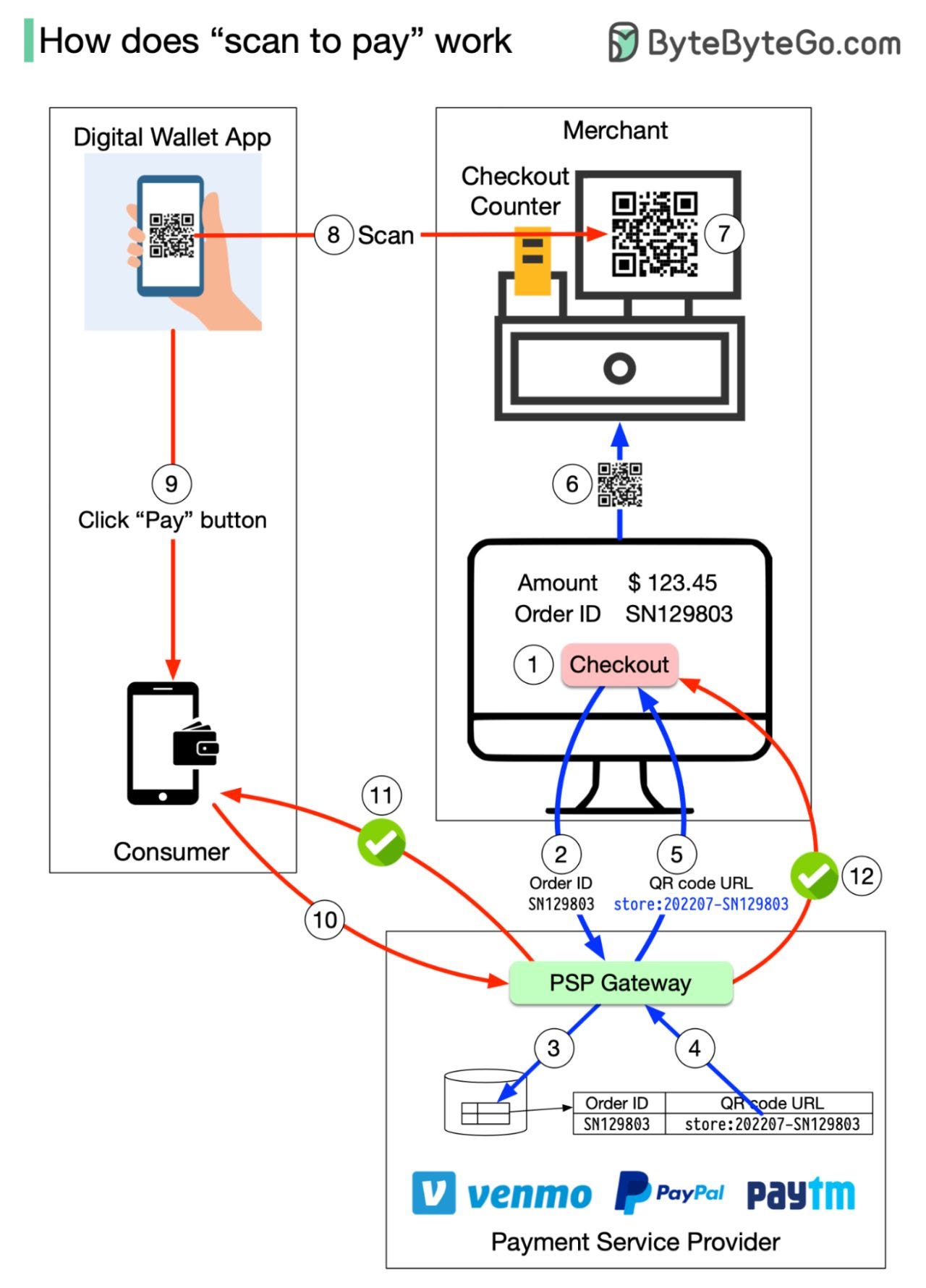
To understand the process involved, we need to divide the “scan to pay” process into two sub-processes:
Merchant generates a QR code and displays it on the screen
Consumer scans the QR code and pays
Here are the steps for generating the QR code:
When you want to pay for your shopping, the cashier tallies up all the goods and calculates the total amount due, for example, $123.45. The checkout has an order ID of SN129803. The cashier clicks the “checkout” button.
The cashier’s computer sends the order ID and the amount to PSP.
The PSP saves this information to the database and generates a QR code URL.
PSP’s Payment Gateway service reads the QR code URL.
The payment gateway returns the QR code URL to the merchant’s computer.
The merchant’s computer sends the QR code URL (or image) to the checkout counter.
The checkout counter displays the QR code.
These 7 steps complete in less than a second. Now it’s the consumer’s turn to pay from their digital wallet by scanning the QR code:
The consumer opens their digital wallet app to scan the QR code.
After confirming the amount is correct, the client clicks the “pay” button.
The digital wallet App notifies the PSP that the consumer has paid the given QR code.
The PSP payment gateway marks this QR code as paid and returns a success message to the consumer’s digital wallet App.
The PSP payment gateway notifies the merchant that the consumer has paid the given QR code.
Get your product in front of more than 500,000 tech professionals.
Our newsletter puts your products and services directly in front of an audience that matters - hundreds of thousands of engineering leaders and senior engineers - who have influence over significant tech decisions and big purchases.
Space Fills Up Fast - Reserve Today
Ad spots typically sell out about 4 weeks in advance. To ensure your ad reaches this influential audience, reserve your space now by emailing [email protected]