Application Programming Interfaces (APIs) are the backbone of software communication.
In the acronym API, the word “Application” refers to software that performs a distinct function. An “Interface” is a contract between two applications that defines a set of rules, protocols, and methods for communication. “Programming” makes all of this possible.
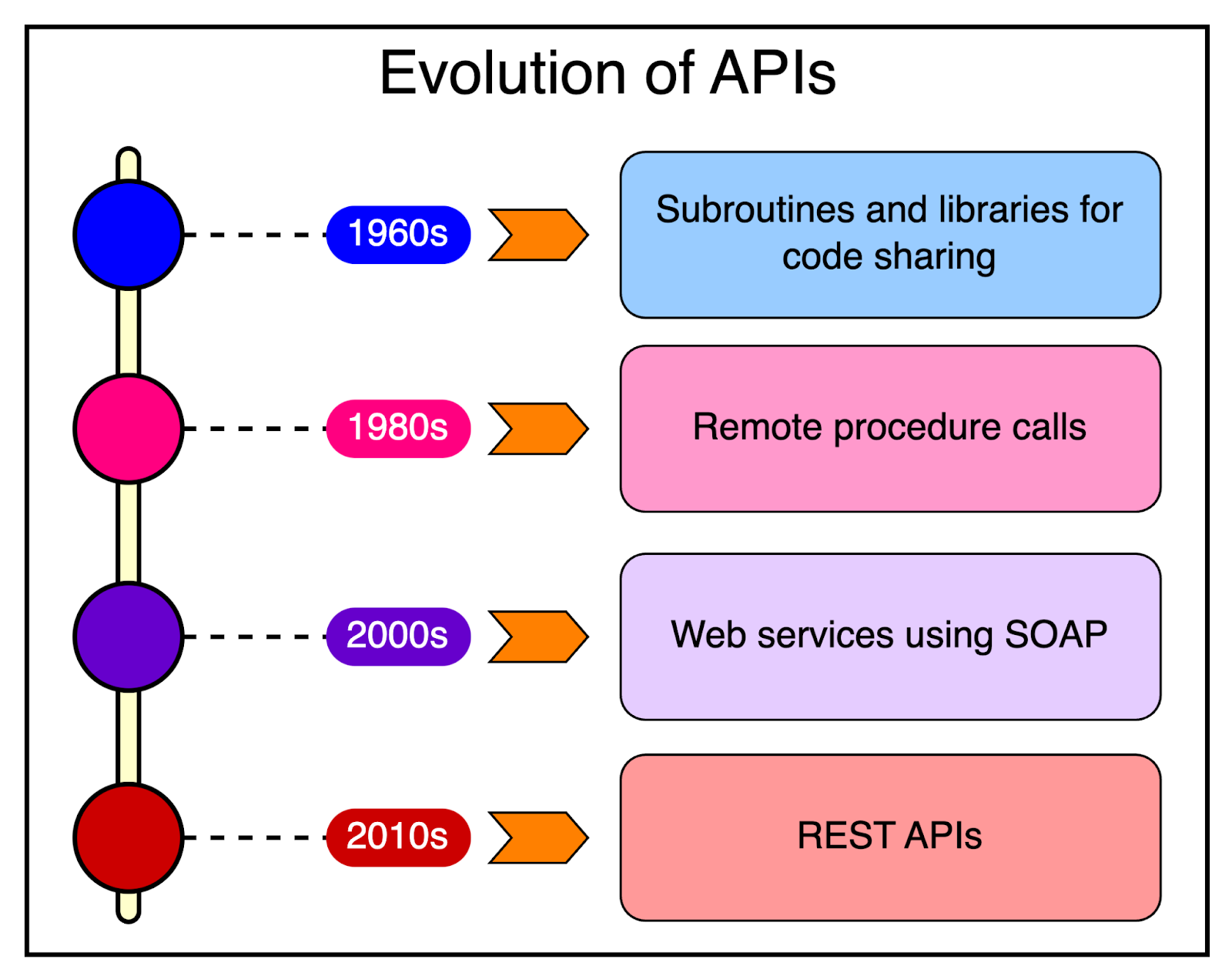
APIs have been around for a long time in one form or the other:
In the 60s and 70s, we had subroutines and libraries to share code and functionality between programs.
In the 1980s, Remote Procedure Calls (RPC) emerged, allowing programs running on different computers to execute procedures on each other.
With the widespread adoption of the Internet in the 2000s, web services such as SOAP became widely adopted.
The late 2000s and early 2010s marked the rise of RESTful APIs, which have since become the dominant approach due to their simplicity and scalability.
In recent years, the API-first approach to software development has gained significant traction, driven by the emphasis on building loosely coupled services. REST APIs, in particular, have emerged as the go-to choice for developers worldwide.
In this post, we will explore the world of REST APIs and cover basic to advanced concepts.
REST stands for Representational State Transfer. Roy Fielding coined the term in his doctoral dissertation in 2000. He defined REST as an architectural style for designing networked applications.
Some important principles form the basis of REST architecture. Let’s look at them in more detail.
Several terminologies are associated with REST and it’s important to know about them to build a complete picture.
HTTP is the foundation protocol for communication on the web and defines a set of rules or conventions for transmitting data between a client (such as a web browser) and a server.
It’s a stateless protocol, meaning each request is independent, and the server doesn’t keep any information about the previous requests.
HTTP follows a request-response model. The client sends a request to the server and the server sends back a response.
Each HTTP request consists of a method (such as GET, POST, PUT, DELETE), headers, and an optional body (containing data).
HTTP responses include a status code, headers, and an optional body (containing the response data or an error message).
URLs are the addresses used to reach resources on the web.
They provide a standard way to specify the location of a resource, such as a web page, an image, or an API endpoint. We will look into resources more closely a couple of sections later.
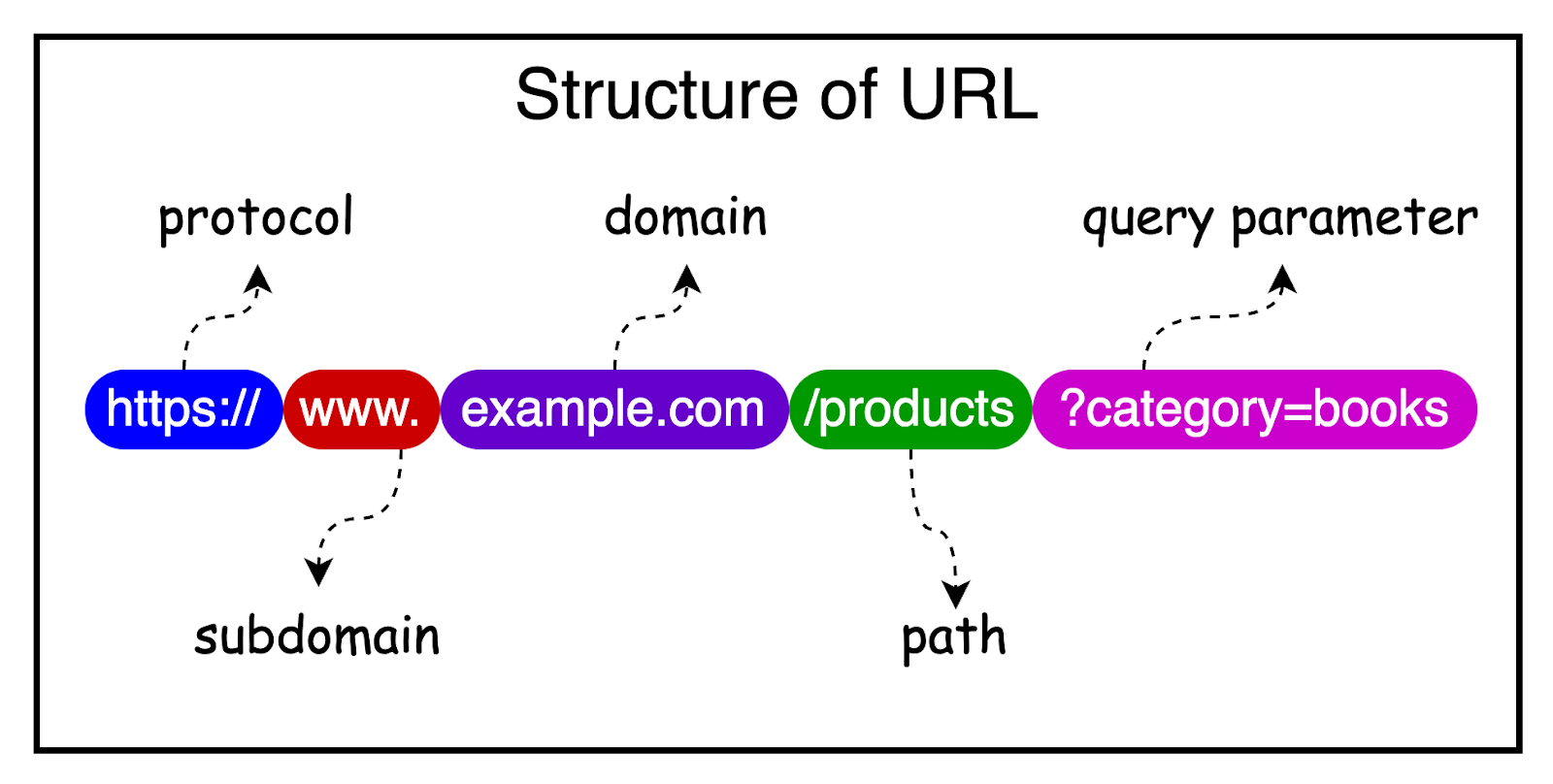
A typical URL consists of several components, including the protocol (HTTP or HTTPS), the domain name, the path to the resource (such as /api/users), and optional query parameters.
The diagram below shows the structure of a URL.
The client-server architecture is a fundamental concept in web development.
In this architecture, the client sends requests to the server. The server processes the requests and sends back responses. The client takes care of presenting the user interface, while the server handles the business logic, data processing, and storage.
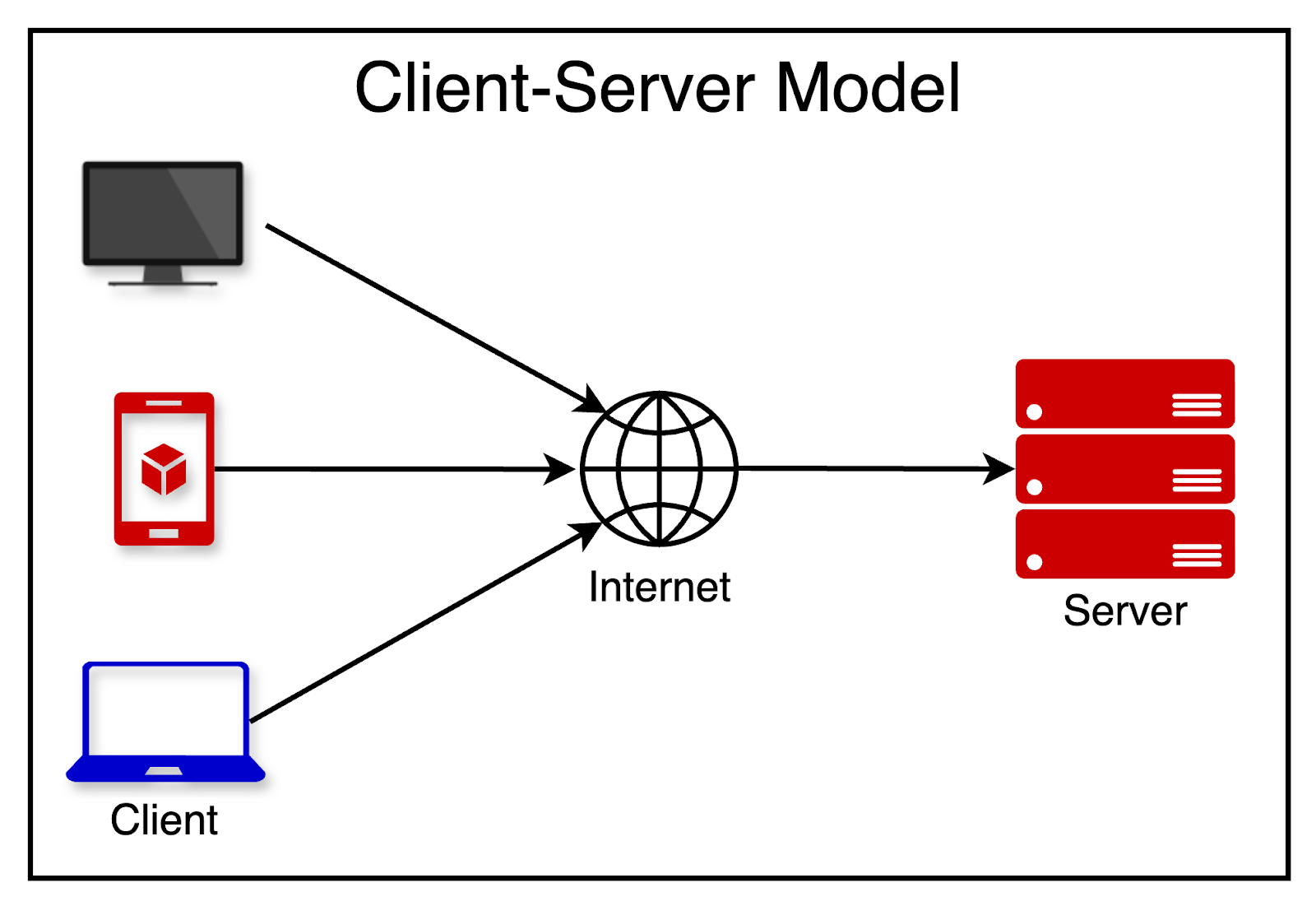
The client and server communicate over a network (such as the Internet), typically using the HTTP protocol. REST APIs leverage the principles of HTTP, URLs, and client-server architecture to expose resources and functionality to the clients.
In REST, the core concept is the resource.
A resource is any piece of information that can be named and accessed through a URL. It can be a user, a product, an order, or even a collection of other resources. Typically, resources are represented using standard formats, such as JSON or XML.
A REST API is designed around the manipulation of these resources.
As we already discussed, each resource is identified by a unique URL, known as the resource URL or endpoint. The REST API exposes a set of standard HTTP methods that clients can use to interact with the resources. In other words, a resource can be retrieved, created, updated, or deleted by sending the appropriate HTTP requests to the corresponding URLs.
It’s important to follow good naming conventions for the resources. The conventions can help create a consistent and intuitive REST API that is easy for developers to understand and work with.
Here are some guidelines that can be considered while designing the resource endpoints:
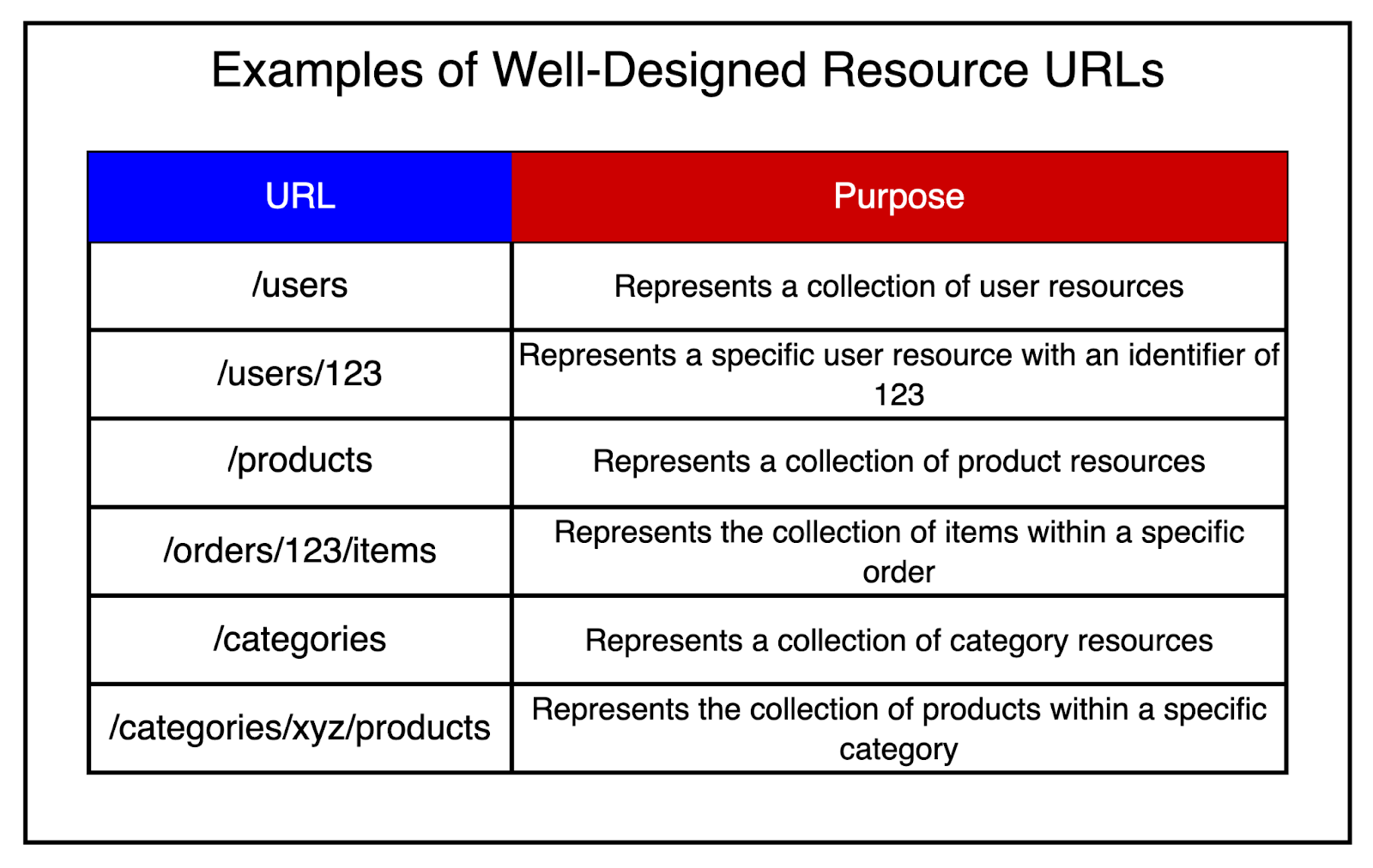
Use nouns, not verbs: Resource URLs should represent the entities or concepts in your system, not the actions performed on them. For example, use /users instead of /getUsers or /createUser.
User plural nouns for collections: For a collection of resources, use plural nouns. For example /products represent a collection of product resources.
Use hierarchical paths: The URL structure should reflect resources with a hierarchical or nested relationship. For example, /orders/123/items represent the collection of items within a specific order.
Use hyphens to separate words: If a resource name consists of multiple words, use hyphens to separate them. For example, /product-categories or /user-profiles.
Use lowercase letters: Resource names should be lowercase to maintain consistency and avoid confusion.
HTTP methods are used in REST APIs to perform different operations on resources. The most commonly used HTTP methods are GET, POST, PUT, PATCH, and DELETE.
Together, these HTTP methods form the foundation of CRUD operations in REST APIs.
Let’s look at each of them in more detail:
The GET method retrieves or reads a resource from the server.
It is a safe and idempotent operation, meaning that multiple identical requests should have the same effect as a single request and should not modify the resource.
When a GET request is sent to a resource URL, the server responds with the representation of the requested resource.
For example, “GET /users” retrieves a list of users, while “GET /users/456” retrieves a specific user with ID 456.
The POST method is used to create a new resource on the server.
We can use it to submit data to the server, typically resulting in the creation of a new resource. The data is sent in the request body using JSON or XML format and the server responds with the created resource or a status indicating the success of the operation.
For example, “POST /users” creates a new user based on the data provided in the request body.
The PUT method updates or replaces an existing resource on the server.
It’s an idempotent operation, just like GET. This means that multiple identical requests should have the same effect as a single request.
The client sends the complete representation of the updated resource in the request body. If the resource does not exist, the server may choose to create a new resource with the specified URL.
For example, “PUT /users/123” updates the user with ID 123 with the data provided in the request body.
The PATCH method partially updates an existing resource on the server.
Unlike PUT, which requires sending the complete representation of the resource, PATCH allows sending only the changes to be applied.
The server applies the specified changes to the resource and responds with the updated resource or a status indicating the success of the operation.
For example, “PATCH /users/123” partially updates the user with ID 123 based on the changes provided in the request body.
The DELETE method deletes a resource from the server.
When a DELETE request is sent to a resource URL, the server deletes the specified resource. It may respond with a status indicating the success of the deletion or return the deleted resource.
For example, “DELETE /users/123” deletes the user with ID 123.
Now that we’ve covered the basics of REST APIs, it’s time to examine some of the best practices for designing APIs.
Versioning is an important aspect of REST API design that allows the API to evolve over time while maintaining backward compatibility.
When introducing breaking changes or significant updates, it’s recommended to create a new version of the API while still supporting the previous version for a fixed period.
There are several API versioning strategies to choose from.
In this approach, the version number is included as part of the API’s URL.
Here’s an example:
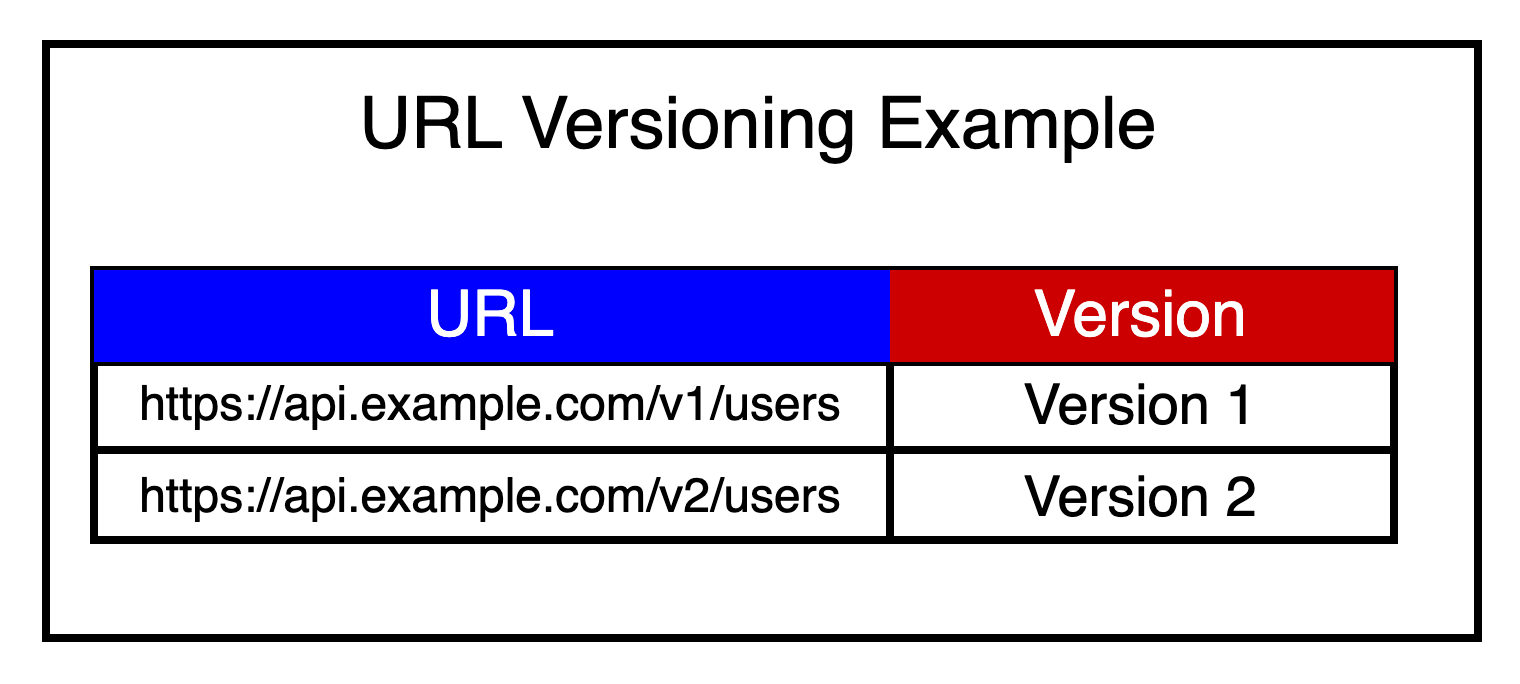
URL versioning approach is simple and explicit for developers to understand.
However, it can also lead to long and complex URLs, especially with deeply nested resources. Also, the URL has to be updated in the client code when switching versions.
In this approach, the version number is passed as a query parameter in the API request.
See the example below:
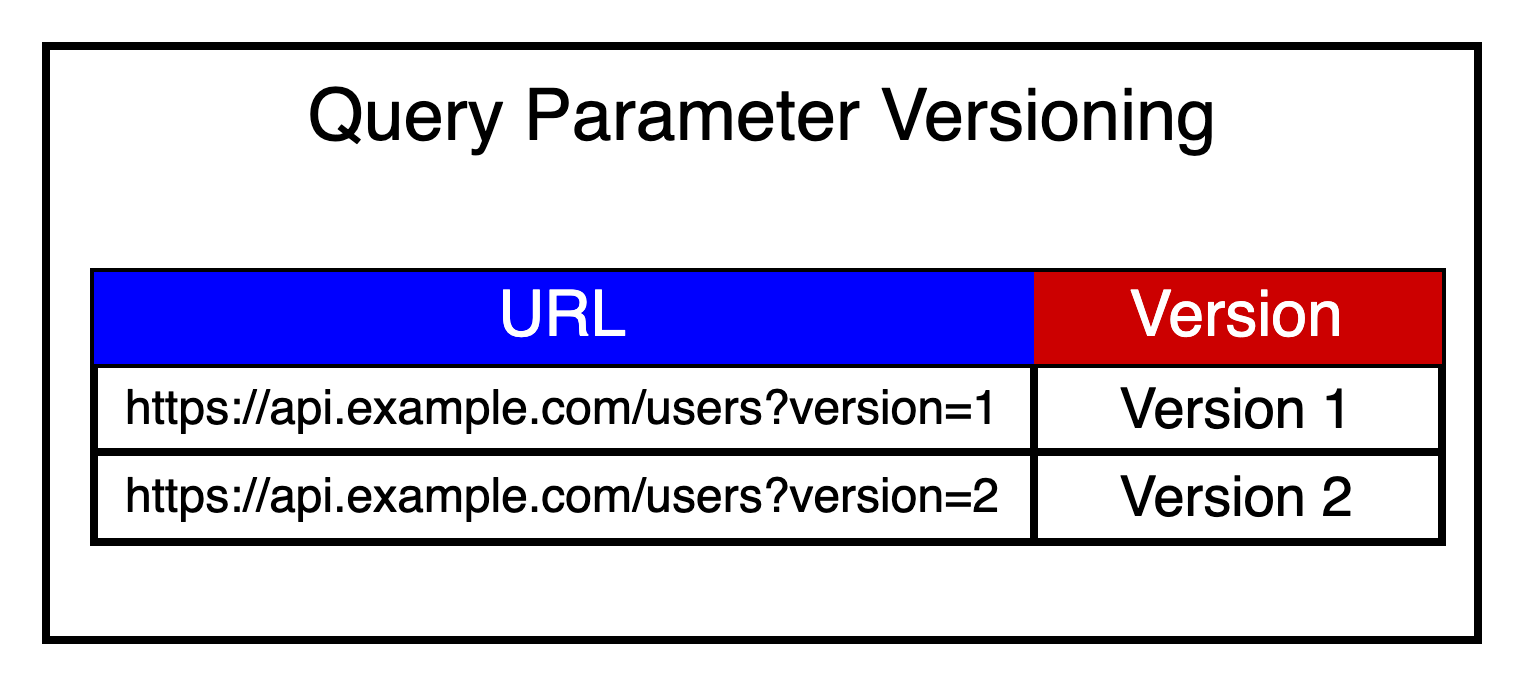
This approach has the advantage of keeping the base URL clean and simple and allowing for easy switching between versions.
However, query parameters are typically used for filtering and sorting. Using a query parameter for versioning feels less intuitive and might be overlooked by developers, leading to unintended version mismatch.
In this approach, a custom header is used to specify the API version.
Example: X-API-Version: 1 or X-API-Version: 2.
It has the same advantages as query parameter versioning. However, it requires additional header configuration in the client code.
Pagination in REST APIs limits the number of results returned in a single API response, especially when dealing with large datasets.
It allows clients to retrieve data in smaller, more manageable chunks and improves the performance of the API.
Common pagination parameters include page (the current page number) and limit (the number of items per page). The API should return pagination metadata in the response, such as the total number of items, total pages, and links to the next and previous pages.
For example, GET /users?page=2&limit=10 retrieves the second page of users with 10 items per page.
Filtering lets clients narrow down the number of records based on specific criteria. This helps reduce the amount of data transferred over the network.
We can implement filtering using query parameters, where the client specifies the field and value to filter on.
The API should document the available filtering options and the syntax for applying filters.
For example, GET /products?category=electronics&price_max=100 retrieves products in the electronics category with a price less than or equal to 100.
Sorting lets clients specify the order in which the results should be returned. Clients can control the sorting criteria to present the data in a meaningful way for the users.
We can implement sorting using query parameters, where the client specifies the field to sort on and the sorting order (ascending or descending).
The API should document the available sorting options and the syntax for applying sorting.
For example, GET /users?sort=name&order=asc retrieves users sorted by name in ascending order.
Proper error handling is crucial for building a robust and user-friendly API.
The API should return meaningful error messages and appropriate HTTP status codes to indicate the type of error. Error responses should include a clear error message, an error code or type, and additional details if necessary.
Consistent error handling across the API endpoints helps clients handle and display errors effectively.
See below for the most common status codes used in REST APIs.
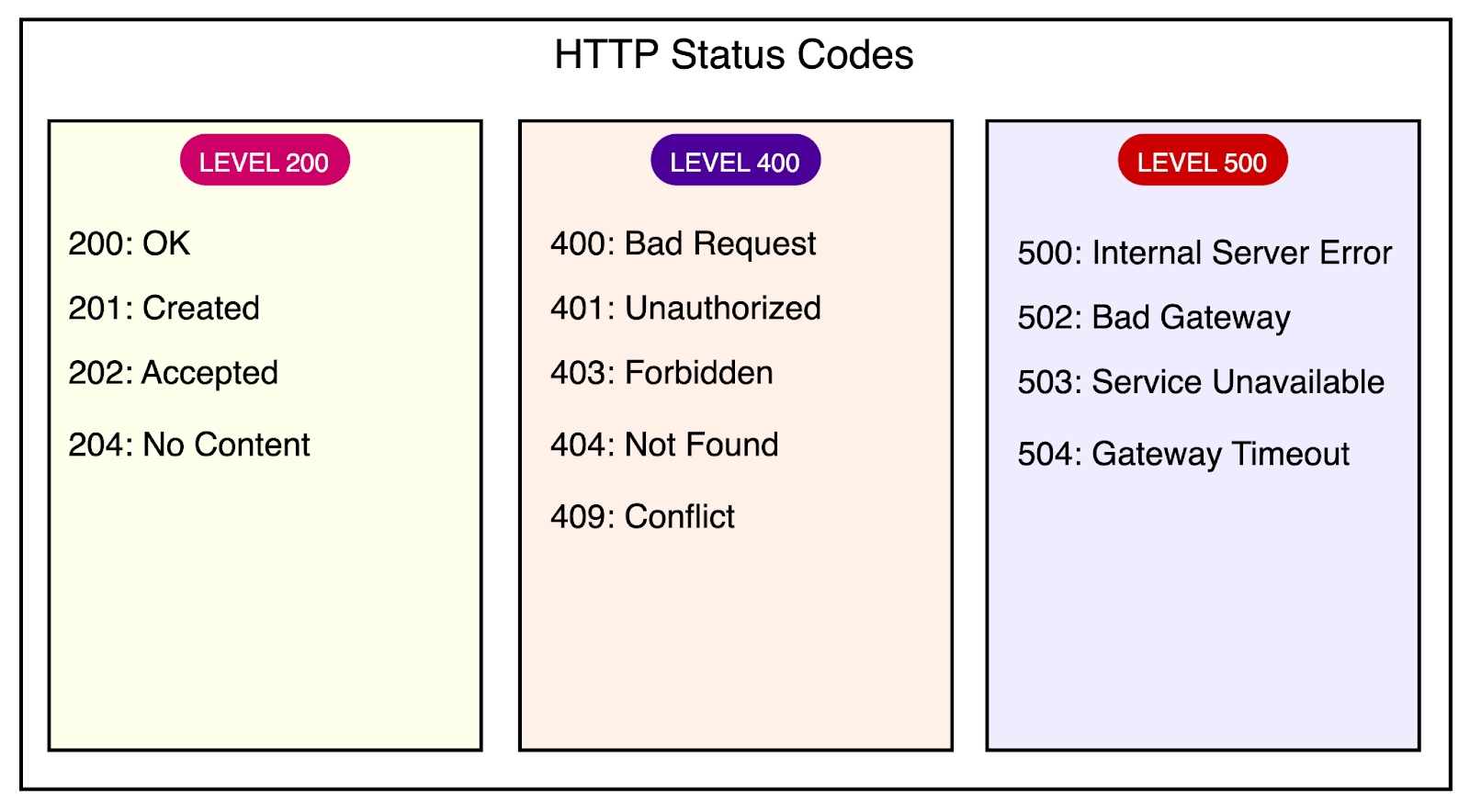
Comprehensive and up-to-date documentation is a key pillar of API accessibility.
The documentation should include details about endpoints, request/response formats, authentication, error handling, and code examples. Also, the documentation should be easily accessible to developers.
Tools like Swagger or OpenAPI can be used to generate interactive documentation from API specifications. Many frameworks provide code-based support for Swagger, automatically updating the documentation as the developer modifies the code.
When it comes to securing REST API, authentication and authorization are two fundamental security concepts.
This is the process of verifying the identity of the user or client accessing the API. It answers the question: “Who are you?”
Authentication ensures that the user or client is who they claim to be. Common authentication mechanisms in REST APIs include:
Username and password-based authentication
API keys or tokens (for example, JWTs)
OAuth for delegated access.
Authentication is important for the following reasons:
Protecting sensitive data and functionality
Tracking and auditing user actions
Personalization and customization based on the identity of the user
The diagram below shows a simple stateless authentication flow with JWTs.
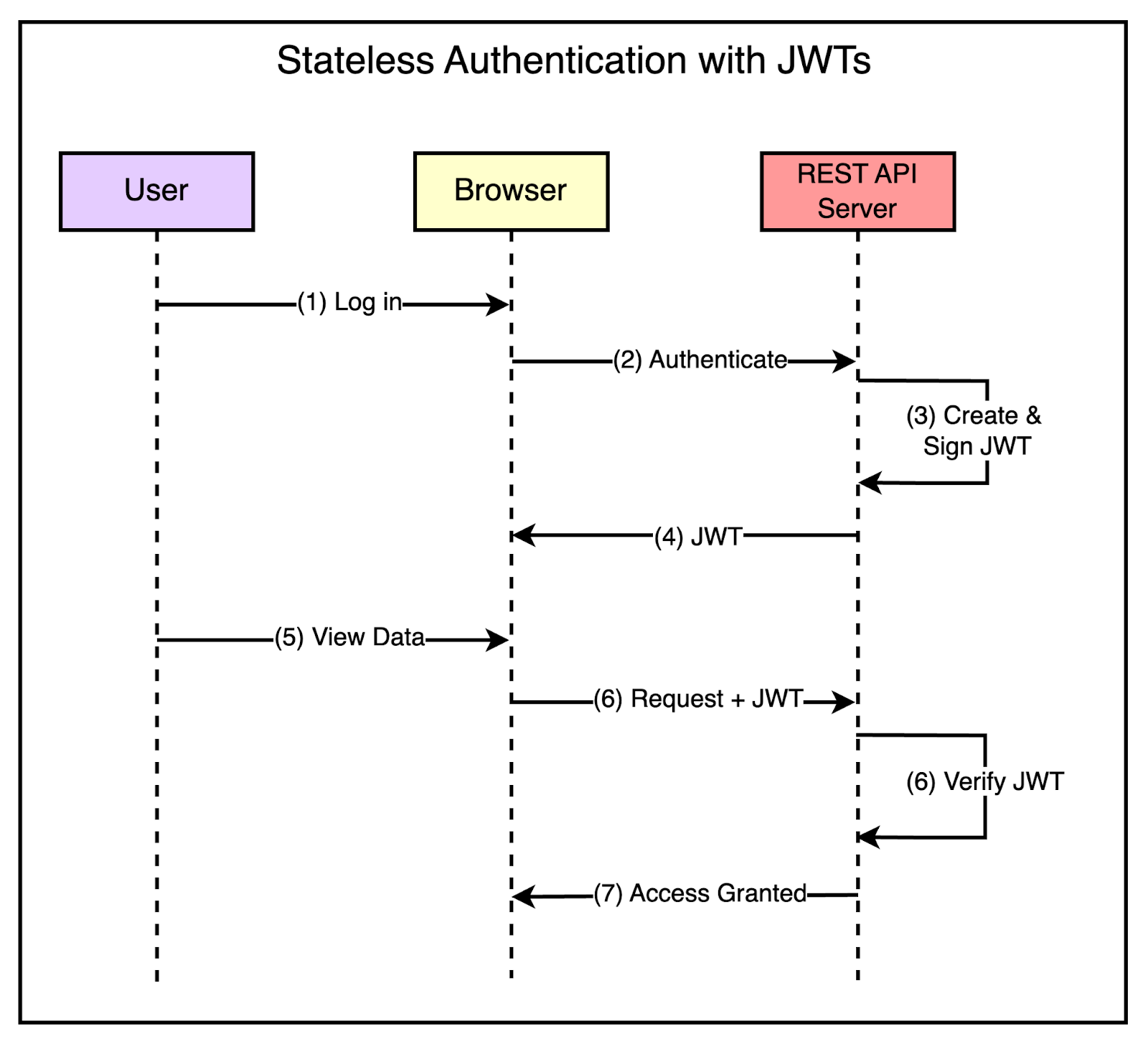
Authorization is the process of determining what actions or resources a user or client is allowed to access once their identity is authenticated.
It answers the question: “What are you allowed to do?”
The main goal of authorization is to enforce access control so that users or clients can only access resources they are permitted to. The API server defines the authorization rules, which are implemented based on the user’s identity and permission levels.
Common authorization mechanisms in REST APIs include:
Role-Based Access Control (RBAC): Users are assigned roles, and permissions are granted based on those rules.
Attribute-Based Access Control (ABAC): Access is granted based on attributes or characteristics of the user, resource, or environment.
OAuth scopes: OAuth tokens include scopes that define the permissions and access levels granted to the client.
Authorization is important for the following reasons:
Ensuring that users or clients can only access resources and perform actions they are authorized to.
Protecting sensitive data and functionality from unauthorized access or modification.
Implementing granular access control based on user roles, permissions, or attributes.
Having understood the theoretical aspects of REST APIs, it’s time to examine some key practical considerations when designing them for scalability and performance.
Here are the most important ones.
As we discussed earlier, HTTP is a stateless protocol. It’s also beneficial to design the REST APIs to be stateless, meaning that each request from the client should contain all the necessary information for the server to process it.
Practically, this might translate to a few important points, such as:
Not storing session data on the server side can hinder scalability and make distributing requests across multiple servers difficult.
Using stateless authentication mechanisms like JSON Web Tokens or API keys for authentication.
Alternatively, when using sessions for authentication, the session information is stored in a separate storage rather than on the API server instance.
The diagram below shows the concept of stateless architecture with a separate storage server.
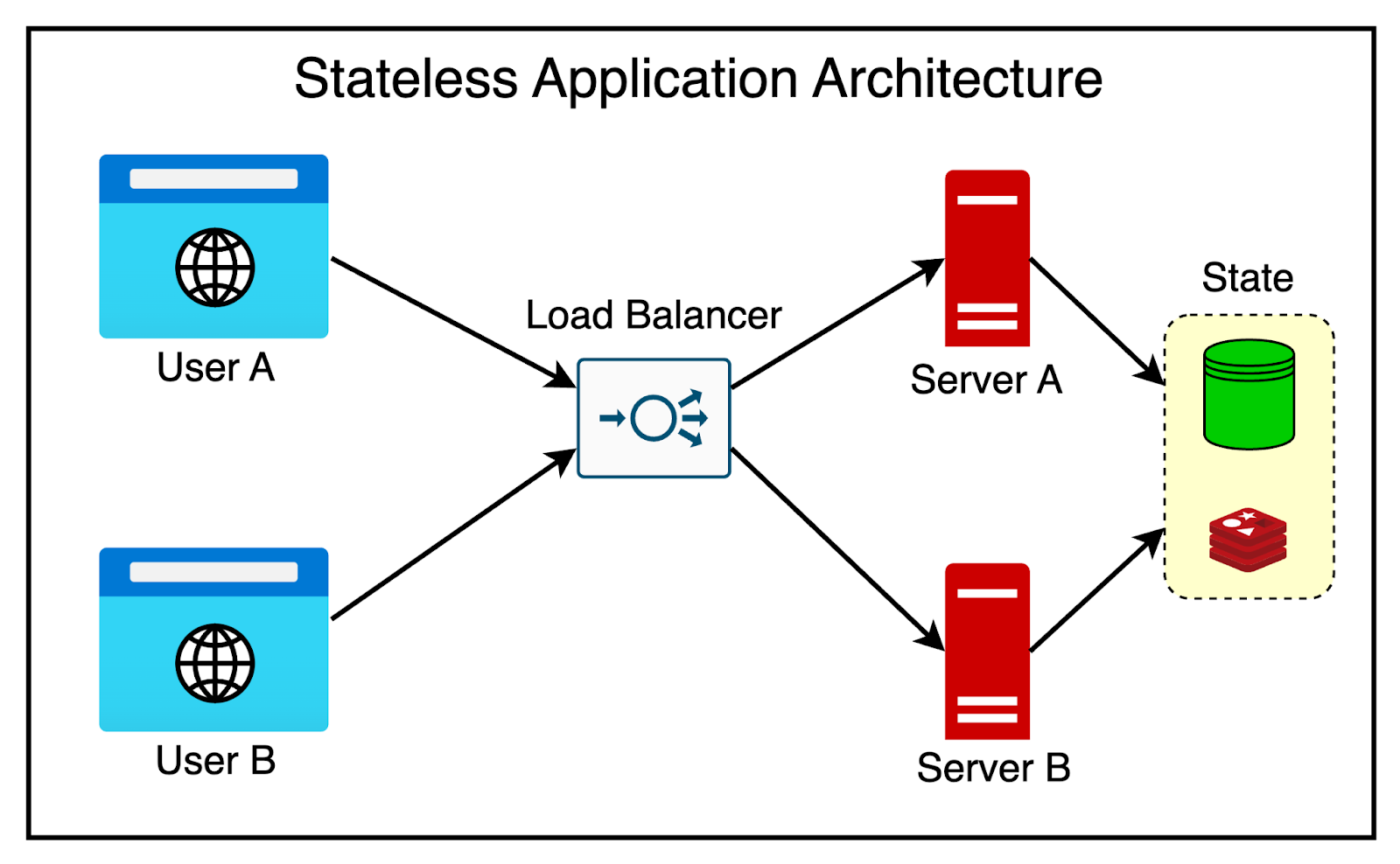
Building REST APIs using a stateless architecture helps make them horizontally scalable.
This means we can add more servers to handle increased traffic and load. The incoming requests are distributed between these servers using load balancers.
It’s a great way to avoid vertical scaling that involves increasing the resources of a single server.
Implement caching mechanisms to reduce the load on the API server and improve response times. These mechanisms can be implemented at various levels of the system architecture.
We can use HTTP caching headers (Cache-Control value ETag) to enable client-side caching and avoid unnecessary requests for unchanged resources.
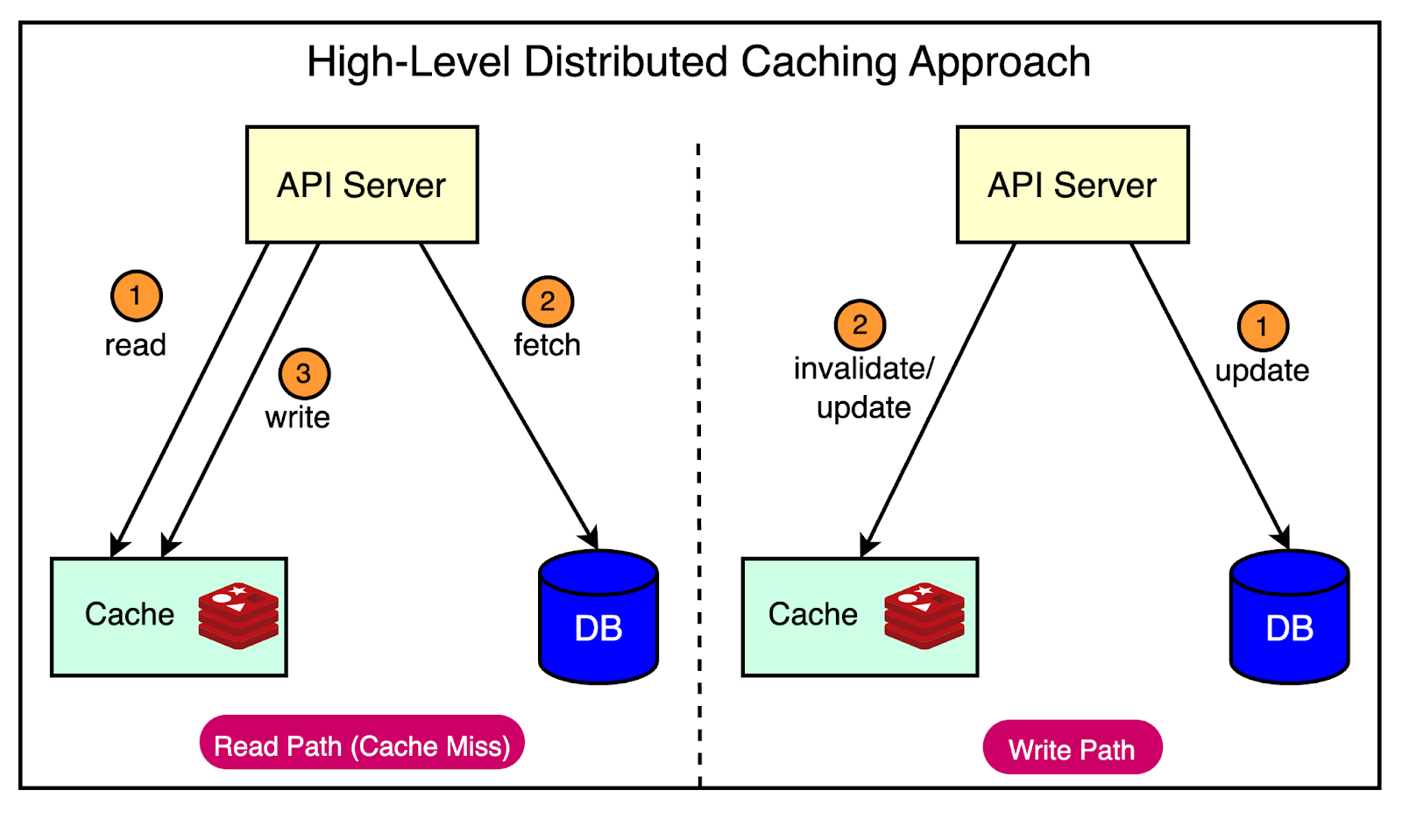
We can also employ server-side caching techniques, such as using a distributed cache like Redis or a content delivery network (CDN) to store the results of expensive computations or frequently accessed data and serve it quickly.
The diagram below shows a typical distributed caching approach with the Cache-Aside pattern.
As discussed earlier, pagination and filtering are important techniques for building performant REST APIs.
This involves two main practical concerns:
Use query parameters to allow clients to specify the page size and page number, enabling them to retrieve data in smaller, manageable chunks.
Provide filtering and sorting options to allow clients to narrow down the result set based on specific criteria, reducing the amount of data transferred over the network.
Choose efficient data serialization formats like JSON or Protocol Buffers to minimize the size of the payload transferred over the network.
It’s important to avoid sending unnecessary data in the response payload.
Asynchronous processing and message queues are powerful techniques that can help build scalable REST APIs.
Let’s look at both:
Asynchronous processing is a programming model where tasks are executed independently of the main program flow. This allows the API to continue processing other requests without waiting for the completion of long-running tasks.
It’s a great option for resource-intensive or time-consuming operations that may slow down the response time of the API.
Instead of blocking the API request until the task is completed, the API can initiate the task asynchronously and immediately return a response to the client, indicating that the request has been accepted and is being processed.
The client can then poll the API or receive notifications (via webhooks) to check the status of the asynchronous task and retrieve the result when it’s ready.
Message queues are a communication mechanism that enables different components of a system to exchange messages asynchronously.
In a message queue architecture, producers (for example, APIs) send messages to a queue while consumers (background workers) retrieve and process those messages independently. This way, the API can quickly enqueue a message representing a task or a job and continue processing other requests while the consumers process the messages asynchronously.
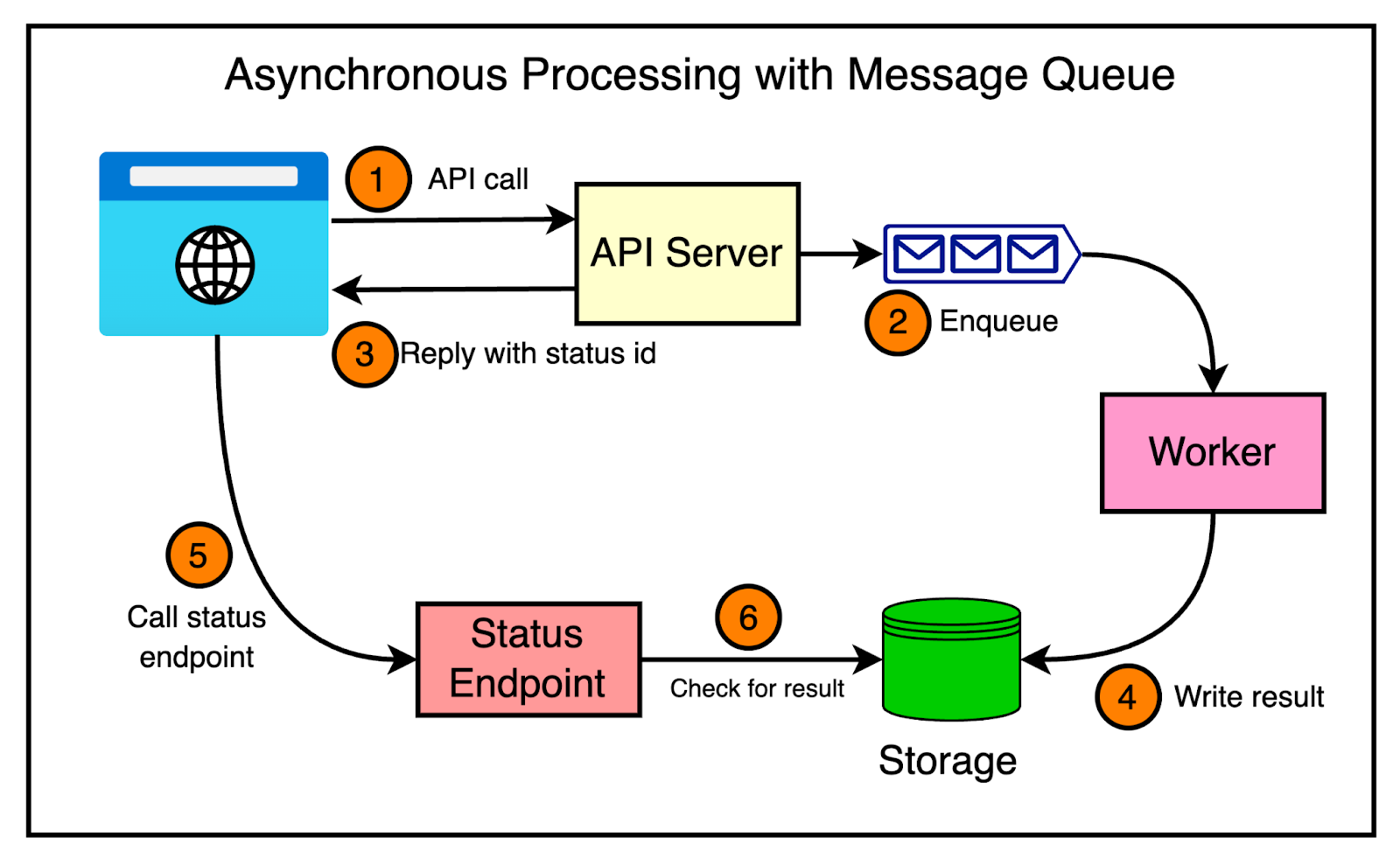
Here’s an example of how asynchronous processing and message queues can be used in a REST API scenario:
A consumer sends a POST request to the REST API to initiate a resource-intensive task, such as generating a complex report.
The API receives the request, validates the input, and enqueues a message representing the task into a message queue.
The API immediately returns a response to the client, indicating that the request has been accepted, and provides a unique identifier for the task.
In the background, a pool of consumers retrieve messages from the queue and process them asynchronously.
The consumers execute the resource-intensive task (for example, generating a report) independently of the API.
Once the task is completed, the result is stored in a database or a storage system.
The consumer can periodically poll the API using the task identifier to check the task's status. Alternatively, a webhook could be used to inform the consumer about the task's progress.
The diagram below shows this approach on a high level.
Implement comprehensive monitoring and logging mechanisms to track the performance and health of REST APIs.
Some of the key metrics that should be tracked are:
Response times
Error rates
Resource utilization
We can use a centralized logging solution to collect and analyze log data from multiple servers.
There’s no doubt that REST APIs are here to stay, and their use will only grow as applications become even more connected.
In this comprehensive guide to REST API, we’ve tried to cover REST APIs from basics to advanced concepts.
Here are some key takeaways:
REST APIs follow a resource-based architecture, where resources are identified by URLs and manipulated using HTTP methods (GET, POST, PUT, DELETE).
Effective API design involves implementing versioning, pagination, filtering, sorting, and proper error handling to ensure a smooth and intuitive developer experience.
Comprehensive API documentation is the key for developers to understand and integrate with the API effectively.
Authentication and authorization mechanisms, such as OAuth and JWT, are essential for securing REST APIs and protecting sensitive data.
Scalability and performance can be achieved through techniques like stateless architecture, horizontal scaling, caching, pagination, efficient data serialization, and asynchronous processing.
Monitoring and logging are critical for tracking API performance, identifying bottlenecks, and ensuring the overall health and reliability of the API.
Designing REST APIs requires careful consideration of various factors, including resource modeling, HTTP status codes, request/response formats, and error-handling strategies.