
SQL, or Structured Query Language, is the backbone of modern data management. It enables efficient retrieval, manipulation, and management of data in a Database Management System (DBMS). Each SQL command taps into a complex sequence within a database, building on concepts like the connection pool, query cache, command parser, optimizer, and executor, which we covered in our last issue.
Crafting effective queries is essential. The right SQL can enhance database performance; the wrong one can lead to increased costs and slower responses. In this issue, we focus on strategies such as using the Explain Plan, adding proper indexes, and optimizing commands like COUNT(*) and ORDER BY. We also dive into troubleshooting slow queries.
While MySQL is our primary example, the techniques and strategies discussed are applicable across various database systems. Join us as we refine SQL queries for better performance and cost efficiency.
In MySQL, the EXPLAIN command, known as EXPLAIN PLAN in systems like Oracle, is a useful tool for analyzing how queries are executed. By adding EXPLAIN before a SELECT statement, MySQL provides information about how it processes the SQL. This output shows the tables involved, operations performed (such as sort, scan, and join), and the indexes used, among other execution details. This tool is particularly useful for optimizing SQL queries, as it helps developers see the query execution plan and identify potential bottlenecks.
When an EXPLAIN statement is executed in MySQL, the database engine simulates the query execution. This simulation generates a detailed report without running the actual query. This report includes several important columns:
id: Identifier for each step in the query execution.
select_type: The type of SELECT operation, like SIMPLE (a basic SELECT without unions or subqueries), SUBQUERY, or UNION.
table: The table involved in a particular part of the query.
type: The join type shows how MySQL joins the tables. Common types include ALL (full table scan), index (index scan), range (index range scan), eq_ref (unique index scan), const/system (constant value optimization).
possible_keys: Potential indexes that might be used.
key: The key (index) chosen by MySQL.
key_len: The length of the chosen key.
ref: Columns or constants used with the key to select rows.
rows: Estimated number of rows MySQL expects to examine when executing the query.
Extra: Additional details, such as the use of temporary tables or filesorts.
Let's explore a practical application of the EXPLAIN command using a database table named orders. Suppose we want to select orders with user_id equal to 100.
SELECT * FROM orders WHERE user_id = 100;To analyze this query with EXPLAIN, we would use:
EXPLAIN SELECT * FROM orders WHERE user_id = 100;The output might look like this:
Analysis of the EXPLAIN Output:
id: 1, indicating the query executes as a single unit.
select_type: SIMPLE, a straightforward select without any subqueries or unions.
table: orders, the table accessed by the query.
type: ref, indicating the query finds rows using an index value, here based on user_id.
possible_keys: usr_idx, suggesting that the usr_idx index could be used.
key: usr_idx, confirming MySQL chooses to use the usr_idx index.
key_len: 4, the length of the key used in bytes.
ref: const, treating user_id as a constant.
rows: 10, reflecting MySQL's estimate that it needs to examine 10 rows to fulfill the query.
Extra: Using index, meaning the index on user_id alone is sufficient to fulfill the query without accessing table data.
Using the EXPLAIN command before running actual queries is invaluable. It helps identify inefficient SQL queries and guides us in indexing and restructuring queries to optimize performance.
Adding indexes to database tables is a key optimization technique that requires careful consideration to avoid creating unnecessary overhead and to maximize performance gains. Let’s review some common pitfalls:
Adding too many indexes can degrade performance, particularly in databases with heavy write operations such as INSERT, UPDATE, and DELETE. Each modification requires updates to all indexes, which consumes additional I/O and CPU resources.
Conversely, insufficient indexing leads to poor query performance, often resulting in full table scans. This is particularly detrimental in large datasets where scans are slow and inefficient.
Indexes on columns that are rarely used in queries do not improve performance and use up disk space and resources unnecessarily. It's vital to analyze query patterns to understand which columns are most beneficial to index.
A composite index includes multiple columns. The order in which columns are arranged in these indexes matters. The ideal order prioritizes columns by their frequency in queries and their cardinality. High cardinality columns, which have a wide range of unique values, should ideally lead in the index to narrow down search results effectively. If a frequently queried column with high cardinality isn't first, MySQL may not utilize the index efficiently, which can slow down query performance.
Indexing columns with low cardinality (i.e., few unique values, such as a "gender" column) may not be effective. The database optimizer might bypass these indexes because they do not sufficiently reduce the number of rows to examine.
While indexes can significantly improve read performance, they can also degrade write performance. This consideration is particularly important in Online Transaction Processing (OLTP) systems where transaction speed is critical. Balancing read and write performance needs is key.
For high-write environments, B-Tree indexes may not be ideal. Instead, LSM trees are often used. New records are written quickly to an active memtable in memory. Older memtables are then transformed into SSTables and moved to disk, avoiding disruption to current writes. Over time, these SSTables are compacted and reorganized, enhancing future write and read operations.
Databases like Apache Cassandra, RocksDB, and Google's Bigtable employ this structure. They offer increased write throughput at the cost of higher latency and sometimes more complex read operations.
Over time, as data grows and changes, indexes can become fragmented, leading to decreased performance. Regular maintenance, such as rebuilding indexes and updating statistics, is necessary to maintain optimal index performance. Developers often overlook this task, as they might assume it falls under the DBA’s responsibilities.
Indexes consume disk space. In systems with limited disk resources, aggressive indexing can cause storage issues. Additionally, larger indexes take longer to maintain and can slow down backup processes.
It is a common practice to use SELECT COUNT(*) to count the number of rows in a table. However, the performance can deteriorate as the number of rows grows. Why?
COUNT(*) is implemented differently in different storage engines. MyISAM stores the total number of rows in a table on the disk, so COUNT(*) returns the number directly. InnoDB executes COUNT(*) by reading the data line by line and then accumulating the count.
InnoDB chose this design because of its transaction design. Repeatable reads are the default isolation level in InnoDB, which is implemented with Multi-Version Concurrency Control, or MVCC. Each row has to determine if it is visible to the transaction, so for a COUNT(*) request, InnoDB has to read the data row by row and determine which rows are visible before it can be used to calculate the total number of rows in the table.
For a frequently updated count, a more realistic solution for counting numbers is to accumulate the counts ourselves instead of asking the database each time.
For example, we can use Redis to keep the total number of rows. Every time there is an insertion to the table, the count is incremented by one; every time there is a deletion, the count is decreased by one. However, Redis stores data in memory, so we need to run a COUNT(*) request when the cache is restarted.
Adding a cache to the system will cause data consistency issues. So, another approach is to maintain a count in the database and update the count when the update transaction is committed.
Note that COUNT(*) doesn’t read the row data, similar to COUNT(1), where the InnoDB engine traverses the entire table but does not retrieve data from the pages. So COUNT(*) and COUNT(1) have similar performance.
As developers, we often use the ORDER BY clause in SQL queries to sort results. However, it’s often overlooked how resource-intensive this simple clause can be. Let’s look at how the sorting process works.
Assuming that we execute the following query:
SELECT order_id, user_id, region, amount
FROM orders
WHERE region = 'CA'
ORDER BY user_id
LIMIT 5000;
To optimize this, we might add an index on the region column to prevent a full table scan. Yet, the EXPLAIN plan may show “Using filesort”, indicating that sorting is necessary. MySQL allocates each thread a block of memory for sorting, called sort_buffer. The process works like this:
Allocate sort_buffer for order_id, user_id, region, and amount.
Retrieve the primary keys that match region = ‘CA’ using the index scan on the region column.
Retrieve the matched rows from the pages, and put order_id, user_id, region, and amount columns into sort_buffer.
Sort the data in sort_buffer by the column user_id.
Take the first 5000 rows from the sort_buffer and return the resultset to the client.
The diagram below shows the step-by-step process.
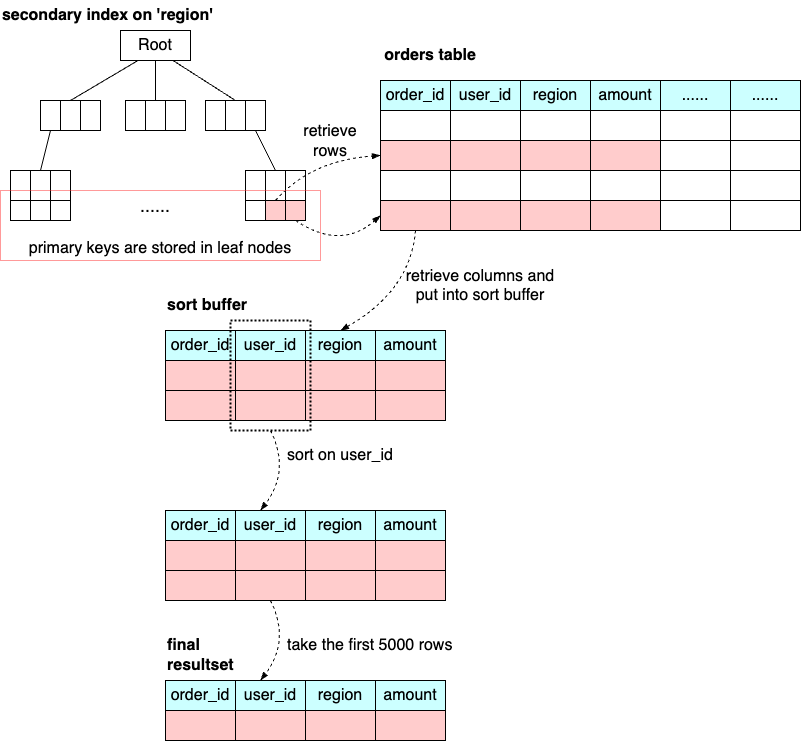
Depending on the size of the sort_buffer, the sorting process can be conducted in memory or on disk. If the data can fit in the sort buffer, the sorting is done in memory; otherwise, it is done with temporary files on disk (external merge sort).
We can see that ORDER BY can be an expensive operation. If the rows in the resultset are already sorted, there is no need for the sorting process. We can add a composite index on (region, user_id) so when we retrieve all the rows with “region = ‘CA’”, the rows are already sorted by user_id. In this way, we save the resources spent on sorting.
The IN clause is often used to filter records based on multiple values, typically sourced from user inputs. When there are too many values, the IN clause can grow quite large, leading to potential performance issues. For example, the SQL statement below queries orders for many users.
SELECT *
FROM orders
WHERE user_id IN (
123, 345, 2523, 2334, 878, 3321, 332, ...)
Excessively large lists in an IN clause can lead to several issues that negatively impact database performance:
SQL queries using a large IN clause consume more memory and CPU resources. This is because the database engine needs to compare each row in the table against a lengthy list of values, which is computationally expensive. The database often fails to use indexes effectively when the IN list is very large.
The database's query planner must evaluate the best way to execute the query, and a large IN clause increases the complexity of this task. This leads to longer compilation times.
Extensive IN clauses can be difficult to read and understand. This complexity can lead to errors during maintenance or when modifying the query.
Instead of a large IN clause, using joins with temporary tables can sometimes be more efficient. This method allows the database's optimizer more flexibility in using indexes and partitioning data.
In this section, we review some cases where badly written SQL statements can lead to bad performance.
Assuming that we use the SQL statement below to select an order from the orders table. This works fine if the order_id column is numeric.
SELECT *
FROM orders
WHERE order_id = 1234;
However, if the order_id column is varchar(32), there is an implicit type conversion here, which triggers a table scan because the optimizer gives up index search for a function operation on an indexed column.
Sometimes, when we execute a simple SQL statement, it hangs for a long time without returning any results. We need to run the “show processlist” command to see what state the SQL statement is in.
“Waiting for table metadata lock”: This means a thread is requesting or holding an MDL(metadata lock) write lock on a table, blocking the SQL statement. We can kill the process that holds the MDL lock.
“Waiting for table flush”: A flush table command was blocked by another statement, which then blocked our SQL statement.
Row lock. We can use the SQL below to check locks on a certain table and kill the blocking_pid if necessary.
SELECT *
FROM sys.innodb_lock_waits
WHERE locked_table='`myschema`.`orders`'We have covered the basic principles of adding proper indexes and common SQL statements that require extra database resources. While SQL is a powerful tool for data manipulation and retrieval, misuse or poor practices can lead to significant performance issues, security vulnerabilities, and maintainability challenges.
Improper indexing: Failing to properly index tables can lead to slow query performance. Conversely, over-indexing can slow down write operations.
Ignoring database concurrency: Neglecting transaction management and isolation levels can lead to data inconsistencies, especially in high concurrency environments.
Inefficient queries: Overly complex queries, excessive use of subqueries, and large IN clauses can severely degrade performance by increasing CPU and memory usage and extending execution times.
By addressing these pitfalls, developers and database administrators can enhance both the efficiency and security of their DBMS, leading to more robust, scalable, and reliable applications.