
This week’s system design refresher:
System Design: Why is Kafka so Popular? (Youtube video)
How do Search Engines Work?
Top 9 Website Performance Metrics You Cannot Ignore
Top 6 Data Management Patterns
Comparing Different API Clients
SPONSOR US
For 1/3rd the cost of a full-time hire, QA Wolf is the first solution that gets web apps to 80% automated E2E test coverage in just 4 months.
They take care of automating, maintaining, and running your test suite in 100% parallel, offering unlimited runs with zero flakes guaranteed. This means your developers can ship faster and with greater confidence than ever before.
Curious about the results? Check out their case studies showcasing customers who have saved $200k+/year in QA engineering and infrastructure costs.
The diagram below shows a high-level walk-through of a search engine.
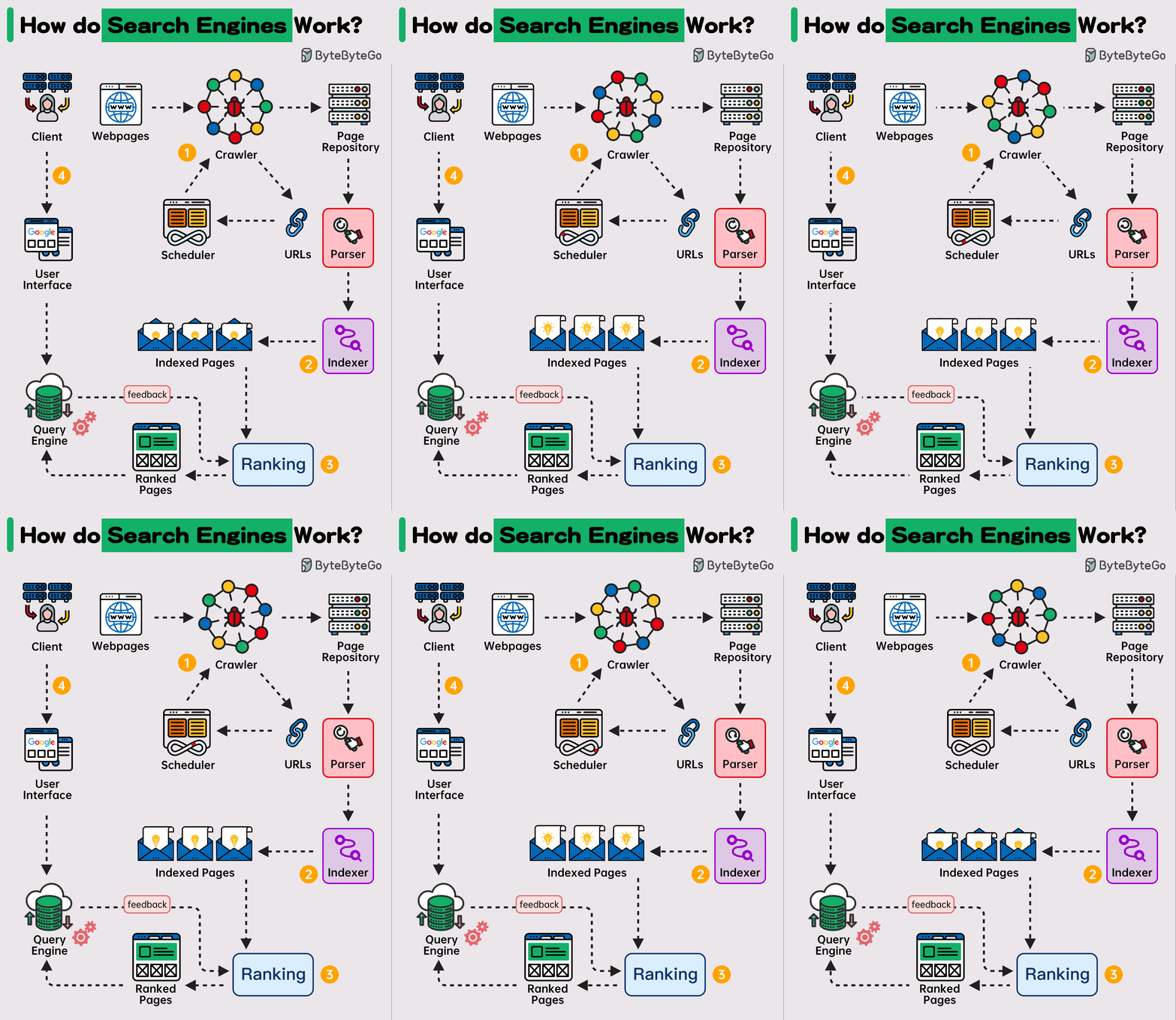
▶️ Step 1 - Crawling
Web Crawlers scan the internet for web pages. They follow the URL links from one page to another and store URLs in the URL store. The crawlers discover new content, including web pages, images, videos, and files.
▶️ Step 2 - Indexing
Once a web page is crawled, the search engine parses the page and indexes the content found on the page in a database. The content is analyzed and categorized. For example, keywords, site quality, content freshness, and many other factors are assessed to understand what the page is about.
▶️ Step 3 - Ranking
Search engines use complex algorithms to determine the order of search results. These algorithms consider various factors, including keywords, pages' relevance, content quality, user engagement, page load speed, and many others. Some search engines also personalize results based on the user's past search history, location, device, and other personal factors.
▶️ Step 4 - Querying
When a user performs a search, the search engine sifts through its index to provide the most relevant results.
If you’re not a paid subscriber, here’s what you missed this month.

To receive all the full articles and support ByteByteGo, consider subscribing:

Load Time: This is the time taken by the web browser to download and display the webpage. It’s measured in milliseconds.
Time to First Byte (TTFB): It’s the time taken by the browser to receive the first byte of data from the web server. TTFB is crucial because it indicates the general ability of the server to handle traffic.
Request Count: The number of HTTP requests a browser has to make to fully load the page. The lower this count, the faster a website will feel to the user.
DOMContentLoaded (DCL): This is the time it takes for the full HTML code of a webpage to be loaded. The faster this happens, the faster users can see useful functionality. This time doesn’t include loading CSS and other assets
Time to above-the-fold load: “Above the fold” is the area of a webpage that fits in a browser window without a user having to scroll down. This is the content that is first seen by the user and often dictates whether they’ll continue reading the webpage.
First Contentful Paint (FCP): This is the time at which content first begins to be “painted” by the browser. It can be a text, image, or even background color.
Page Size: This is the total file size of all content and assets that appear on the page. Over the last several years, the page size of websites has been growing constantly. The bigger the size of a webpage, the longer it will take to load
Round Trip Time (RTT): This is the amount of time a round trip takes. A round trip constitutes a request traveling from the browser to the origin server and the response from the server going to the browser. Reducing RTT is one of the key approaches to improving a website’s performance.
Render Blocking Resources: Some resources block other parts of the page from being loaded. It’s important to track the number of such resources. The more render-blocking resources a webpage has, the greater the delay for the browser to load the page.
Over to you - What other website performance metrics do you track?
Reference: Cloudflare Docs

Cache Aside
When an application needs to access data, it first checks the cache. If the data is not present (a cache miss), it fetches the data from the data store, stores it in the cache, and then returns the data to the user. This pattern is particularly useful for scenarios where data is read frequently but updated less often.
Materialized View
A Materialized View is a database object that contains the results of a query. It is physically stored, meaning the data is actually computed and stored on disk, as opposed to being dynamically generated upon each request. This can significantly speed up query times for complex calculations or aggregations that would otherwise need to be computed on the fly. Materialized views are especially beneficial in data warehousing and business intelligence scenarios where query performance is critical.
CQRS
CQRS is an architectural pattern that separates the models for reading and writing data. This means that the data structures used for querying data (reads) are separated from the structures used for updating data (writes). This separation allows for optimization of each operation independently, improving performance, scalability, and security. CQRS can be particularly useful in complex systems where the read and write operations have very different requirements.
Event Sourcing
Event Sourcing is a pattern where changes to the application state are stored as a sequence of events. Instead of storing just the current state of data in a domain, Event Sourcing stores a log of all the changes (events) that have occurred over time. This allows the application to reconstruct past states and provides an audit trail of changes. Event Sourcing is beneficial in scenarios requiring complex business transactions, auditability, and the ability to rollback or replay events.
Index Table
The Index Table pattern involves creating additional tables in a database that are optimized for specific query operations. These tables act as secondary indexes and are designed to speed up the retrieval of data without requiring a full scan of the primary data store. Index tables are particularly useful in scenarios with large datasets and where certain queries are performed frequently.
Sharding
Sharding is a data partitioning pattern where data is divided into smaller, more manageable pieces, or "shards", each of which can be stored on different database servers. This pattern is used to distribute the data across multiple machines to improve scalability and performance. Sharding is particularly effective in high-volume applications, as it allows for horizontal scaling, spreading the load across multiple servers to handle more users and transactions.
Reference: Data Management Patterns by Microsoft

Postman is a widely used API lifecycle platform. It emerges as a comprehensive and versatile API client suitable for enterprise-level development. Its support for a wide range of protocols, robust feature set, and strong performance make it a top choice for complex projects. With an intuitive design, collaboration features, and a large community, Postman excels in scenarios requiring extensive functionality and community support.
Insomnia is a powerful API client with extensive features and being completely open-source makes it a good choice for developers seeking flexibility and continuous growth. Insomnia is suited for those who value an open-source environment and an active community.
ReadyAPI, with its simplicity and focus on smaller projects, is an ideal choice for scenarios where a lightweight and responsive tool is preferred. It provides essential features, making it suitable for projects with less complexity. However, it may not be the best fit for larger, more intricate endeavors that require extensive functionality.
ThunderClient, a VS Code plugin, is free and user-friendly, catering to developers who prefer an integrated testing environment. However, it lacks extensive features and community support, crucial for larger or complex projects, rendering it more appropriate for smaller teams with simpler requirements. Additionally, its reliance on Visual Studio Code may restrict its appeal to users who prefer alternative development environments. Experienced users accustomed to feature-rich tools may encounter a learning curve and might find ThunderClient lacking in certain functionalities.
Hoppscotch, a free and open-source tool, focuses on functionality over design, offering a lightweight web version with support for various protocols. While it lacks extensive documentation and community support, it provides a cost-effective solution for developers seeking simplicity.
Over to you: Which API client do you prefer?
Get your product in front of more than 500,000 tech professionals.
Our newsletter puts your products and services directly in front of an audience that matters - hundreds of thousands of engineering leaders and senior engineers - who have influence over significant tech decisions and big purchases.
Space Fills Up Fast - Reserve Today
Ad spots typically sell out about 4 weeks in advance. To ensure your ad reaches this influential audience, reserve your space now by emailing [email protected].