Software applications have traditionally been closely tied to the specific servers they run on and the operating systems they use. But as companies look to get more out of their infrastructure while spending less time and effort managing it, vendors are offering easier deployment options. Virtualization and Containerization let you run multiple isolated applications on a single physical server while sharing and managing resources between them.
In this issue, we’ll talk about virtualization and containerization more broadly, aiming to give you a good understanding of these technologies without diving into specific platforms such as Docker and Kubernetes. While those platforms undoubtedly play significant roles here, our intention is to present a more generalized exploration. We’ll try to answer when to choose which technology and why. So, stick around and read on if you want to know the answer.
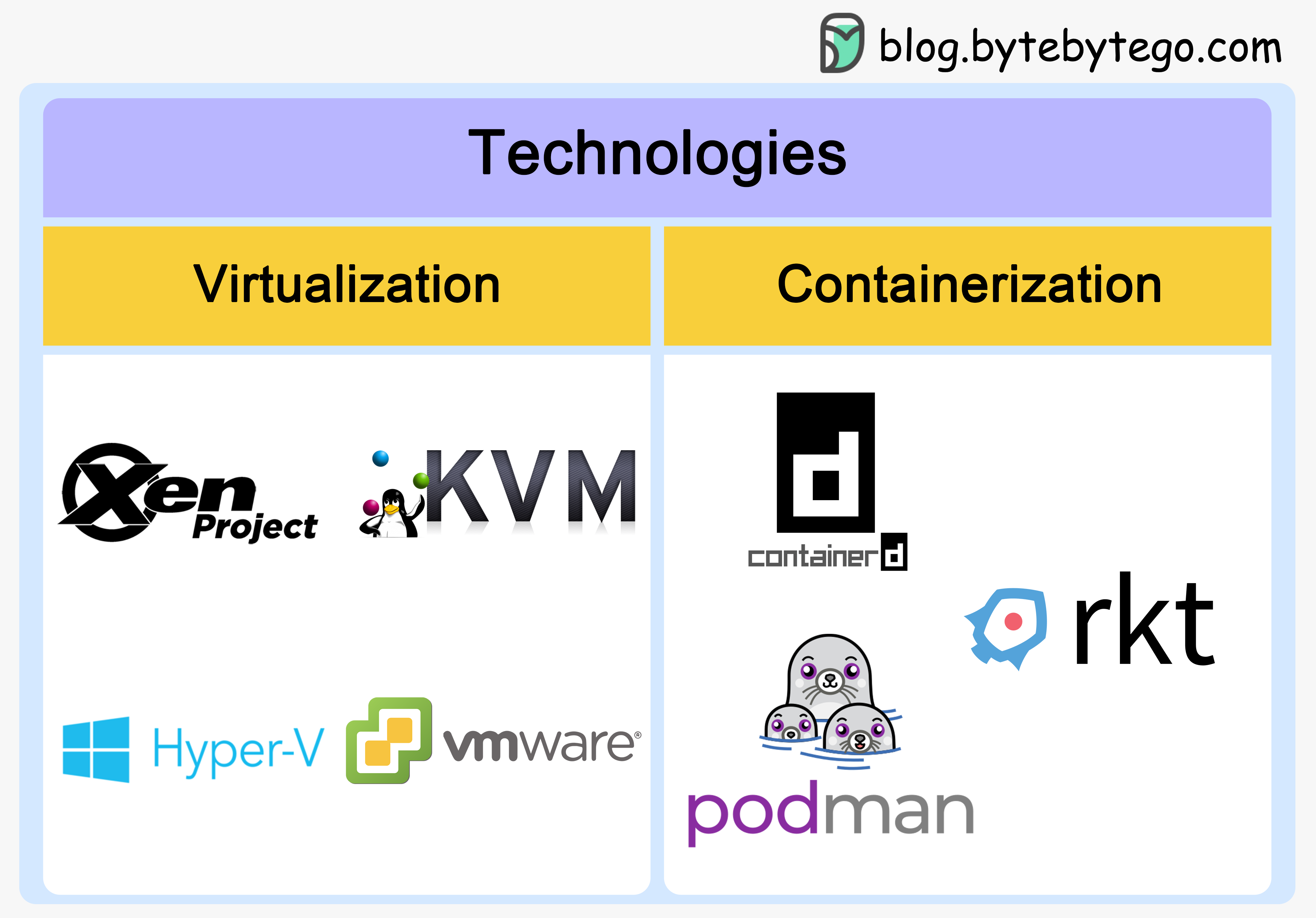
Virtualization and containerization can be confusing, partly because so many players are in the space. On the virtualization side, we have open-source platforms like Xen and KVM. Then there’s VMware vSphere, Microsoft Hyper V, Oracle's Virtual Box, and more.
For containers, Docker is the most popular container engine right now. We also have alternatives like rkt, Podman, and Containerd. When it comes to container orchestration, options include Kubernetes, Docker Swarm, and Nomad.
With all these choices, how do you know what to use? Well, before we pick, let's back up and make sure we understand exactly what virtualization and containerization are. That context will help guide our decision.
Virtualization has been around for a while but still plays a key role in cloud computing today. So, let’s start with the basics: What exactly is virtualization?
Virtualization technology allows a single physical server to act like multiple separate computers. It creates virtual or simulated versions of computing resources like CPU, memory, network, and storage. These virtual resources can each run different applications and operating systems independently, even though they are all hosted on the same physical machine.
Here’s a straightforward example. Imagine having three physical servers, each designated for a specific purpose. One manages emails, another deals with web-related tasks, and the third oversees some internal legacy applications. Let’s say all these servers only run at about 35% capacity – nowhere near their full potential. In many traditional environments, critical apps would each run on dedicated servers to maximize stability and reliability. But this also meant inefficient resource use. Virtualization offers a solution.

It lets us divide the email server into two separate entities capable of handling different tasks, freeing up space for those legacy applications to migrate over. We get better hardware efficiency while still meeting operational needs.
With unused capacity freed up, any extra servers can now be repurposed for other uses or even retired, saving on operational and maintenance costs.

Let's talk about how virtualization works to understand where the efficiencies are.
Virtualization works by creating and managing virtualized environments on a single physical machine. The key components include:
Hypervisors
Virtual machines
Host machines
Guest operating systems
A hypervisor is software that runs above the physical server or host. It pools the host’s resources and allocates them to virtual machines (VMs).
There are two main types of hypervisors:
Type 1 Hypervisor: A Type 1 hypervisor installs directly on the physical server. They are also called bare metal hypervisors. Type 1 hypervisors are the most common. They provide better security and lower latency. Some examples are:
VMware ESXi
Microsoft Hyper-V
Open source KVM
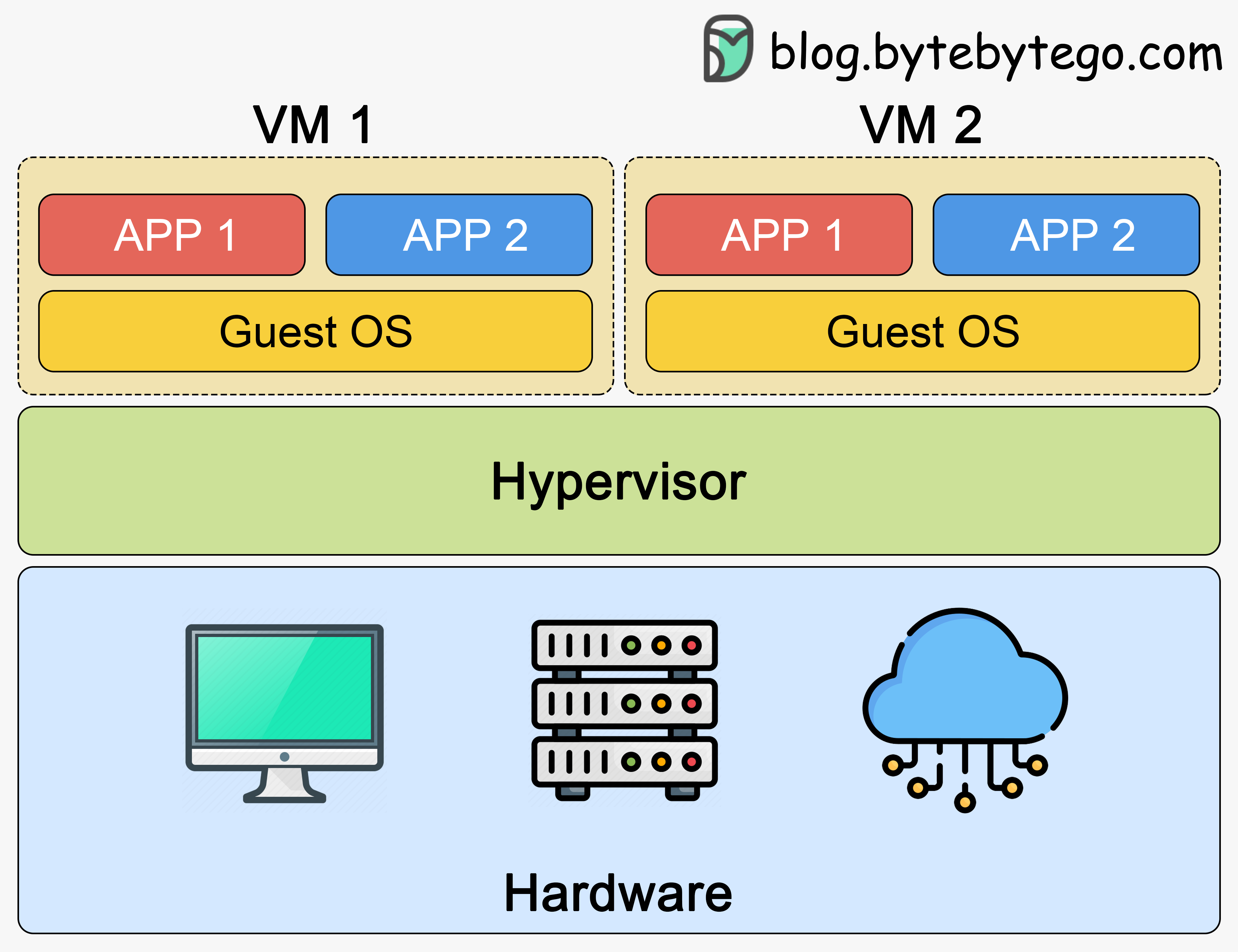
Type 2 Hypervisor: A Type 2 hypervisor runs on top of a host operating system installed on the physical server. They are also called hosted hypervisors. Type 2 hypervisors see less frequent use, mainly for end-user virtualization. They have higher latency than Type 1 hypervisors. Some examples include:
Oracle VirtualBox
VMware Workstation
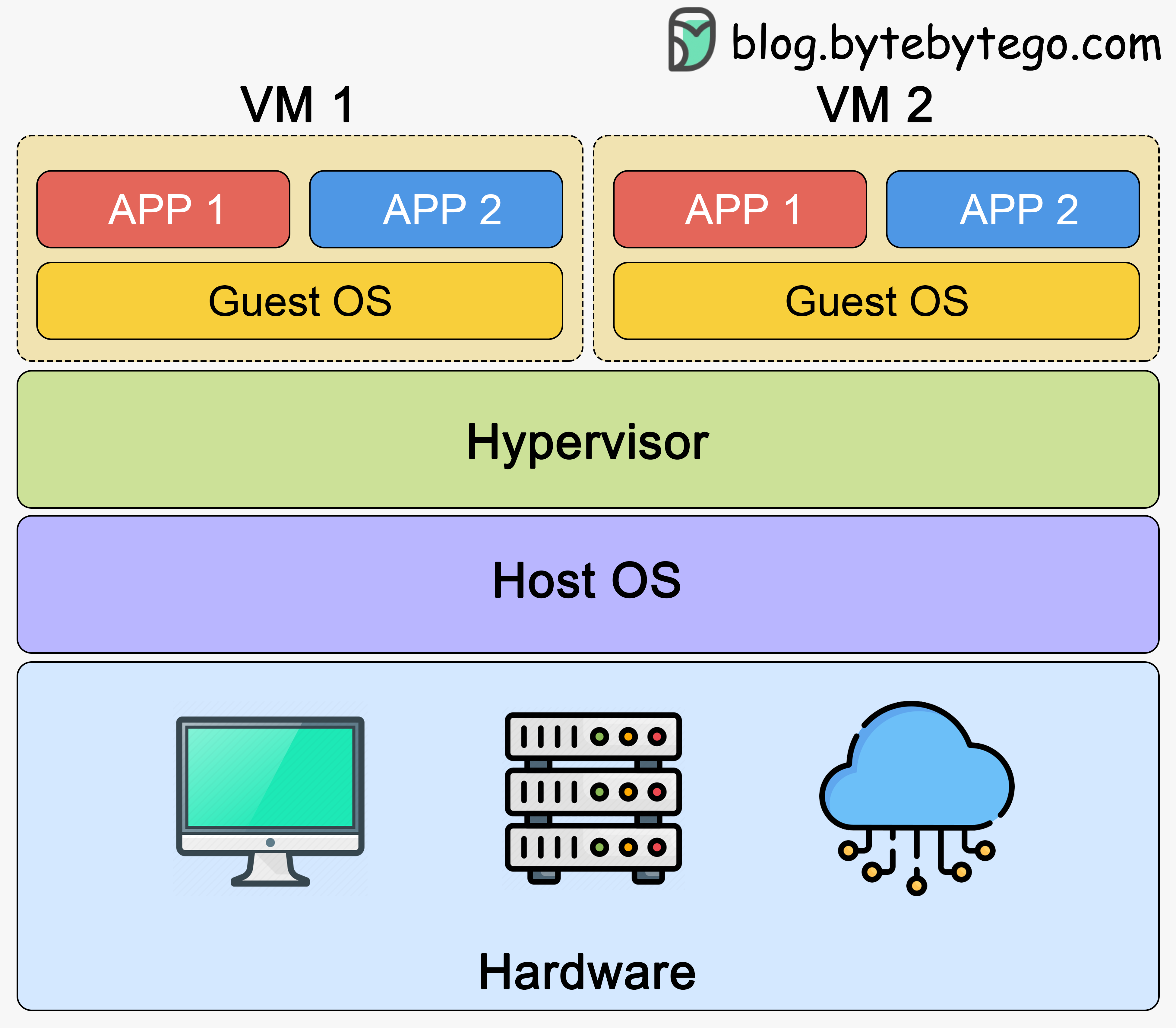
Virtual machines (VMs) are simulated computer systems run as independent instances. Each VM has its own operating system and applications. The hypervisor isolates VMs from each other while allowing them to share the underlying physical server’s resources efficiently.
Once the hypervisor is installed, multiple VMs can be created as virtual environments. The hypervisor then manages how resources from the physical server are allocated to each VM.
The host machine is the physical server where the hypervisor is installed. It provides CPU, memory, storage, and other resources that get shared among virtual machines.
Each virtual machine runs its own guest operating system. These operating systems function independently, believing they have full control of the physical hardware, when in fact, they share resources with other VMs.
In essence, virtualization enables multiple isolated virtual environments to coexist on a single physical server. This provides benefits such as improved resource utilization, flexibility, and cost savings. Virtualization enables the isolation of applications and operating systems, making it easier to manage, deploy, and scale IT infrastructure, contributing to its widespread adoption in data centers, server consolidation, and cloud computing environments.
Whenever containers are discussed, Docker often comes to mind. But container technology has existed for some time. In 2008, the Linux kernel introduced control groups (cgroups), paving the way for modern container technologies.
It was Docker in 2013, however that truly revolutionized containers. Docker simplified the process of creating, distributing, and managing containers. It popularized the use of container images and introduced a registry for sharing them.
A container sits on top of a physical server and its host OS, then virtualizes the OS only, not the underlying hardware like a VM does. We still have hardware and some kind of host operating system. But instead of a hypervisor, we have a container engine. This container engine exposes parts of the host operating system into the containers. The containers themselves only contain the necessary binaries, libraries, and applications - not an entire OS. They don't need their own full OS because they can share the kernel of the underlying host OS. By sharing some resources in this way, we lose the complete separation and independence of VMs, but we gain a ton of efficiency. This optimized sharing is what makes containers so powerful.
Let's understand the concept of containerization by walking through an example using a Node.js application we want to push into production.
There is a 3-step process when doing anything container-related:
Create a manifest describing the container. For Docker, this would be a Dockerfile. For Cloud Foundry, it’s a YAML manifest.
Build the actual container image. For Docker, this is a Docker image. For Rocket, it would be an Application Container image (ACI). The step is the same regardless of the containerization technology used.
Spin up the container itself, which contains all the runtimes, libraries, and binaries needed to run the application. The application runs in a very similar setup to the VMs, but instead of a hypervisor, we’ll have an engine like the Docker Engine to run containers. Different technologies will have different engines that handle running containers.
The great thing about containers is that they are lightweight compared to VMs. This makes deploying multiple containers to scale out an application much easier. With VMs, we have to duplicate full guest operating systems each time, which uses many more resources. But with containers, we don’t duplicate operating systems. We mainly just replicate the necessary application code and libraries. This means using fewer resources overall.
Now, let's say that our Node.js application wants to utilize a third-party payment API for payment processing. We want to access that third-party service using a Python application. With the container-based approach, we can simply create another lightweight container to deploy one copy of that Python application. This optimized resource sharing is what enables containers to truly unlock cloud-native application architectures, running services across languages all on the same infrastructure.
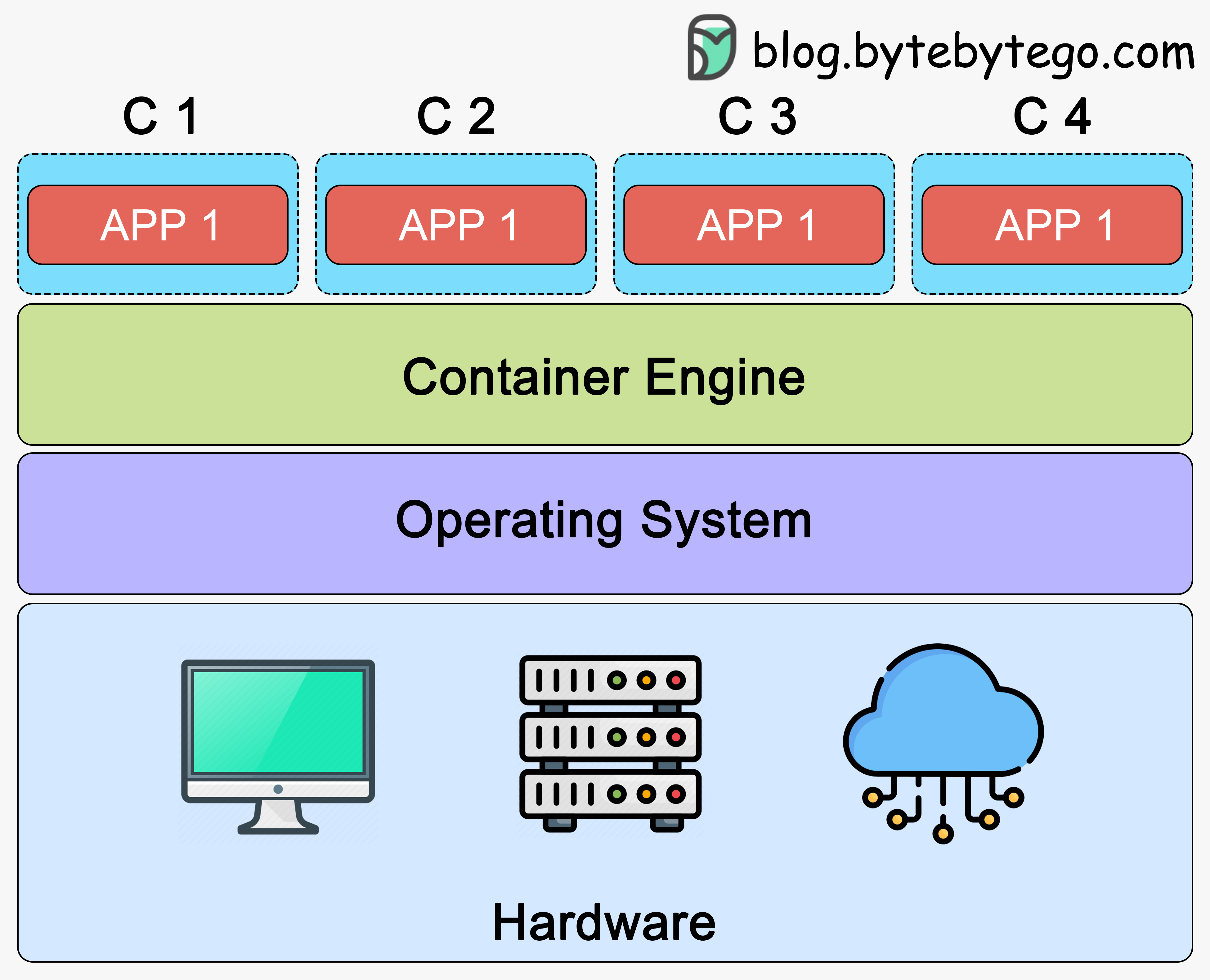
Container runtimes and orchestration platforms are key components for deploying, managing, and scaling containerized applications.
A container runtime executes and manages containers on a host. It interacts directly with the host OS kernel to create and run containers. Two prominent container runtimes in the industry are:
Docker
containerd
Container orchestration handles deploying, scaling, and operating containerized applications across machines. It automates load balancing, service discovery, failure recovery, and more. Popular container orchestration platforms include:
Kubernetes
Docker Swarm
Amazon ECS (Elastic Container Service)
OpenShift
Container runtimes focus on container execution, while container orchestration platforms automate container management across clusters. The choice between container runtimes and orchestration platforms depends on the specific needs and goals of the application.
Now, that we have some background on virtualization and containerization, let’s discuss some key differences between these two technologies that guide when to use each technology.
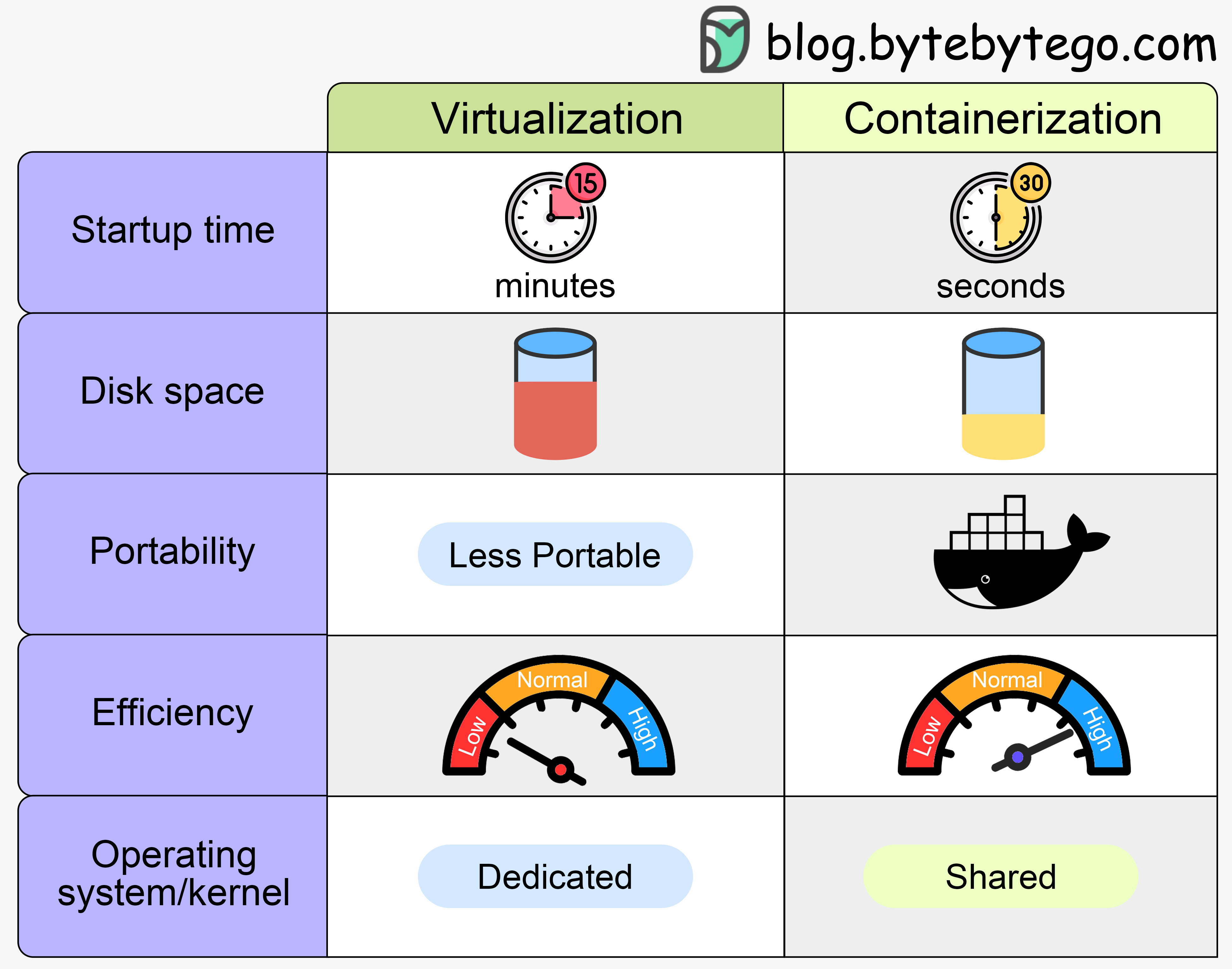
Virtual machines boot an entire operating system, taking a minute or two to start up and customize before becoming operational.This can work for long-running workloads. Cloud providers rely heavily on persistent VMs to virtualize servers.
Containers only package the application code, leveraging an already running kernel, allowing them to start in seconds. This fast startup makes containers ideal for auto-scaled cloud deployments.
Virtual machines duplicate a whole operating system, consuming substantial disk space. Adding more VMs means more duplicate OS copies, taking up extra storage.
Containers achieve storage efficiency through layered container images. Rather than duplicating complete OS installations like VMs do, container images are built from incremental layers. These layers contain only diffs of files needed for that particular container, like the specific application binaries or dependencies. The base OS files are shared read-only amongst containers at the bottom layer. This layered approach prevents duplicate copies of operating system files across containers. Only new files and diffs get added to images, keeping their storage footprint small.
Virtual machines can move between hardware, assuming the target environment runs the same hypervisor and compatible settings as the source VM image. Migration requires compatibility across the full stack.
However, containers provide far easier and portable deployment across environments, thanks to standardized formats like Docker containers. We can build a Docker container locally on a laptop, and run that same container unchanged on a bare metal server, in AWS, Azure, or other cloud environments. The format consistency enables "write once, run anywhere" simplicity that virtual machines currently lack.
Virtual machines duplicate full operating systems, consuming more RAM, CPU, and disk space per instance.
Containers are far more efficient, sharing resources at the OS level between instances. This trades off some isolation for efficiency gains.
Virtual machines have dedicated OSes and kernels per instance - one crashing VM does not affect others.
Containers share the host OS kernel. This makes them more efficient. However, a kernel crash impacts all containers. Fortunately, containers are small and can rapidly reload elsewhere thanks to their portability.
Let's sum up the differences in the table below.
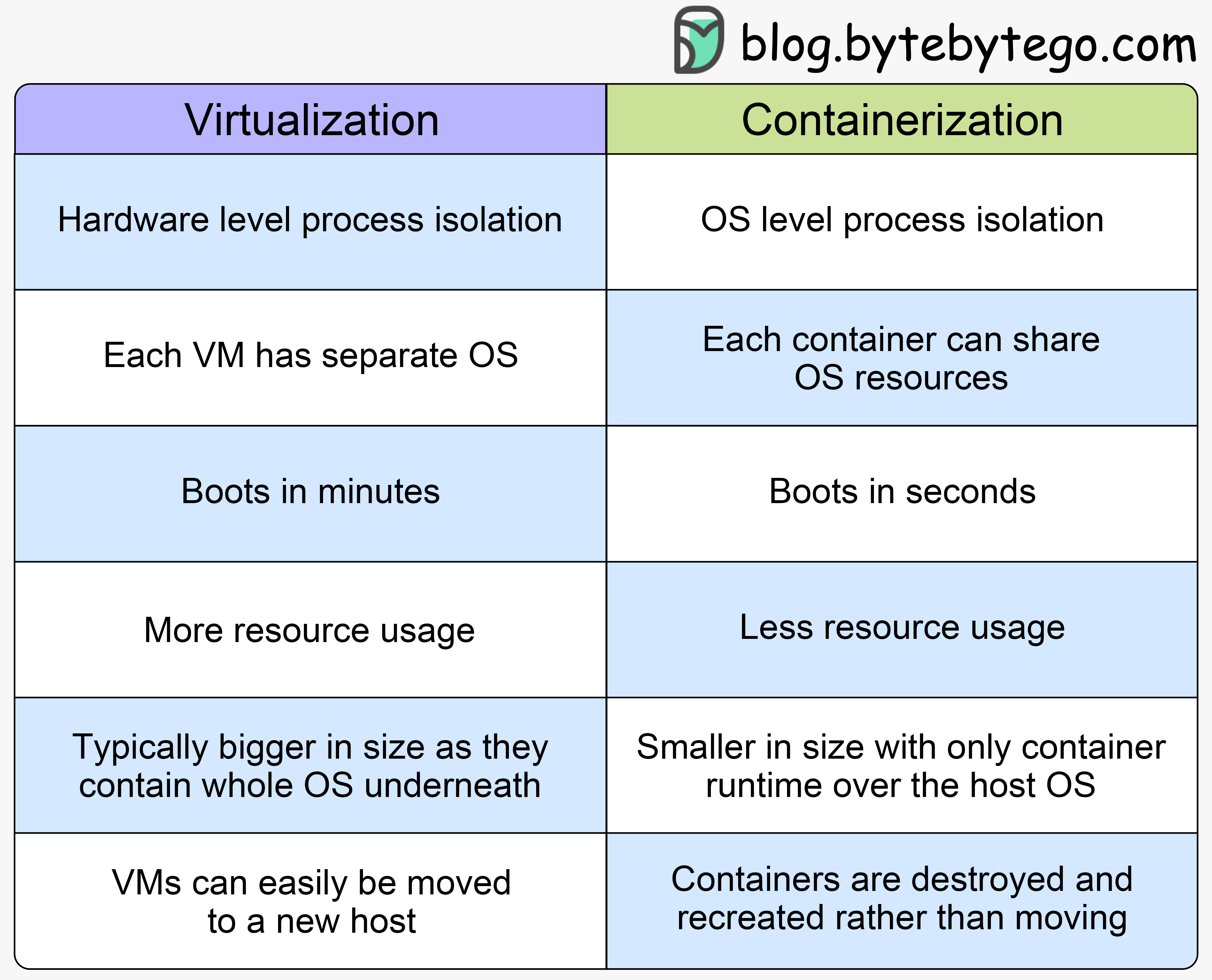
The choice between virtualization and containerization depends on the specific use cases and goals. Each technology has relative strengths and weaknesses that suit different scenarios.
Isolation is critical: If strong isolation between workloads is a priority, virtualization is a better choice. Virtual machines provide a complete and independent operating system for maximum application isolation.
Diverse operating systems are required: If we need a mix of Windows, Linux, or other OSes, virtualization can support this diversity more easily.
Resource-intensive applications: Applications demanding significant compute resources benefit from virtualization's robust isolation and resource allocation capabilities. For example, apps needing substantial CPU, memory, or access to GPUs for processing intensive workloads are great candidates for dedicated virtual machines. Each VM can allocate a portion of total physical resources to an application, providing strong performance guarantees that are not as easily achievable if competing for resources at the operating system level.
Legacy applications: Virtualization is a common choice for running legacy applications that can be difficult to containerize. For example, applications originally designed to run on a specific operating system version may require complex dependencies or configurations tailored to that OS. Attempting to containerize applications with finicky runtime requirements can cause issues. Legacy Windows applications with custom configurations provide a prime example. Hosting these applications in dedicated virtual machines allows them to leverage the isolated guest OS best suited for their needs without extensive repackaging efforts.
Lightweight and fast deployment: If rapid deployment and scaling are crucial, containerization is preferred. Containers have faster startup times and lower overhead than virtual machines. This makes containers ideal for dynamic workloads that change quickly. Their startup speed and smaller resource footprint suit needs that require rapid scaling up and down based on real-time demand or load fluctuations.
Microservices architecture: Containerization is highly suitable for applications built using a microservices architecture. Microservices break down monolithic applications into smaller, independently deployable modules. This aligns well with the modular nature of microservices.
Consistent environments: Containerization ensures consistency across development, testing, and production environments. Containers avoid "works on my machine" issues plaguing VM-based deployments. Packaging the application and all dependencies into a standard container allows the same image to be deployed across different target environments reliably. This portability promotes confidence that an application validated in staging will run the same way in production.
Cloud-Native and DevOps practices: Containerization strongly aligns with cloud-native practices and DevOps workflows. Containers fit nicely into continuous integration / continuous delivery (CI/CD) pipelines. Their portability standardizes movements across environments, while their small footprint speeds up deployment cycles. Both promote faster, more automated application development and deployment processes.
In practice, many organizations adopt a hybrid approach, using both virtualization and containerization based on specific use cases and application requirements. This allows them to leverage the benefits of each technology where it is most appropriate for their workloads.
Here are circumstances under which a hybrid approach is beneficial.
Mixed workload environments: In scenarios where a combination of traditional, monolithic applications and modern, microservices-based applications coexist, a hybrid approach allows us to use virtual machines for legacy applications and containers for newer, more agile components. This ensures compatibility and optimal performance for each type of workload.
Transitioning legacy applications: A phased approach may be preferable when migrating from traditional virtualized environments to containerized architectures. We can start by containerizing new applications or components while maintaining existing virtualized infrastructure for legacy applications until they can be refactored or replaced.
Multi-Tenancy Requirements: In environments where different teams or projects have diverse requirements for isolation, security, and resource allocation, a hybrid approach allows us to use virtualization for stronger isolation and containers for lightweight, shared workloads. This caters to the specific needs of each tenant.
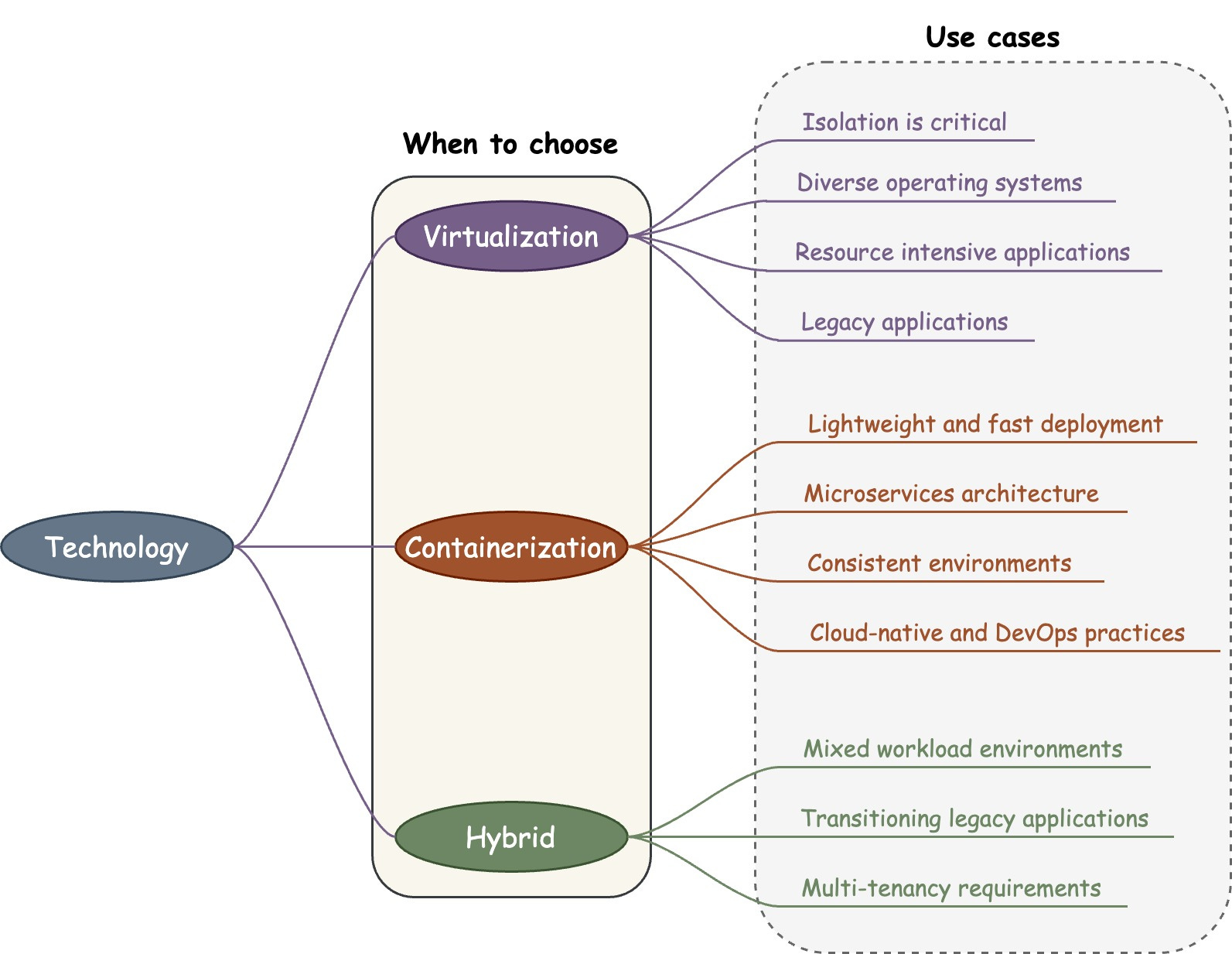
Choosing between virtualization and containerization depends on many factors. Each technology has distinct strengths and weaknesses.
Virtualization provides hardware-level process isolation and complete OS independence per VM. It suits requirements like strong isolation, diverse OSes, resource-intensive apps, and legacy systems.
Containerization operates at the OS level with lightweight and fast deployment. It is ideal for environments requiring rapid scalability, consistent development-to-production environments, microservices architecture, and alignment with cloud-native and DevOps practices.
The decision isn't always clear-cut. Evaluating workload types, deployment speed needs, efficiency, and compatibility with existing infrastructure helps guide appropriate technology decisions tailored to business objectives. This enables building optimal, flexible IT environments by leveraging the most applicable technologies.