Welcome back! This is Part 2 of "Netflix: What Happens When You Press Play?” by guest author, Todd Hoff.
For those interested in a deeper dive into other subjects of the book Explain the Cloud Like I’m 10, check it out here.
Remember how we said a CDN has computers distributed all over the world?
Netflix developed its own computer system for video storage. Netflix calls them Open Connect Appliances or OCAs.
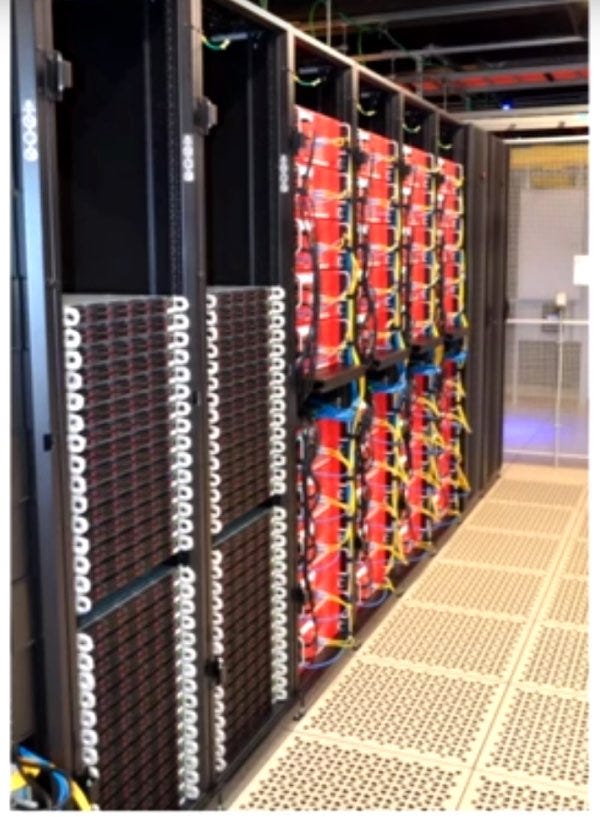
Here’s what an early OCA installation in a site looked like:
There are many OCAs in the above picture. OCAs are grouped into clusters of multiple servers.
Each OCA is a fast server, highly optimized for delivering large files, with lots and lots of hard disks or flash drives for storing video.
Here’s what one of the OCA servers looks like:

There are several different kinds of OCAs for other purposes. There are large OCAs that can store Netflix’s entire video catalog. Some smaller OCAs can store only a portion of Netflix’s video catalog. Smaller OCAs are filled with video daily, during off-peak hours, using a process that Netflix calls proactive caching. We’ll talk more about how proactive caching works later.
From a hardware perspective, there’s nothing special about OCAs. They’re based on commodity PC components and assembled in custom cases by various suppliers. You could buy the same computers if you wanted to.
Notice how all of Netflix’s computers are red? Netflix had their computers specially made to match their logo color.
From a software perspective, OCAs use the FreeBSD operating system and NGINX for the web server. Yes, every OCA has a web server. Video streams using NGINX. If none of these names make sense, don’t worry, I just include them for completeness.
The number of OCAs on a site depends on how reliable Netflix wants the site to be, the amount of Netflix traffic (bandwidth) that is delivered from that site, and the percentage of traffic a site allows to be streamed.
When you press play, you’re watching video streaming from a specific OCA, like the one above, in a location near you.
For the best possible video viewing experience, what Netflix would like to do is cache video in your house. But that’s not practical yet. The next best thing is to put a mini-Netflix as close to your home as possible. How do they do that?
Where does Netflix put Open Connect Appliances (OCAs)?
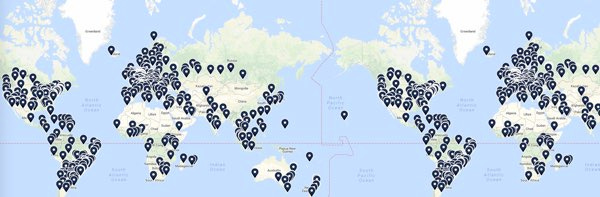
Netflix delivers vast amounts of video traffic from thousands of servers in more than 1,000 locations worldwide. Take a look at this map of video serving locations:

Other video services, like YouTube and Amazon, deliver video on their own backbone network. These companies built their own global network for delivering video to users. That’s very complicated and very expensive to do.
Netflix took a completely different approach to build its CDN.
Netflix doesn’t operate its network; it doesn’t operate its own data centers anymore. Instead, internet service providers (ISPs) agree to put OCAs in their data centers. OCAs are offered free to ISPs to embed in their networks. Netflix also puts OCAs in or close to internet exchange locations (IXPs).
Using this strategy, Netflix doesn’t need to operate its own data centers, yet it gets all the benefits of being in a regular datacenter. It’s just someone else’s datacenter. Genius!
Those last two paragraphs were dense, so let’s break it down.
Using ISPs to build a CDN.
An ISP is your internet provider. It’s where you get your internet service from. It might be Verizon, Comcast, or thousands of other services.
The main point here is that ISPs are located all around the world, and they’re close to customers. By placing OCAs in ISP data centers, Netflix is also worldwide and close to its customers.
Using IXPs to build a CDN.
An internet exchange location is a datacenter where ISPs and CDNs exchange internet traffic between their networks. It’s like going to a party to exchange Christmas presents with your friends. It’s easier to exchange gifts if everyone is in one place. It’s easier to exchange network traffic if everyone is in one place.
IXPs are located all over the world:
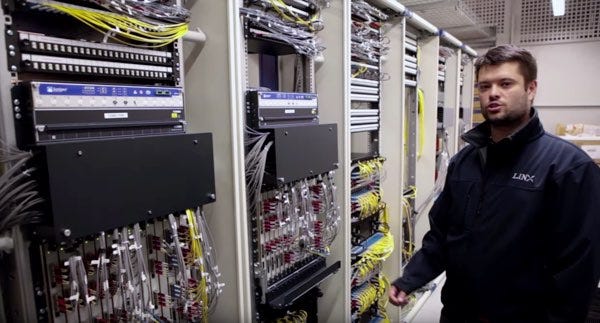
Here’s what the London Internet Exchange looks like:
Drill down on those yellow fiber optic cables and what you’ll see is something like this from the AMS-IX Internet exchange point in Amsterdam, Netherlands:
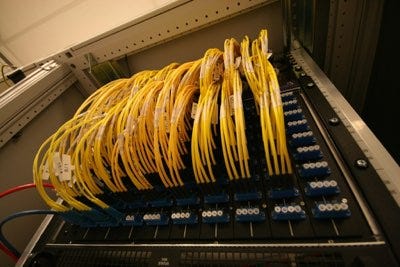
Each wire in the above picture connects one network to another network. That’s how different networks exchange traffic with each other.
An IXP is like a highway interchange, only using wires:
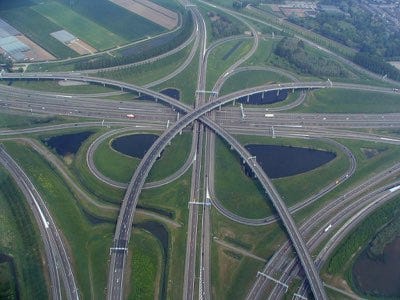
For Netflix, this is another win. IXPs are all over the world. So by putting their OCAs in IXPs, Netflix doesn’t have to run its own data centers.
Video is Proactively Cached to OCAs Every Day
Netflix has all this video sitting in S3. They have all these video-serving computers spread throughout the world. There’s just one thing missing: Video!
Netflix uses a process it calls proactive caching to efficiently copy video to OCAs.
What is a cache?
A cache is a hiding place for ammunition, food, and treasures, especially in the ground.
Do you know that squirrels bury nuts for the winter?

Each location they bury nuts is a cache. During the winter, any squirrel can find a nut cache and chow down.
Arctic explorers sent small teams ahead to cache food, fuel, and other supplies along their route. The larger team following behind would stop at every cache location and resupply.
The squirrels and Arctic explorers were proactive; they were doing something ahead of time to prepare for later.
Each OCA is a cache of videos that you’ll most likely want to watch.
Netflix caches video by predicting what you’ll want to watch.
Everywhere in the world, Netflix knows to a high degree of accuracy what its members like to watch and when they like to watch it. Remember how we said Netflix was a data-driven company?
Netflix uses its popularity data to predict which videos members probably will want to watch tomorrow in each location. Here, location means a cluster of OCAs housed within an ISP or IXP.
Netflix copies the predicted videos to one or more OCAs at each location. This is called prepositioning. Video is placed on OCAs before anyone even asks.
This gives excellent service to members. The video they want to watch is already close to them, ready and available for streaming.
Netflix operates what is called a tiered caching system.
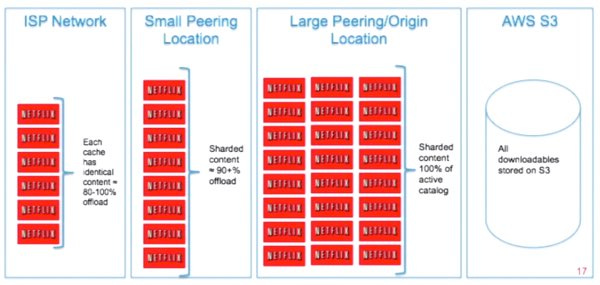
The smaller OCAs we talked about earlier are placed in ISPs and IXPs. These are too small to contain the entire Netflix catalog of videos. Other locations have OCAs containing most of Netflix’s video catalog. Still, different locations have big OCAs containing the entire Netflix catalog. These OCAs get their videos from S3.
Every night, each OCA wakes up and asks a service in AWS which videos it should have. The service in AWS sends the OCA a list of videos it’s supposed to have based on the predictions we talked about earlier.
Each OCA is responsible for ensuring it has all the videos on its list. If an OCA in the same location has one of the videos it’s supposed to have; then it will copy the video from the local OCA. Otherwise, a nearby OCA with the video will be found and copied.
Since Netflix forecasts what will be popular tomorrow, there’s always a one-day lead time before a video is required to be on an OCA. This means videos can be copied during quiet, off-peak hours, substantially reducing bandwidth usage for ISPs.
There’s never a cache miss in Open Connect. A cache miss happens when a specific video is requested from an OCA, and the OCA doesn’t have it. Cache misses happen all the time on other CDNs because you can’t afford to copy content everywhere. Since Netflix knows all the videos it must cache, it knows exactly where each video is at all times. If a smaller OCA doesn’t have a video, one of the larger OCAs is always guaranteed to have it.
Why doesn’t Netflix just copy all their video to every OCA in the world? Its video catalog is way too large to store everything at all locations. In 2013, the video catalog for Netflix was over 3 petabytes; I have no idea how large it is today, but I can only assume it’s significantly larger.
That’s why Netflix developed the method of choosing which videos to store on each OCA using data to predict what their members will want to watch.
Let’s take an example. Stranger Things is a top-rated show. Which OCAs should it be copied to? Probably every location because members worldwide will want to watch Stanger Things.
What if a video isn’t as popular as Stranger Things? Netflix decides which locations it should be copied to serve nearby member requests best.
Within a location, a popular video like Stranger Things is copied by many different OCAs. The more popular a video, the more servers it will be copied to. Why? Streaming the video to members would overwhelm the server if there was only one copy of a viral video. As they say, many hands make light work.
A video isn’t considered live when copied to just one OCA. Netflix wants to be able to play the same content at the same time everywhere in the world. Only when there are a sufficient number of OCAs with enough copies of the video to serve it appropriately will the video be considered life and ready for members to watch.
Daredevil Season 2 in 2016, for example, was the first time Netflix released all episodes of a show, on all devices, in all countries, at the same time.
Hosting OCAs: What’s in it for ISPs?
Why would an ISP agree to put an OCA cluster inside their network? At first blush, it seems too generous, but you’ll be happy to know it’s rooted firmly in self-interest.
To understand why we’ll need to talk about how networks work. Throughout this book, we’ve said cloud services are accessed over the internet. That’s not the case for Netflix, at least when watching a video. When using a Netflix app, it talks to AWS over the internet.
The internet is an interconnect of networks. You have an ISP that provides internet service. I get my internet service from Comcast. My house connects to Comcast’s network using a fiber optic cable. Comcast’s network is their network; it’s not the internet; the internet is something else.
Let’s say I want to do a Google search, and I type a query into my browser and hit enter.
My request to Google first flows over Comcast’s network. Google isn’t on Comcast’s network. At some point, my request has to go to Google’s network. That’s what the internet is for.
The internet connects Comcast’s network to Google’s network. These routing protocols act like a traffic cop, directing where network traffic goes.
When my Google query is routed onto the internet, it’s not on Comcast’s network anymore, and it’s not on Google’s network. It’s on what’s called the internet backbone.
The internet is woven from many privately owned networks that choose to interoperate with each other. The IXPs we looked at earlier are one-way networks that connect with each other.
In the United States, here’s a map of the long-haul fiber network:
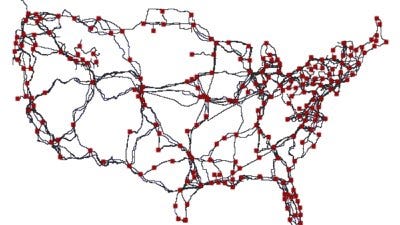
What Netflix has done with Open Connect is place its OCA clusters inside the ISP’s network. That means I’ll be talking to an OCA in Comcast’s network if I watch a Netflix video. All my video traffic is on Comcast’s network; it never hits the internet.
The key to scaling video delivery is to be as close to users as possible. When you’re doing that, you’re not using the internet backbone. Requests are being satisfied on a local part of the network.
Why is this a good thing? Recall that we said Netflix already consumes more than 37% of the internet traffic in the United States. If ISPs didn’t cooperate, Netflix would use even more of the internet. The internet couldn’t handle all the video traffic. ISPs would have to add a lot more network capacity, and that’s expensive to build.
Currently, nearly 100% of Netflix content is served within ISP networks. This reduces costs by relieving internet congestion for ISPs. At the same time, Netflix members experience a high-quality viewing experience. And network performance improves for everyone.
It’s a win-win.
Open Connect is Reliable and Resilient
Earlier, we discussed how Netflix increased the reliability of its system by running out of three different AWS regions. The architecture of Open Connect accomplished the same goal.
What may not be immediately obvious is that the OCAs are independent of each other. OCAs act as self-sufficient video-serving archipelagos. Members streaming from one OCA are not affected when other OCAs fail.
What happens when an OCA fails? The Netflix client you’re using immediately switches to another OCA and resumes streaming.
What happens if too many people in one location use an OCA? The Netflix client will find a more lightly loaded OCA to use.
What happens if the network a member uses to stream video overloads? The same sort of thing. The Netflix client will find another OCA on a better-performing network.
Open Connect is a very reliable and resilient system.
Netflix Controls the Client
Netflix handles failures gracefully because it controls the client on every device running Netflix.
Netflix develops its Android and iOS apps, so you might expect them to control them. But even on platforms like Smart TVs, where Netflix doesn’t build the client, Netflix still has control because it controls the software development kit (SDK).
An SDK is a set of software development tools that allows the creation of applications. Every Netflix app makes requests to AWS and plays video using the SDK.
By controlling the SDK, Netflix can adapt consistently and transparently to slow networks, failed OCAs, and any other problems that might arise.
It’s been a long road, but we’re finally here. We’re ready to press play and watch a movie!

We’ve learned a lot. Here’s what we’ve learned so far:
Netflix can be divided into three parts: the backend, the client, and the CDN.
All requests from Netflix clients are handled in AWS.
All video is streamed from a nearby Open Connect Appliance (OCA) in the Open Connect CDN.
Netflix operates out of three AWS regions and can usually handle a failure in any region without members even noticing.
Netflix transforms new video content into many different formats so the best format can be selected for viewing based on the device type, network quality, geographic location, and the member’s subscription plan.
Every day, over Open Connect, Netflix distributes videos worldwide based on what they predict members in each location will want to watch.
Here’s a picture of how Netflix describes the play process:
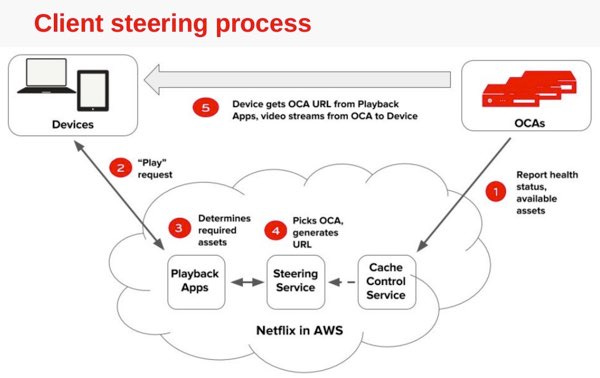
Now, let’s complete the picture:
You select a video to watch using a client running on some device. The client sends a play request, indicating which video you want to play, to Netflix’s Playback Apps service running in AWS.
We’ve not discussed this before, but licensing is a big part of what happens after you hit play. Not every location in the world has a license to view every video. Netflix must determine if you have a valid license to view a particular video. We won’t talk about how that works—it’s boring—but keep in mind it’s always happening. One reason Netflix started developing its owan content is to avoid licensing issues. Netflix wants to release a show to everyone in the world all at the same time. Creating its own content is the easiest way for Netflix to avoid worrying about licensing problems.
Considering all the relevant information, the Playback Apps service returns URLs for up to ten different OCA servers. These are the same sort of URLs you use all the time in your web browser. Netflix uses your IP address and information from ISPs to identify which OCA clusters are best for you to use.
The client intelligently selects which OCA to use. It does this by testing the network connection quality to each OCA. It will connect to the fastest, most reliable OCA first. The client keeps running these tests throughout the video streaming process.
The client probes to determine the best way to receive content from the OCA.
The client connects to the OCA and starts streaming video to your device.
Have you noticed when watching a video, the picture quality varies? Sometimes it will look pixelated, and after a while, the picture snaps back to HD quality? That’s because the client is adapting to the quality of the network. The client lowers the video quality to match if the network quality declines. The client will switch to another OCA when the quality deteriorates too much.
That’s what happens when you press play on Netflix. Who would have ever thought so simple a thing as watching a video was so complex?