
This week's newsletter features a chapter from one of my favorite books, Explain the Cloud Like I’m 10.
I am fascinated by our guest author, Todd Hoff’s ability to distill complex topics into simpler discussions. This is one of our inspirations for why we made the ByteByteGo newsletter in the first place.
He’s been a programmer for over 30 years, having worked in Silicon Valley his entire career. He worked with various companies, including NEC, System Industries, IBM, Sun Microsystems, and Yahoo, to name a few.
He also enjoyed teaching database courses and Perl programming during his tenure at UCSC. He ran a blog called HighScalability, covering cloud space in detail.
For those interested in a deeper dive into other subjects, the e-book is available here.
Netflix seems so simple. Press play, and video magically appears. Easy, right? Not so much.
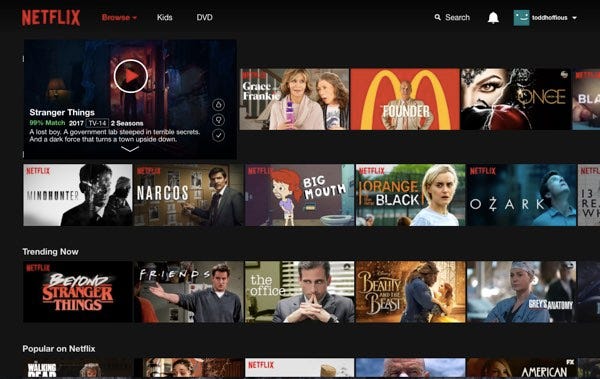
You might expect Netflix to serve video using AWS. Press play in a Netflix application and video stored in S3 would be streamed directly to your device from S3 over the internet.
An utterly sensible approach…for a much smaller service.
But that’s not how Netflix works at all. It’s far more complicated and exciting than you might imagine.
To see why let’s look at some impressive Netflix statistics for 2022.
Netflix has more than 221.64 million subscribers.
Netflix operates in more than 190 countries.
Netflix has nearly $7.87 billion in revenue per quarter.
Netflix.com generated over 765 million global visits.
Netflix is used by 62% of US households.
Netflix is used by 23% of US adults on a daily basis.
Netflix is responsible for 9.39% of global internet traffic.
Netflix plays more than 6 billion hours of video per month.
Stranger Things 4 crossed 1 billion hours viewed.
Netflix budgeted about $17 billion for creating new content from 2021 through 2023.
What have we learned?
Netflix is huge. They’re global, have a lot of members, play a lot of videos, and have a lot of money.
Another relevant factoid is that Netflix is subscription based. Members pay Netflix monthly and can cancel at any time. When you press play to chill on Netflix, it had better work. Unhappy members unsubscribe.
We’re Going Deep
Netflix is a terrific example of all the ideas we’ve talked about, which is why this chapter goes into a lot more detail than the other cloud services we’ve covered.
One big reason for diving deeper into Netflix is they make much more information available than other companies.
Netflix holds communication as a central cultural value. Netflix more than lives up to its standards.
I’d like to thank Netflix for being so open about its architecture. Over the years, Netflix has given hundreds of talks and written hundreds of articles on the inner workings of how they operate. The whole industry is better for it.
Another reason for going into so much detail on Netflix is that Netflix is just plain fascinating. Most of us have used Netflix at one time or another. Who wouldn’t love peeking behind the curtain to see what makes Netflix tick?
Netflix operates in two clouds: AWS and Open Connect
How does Netflix keep its members happy? With the cloud, of course. Actually, Netflix uses two different clouds: AWS and Open Connect.
Both clouds must work together seamlessly to deliver endless hours of customer-pleasing video.
The three parts of Netflix: client, backend, and content delivery network (CDN)
You can think of Netflix as being divided into three parts: the client, the backend, and the content delivery network (CDN).
The client is the user interface on any device used to browse and play Netflix videos. It could be an app on your iPhone, a website on your desktop computer, or even an app on your Smart TV. Netflix controls every client for each and every device.
Everything, before you hit play, happens in the backend, which runs in AWS. That includes things like preparing all new incoming videos and handling requests from all apps, websites, TVs, and other devices.
Open Connect handles everything that happens after you hit play. Open Connect is Netflix’s custom global content delivery network (CDN). Open Connect stores Netflix videos in different locations worldwide. When you press play, the video streams from Open Connect to your device and is displayed by the client. Don’t worry; we’ll talk more about what a CDN is a little later.
Interestingly, at Netflix, they don’t say hit play on a video; they say clicking start on a title. Every industry has its lingo.
By controlling all three areas—client, backend, and CDN— Netflix has achieved complete vertical integration.
Netflix controls your video viewing experience from beginning to end. That’s why it just works when you click play from anywhere in the world. You reliably get the content you want to watch when you want to watch it.
Let’s see how Netflix makes that happen.
In 2008 Netflix Started Moving to AWS
Netflix launched in 1998. At first, they rented DVDs through the US Postal Service.
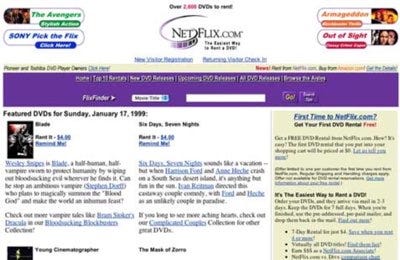
But Netflix saw the future as on-demand streaming video.
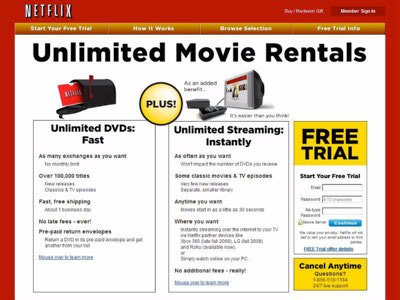
In 2007 Netflix introduced its streaming video-on-demand service that allowed subscribers to stream television series and films via the Netflix website on personal computers or the Netflix software on a variety of supported platforms, including smartphones and tablets, digital media players, video game consoles, and smart TVs.
On a personal note, that streaming video-on-demand was the future might seem obvious. And it was. I worked at a couple of startups that tried to make a video-on-demand product. They failed.
Netflix succeeded. Netflix executed well, but they were late to the game, which helped them. By 2007 the internet was fast and cheap enough to support streaming video services. That was never the case before. The addition of fast, low-cost mobile bandwidth and the introduction of powerful mobile devices like smartphones and tablets has made it easier and cheaper for anyone to stream video at any time from anywhere. Timing is everything.
Netflix Began by Running their Own Data Centers
EC2 was just starting in 2007, about the same time Netflix's streaming service started. There was no way Netflix could have launched using EC2.
Netflix built two data centers located right next to each other. They experienced all the problems we talked about in earlier chapters.
Building out a datacenter is a lot of work. Ordering equipment takes a long time. Installing and getting all the equipment working takes a long time. And as soon they got everything working, they would run out of capacity, and the whole process had to start over again.
The long lead times for equipment forced Netflix to adopt what is known as a vertical scaling strategy. Netflix made extensive programs that ran on big computers. This approach is called building a monolith. One program did everything.
The problem is that it’s tough to make a reliable monolith when you’re growing fast, like Netflix. And it wasn’t.
A Service Outage Caused Netflix to Move to AWS
For three days in August 2008, Netflix could not ship DVDs because of corruption in their database. This was unacceptable. Netflix had to do something.
The experience of building data centers had taught Netflix an important lesson—they weren’t good at building data centers.
What Netflix was good at was delivering videos to its members. Netflix would rather concentrate on getting better at delivering video rather than getting better at building data centers. Building data centers was not a competitive advantage for Netflix; delivering video is.
At that time, Netflix decided to move to AWS. AWS was just getting established, so selecting AWS was a bold move.
Netflix moved to AWS because it wanted a more reliable infrastructure. Netflix wanted to remove any single point of failure from its system. AWS offered highly reliable databases, storage, and redundant data centers. Netflix wanted cloud computing, so it wouldn’t have to build big unreliable monoliths. Netflix wanted to become a global service without building its own data centers. None of these capabilities were available in its old datacenters and never would be.
A reason Netflix gave for choosing AWS was it didn’t want to do any undifferentiated heavy lifting. Undifferentiated heavy lifting is those things that have to be done but don’t provide any advantage to the core business of providing a quality video-watching experience. AWS does all the undifferentiated heavy lifting for Netflix. This lets Netflixians focus on delivering business value.
It took over eight years for Netflix to complete moving from its data centers to AWS. During that period, Netflix grew its number of streaming customers eightfold. Netflix now runs on several hundred thousand EC2 instances.
Netflix is More Reliable in AWS
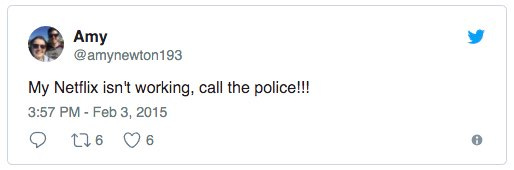
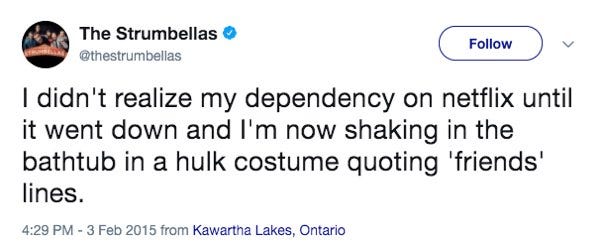
It’s not like Netflix never experiences downtime on AWS, but on the whole, its service is much more reliable than it was before.
You don’t see complaints like this very often anymore:
Or this:
Netflix is so reliable now because they’ve taken extraordinary steps to make their service reliable.
Netflix operates out of three AWS regions: one in North Virginia, one in Portland, Oregon, and one in Dublin, Ireland. Within each region, Netflix operates in three different availability zones.
Netflix has said there are no plans to operate out of more regions. It’s costly and complicated to add new regions. Most companies operate out of just one region, let alone two or three.
The advantage of having three regions is that any one region can fail, and the other regions will step in to handle all the members in the failed region. When a region fails, Netflix calls this evacuating a region.
Let’s use an example. Let’s say you’re watching a new Stanger Things episode in London, England. Because it’s closest to London, chances are your Netflix device is connected to the Dublin region.
What happens if the entire Dublin region fails? Does that mean Netflix should stop working for you? Of course not!
Netflix, after detecting the failure, redirects you to Virginia. Your device would now talk to the Virginia region instead of Dublin. You might not even notice there was a failure.
How often does an AWS region fail? Once a month. Well, a region doesn’t fail every month. Netflix runs monthly tests. Every month, Netflix causes a region to die to ensure its system can handle region-level failures. A region can be evacuated in six minutes.
Netflix calls this their global services model. Any customer can be served out of any region. This is amazing. And it doesn’t happen automatically. AWS has no magic sauce for handling region failures or serving customers out of multiple regions. Netflix has done all this work on its own. Netflix is a pioneer in figuring out how to create reliable systems using multiple regions. I’m unaware of any other company that goes to these lengths to make their service reliable.
Another advantage of being in these three regions is that it gives Netflix worldwide coverage. Netflix ran some tests and found if you use a Netflix application anywhere in the world, you’ll get fast service from any one of these three regions.
Netflix Saves Money in AWS
This may surprise a lot of people, but AWS is cheaper for Netflix. The cloud costs per streaming view ended up being a fraction of the cost of its old datacenters.
Why? The elasticity of the cloud.
Netflix could add servers when needed and return them when it didn’t. Rather than have a lot of extra computers hanging around doing nothing to handle peak load, Netflix only had to pay for what was needed, when it was needed.
What Happens in AWS Before you Press Play?
Anything that doesn’t involve serving video is handled in AWS.
This includes scalable computing, storage, business logic, distributed databases, big data processing and analytics, recommendations, transcoding, and hundreds of other functions.
Don’t worry, you don’t need to understand all those things, but since you may find them interesting, I’ll explain them briefly.
Scalable computing and scalable storage.
Scalable computing is EC2, and scalable storage is S3. Nothing new for us here.
Your Netflix device—iPhone, TV, Xbox, Android phone, tablet, etc.—talks to a Netflix service running in EC2.
View a list of potential videos to watch? That’s your Netflix device contacting a computer in EC2 to get the list.
Ask for more details about a video? That’s your Netflix device; contacting a computer in EC2 to get the details.
It’s like all the other cloud services we’ve discussed in the book.
Scalable distributed database
Netflix uses both DynamoDB and Cassandra for their distributed databases. Not that these names should mean anything to you, they’re just high-quality database products.
Database. A database stores data. Your profile information, billing information, all the movies you’ve ever watched, and all that information is stored in a database.
Distributed. Distributed means the database doesn’t run on one big computer; it runs on many computers. Your data is copied to multiple computers, so if one or even two computers holding your data fail, your data will be safe. Your data is copied to all three regions. If a region fails, your data will be there when the new region is ready to start using it.
Scalable. Scalable means the database can handle as much data as you ever want to put into it. That’s one major advantage of being a distributed database. More computers can be added as necessary to handle more data.
Big data processing and analytics. Big data simply means there’s a lot of data. Netflix collects a lot of information. Netflix knows what everyone has watched when they watched it and where they were when they watched it. Netflix knows which videos members have looked at but decided not to watch. Netflix knows how often each video has been watched…and much more.
Putting all the data in a standard format is called processing.
Making sense of all that data is called analytics. Data is analyzed to answer specific questions.
Netflix personalizes artwork just for you.
Here’s a great example of how Netflix entices you to watch more videos using its data analytics capabilities.
When browsing around looking for something to watch on Netflix, have you noticed there’s always an image displayed for each video? That’s called the header image.
The header image is meant to intrigue you, to draw you into selecting a video. The idea is that the more compelling the header image, the more likely you will watch a video. And the more videos you watch, the less likely you’ll unsubscribe from Netflix.
Here’s an example of different header images for Stranger Things:
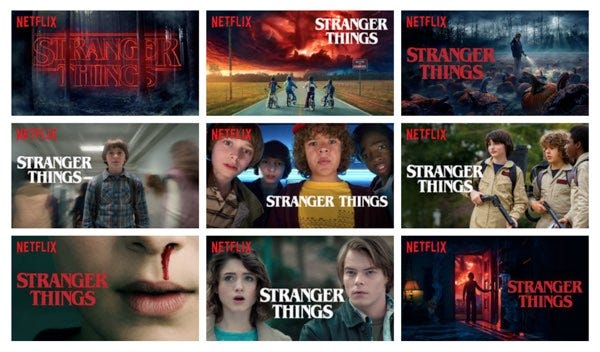
You might be surprised to learn the image shown for each video is selected specifically for you. Not everyone sees the same image.
Everyone used to see the same header image. Here’s how it worked. Members were shown at a random one picture from a group of options, like the pictures in the above Stranger Things collage. Netflix counted every time a video was watched, recording which picture was displayed when the video was selected.
For our Stranger Things example, let’s say when the group picture in the center was shown, Stranger Things was watched 1,000 times. All the other pictures were watched only once each.
Since the group picture was the best at getting members to watch, Netflix would forever make it the header image for Stranger Things.
This is called being data-driven. Netflix is known for being a data-driven company. Data is gathered—in this case, the number of views associated with each picture—and used to make the best decisions possible—in this case, which header image to select.
Clever, but can you imagine doing better? Yes, by using more data. That’s the theme of the future—solving problems by learning from data.
You and I are likely very different people. Do you think we are motivated by the same kind of header image? Probably not. We have different tastes. We have different preferences.
Netflix knows this too. That’s why Netflix personalizes all the images they show you. Netflix tries to select the artwork highlighting the most relevant aspect of a video to you. How do they do that?
Remember, Netflix records and counts everything you do on their site. They know which kind of movies you like best, which actors you like the most, and so on.
Let’s say one of your recommendations is the movie Good Will Hunting. Netflix must choose a header image to show you. The goal is to show an image that lets you know about a movie you’ll probably be interested in. Which image should Netflix show you?
Netflix will show you an image featuring Robin Williams if you like comedies. If you prefer romantic movies, Netflix will show you an image of Matt Damon and Minnie Driver poised for a kiss.
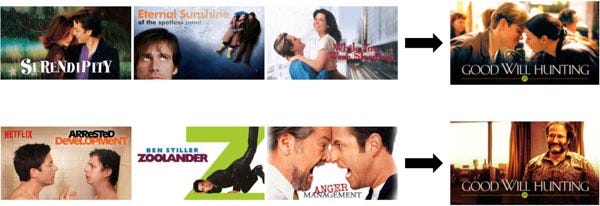
By showing Robin Williams, Netflix is letting you know there’s likely to be humor in the movie, and because Netflix knows you like comedies, this video is a good match.
The Matt Damon and Minnie Driver image convey a completely different message. If you’re a comedy fan and saw this image, you might skip right on by.
That’s why selecting the right header image is so important. It sends a strong personalized signal indicating what a movie is about.
Here’s another example, Pulp Fiction.
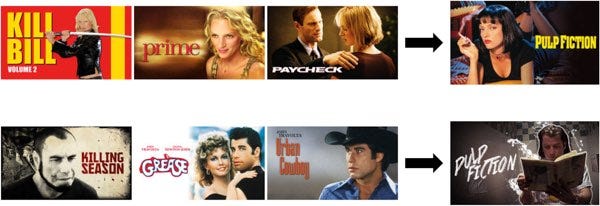
If you’ve watched a lot of movies starring Uma Thurman, then you’re likely to see the header image featuring Uma. If you’ve watched a lot of movies starring John Travolta, then you’re likely to see the header image featuring John.
Can you see how choosing the best possible personalized artwork might make you more likely to watch a video?
Netflix appeals to your interests when selecting artwork, yet Netflix doesn’t want to lie to you either. They don’t want to show a clickbait image just to get you to watch a video you may not like. There’s no incentive in that. Netflix isn’t paid per video watched. Netflix tries to minimize regret. Netflix wants you to be happy with the videos you watch, so they pick the best header images they can.
This is just one small example of how Netflix uses data analysis. Netflix uses these kinds of strategies everywhere.
Recommendations.
Usually, Netflix will show you only 40 to 50 video options, yet they have many thousands of videos available.
How does Netflix decide? Using machine learning.
That’s part of the big data processing and analytics we just talked about. Netflix looks at its data and predicts what you’ll like. Nobody else’s Netflix screen looks like yours. Everything you see on a Netflix screen is chosen specifically for you using machine learning.
Transcoding From Source Media to What You Watch
Here’s where we start transitioning into how Netflix handles video.
Before watching a video on your favorite device, Netflix must convert the video into a format that works best for your device. This process is called transcoding or encoding.
Transcoding is the process that converts a video file from one format to another to make videos viewable across different platforms and devices.
Netflix encodes all its video in AWS on as many as 300,000 CPUs at one time. That’s larger than most supercomputers!
The source of source media
Who sends videos to Netflix? Production houses and studios. Netflix calls this video source media. The new video is given to the Content Operations Team for processing.
The video comes in a high-definition format that’s many terabytes in size. A terabyte is big. Imagine 60 stacks of paper as tall as the Eiffel Tower. That’s a terabyte.
Before you can view a video, Netflix puts it through a rigorous multi-step process.
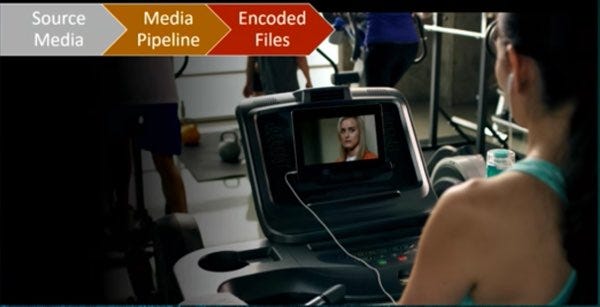
Validating the video
The first thing Netflix does is spend a lot of time validating the video. It looks for digital artifacts, color changes, or missing frames that may have been caused by previous transcoding attempts or data transmission problems.
The video is rejected if any problems are found.
Into the media pipeline
After the video is validated, it’s fed into what Netflix calls the media pipeline.
A pipeline is simply a series of steps data is put through to make it ready for use, much like an assembly line in a factory. More than 70 different pieces of software have a hand in creating every video.
It’s not practical to process a single multi-terabyte-sized file, so the first step of the pipeline is to break the video into lots of smaller chunks.
The video chunks are then put through the pipeline so they can be encoded in parallel. In parallel simply means the chunks are processed at the same time.
Let’s illustrate parallelism with an example.

Let’s say you have one hundred dirty dogs that need washing. Which would be faster, one person washing the dogs one after another? Or would it be faster to hire one hundred dog washers and wash them all simultaneously?
Obviously, it’s faster to have one hundred dog washers working simultaneously. That’s parallelism. And that’s why Netflix uses so many servers in EC2. They need a lot of servers to process these huge video files in parallel. It works too. Netflix says a source media file can be encoded and pushed to their CDN in as little as 30 minutes.
Once the chunks are encoded, they’re validated to ensure no new problems have been introduced.
Then the chunks are assembled back into a file and validated once again.
The result is a pile of files
The encoding process creates a lot of files. Why? The end goal for Netflix is to support every internet-connected device.
Netflix started streaming video in 2007 on Microsoft Windows. Over time more devices were added—Roku, LG, Samsung Blu-ray, Apple Mac, Xbox 360, LG DTV, Sony PS3, Nintendo Wii, Apple iPad, Apple iPhone, Apple TV, Android, Kindle Fire, and Comcast X1.
In all, Netflix supports 2200 different devices. Each device has a video format that looks best on that particular device. If you’re watching Netflix on an iPhone, you’ll see a video that gives you the best viewing experience on the iPhone.
Netflix calls all the different formats for a video its encoding profile.
Netflix also creates files optimized for different network speeds. If you’re watching on a fast network, you’ll see a higher quality video than you would if you’re watching over a slow network.
There are also files for different audio formats. Audio is encoded into varying levels of quality and in different languages.
There are also files included for subtitles. A video may have subtitles in several different languages.
There are a lot of different viewing options for every video. What you see depends on your device, network quality, Netflix plan, and language choice.
Just how many files are we talking about?
For The Crown, Netflix stores around 1,200 files!
Stranger Things season 2 has even more files. It was shot in 8K and had nine episodes. The source video files were many, many terabytes of data. It took 190,000 CPU hours to encode just one season.
The result? 9,570 different video, audio, and text files!
Let’s see how Netflix plays all that video.
Three Different Strategies for Streaming Video
Netflix has tried three different video streaming strategies its own small CDN; third-party CDNs; and Open Connect.
Let’s start by defining CDN. A CDN is a content distribution network.
Content for Netflix—is, of course—the video files we discussed in the previous section.
Distribution means video files are copied from a central location, over a network and stored on computers worldwide.
For Netflix, the central location where videos are stored in S3.
Why build a CDN?
The idea behind a CDN is simple: put video as close as possible to users by spreading computers worldwide. When a user wants to watch a video, find the nearest computer with the video on it and stream it to the device from there.
The most significant benefits of a CDN are speed and reliability.
Imagine you’re watching a video in London that is being streamed from Portland, Oregon. The video stream must pass through many networks, including an undersea cable, so that the connection will be slow and unreliable.
Moving video content as close as possible to the people watching it will make the viewing experience as fast and reliable as possible.
Each location with a computer storing video content is called a PoP or point of presence. Each PoP is a physical location that provides access to the internet. It houses servers, routers, and other telecommunications equipment. We’ll talk more about PoPs later.
The First CDN Was Too Small
In 2007, when Netflix debuted its new streaming service, it had 36 million members in 50 countries, watching more than a billion hours of video each month, streaming multiple terabits of content per second.
To support the streaming service, Netflix built its own simple CDN in five locations in the United States.
The Netflix video catalog was small enough at the time that each location contained all of its content.
The Second CDNs Were Too Big
In 2009, Netflix decided to use 3rd-party CDNs. Around this time, the pricing for 3rd-party CDNs was coming down.
Using 3rd-party CDNs made perfect sense for Netflix. Why spend all the time and effort building your own CDN when you can instantly reach the globe using existing CDN services?
Netflix contracted with companies like Akamai, Limelight, and Level 3 to provide CDN services. There’s nothing wrong with using third-party CDNs. Pretty much every company does. For example, the NFL has used Akamai to stream live football games.
By not building its own CDN, Netflix had more time to work on other higher-priority projects.
Netflix puts a lot of time and effort into developing smarter clients. Netflix created algorithms to adapt to changing network conditions. Even in the face of errors, overloaded networks, and overloaded servers, Netflix wants members always viewing the best picture possible. One technique Netflix developed is switching to a different video source—say another CDN or a different server—to get a better result.
At the same time, Netflix was also devoting much effort into all the AWS services we discussed earlier. Netflix calls the services in AWS its control plane. Control plane is a telecommunications term identifying the part of the system that controls everything else. In your body, your brain is the control plane; it controls everything else.
Then Netflix thought it could do better by developing its own CDN.
Open Connect Was Just Right
In 2011, Netflix realized at its scale, it needed a dedicated CDN solution to maximize network efficiency. Video distribution is a core competency for Netflix and could be a competitive advantage.
So Netflix started developing Open Connect, its own purpose-built CDN. Open Connect launched in 2012.
Open Connect has a lot of advantages for Netflix:
Less expensive. 3rd-party CDNs are expensive. Doing it themselves would save a lot of money.
Better quality. By controlling the entire video path—transcoding, CDN, clients on devices—Netflix reasoned it could deliver a superior video viewing experience.
More Scalable. Netflix aims to provide service everywhere in the world, and quickly supporting all those people while delivering a quality video viewing experience requires building its system.
The 3rd-party CDNs must support users accessing any content from anywhere in the world. Netflix has a much simpler job.
Netflix knows exactly who its users are because they must subscribe to Netflix. Netflix knows precisely which videos it needs to serve. Just knowing it only has to serve large video streams allows Netflix to make a lot of smart optimization choices other CDNs can’t make. Netflix also knows a lot about its members. The company knows which videos they like and when they want to watch them.
With this kind of knowledge, Netflix built a high-performing CDN. Let’s go into more detail on how Open Connect works.
Due to the length limit of an email, we'll round off our discussion on "Netflix: What Happens When You Press Play?" next week. Stay tuned.