The Internet blinked and Facebook disappeared. For nearly six hours in October 2021, Facebook’s apps vanished from the online world. In this issue, we unpack the anatomy of this severe outage to understand the deeper machinery powering the global Internet.
Recap how DNS resolution works, from root servers to resolving a domain
Explain the border gateway protocol (BGP) - the glue holding the decentralized Internet together
Trace how packets traverse multiple networks to reach destinations
Reconstruct the sequence of events that caused Facebook's infrastructure to vanish
Discuss the power and fragility of the core protocols that keep information flowing online
By peering into the inner workings of DNS and BGP, we’ll shed light on the incredible infrastructure that keeps us all connected online. Let's dive into the fascinating world of protocols behind the scenes.
In a recent issue, we offered an in-depth exploration of DNS. This week, let’s take a step further. We’ll look at how the Internet itself is put together, using what we learned about DNS as an illustration.
To bring these abstract concepts to life, we’ll take a closer look at the Facebook global outage in October 2021 caused by their DNS servers disappearing from the map. So buckle up as we dive deeper into the mechanisms that keep us all connected online.
Let’s quickly recap what we learned about DNS from our recent issue.
We start with the concept that every computer on the Internet has a numerical IP address that it uses to communicate.
There are two types of IP addresses.
IPv4: A 32-bit number written out as four 8-bit numbers separated by dots (e.g., 192.168.1.1)
IPv6: A 128-bit number written in hexadecimal format (e.g. 2001:db8::1)
The internet is slowly moving towards adopting IPv6 more broadly because it supports a much bigger address space.
For simplicity, in this issue, we’ll focus on IPv4, since the dot-separated numbers are easier to work with for illustrative examples.
Now that we've covered the IP address basics, let's recap how DNS helps map domain names to these underlying IP addresses.
When we type a domain name like blog.bytebytego.com into the browser, the computer has to look up the IP address for the name.
This is accomplished using DNS, the domain name system we explored in-depth last week.
Let’s recap how it works: The computer starts by contacting a recursive resolver, typically one run by the ISP or a major provider like Google’s 8.8.8.8 and Cloudflare’s 1.1.1.1.
The recursive resolver then queries the DNS hierarchy on our behalf, starting with the root servers.
These root DNS servers have well-known public IP addresses maintained by the Internet Assigned Numbers Authority. There are 13 IP addresses worldwide.
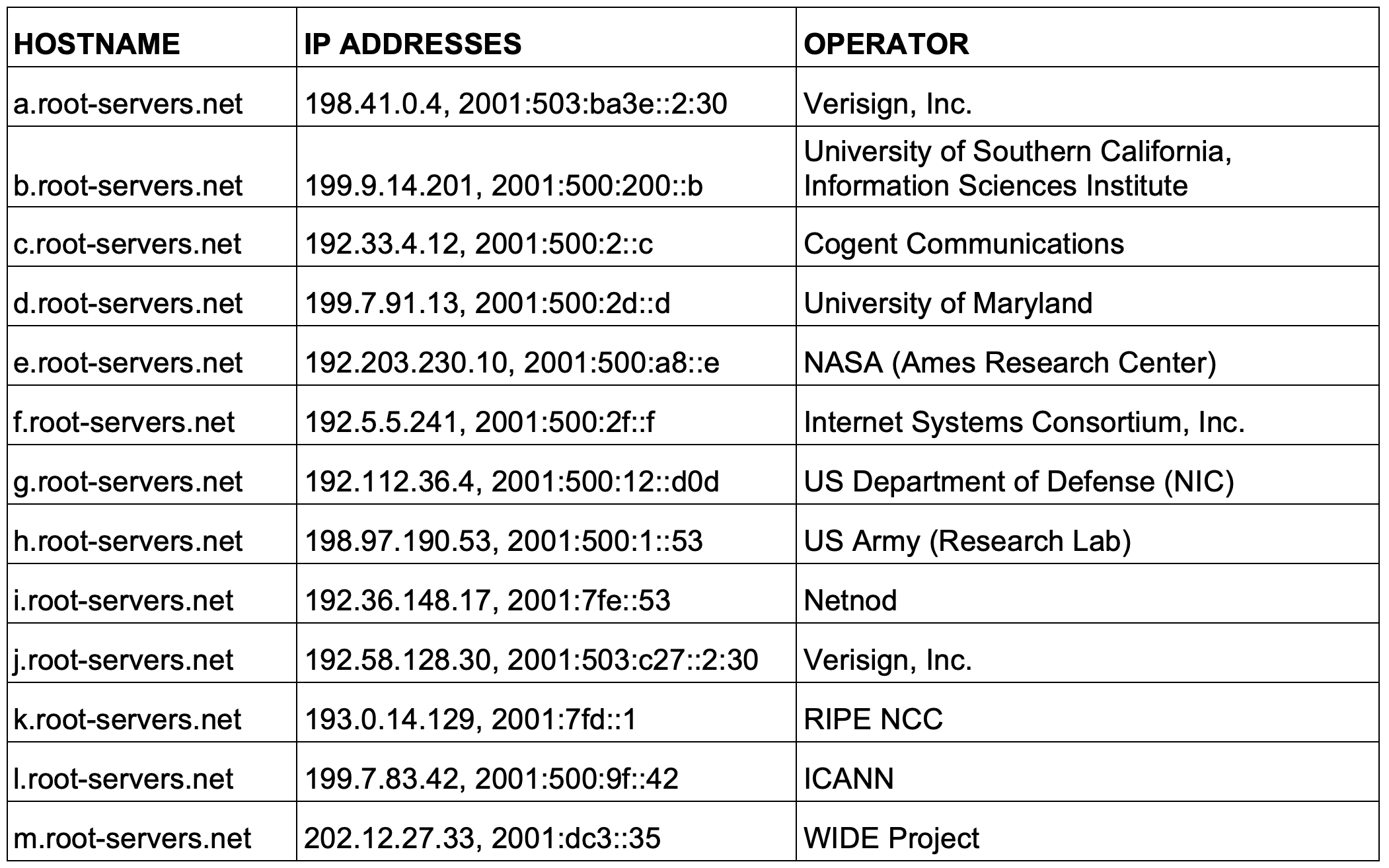
The servers are maintained and operated by different entities worldwide. They are corporations, educational institutions, governments, and various nonprofits. There is no single entity that controls all these root servers.
These 13 IP addresses span across about 1700 server instances as of this writing. That means each IP address is served by more than a single server. As we progress through this issue, you’ll learn more about the techniques that make it possible.
Everyone agrees these 13 IP addresses are the authoritative root servers. We can send a request to any one of them to look up an IP address.
Let’s go over an example of performing a DNS lookup from one of the root servers. We can use the dig command to ask a root server to resolve blog.bytebytego.com:
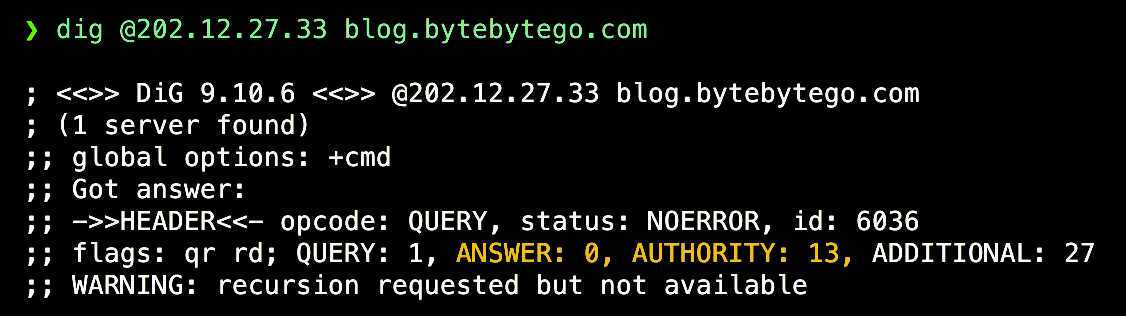
The IP address 202.12.27.33 is the root server m.root-servers.net. It returned “ANSWER: 0” - it doesn’t have the IP address for our target domain. But it provided “AUTHORITY: 13” - the 13 “.com” name servers it knows about.
As we learned from the last issue, the root servers do not hold the actual IP addresses for our target domain “blog.bytebytego.com”. Instead of providing an answer, it directed us to the 13 .com TLD name servers, as shown here:

It even gave us their IP addresses under the “Additional Section”. We’ll show a subset here:

The root server is saying it doesn’t have the answer, but to talk to one of the .com servers. So let’s ask one about blog.bytebytego.com. We’ll ask 192.43.172.30:

Again, no final answer, but we’re closer! It returned 2 authoritative name servers for bytebytego.com and their IP addresses:

Now, let’s query one of those authoritative servers:
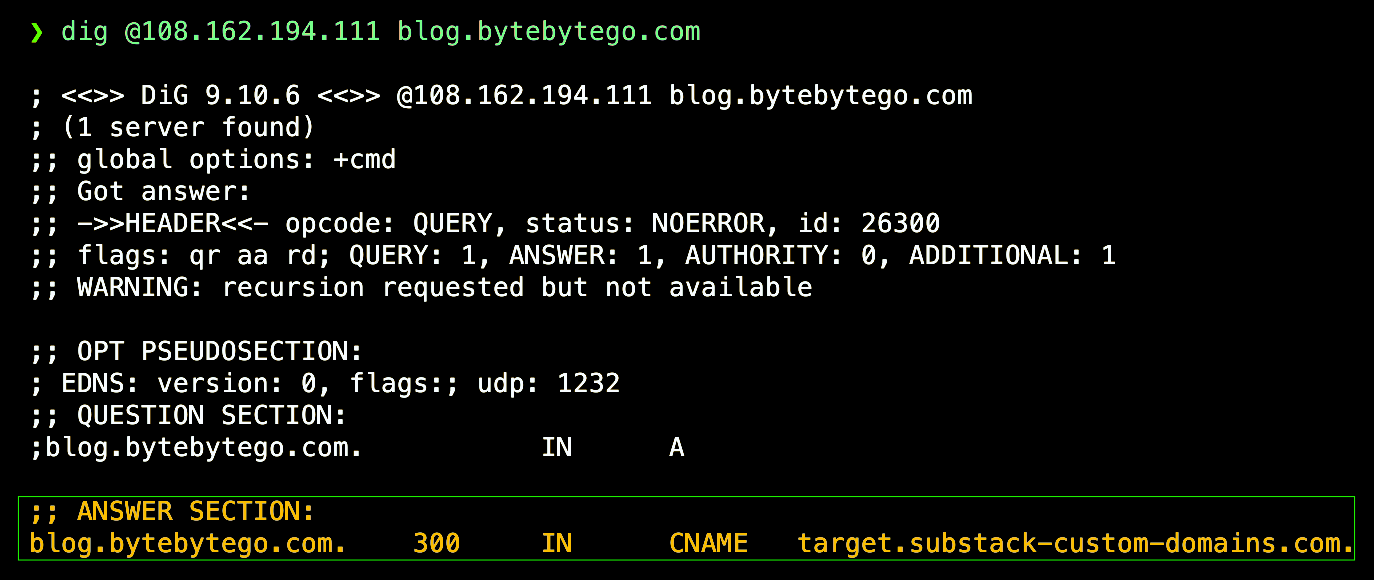
Now we have the CNAME record pointing to the canonical name. We could continue querying to get the final IP address. We’ll leave it as an exercise for the readers.
When the computer requests the IP address for “blog.bytebytego.com”, it offloads the lookup task to a DNS resolver.
If we run dig without specifying a server, it uses my configured resolver, which is usually maintained by the ISP. It directly returns three answers:

The resolver handled the full recursive query so we got the result in one step, without having to start at the root and work down myself.
Behind the scenes, the resolver is doing the iterative querying we demonstrated earlier. The client only has to make a single request to get back the final IP addresses.
This simplifies DNS resolution by abstracting away all the hierarchical steps from the client's perspective.
As we went through this exercise with “dig”, several questions came to mind:
How did the computer reach one of these IP addresses for these DNS servers?
A single IP address could have many server instances behind it, and these instances are all over the world. How and what decides which of these servers our request would reach?
This gets to the heart of this issue. How is the Internet put together? How does our request actually reach those DNS servers in the first place?
The Internet is built on networks talking to networks. It consists not of a single network of computers, but of a network of computer networks. These networks are called Autonomous Systems (ASes).
An Autonomous System (AS) is a network or group of IP networks that are all under the control of a single entity or administration. ASes have clear borders and routing policies. There are countless autonomous systems on the Internet. These are networks operated by companies, ISPs, cloud providers, universities, governments, and more.
Each AS has a unique AS Number (ASN) assigned by regional internet registries. ASes use the Border Gateway Protocol (BGP) to exchange routing and reachability information with neighboring ASes. A direction connection between two ASes is called a BGP peering relationship.
BGP is the core routing protocol that glues the Internet together and allows these ASes to figure out how to transmit a packet from its source to the destination, potentially traversing multiple intermediate ASes along the way. BGP routing works on a path vector basis - ASes inform their neighbors of the routes they know how to reach, and this information propagates across the Internet.
Let’s demonstrate how BGP works with a simple example:
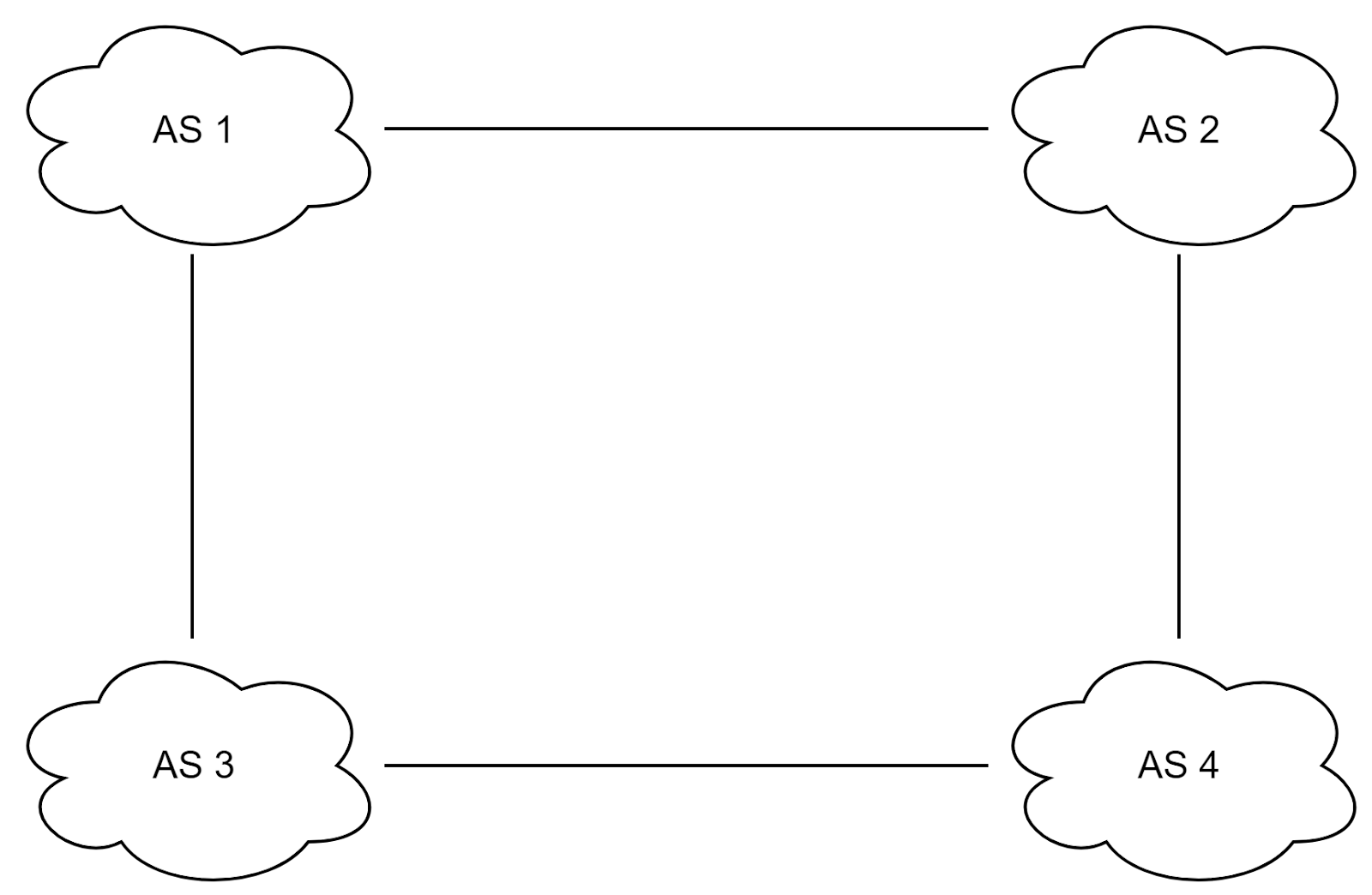
We have four autonomous systems here - AS1, AS2, AS3, and AS4. The internal routing inside each AS is the responsibility of the autonomous system itself. BGP handles routing between ASes.
AS1 is peered with AS2 and AS3 directly. This means AS1 can send traffic directly to destinations in AS2 and AS3, and vice versa. For traffic from AS2 to reach AS3, it either needs to get through AS1 first, or be sent through AS4.
BGP neighbor relationships are configured between routers on the edges of these ASes. These BGP routers exchange reachability information - essentially saying "I can reach these destination networks."
So BGP has two main functions:
It allows the autonomous systems to figure out who they can reach either directly or indirectly. This reachability information propagates through the network.
It helps routers in each AS decide the best path to use when sending traffic toward a destination in another AS. For example, a router in AS2 must decide whether to send a packet destined for AS3 via AS1 or AS4.
The BGP decision process on routers decides this based on configurable policies like performance, cost, etc. This is how BGP guides data packets from source to destination across the global Internet.
The core function of BGP is for routers in different ASes to exchange reachability information - telling their directly connected neighbor routers "I can reach these destination networks."
For example, the BGP process works like this:
The BGP router inside AS1 establishes a BGP neighbor relationship and session with the BGP routers inside AS2 and AS3.
The AS1 router sends an update message to the AS2 and AS3 routers saying: “I have reachability to networks in AS1, as well as direct connections to AS2 and AS3”.
When the AS2 router receives this BGP update, it updates its own BGP routing table to show:
Direct connectivity to networks in AS2 (itself)
Direct connectivity to AS1 and AS4 from existing neighbor relationships
Newly learned reachability to networks in AS3 via the AS1 neighbor, with 2 hops
The AS2 router then takes this updated routing information and sends its own BGP route updates to neighboring routers, including the router in AS4. With this update, the AS4 router has now learned that it can reach AS1 via AS2.
This propagation of BGP routing information allows each router to recursively learn routes to networks across the Internet through neighbors. Routers build up BGP routing tables to direct traffic flow using the best paths.
Going back to the DNS example, when my computer requests a DNS lookup, BGP enables my ISP's AS to route the request across multiple interconnected ASes until it reaches the AS home to the DNS server. The response follows some BGP routing in reverse (not necessarily the same path) back to me.
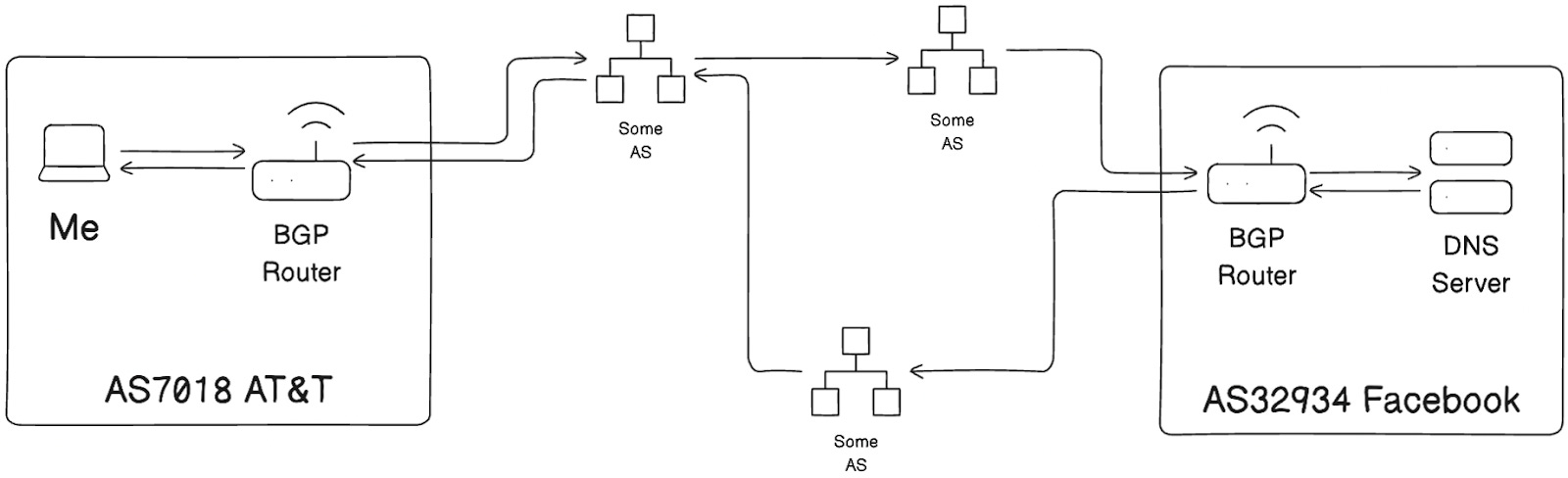
Let’s apply what we have learned so far and see if we can make sense of the Facebook global outage in October 2021. Facebook, WhatsApp, and Instagram were all completely offline for many hours on that fateful day. What happened?
Here’s what Facebook said in its update (with emphasis added for clarity):
One of the jobs performed by our smaller facilities is to respond to DNS queries. DNS is the address book of the internet, enabling the simple web names we type into browsers to be translated into specific server IP addresses. Those translation queries are answered by our authoritative name servers that occupy well known IP addresses themselves, which in turn are advertised to the rest of the internet via another protocol called the border gateway protocol (BGP).
To ensure reliable operation, our DNS servers disable those BGP advertisements if they themselves can not speak to our data centers, since this is an indication of an unhealthy network connection. In the recent outage the entire backbone was removed from operation, making these locations declare themselves unhealthy and withdraw those BGP advertisements. The end result was that our DNS servers became unreachable even though they were still operational. This made it impossible for the rest of the internet to find our servers.
In short, all authoritative name servers for Facebook were unreachable, and because of that, no one would be able to get the IP address for any Facebook service.
Let’s run “dig” again and see how many authoritative servers are there. For this, we will contact one of the TLD name servers for .com:
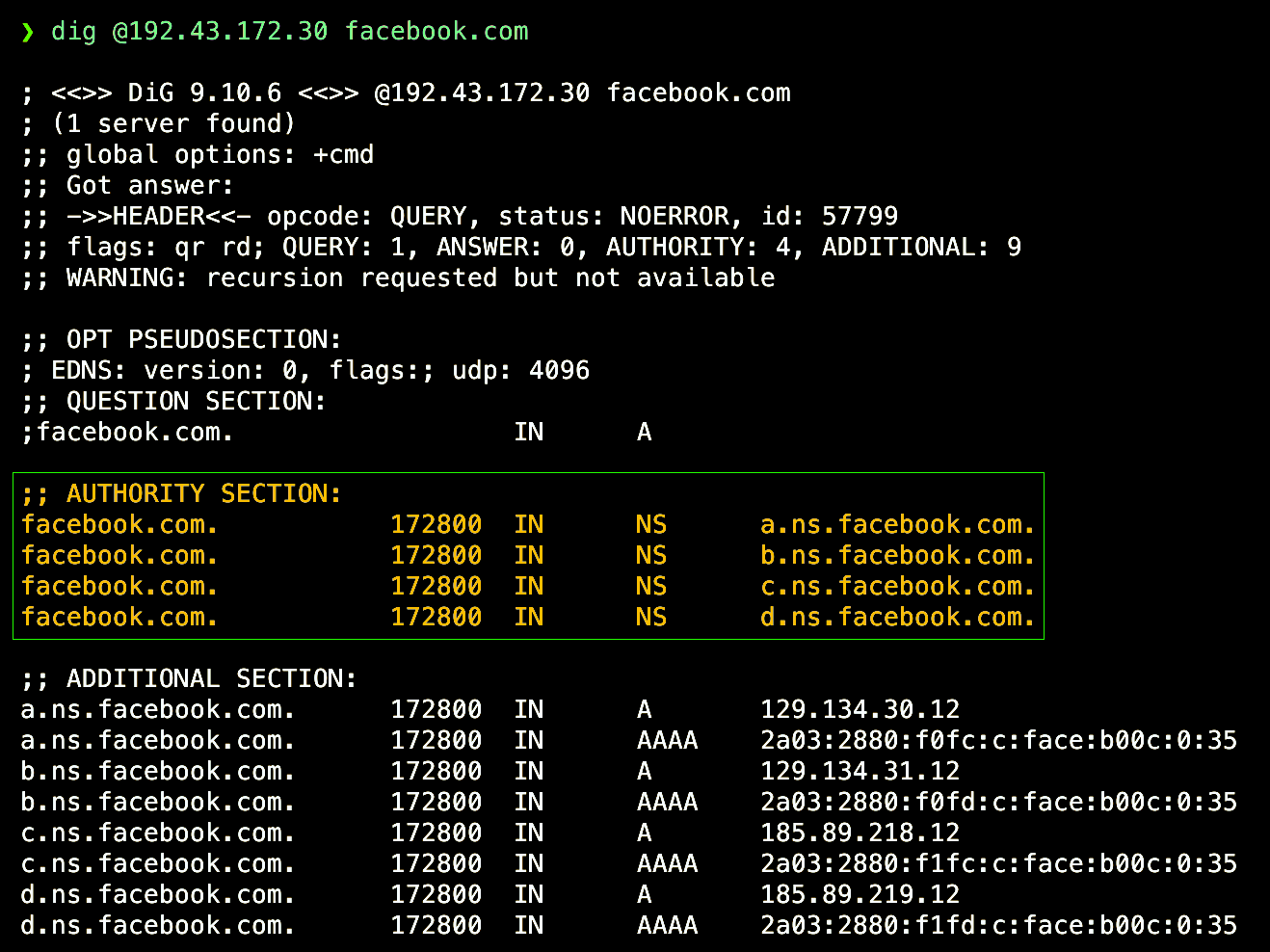
So there are four authoritative servers for facebook.com.
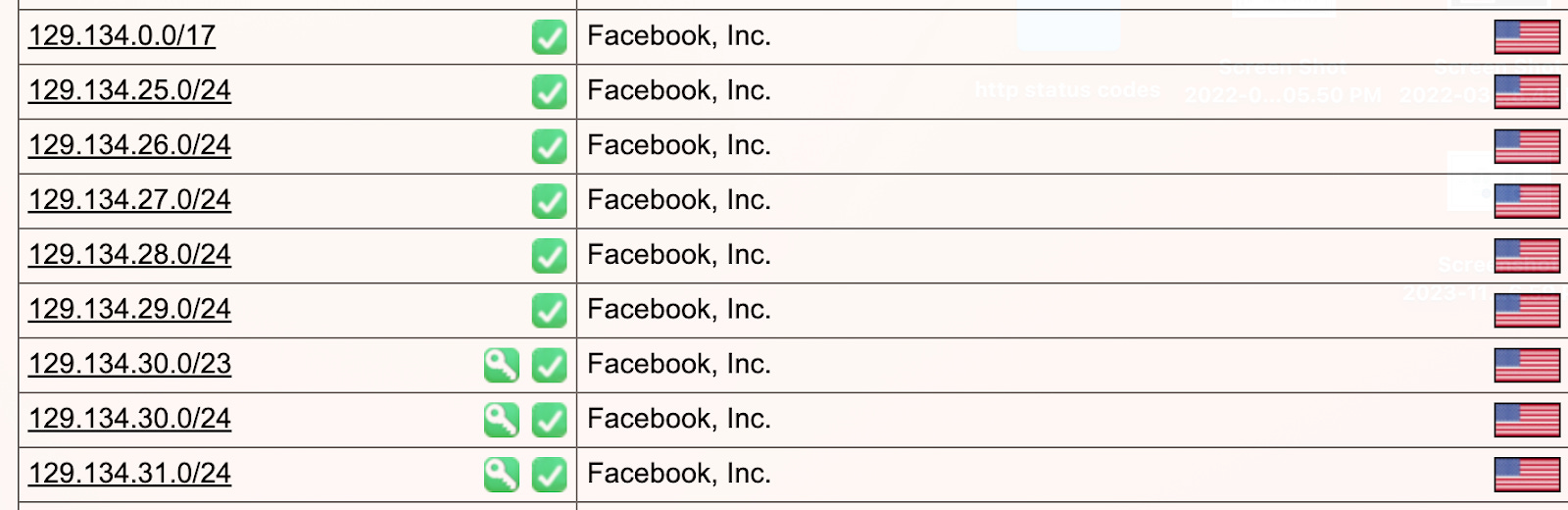
We’ll trace through what happened on that fateful day by simulating what must have happened from my computer to one of the authoritative name servers for Facebook: 129.134.30.12.
My ISP operates as an autonomous system. If we were able to peek at the routing table at one of these autonomous systems, we would likely see hundreds of thousands of routes. Each route refers to an address prefix for a destination network, potentially covering a big block of IP addresses. Collectively, these routes aim to cover the entire internet, either through direct peering connections, or multiple hops.
Any autonomous system will have a comparable routing table configuration across its routers.
Facebook, too, directs its own autonomous system. While the intricacies of Facebook’s network are not public, we can mock up some fictitious routers that approximate how they might function for illustration purposes.
Now let's trace what transpired when my ISP received my request to look up facebook.com.
The router at my ISP would consult its routing table and see that 129.134.30.12 belonged to Facebook's autonomous system - AS32934.
We’ll call my ISP router ISP-R1. It spotted a direct link to Facebook's ASN 32934, so it forwarded the packet accordingly.
The packet then reached one of Facebook's edge routers, let's call it FB-R1. FB-R1 recognized this packet was destined for 129.134.30.12, an authoritative nameserver for Facebook.
Normally, FB-R1 would therefore route this packet internally to reach 129.134.30.12. The nameserver would then respond with the IP addresses for facebook.com. This response would flow back out of Facebook's AS32934, via the direct or indirect peer connections with my ISP, and back to my computer.
That's how a DNS lookup would work normally.
However, on that fateful day, something occurred inside Facebook's network that disturbed connectivity. Facebook said its backbone was “completely removed from operation”. This meant none of Facebook's routers could communicate with each other internally. So while FB-R1 could receive packets coming in from outside, it had no way to route them within Facebook's network.
Facebook said that their DNS servers were configured to disable those BGP advertisements if they themselves could not speak to their data centers. When those routes were withdrawn, all the BGP routers at Facebook, FB-R1 included, would send a BGP update to notify all its peers like my ISP:
"Hey, some of my routes are withdrawn, I can no longer reach (list of routes, including those for the DNS servers)".
Upon receiving this, the ISP routers would update their routing table, removing all those important Facebook route prefixes.
If we inspected ISP-R1's routing table at that moment, there would be a major gap where the Facebook routes previously existed
With no idea how to route to Facebook, when my DNS request came in again, ISP-R1 was lost. As far as it could tell, Facebook DNS servers no longer existed on the Internet!
This explains the DNS resolution failures - the routing system believed an important part of the Facebook network was unreachable.
Although the nameservers were still operating, the Internet had no avenue to send them packets.
This underscores the power and fragility of BGP. If an AS withdraws routes, they will vanish from the Internet within minutes.
How did Facebook eventually recover from this outage?
Once their backend issues were addressed, Facebook began steadily re-advertising their withdrawn prefixes to their BGP peers.
Facebook operates numerous edge routers that peer with ISPs globally.
Within a couple of hours, enough routes had returned for most major regions to regain access.
However, due to BGP's decentralized nature, it took time for all providers worldwide to learn about the restored routes.
So access remained intermittent for hours until finally, all routes of Facebook's AS32934 became reachable again by all networks globally.
This demonstrates how even brief failures can massively impact core BGP routing.
It also highlights the Internet’s reliance on DNS. If the routing systems believe your DNS servers don't exist, your apps will stop functioning.
Let's recap what we learned:
The Internet is a decentralized web of networks (ASes) that use BGP to exchange routing information
BGP enables each AS to build routing tables covering the entire Internet
If an AS withdraws BGP routes, those networks will vanish from global connectivity
DNS servers rely on BGP to advertise themselves across the Internet
If DNS servers become unreachable, dependent apps and sites will fail
This provides insight into the infamous Facebook outage. While concerning, such outages are rare thanks to extensive redundancy in the core Internet infrastructure.
However, no system is 100% reliable. The Internet's complexity means even the largest sites remain vulnerable if key routing or DNS components fail.
We covered considerable ground explaining the specifics of DNS, BGP routing, and how they interact. Please let us know if any part of the discussion was unclear. We’re happy to elaborate further on how the fundamental protocols of the Internet mesh together to keep everyone online.