
A book that I have been waiting for a long time is finally out: The Software Engineer's Guidebook, written by Gergely Orosz, a software engineer and author of 'The Pragmatic Engineer Newsletter.'
Since the book is out, I contacted Gergely to inquire whether he would be willing to share a chapter with the newsletter audience. To my delight, he kindly agreed. The chapter I've chosen is 'Shipping to Production.' I hope you enjoy it.
You can check out the book here: The Software Engineer's Guidebook
As a tech lead, you’re expected to get your team’s work into production quickly and reliably. But how does this happen, and which principles should you follow? This depends on several factors: the environment, the maturity of the product being worked on, how expensive outages are, and whether moving fast or having no reliability issues is more important.
This chapter covers shipping to production reliably in different environments. It highlights common approaches across the industry, and helps you refine how your team thinks about this process. We cover:
Extremes in shipping to production
Typical shipping processes at different types of companies
Principles and tools for shipping to production responsibly
Additional verification layers and protections
Taking pragmatic risks to move faster
Additional considerations for defining a deployment process
Selecting an approach
Let’s start with two “extremes” in shipping to production:
The You Only Live Once (YOLO) approach is used for many prototypes, side projects, and unstable products like alpha/beta versions. It’s also how some urgent changes make it into production.
The idea is simple, make a change in production and check if it works in production. Examples of YOLO shipping include:
SSH into a production server → open an editor (e.g. vim) → make a change in a file → save the file and/or restart the server → see if the change works.
Make a change to a source code file → force land this change without a code review → push a new deployment of a service.
Log on to the production database → execute a production query to fix a data issue (e.g. modifying records with issues) → hope this fixes the problem.
YOLO shipping is as fast as it gets when shipping a change to production. However, it also has the highest risk of introducing new issues into production because there is no safety net. For products with few to zero production users, the damage done by introducing bugs into production can be low, so this approach is justifiable.
YOLO releases are common for:
Side projects
Early-stage startups with no customers
Mid-sized companies with poor engineering practices
Resolving urgent incidents at places without well-defined incident handling practices
As a software product grows and more customers rely on it, code changes need to go through extra validation before production. Let’s go to the other extreme: a team obsessed with doing everything possible to ship zero bugs into production.
This is an approach used for mature products with many valuable customers, where a single bug can cause major problems. This rigorous approach is used if bugs could result in customers losing money, or make them switch to a competitor’s offering.
Several verification layers are in place, with the goal of simulating the real world with greater accuracy, such as:
Local validation. Tooling for software engineers to catch obvious issues.
CI validation. Automated tests like unit tests and linting on every pull request.
Automation before deploying to a test environment. More expensive tests such as integration tests or end-to-end tests, before deployment to the next environment.
Test environment #1. More automated testing, like smoke tests. Quality assurance engineers might manually exercise the product, running manual tests and doing exploratory testing.
Test environment #2. An environment where a subset of real users – such as internal company users or paid beta testers – exercise the product. The environment is coupled with monitoring and the rollout is halted upon sign of a regression.
Pre-production environment. An environment in which the final set of validations are run. This often means running another set of automated and manual tests.
Staged rollout. A small subset of users get the changes, and the team monitors for key metrics to remain healthy, and checks customer feedback. A staged rollout strategy depends on the riskiness of the change being made.
Full rollout. As the staged rollout increases, at some point changes are pushed to all customers.
Post-rollout. Issues arise in production, for which monitoring and alerting is set up, and also a feedback loop with customers. If there’s an issue, it’s dealt with by the standard oncall process. We discuss this process more in Part 5: “Reliable software engineering.”
A heavyweight release process is used by:
Highly regulated industries, such as healthcare, aviation or automotive.
Telecommunications providers, where it’s common to have ~6 months of thorough testing of changes before major changes are shipped to customers.
Banks, where bugs could cause financial losses.
Traditional companies with legacy codebases with little automated testing. These places want to keep quality high and are happy to slow down releases by adding verification stages.
Different companies tend to take different steps in shipping to production. Below is a summary of typical approaches, highlighting the variety of processes:
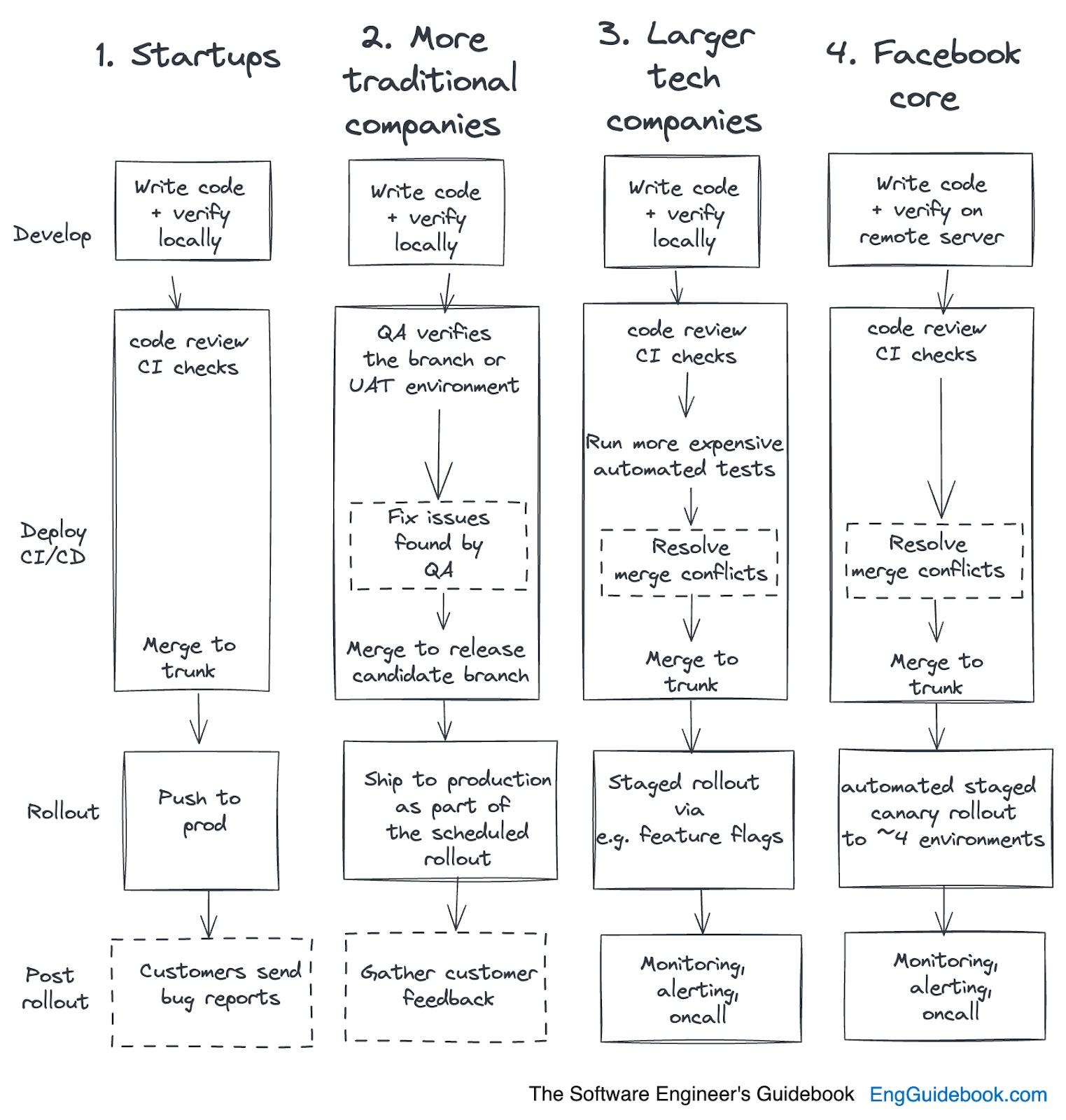
Startups typically do fewer quality checks. These companies tend to prioritize moving fast and iterating quickly, and often do so without much of a safety net. This makes perfect sense if they don't have customers yet. As customers arrive, teams need to find ways to avoid regressions and the shipping of bugs.
Startups are usually too small to invest in automation, and so most do manual QA – including the founders being the ‘ultimate’ testers, while some places hire dedicated QA folks. As a company finds its product-market fit, it’s more common to invest in automation. And at tech startups that hire strong engineering talent, these teams can put automated tests in place from day one.
These places tend to rely more heavily on QAs teams. Automation is sometimes present at more traditional companies, but typically they rely on large QA teams to verify what is built. Working on branches is also common; it's rare to have trunk-based development.
Code mostly gets pushed to production on a weekly schedule or even less frequently, after the QA team verifies functionality.
Staging and UAT (User Acceptance Testing) environments are more common, as are larger, batched changes shipped between environments. Sign-off is required from the QA team, the product manager, or the project manager, in order to progress the release to the next stage.
These places typically invest heavily in infrastructure and automation related to shipping with confidence. Such investments often include automated tests which run quickly and deliver rapid feedback, canarying, feature flags and staged rollouts.
These companies aim for a high quality bar, but also to ship immediately when quality checks are complete, working on trunk. Tooling to deal with merge conflicts becomes important, given that some places can make over 100 changes on trunk per day. For details on QA at Big Tech, see the article How Big Tech does QA.
Facebook, as a product and engineering team, merits a separate mention, because this organization has a sophisticated and effective approach few other companies use.
This Meta product has fewer automated tests than many would assume, but on the other hand, Facebook has an exceptional automated canarying functionality, where the code is rolled out through 4 environments, from a testing environment with automation, through one that all employees use, then through a test market that is a smaller geographical region, and finally to all users. At each stage, the rollout automatically halts if the metrics are off.
What are principles and approaches worth following for shipping changes to production responsibly? Consider these:
Use a local or isolated development environment. Engineers should be able to make changes on their local machine, or in an isolated environment unique to them. It’s more common for developers to work in local environments. However, places like Meta are shifting to remote servers for each engineer. From the article, Inside Facebook’s Engineering culture:
“Most developers work with a remote server, not locally. Starting from around 2019, all web and backend development is done remotely, with no code copied locally, and Nuclide facilitating this workflow. In the background, Nuclide was using virtual machines (VMs) at first, later moving to OnDemand instances – similar to how GitHub Codespaces works today – years before GitHub launched Codespaces.
Mobile development is still mostly done on local machines, as doing this in a remote setup, as with web and backend, has tooling challenges.”
Verify locally. After writing the code, do a local test to ensure it works as expected.
Consider edge cases and test for them. Which obscure cases does your code change need to account for? Which real-world use cases haven’t you accounted for yet?
Before finalizing work on the change, compile a list of edge cases. Consider writing automated tests for them, if possible. At least do manual testing. Coming up with a list of unconventional edge cases is a task for which QA engineers or testers can be very helpful.
Write automated tests to validate your changes. After manually verifying your changes, exercise them with automated tests. If following a methodology like test driven development (TDD,) you might do this the other way around by writing automated tests first, then checking that your code change passes them.
Another pair of eyes: a code review. With your code changes complete, put up a pull requests and get somebody with context to look at your code changes. Write a clear, concise description of the changes, which edge cases are tested for, and get a code review.
All automated tests pass, minimizing the risk of regressions. Before pushing the code, run all the existing tests for the codebase. This is typically done automatically, via the CI/CD system (continuous integration/continuous deployment.)
Have monitoring in place for key product characteristics related to your change. How will you know if your change breaks things which automated tests don’t check for? You won’t know unless you have ways to monitor health indicators on the system. For this, ensure there are health indicators written for the change, or others you can use.
For example, at Uber most code changes were rolled out as experiments with a defined set of metrics they were expected to improve, or not have an impact on. One metric which should be unchanged was the percentage of customers successfully taking trips. If this metric dropped with a code change, an alert was fired and the team making it had to investigate whether it degraded user experience.
Have oncall in place, with enough context to know what to do if things go wrong. After a change is shipped to production, there’s a fair chance some defects will only become visible later. That why it’s good to have an oncall rotation in place with engineers who can respond to health alerts, inbounds from customers, and customer support.
Make sure the oncall is organized so that colleagues on duty have enough context on how to mitigate outages. In most cases, teams have runbooks with details about how to confirm and mitigate outages. Many teams also have oncall training, and some do oncall situation simulations to prepare team members.
Create a culture of blameless incident handling. This is an environment in which the team learns and improves from incidents. I’m not saying to follow all these ideas, but it’s a good exercise to consider why you would not implement these steps. We cover more on this topic in Part 5: “Reliable software engineering.”
Some companies have extra verification layers for delivering reliable code to production. Here are 10 of these safety nets:
Setting up separate environments to test code changes is a common safety net in the release process. Before code hits production, it’s deployed to one of these environments, which might be called testing, UAT (user acceptance testing,) staging, pre-prod (pre-production,) etc.
At companies with QA teams, QA often exercises a change in this environment and looks for regressions. Some environments are for executing automated tests, such as end-to-end tests, smoke tests, or load tests.
These environments have heavy maintenance costs, both in resources, as machines need to operate to make this environment available, and even more so in the keeping of data up to date. These environments need to be seeded with data that’s generated or brought over from production.
Maintaining deployment environments tends to create a lot of overhead. This is especially true when doing data migrations for which data in all test environments needs to be updated.
A better development experience involves investing in automation to spin up test environments, including the seeding of the data they contain. This opens up opportunities for more efficient automated testing, easier validation of changes, and automation which better fits your use cases. At the same time, putting such test environments in place can be a significant investment. As a tech lead, you need to make a business case for building such a solution, or buying and integrating a vendor solution. For example, some cloud development environment vendors offer ways to spin up these environments. We touch on cloud development environments in Part 5: “Software engineering.”
An investment many companies make to reduce defects is to hire a QA team, usually responsible for manual and exploratory testing of the product. Most QA teams also write automated tests, such as end-to-end tests.
My view is that there’s value in a QA team doing only manual testing. In productive teams, QA often becomes a domain expert, or people code automated tests; and frequently both:
QA is a domain expert: QA folks help engineers anticipate edge cases and do exploratory testing of new edge cases and unexpected behaviors.
QA rolls sleeves up and writes automation: QA folks shift to become QA engineers, as well as manual testers. They start getting involved in the automation of tests, and have a say in shaping the automation strategy, to speed up getting code changes into production.
I worked with dedicated QA engineers at Microsoft, in 2013. Back then, this role was called software development engineer in test (SDET,) and these engineers brought a real testing mindset to the table, on top of writing automated tests. For more details on the evolution of the SDET role at Microsoft, see my article How Microsoft does QA.
Most engineers are good at testing their changes to verify they work as expected, and at considering edge cases. But what about testing how retail users utilize the product?
This is where exploratory testing comes in.
Exploratory testing involves simulating how customers will use the product, in order to reveal edge cases. Good exploratory testing requires empathy with users, an understanding of the product, and tooling to simulate use cases with.
At companies with dedicated QA teams, it’s usually they who do exploratory testing. At places with no QA team, it’s down to engineers, or the business may recruit vendors specializing in exploratory testing.
This term derives from the phrase “canary in the coal mine,” which was a practice by miners of taking a caged canary bird with them down a coal mine, to detect dangerous gas. The bird has a lower tolerance for toxic gasses than humans, so if it stopped chirping or fainted, it was a warning sign that gas was present, and the miners evacuated.
Today, canary testing means rolling out code changes to a small percentage of the user base, then monitoring this deployment’s health signals for signs that something’s wrong. A common way to implement canarying is to route traffic to the new version of the code using a load balancer, or to deploy a new version of the code to a single node.
Another way to control the rollout of a change is to hide it behind a feature flag in the code. This feature flag can then be enabled for a subset of users who execute the new version of the code.
Feature flags are easy enough to implement, and might look something like this for an imaginary feature called “Zeno:”
if( featureFlags.isEnabled(“Zeno_Feature_Flag”)) {
// New code to execute
} else {
 // Old code to execute
}
Feature flags are a common way to run experiments involving bucketing users in two groups: treatment group (the experiment) and control group (those not subject to the experiment.) These groups get different experiences, and the engineering and data science teams evaluate and compare results.
Stale feature flags are the biggest downside of this approach. With large codebases, it’s common to see feature flags “polluting” the codebase because they weren’t removed after the feature was rolled out. Most teams tackle this issue by having a reminder to remove the flag after rollout – for example, adding a calendar event, or creating a ticket – while some companies build automated tooling to detect and remove stale flags. The Piranha tool, open sourced by Uber, is one such example.
Staged rollouts involve shipping changes step by step, and evaluating the results at each stage. They typically define the percentage of the user base which gets a new functionality, or the region in which this functionality should roll out, or both.
A staged rollout plan may look like this:
Phase 1: 10% rollout in New Zealand (a small market for validating changes)
Phase 2: 50% rollout in New Zealand
Phase 3: 100% rollout in New Zealand
Phase 4: 10% rollout, globally
Phase 5: 25% rollout, globally
Phase 6: 50% rollout, globally
Phase 7: 99% rollout, globally (leaving just a very small “control” group for more verification)
Phase 8: 100% rollout, globally
Between each rollout stage, a criteria is set for when it can continue. This is typically defined as when no unexpected regressions happen and the expected changes occur (or do not occur) to business metrics. Canary releases are fundamentally a simpler type of staged rollouts – and canarying is usually much quicker than a staged rollout process.
An approach growing in popularity is using production as the one and only environment to deploy code to, including testing in production.
While testing in production sounds reckless, it’s not if done with a multi-tenant approach. In this article, Uber describes its journey from a staging environment, through a test sandbox with shadow traffic, to tenancy-based routing.
The idea behind multi-tenancy is that the tenancy context is propagated with requests. Services receiving a request can tell if it’s a production request, a test tenancy, a beta tenancy, and so on. Services have logic built in to support tenancies, and might process or route requests differently. For example, a payments system getting a request with a test tenancy would likely mock the payment, instead of making an actual payment request.
A powerful way to increase reliability is to make rollbacks automatic for any code changes suspected of breaking something. This is an approach Booking.com uses; any experiment which degrades key metrics is shut down and the change rolled back.
At companies which invest in multi-staged automatic rollouts with automated rollbacks, engineers rarely fear breaking production and can move quickly with confidence.
Taking automated rollbacks a step further by combining them with staged rollouts and multiple testing environments, is an approach Meta has uniquely implemented for its core product.
Note that while it’s common for teams to use some of the approaches mentioned here, it’s rare to use all at once. Some approaches cancel each other out; for example, there’s little need for multiple testing environments if multi-tenancy is in place, and testing in production already happens.
There are times when you want to move faster than normal, and are comfortable with taking more risk. Here are pragmatic approaches for doing so.
Decide which process or tool it’s not okay to bypass. Is force-landing without running any tests an option, can you make a change to the codebase without anyone looking at it, can a production database be changed without testing?
It’s down to every team – or company – to decide which processes cannot be bypassed. If this question arises at a mature company with a large number of dependent users, I’d think carefully before breaking rules because it could do more harm than good. If you decide to bypass rules in order to move faster, then I recommend getting support from teammates first.
Give a heads up to relevant stakeholders when shipping risky changes. Every now and then, you’ll ship a change that’s less tested than is ideal. This makes it a riskier change. It’s good practice to give a heads up to people who could alert you if something strange happens. Stakeholders worth notifying in these cases can include:
Teammates
Oncalls for teams which depend on your team, and whom you depend on
Customer support
Business stakeholders with access to business metrics, who can notify you if something trends in the wrong direction
Have a rollback plan that’s easy to execute. How can you revert a change which causes an issue? Even when moving fast, have a plan that’s easy enough to execute. This is especially important for data changes and configuration changes.
Revert plans used to be commonly added to diffs at Facebook during its early days. From Inside Facebook’s Engineering Culture:
“Early engineers shared how people used to also add a revert plan to their diff to instruct how to undo the change, in the frequent case this needed to be done. This approach has improved over the years with better test tooling.”
Inspect customer feedback after shipping risky changes. Check customer feedback channels like forums, reviews, and customer support tickets, after you ship a risky change. Proactively check these channels for customers with issues stemming from a rolled out change.
Track incidents and measure their impact. Do you know how many outages your product had during the past month, or past three months? What did customers experience, and what was the business impact?
If the answer to these questions is “don’t know,” then you’re flying blind and don’t know how reliable your systems are. Consider changing your approach to track and measure outages, and accumulate their impacts. You need this data to know when to tweak release processes for more reliable releases. You’ll also need it for error budgets.
Use error budgets to decide if you can do risky deployments. Start measuring the availability of your system’s SLIs (Service Level Indicators) and SLOs (Service Level Objectives,) or by measuring how long the system is degraded or down.
Next, define an error budget. This is the amount of temporary service degradation that’s deemed acceptable for users. So long as this error budget isn’t exceeded, then riskier deployments – which are those more likely to break the service – might be fine to proceed with. However, once the error budget is used up, pause all deployments that are considered risky.
In this chapter, we haven’t gone into detail about some parts of the release process to production which any mature product and company must address. They include:
Security practices. Who’s allowed to make changes to systems, and how are these changes logged for audit? How are security audits on code changes done to reduce the risk that vulnerabilities make it into the system? Which secure coding practices are followed, and how are they encouraged or enforced?
Configuration management. Many changes to systems are configuration changes. How is configuration stored, and how are changes to configurations signed off and tracked?
Roles and responsibilities. Which roles are in the release process? For example, who owns the deployment systems? In the case of batched deployments, who follows up on issues, and gives the green light to deployments?
Regulation. When working in highly regulated sectors, shipping changes might include working with regulators and adhering to strict rules. This can mean a deliberately slow pace of shipping. Regulatory requirements could include legislation like GDPR (General Data Protection Regulation,) PCI DSS (Payment Card Industry Data Security Standard,) HIPAA (Health Insurance Portability and Accountability Act,) FERPA (Family Educational Rights and Privacy Act,) FCRA (Fair Credit Reporting Act,) Section 508 when working with US federal agencies, SOX compliance (Sarbanes-Oxley Act, important in finance,) the European Accessibility Act when developing for a government within the European Union, country-specific privacy laws, and many others.
We’ve covered a lot of ground and many potential approaches for shipping reliably to production, every time. So how do you decide which to choose? There’s a few things to consider.
How much are you willing to invest in modern tooling, in order to ship more iterations? Before getting into the tradeoffs of various approaches, be honest with yourself about how much investment you, your team, or company, is willing to make in tooling.
Many of the approaches we’ve covered involve putting tooling in place. Most of this can be integrated through vendors, but some must be purchased. At a company with platform teams or SRE teams focused on reliability, there might be lots of support. At a smaller company, you may need to make the case for investing in tooling.
How big an error budget can your business realistically afford? If a bug makes it to production for a few customers, what’s the impact? Does the business lose millions of dollars, or are customers mildly annoyed – but not churning – if the bug is fixed quickly?
For businesses like private banks, a bug in the money flows can cause massive losses. For products like Facebook, a quickly-fixed UI bug will not have much impact. This is why the Facebook product has less automated testing in place than at many other tech companies, and why Meta has no dedicated QA function for pure software teams.
What iteration speed should you target as a minimum? The faster engineers can ship their code to production, the sooner they get feedback. In many cases, faster iteration results in higher quality because engineers push smaller and less risky changes to production.
According to the DORA metrics – which stands for DevOps Research and Assessment metrics – , elite performers do multiple on-demand deployments per day. The lead time for changes – the duration between code being committed and it finally reaching production – is less than a day for elite performers. I’m not the biggest fan of only focusing on DORA metrics, as I think they don’t give a full view of engineering excellence, and that focusing only on those numbers can be misleading. Nevertheless, these observations of how nimble teams ship to production quickly do match my experience. For more of my thoughts on developer productivity, see this two-part article, co-authored with Kent Beck.
At most Big Tech firms and many high-growth startups it takes less than a day – typically a few hours – from code being committed to it reaching production, and teams deploy on-demand, multiple times per day.
If you have QA teams, what is the primary purpose of the QA function? QA teams are typical at companies that cannot afford many bugs in production, or lack the capability to automate testing.
Still, I suggest setting a goal for what the QA organization should evolve into, and how it should support engineering. If all goes well, what will QA look like in a few years’ time? Will they do only manual testing? Surely not. Will they own the automation strategy, or help engineering teams ship code changes to a deployment environment on the same day? What about allowing engineers to ship to production in less than a week?
Think ahead and set goals which lead to shorter iteration, faster feedback loops, and catching and fixing issues more quickly.
How much legacy infrastructure and code is there? It can be expensive, time-consuming and difficult to modernize legacy systems with some modern practices like automated testing, staged rollouts, or automatic rollbacks. Take an inventory of the existing tech stack to evaluate if it’s worth modernizing or not. There will be times when there’s little point investing in modernization.
Consider investing in advanced capabilities. As of today, some deployment capabilities are still considered less common because they’re hard to build, including:
Sophisticated monitoring and alerting setups, where code changes can easily be paired with monitoring and alerting for key system metrics. Engineers can easily monitor whether their changes regress system health indicators.
Automated staged rollouts, with automated rollbacks.
The ability to generate dynamic testing environments.
Robust integration, end-to-end and load testing capabilities.
Testing in production through multi-tenancy approaches.
Decide if you want or need to invest in any of these complex approaches. They could result in faster shipping, with added confidence.