
This week’s system design refresher:
*BIG* Announcement: We’ve launched an Instagram account
Top 12 Tips for API Security
Our Recommended Materials For Cracking Your Next Tech Interview (Youtube video)
How To Release A Mobile App
Git Vs Github
We will post more instagram reels, shorts and diagrams
If you're interested in seeing more, make sure to subscribe to our Instagram account here: https://www.instagram.com/bytebytego/

Use HTTPS
Use OAuth2
Use WebAuthn
Use Leveled API Keys
Authorization
Rate Limiting
API Versioning
Whitelisting
Check OWASP API Security Risks
Use API Gateway
Error Handling
Input Validation

QA Wolf offers a cost-effective approach to getting 80% test coverage in just 4 months. And they guarantee zero flakes.
They build and maintain your test suite in Playwright + include unlimited parallel test runs on their infrastructure. The benefit? No more manual e2e testing, no more slow QA cycles, and no more bugs.
QA Wolf has multiple case studies of customers saving $200k+/year in QA engineering and infrastructure costs. Schedule a demo to learn more.
PS: They have a 4.8/5 star rating on G2.
The mobile app release process differs from conventional methods. This illustration simplifies the journey to help you understand.
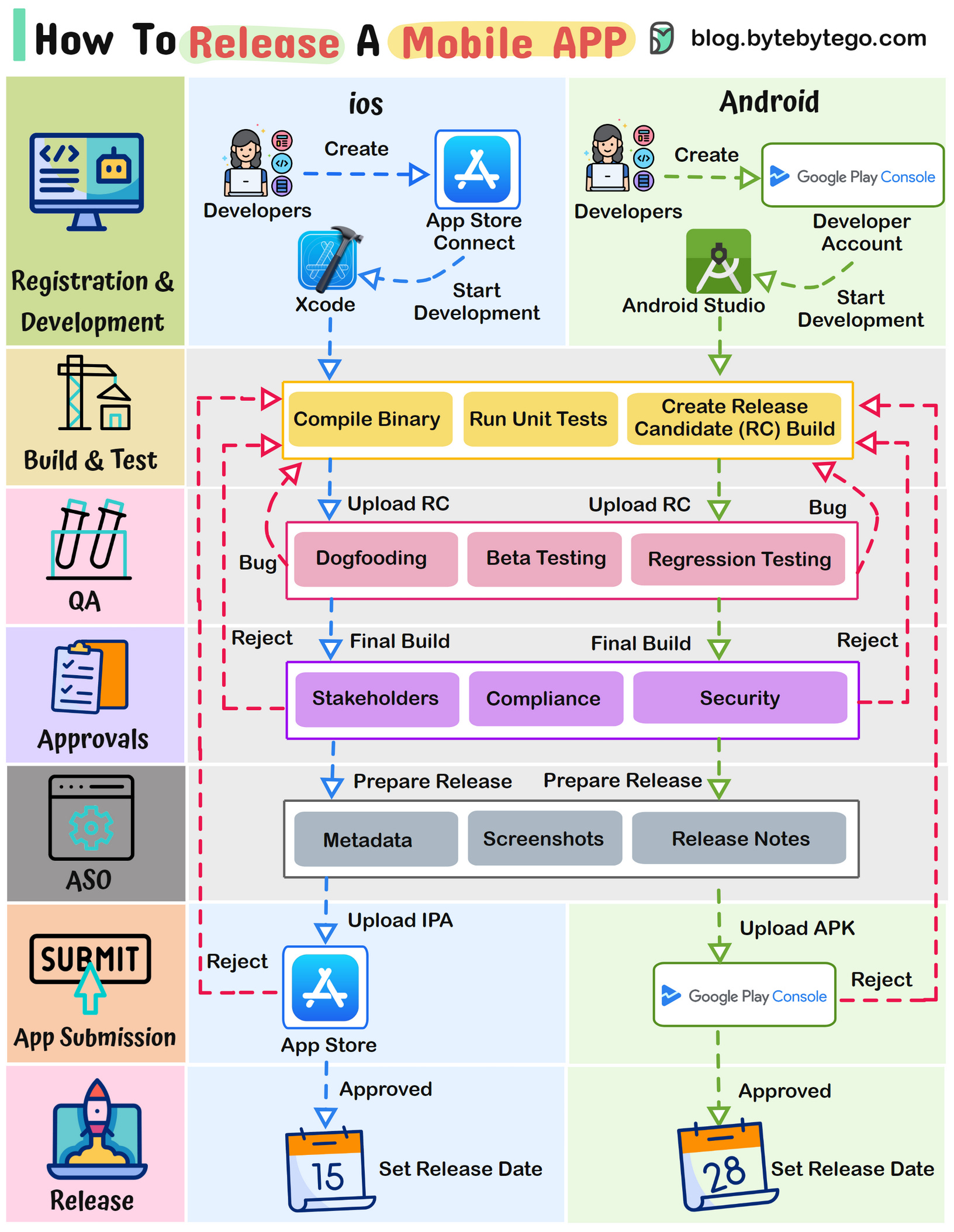
Typical Stages in a Mobile App Release Process:
Registration & Development (iOS & Android):
- Enroll in Apple's Developer Program and Google Play Console as iOS and Android developer
- Code using platform-specific tools: Swift/Obj-C for iOS, and Java/Kotlin for Android
Build & Test (iOS & Android):
Compile the app's binary, run extensive tests on both platforms to ensure functionality and performance. Create a release candidate build.
QA:
- Internally test the app for issue identification (dogfooding)
- Beta test with external users to collect feedback
- Conduct regression testing to maintain feature stability
Internal Approvals:
- Obtain approval from stakeholders and key team members.
- Comply with app store guidelines and industry regulations
- Obtain security approvals to safeguard user data and privacy
App Store Optimization (ASO):
- Optimize metadata, including titles, descriptions, and keywords, for better search visibility
- Design captivating screenshots and icons to entice users
- Prepare engaging release notes to inform users about new features and updates
App Submission To Store:
- Submit the iOS app via App Store Connect following Apple's guidelines
- Submit the Android app via Google Play Console, adhering to Google's policies
- Both platforms may request issues resolution for approval
Release:
- Upon approval, set a release date to coordinate the launch on both iOS and Android platforms
Over to you:
What's the most challenging phase you've encountered in the mobile app release process?
Dive into the fascinating world of version control.

First, meet Git, a fundamental tool for developers. It operates locally, allowing you to track changes in your code, much like taking snapshots of your project's progress. This makes collaboration with your team a breeze, even when you're working on the same project.
Now, let's talk about GitHub. It's more than just a platform; it's a powerhouse for hosting Git repositories online. With GitHub, you can streamline team collaboration and code sharing.
Learning Git and GitHub is a fundamental part of software engineering, so definitely try your best to master them.