
This week’s system design refresher:
Top 6 Load Balancing Algorithms Every Developer Should Know (Youtube video)
Cheat sheet of different databases in cloud services
HTTPS, SSL Handshake, and Data Encryption Explained to Kids
How does Chrome work?
For the fifth year, the State of the API is the world's largest and most comprehensive survey and report on APIs. More than 40,000 developers and API professionals have shared their thoughts on development priorities, their API tools, and where they see APIs going.
Static Algorithms
1. Round robin
The client requests are sent to different service instances in sequential order. The services are usually required to be stateless.
2. Sticky round-robin
This is an improvement of the round-robin algorithm. If Alice’s first request goes to service A, the following requests go to service A as well.
3. Weighted round-robin
The admin can specify the weight for each service. The ones with a higher weight handle more requests than others.
4. Hash
This algorithm applies a hash function on the incoming requests’ IP or URL. The requests are routed to relevant instances based on the hash function result.
Dynamic Algorithms
5. Least connections
A new request is sent to the service instance with the least concurrent connections.
6. Least response time
A new request is sent to the service instance with the fastest response time.
Choosing the right database for your project is a complex task. The multitude of database options, each suited to distinct use cases, can quickly lead to decision fatigue.
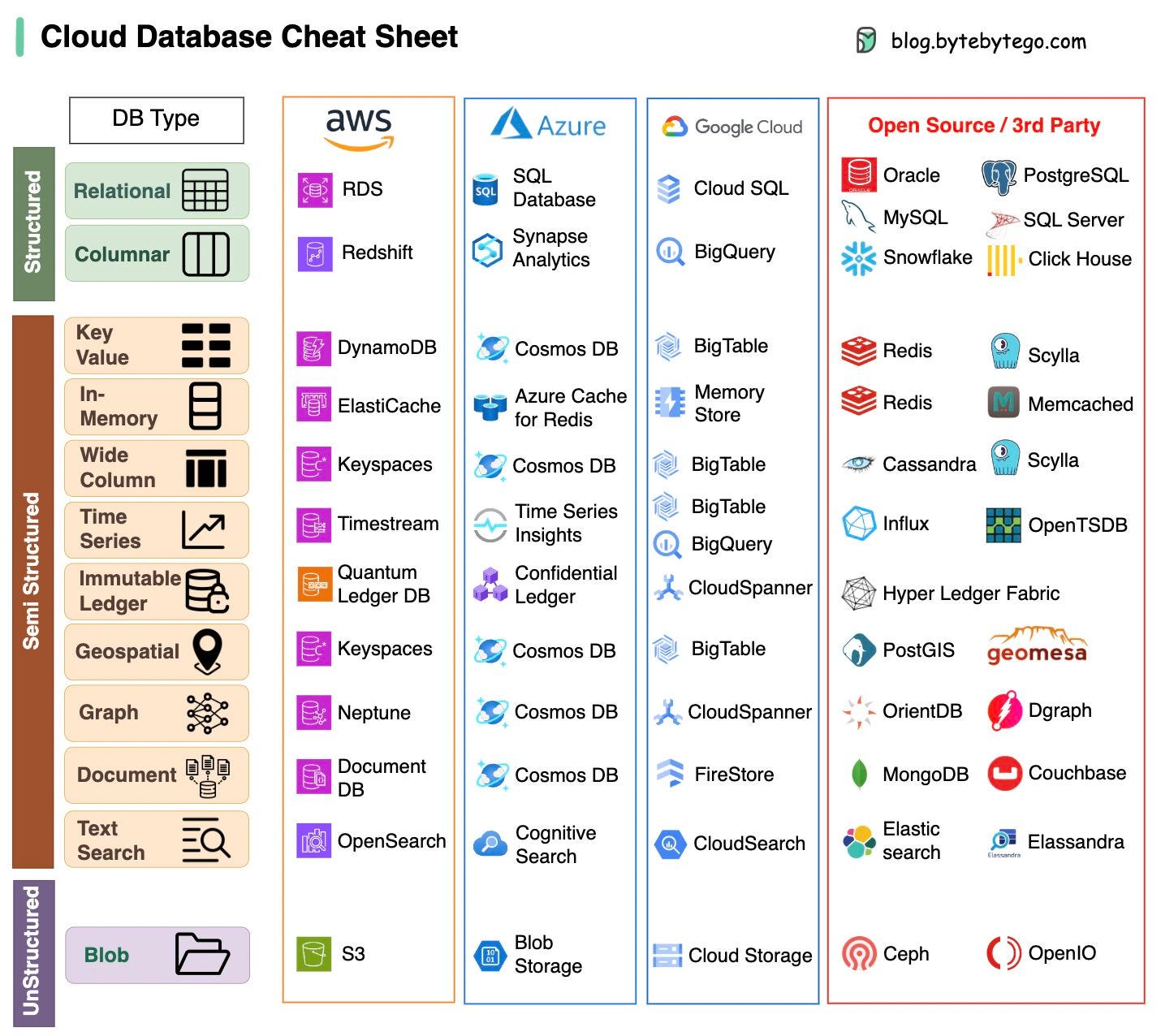
We hope this cheat sheet provides high level direction to pinpoint the right service that aligns with your project's needs and avoid potential pitfalls.
Note: Google has limited documentation for their database use cases. Even though we did our best to look at what was available and arrived at the best option, some of the entries may be not accurate.
Over to you: Which database have you used in the past, and for what use cases?
If you’re not a subscriber, here’s what you missed this month.

"I Was Under Leveled!" — Avoiding the Tragedy of Making Only $500k a Year
Network Protocols behind Server Push, Online Gaming, and Emails
To receive all the full articles and support ByteByteGo, consider subscribing:

HTTPS: Safeguards your data from eavesdroppers and breaches. Understand how encryption and digital certificates create an impregnable shield.
SSL Handshake: Behind the Scenes — Witness the cryptographic protocols that establish a secure connection. Experience the intricate exchange of keys and negotiation.
Secure Data Transmission: Navigating the Tunnel — Journey through the encrypted tunnel forged by HTTPS. Learn how your information travels while shielded from cyber threats.
HTML's Role: Peek into HTML's role in structuring the web. Uncover how hyperlinks and content come together seamlessly. And why is it called HYPER TEXT.
Over to you: In this ever-evolving digital landscape, what emerging technologies do you foresee shaping the future of cybersecurity or the web?
The diagram below shows the architecture of a modern browser. It is based on our understanding of “Inside look at modern web browser” published by the chrome team.
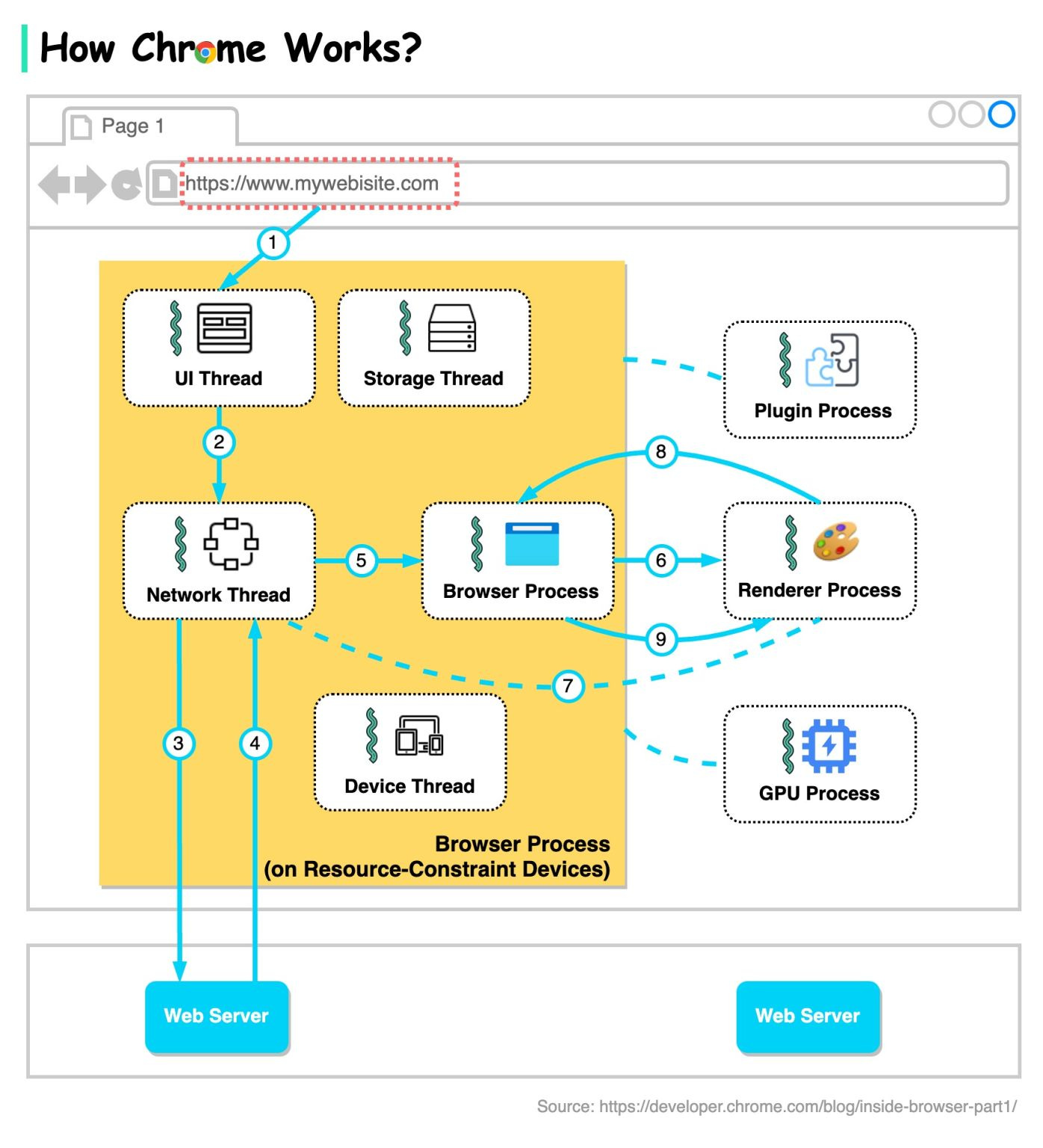
There are in general 4 processes: browser process, renderer process, GPU process, and plugin process.
Browser process controls address bar, bookmarks, back and forward buttons, etc.
Renderer process controls anything inside of the tab where a website is displayed.
GPU process handles GPU tasks.
Plugin process controls the plugins used by the websites.
The browser process coordinates with other processes.
When Chrome runs on powerful hardware, it may split each service in the browser process into different threads, as the diagram below shows. This is called Servicification.
Now let’s go through the steps when we enter a URL in Chrome.
Step 1: The user enters a URL into the browser. This is handled by the UI thread.
Step 2: When the user hits enter, the UI thread initiates a network call to get the site content.
Steps 3-4: The network thread goes through appropriate network protocols and retrieves the content.
Step 5: When the network thread receives responses, it looks at the first few bytes of the stream. If it is an HTML file, it is passed to the renderer process by the browser process.
Steps 6-9: An IPC is sent from the browser process to the renderer process to commit the navigation. A data pipe is established between the network thread and the renderer process so that the renderer can receive data. Once the browser process hears confirmation that the commit has happened in the renderer process, the navigation is complete and the document loading phase begins.
Over to you: Why does Chrome assign each tab a renderer process?