
This week’s system design refresher:
DevOps vs. SRE vs. Platform Engineering (Youtube video)
Explaining JSON Web Token (JWT) to a 10-year-old Kid
How does Docker work?
Top 6 most commonly used Server Types
Learning Linux system
Feature your product on Substack
Imagine you have a special box called a JWT. Inside this box, there are three parts: a header, a payload, and a signature.
The header is like the label on the outside of the box. It tells us what type of box it is and how it's secured. It's usually written in a format called JSON, which is just a way to organize information using curly braces { } and colons :
The payload is like the actual message or information you want to send. It could be your name, age, or any other data you want to share. It's also written in JSON format, so it's easy to understand and work with.
Now, the signature is what makes the JWT secure. It's like a special seal that only the sender knows how to create. The signature is created using a secret code, kind of like a password. This signature ensures that nobody can tamper with the contents of the JWT without the sender knowing about it.
When you want to send the JWT to a server, you put the header, payload, and signature inside the box. Then you send it over to the server. The server can easily read the header and payload to understand who you are and what you want to do.
Over to you: When should we use JWT for authentication? What are some other authentication methods?
Guest post by Rohit Sehgal.
The diagram below shows the architecture of Docker and how it works when we run “docker build”, “docker pull” and “docker run”.

There are 3 components in Docker architecture:
Docker client
The docker client talks to the Docker daemon.
Docker host
The Docker daemon listens for Docker API requests and manages Docker objects such as images, containers, networks, and volumes.
Docker registry
A Docker registry stores Docker images. Docker Hub is a public registry that anyone can use.
Let’s take the “docker run” command as an example.
Docker pulls the image from the registry.
Docker creates a new container.
Docker allocates a read-write filesystem to the container.
Docker creates a network interface to connect the container to the default network.
Docker starts the container.

Web Server:
Hosts websites and delivers web content to clients over the internet
Mail Server:
Handles the sending, receiving, and routing of emails across networks
DNS Server:
Translates domain names (like bytebytego. com) into IP addresses, enabling users to access websites by their human-readable names.
Proxy Server:
An intermediary server that acts as a gateway between clients and other servers, providing additional security, performance optimization, and anonymity.
FTP Server:
Facilitates the transfer of files between clients and servers over a network
Origin Server:
Hosts central source of content that is cached and distributed to edge servers for faster delivery to end users.
Over to you: Which type of server do you find most crucial in your online experience?
Guest post by Govardhana Miriyala Kannaiah.
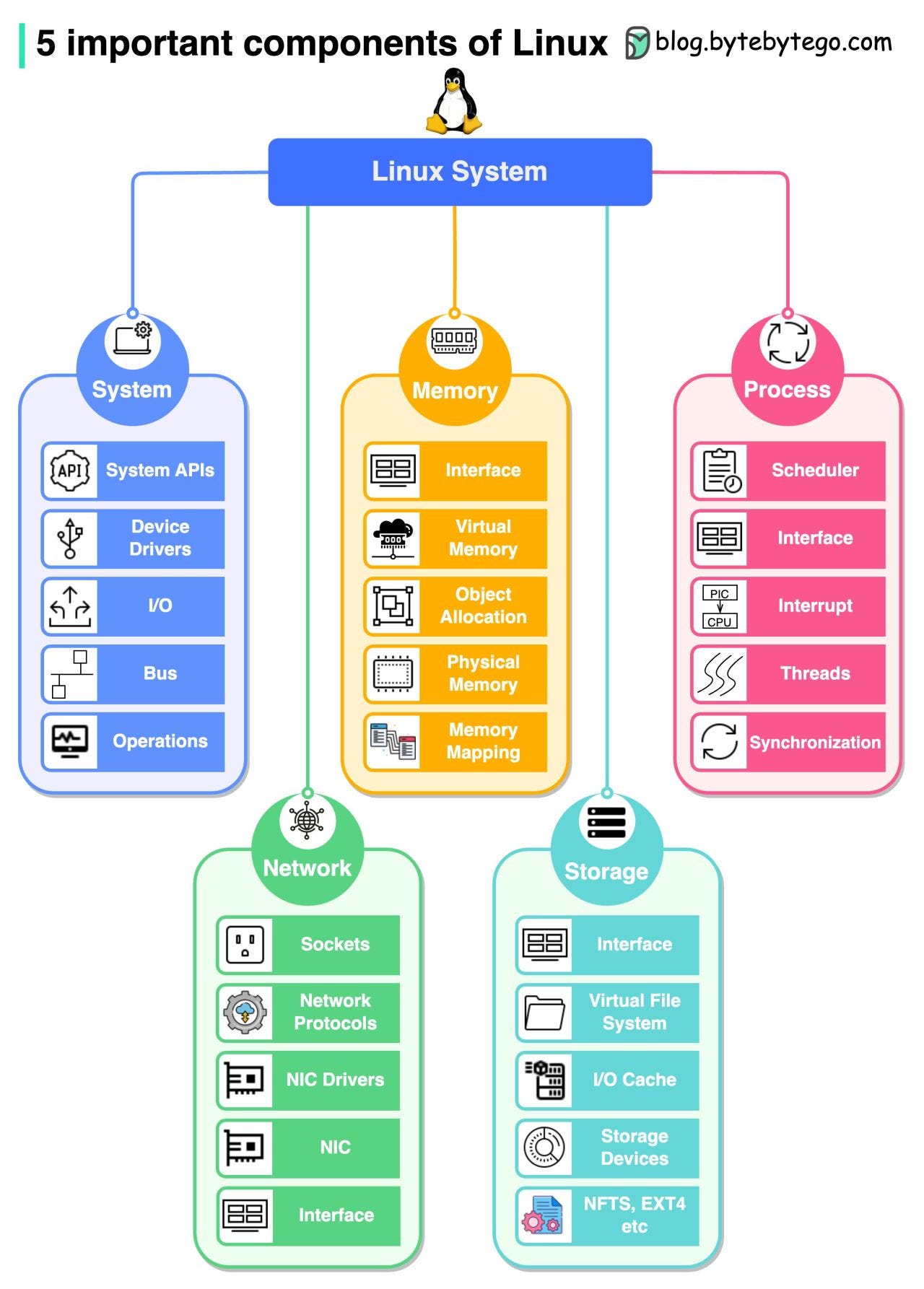
System
In the system component, we need to learn modules like system APIs, device drivers, I/O, buses, etc.
Memory
In memory management, we need to learn modules like physical memory, virtual memory, memory mappings, object allocation, etc.
Process
In process management, we need to learn modules like process scheduling, interrupts, threads, synchronization, etc.
Network
In the network component, we need to learn important modules like network protocols, sockets, NIC drivers, etc.
Storage
In system storage management, we need to learn modules like file systems, I/O caches, different storage devices, file system implementations, etc.
📈Feature your product in the biggest technology newsletter on Substack

ByteByteGo is the biggest technology newsletter on Substack with 500,000 readers working at companies like Apple, Meta, Amazon, Google, etc. They have the influence and autonomy to make large purchase decisions. If you are interested in sponsoring us, please send an email to [email protected].