Welcome to this new issue where we expand our exploration into essential network protocols and their various applications. The focus here is on understanding how different protocols shape the way we communicate and interact over the Internet. We will dive into the following areas:
The process through which servers can proactively send updates to clients using WebSockets.
The reason behind the choice of UDP protocol in gaming applications, and how its reliability can be enhanced.
The mechanisms involved in delivering emails via SMTP.
Each of these protocols serves unique purposes and empowers various functionalities in the digital world. Let's dive in to understand how these protocols bring life to our everyday online interactions.
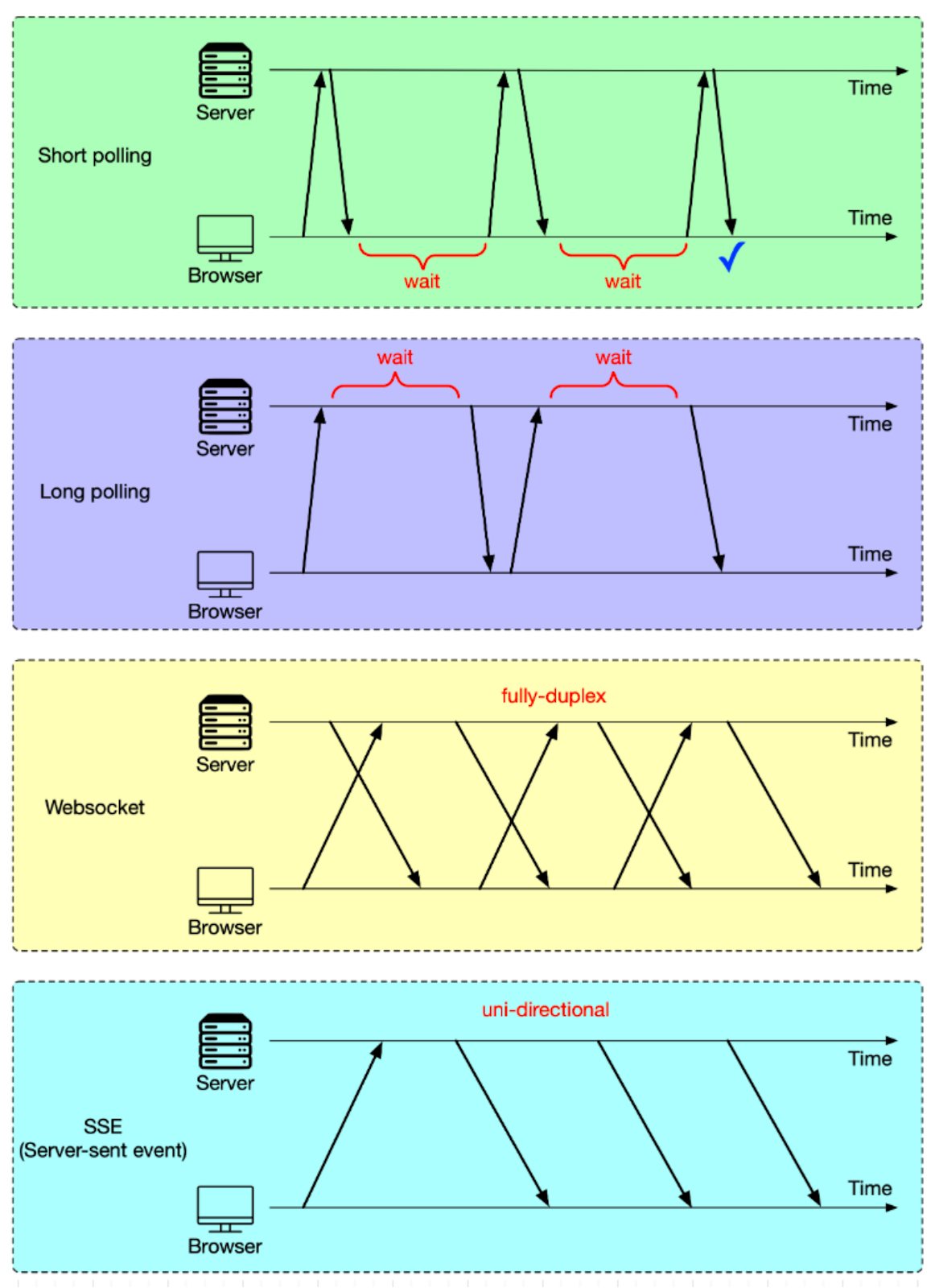
In our previous discussions, we examined HTTP and its role in typical request-response interactions between a client and a server. HTTP serves most scenarios well, especially when responses are immediate. However, in situations where the server needs to push updates to the client, especially when those updates depend on events not predictable by the client (such as another user's actions), HTTP may not be the most efficient approach. This is because HTTP is fundamentally a pull-based protocol where the client has to initiate all requests. So, how do we manage to push data from the server to the client without the client having to predict and request each update? There are typically four methods to handle this kind of push-based communication, as shown in the diagram below.
Short polling
This is the most basic method. In this approach, the client, which could be a web app running in our browser, repeatedly sends HTTP requests to the server. Imagine this scenario: We log in to a web app and are presented with a QR code to scan with our smartphone. This QR code is usually for a specific action, like authentication or to initiate a certain process. The web app doesn't know the exact moment we scan the QR code. So, it keeps sending requests to the server every 1-2 seconds to check the status of the QR code. Once we scan the QR code with the smartphone, the server identifies the scan, and in response to the next check from the web app, sends back the updated status. This way, we’ll get a response within the next 1-2 seconds after scanning the QR code. This frequent checking is why we refer to this method as "short polling".
There are two problems with this:
It sends an excessive number of HTTP requests. This takes up bandwidth and increases the server load.
In the worst scenario, we might wait up to 2 seconds for a response, causing noticeable delay.
Long polling
Long polling tackles short polling issues by setting a longer timeout for HTTP requests. Think of it this way: we adjust the timeout to 30 seconds. If we scan the QR code within this timeframe, the server immediately sends a response. This approach significantly decreases the number of HTTP requests.
However, long polling isn’t without its challenge. Even though long polling cuts down the number of requests, each open request still maintains a connection to the server. If there are many clients, this can put strain on the server resources.
WebSocket
Short and long polling work well for simpler tasks like QR code scanning. But for complex, data-heavy, and real-time tasks like online gaming, a more efficient solution is needed - enter WebSocket.
TCP, by nature, allows bidirectional data flow, enabling the client and server to send data to each other simultaneously. However, HTTP/1.1, built on TCP, doesn't fully utilize this capability. In HTTP/1.1, data transmission is generally sequential - one party sends data, then the other. This design, while sufficient for web page interactions, falls short for applications like online gaming that demand simultaneous, real-time communication. WebSocket, another protocol based on TCP, fills this gap by allowing full-duplex communication between client and server over a single connection. More on this later.
SSE (Server-Sent Events)
SSE, or Server-Sent Events, stands out for a specific use case. When a client establishes an SSE connection, the server keeps this connection open to continuously send updates. This setup is perfect for situations where the server needs to regularly push data to the client, while the client just receives the data without needing to send information back to the server. A typical example is live stock market data updates. With SSE, servers can push real-time data to the client without needing a request every time an update is available. It's worth noting that, unlike WebSockets, SSE doesn't support bidirectional communication, making it less suitable for use cases that require back-and-forth communication.
To set up a WebSocket connection, we need to include certain fields in the HTTP header. These headers tell the browser to switch to the WebSocket protocol. A randomly generated base64-encoded key (Sec-WebSocket-Key) is sent to the server.
Connection: Upgrade
Upgrade: WebSocket
Sec-WebSocket-Key: T2a6wZlAwhgQNqruZ2YUyg==\r\n
The server responds with these fields in the HTTP header.
HTTP/1.1 101 Switching Protocols\r\n
Sec-WebSocket-Accept: iBJKv/ALIW2DobfoA4dmr3JHBCY=\r\n
Upgrade: WebSocket\r\n
Connection: Upgrade\r\n
The status code 101 means the protocol is switching. After this extra handshake, a WebSocket connection is established, as illustrated in the diagram below.
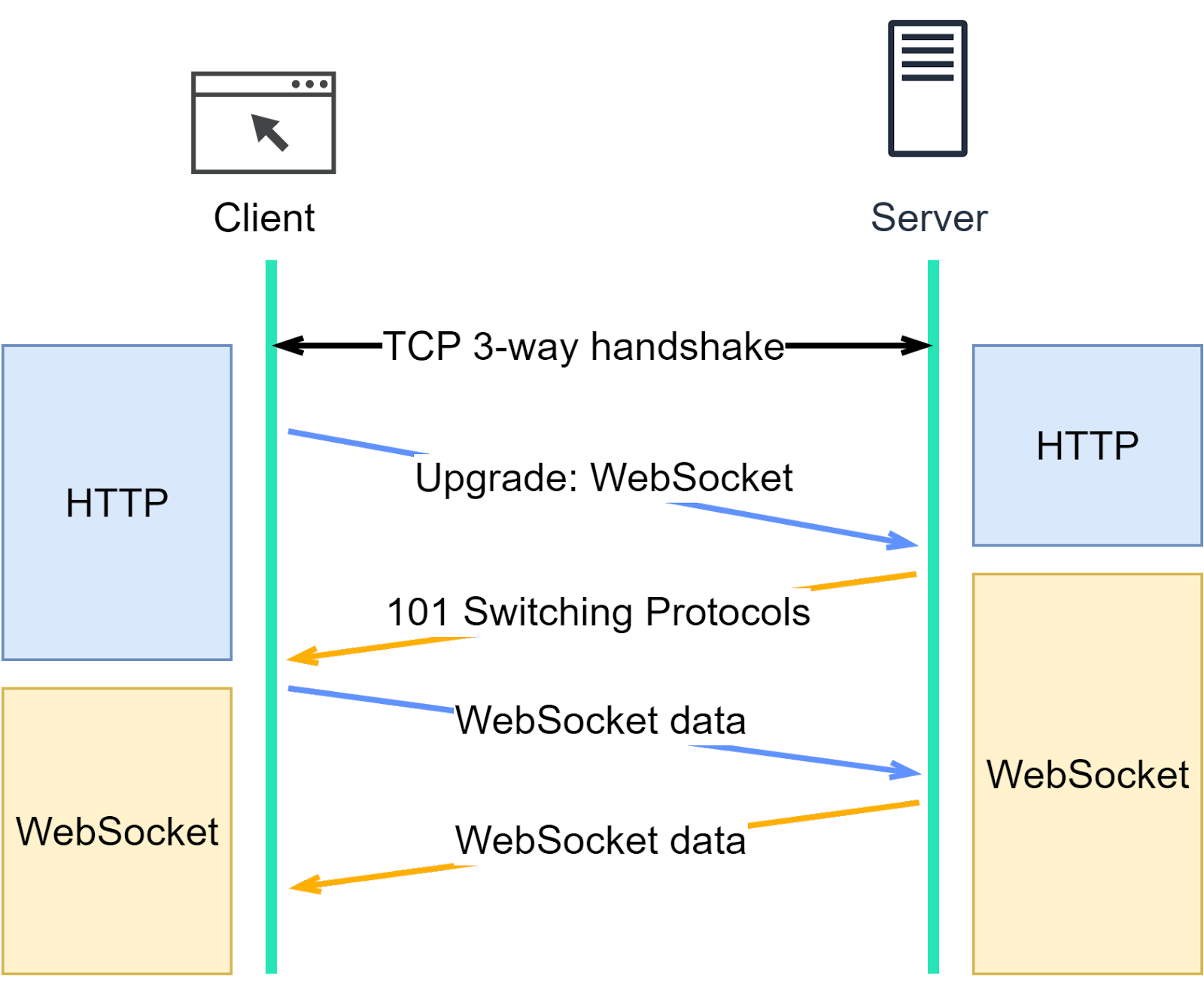
Once HTTP upgrades to WebSocket, the client and server exchange data in frames. Let’s see what the data looks like.
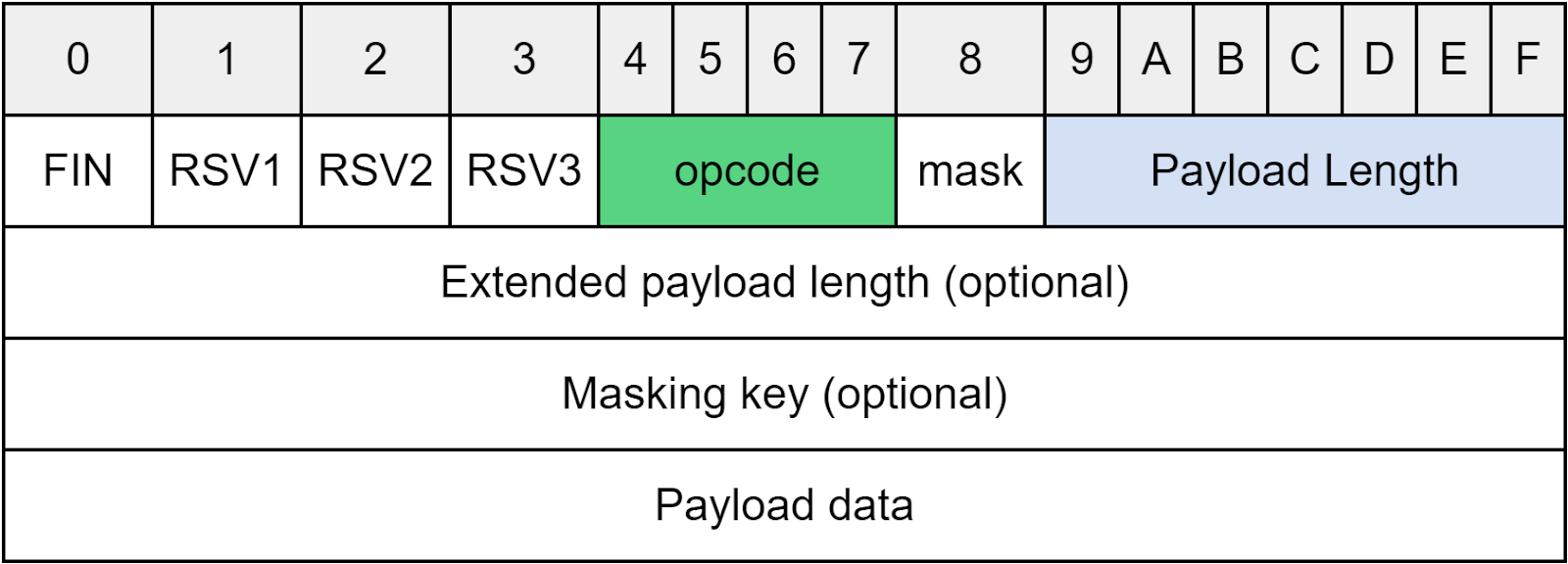
The Opcode, a 4-bit field, shows the type of frame data.
“1” indicates a text frame.
“2” indicates a binary frame.
“8” is a signal to close the connection.
Payload length could be a 7-bit field or extended to include the extended payload length. If both length fields are fully utilized, the payload length could represent several terabytes of data.
WebSocket is suitable for online gaming, chat rooms, and collaborative editing applications. These require frequent interactions between client and server.
In the next part, we’ll discuss another important application-layer protocol - RPC (Remote Procedure Call).
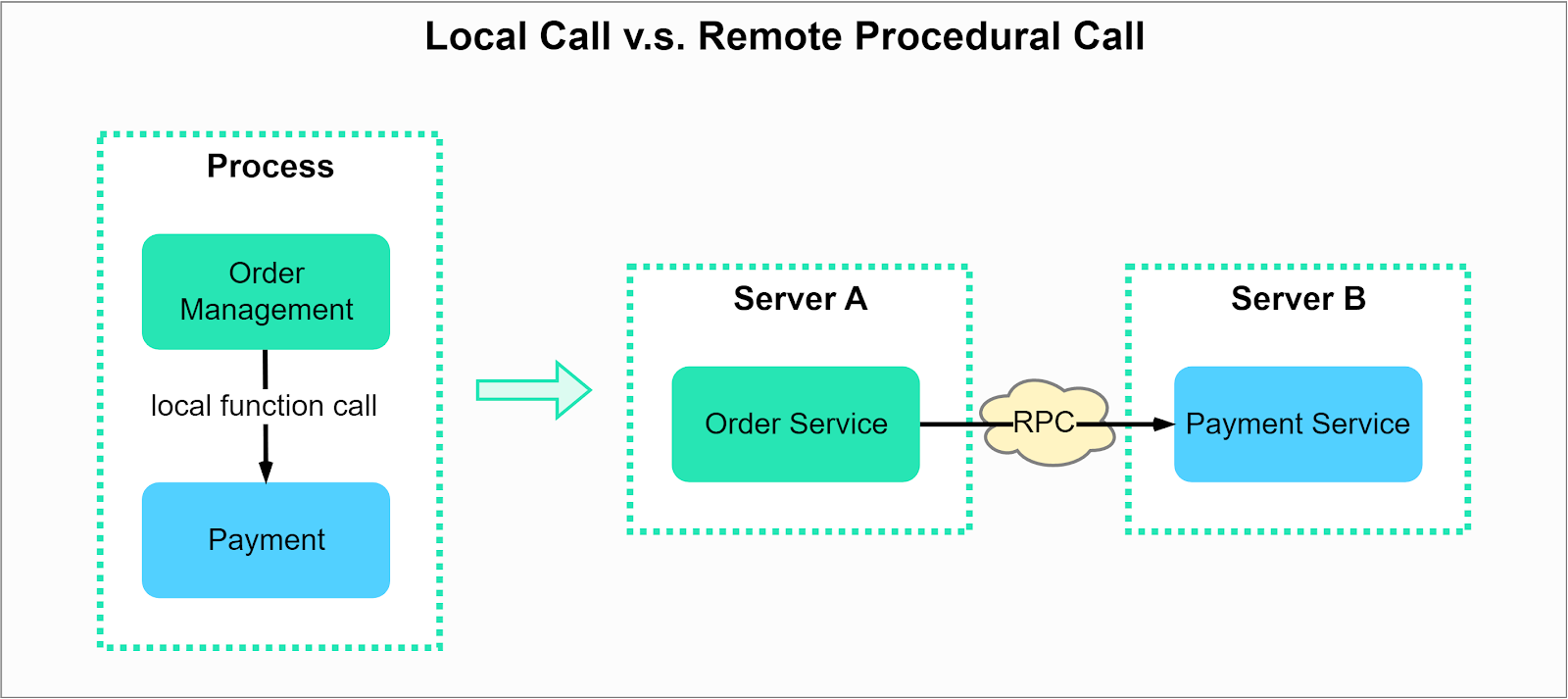
RPC allows the execution of a function on a different service. From the calling program’s perspective, it appears as if the function is being executed locally. The diagram below illustrates the difference between local and remote procedure calls. We could deploy modules like order management and payment either in the same process or on different servers. When deployed in the same process, it is a local function call. When deployed on different servers, it is a remote procedure call.
Why do we need RPC? Can’t we use HTTP for communication between services? Let’s compare RPC and HTTP in the table below.
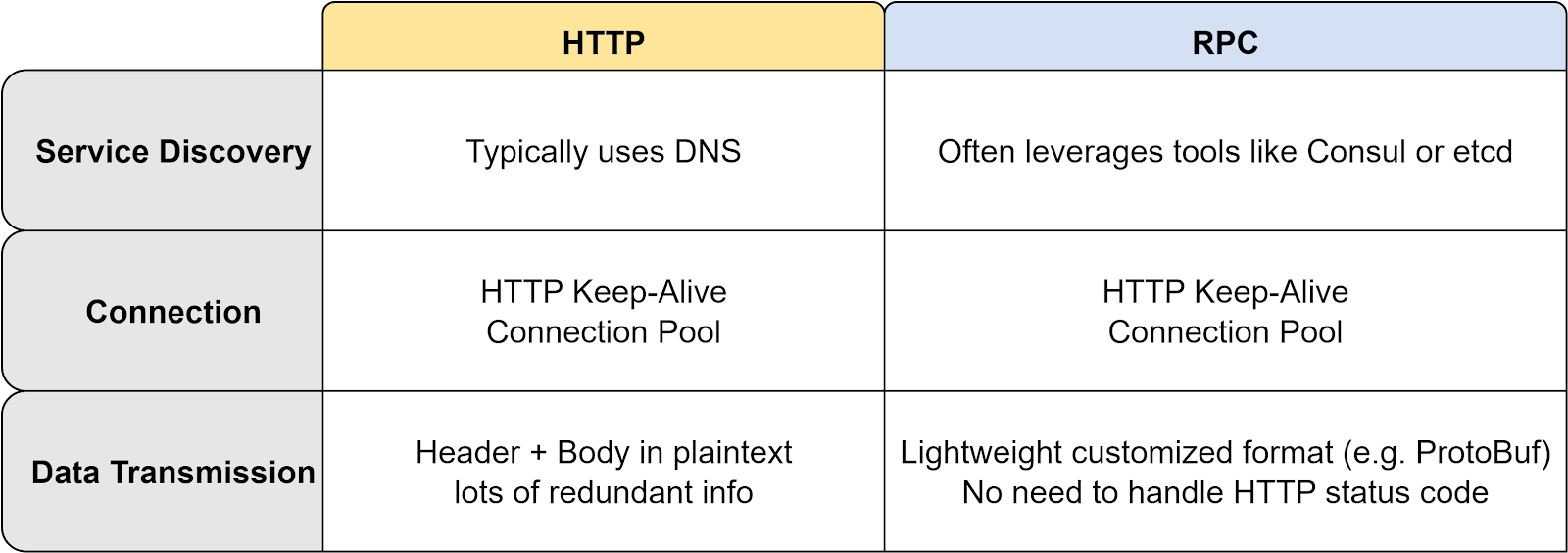
The main advantage of RPC over HTTP is its lightweight message format and improved performance. An example is gRPC, which operates on HTTP/2 and delivers better performance due to this.
Let's examine how gRPC works from start to end:
Step 1: A REST call is made from the client. The request body is usually in JSON format.
Steps 2 - 4: The order service (acting as a gRPC client) receives the REST call, transforms it into a suitable format, and then initiates an RPC call to the payment service. gPRC encodes the client stub into binary format and sends it to the low-level transport layer.
Step 5: gRPC sends the packets over the network via HTTP2. Binary encoding and network optimizations make gRPC reportedly up to five times faster than JSON.
Steps 6 - 8: The payment service (acting as a gRPC server) receives the packets, decodes them, and invokes the server application.
Steps 9 - 11: The result from the server application gets encoded and sent to the transport layer.
Steps 12 - 14: The order service receives the packets, decodes them, and sends the result to the client application.
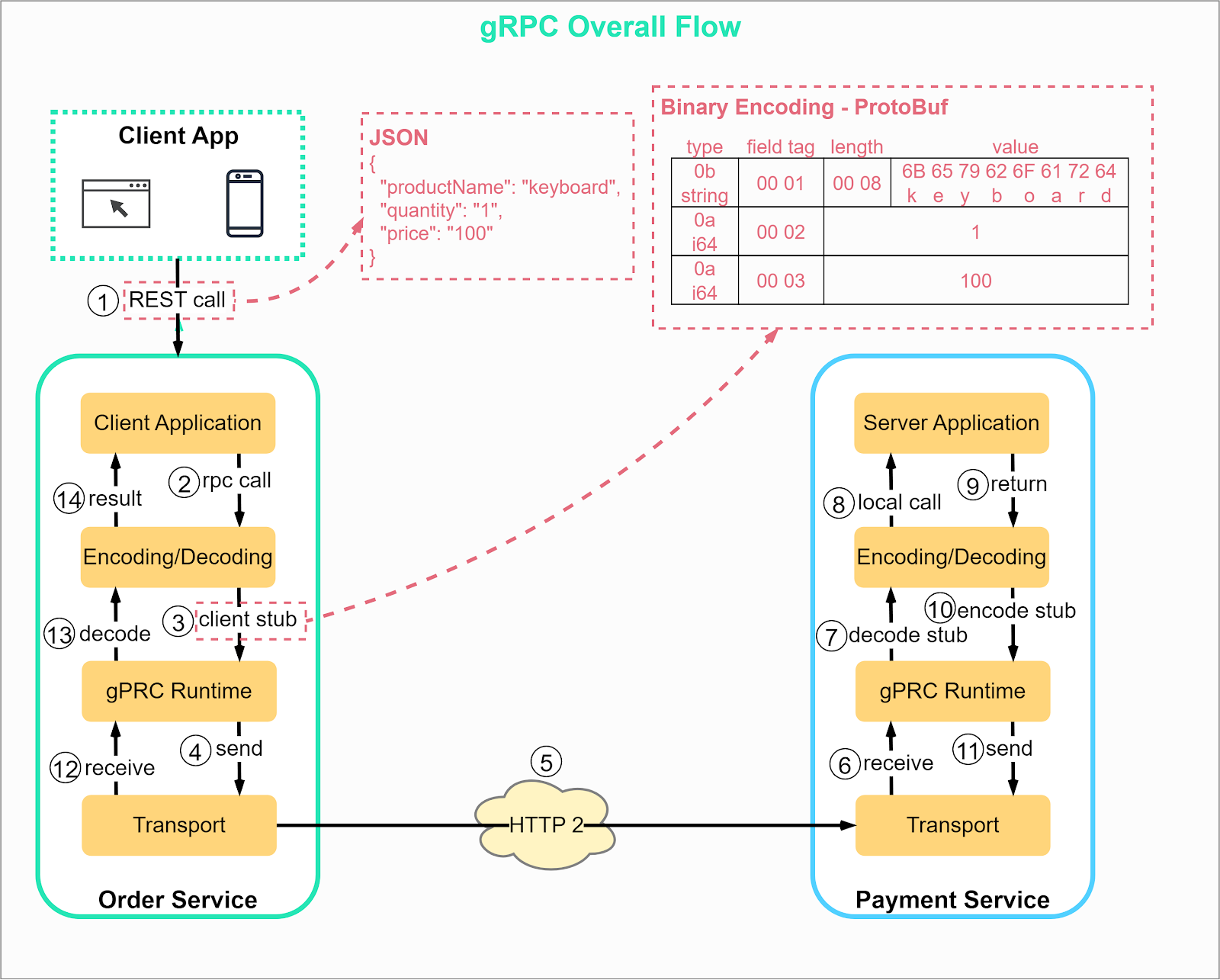
Strictly speaking, RPC is just an invocation method, not a protocol. Implementations like gRPC and Thrift are application-layer protocols.
As a rule of thumb, HTTP is typically used for client-server communication, while RPC is preferred for communication between services due to its efficiency.
In the issue on TCP, we discussed the performance overheads of TCP, including:
The necessity of a 3-way handshake for TCP to establish a connection can introduce delay, which may be detrimental for real-time applications where low latency is crucial.
TCP has inherent difficulties accommodating modifications or updates. As TCP is a protocol standardized by the Internet Engineering Task Force (IETF), changes to its operation or features require broad consensus and extensive testing, making its evolution a slow process.
TCP has an issue with HOL (head-of-line) blocking, a phenomenon where the entire data stream stalls if a packet is lost or delayed, as it needs to process packets in sequence. This requirement can cause performance issues in networks where packet loss is common.
Network migration, such as changing the user's IP address or port during a session (like moving from WiFi to cellular data), can disrupt ongoing TCP connections. This requires re-establishing these connections.
In scenarios like video conferencing, where speed is crucial and occasional packet loss is acceptable, UDP becomes a more suitable choice. But can we make UDP reliable without incorporating all the complexities of TCP, with features such as sequence numbers, 3-way handshake, retry mechanisms, and flow control? The answer is yes, thanks to Reliable UDP (RUDP).
RUDP enhances the basic User Datagram Protocol (UDP) by adding reliability features commonly associated with the Transmission Control Protocol (TCP). These include acknowledgment of received packets, retransmission of lost packets, and sequencing to ensure correct order of delivery. The goal is to achieve a balance - to provide a protocol faster and less complex than TCP but more reliable than basic UDP.
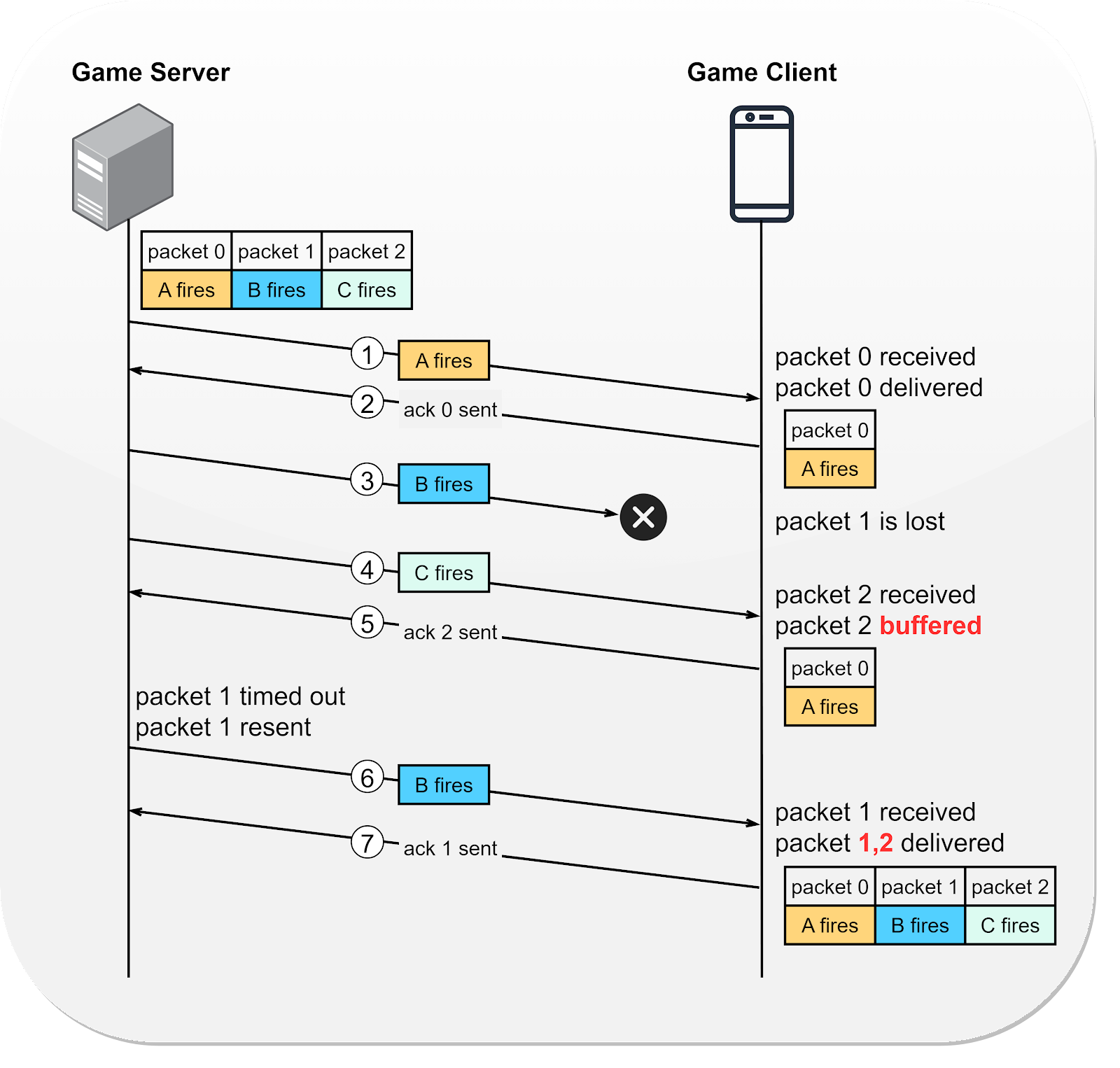
Let's look at how RUDP works using an online gaming example. Imagine a heated battle in a simulation shooter game where characters A, B, and C fire their weapons in sequence. How does the game server transmit the states from the game server to the game client using RUDP?
Steps 1 and 2 - Character A fires the first shot. This action gets packaged into a data packet (packet 0) and sent to the client. Upon receiving packet 0, the client acknowledges its receipt to the server.
Step 3 - Character B fires, and the corresponding packet is dispatched. Unfortunately, this packet is lost during transmission.
Steps 4 and 5 - Character C fires next. The game server bundles this action into packet 2 and sends it to the client. Recognizing the gap (since the last successfully delivered packet was packet 0), the client infers that packet 1 is lost. To ensure continuity, the client buffers packet 2 and sends an acknowledgment for this packet to the server.
Steps 6 and 7 - After a while without receiving an acknowledgment for packet 1, the server retransmits it. On its arrival, the client acknowledges packet 1 to the server and marks packets 1 and 2 as "delivered". At this point, no packets are left buffered.
This is a simplified version of how reliable UDP operates, enhancing the efficiency of high-speed, real-time applications without resorting to the complexity of TCP.
Reliable UDP is also useful in low-latency trading due to its low latency. The QUIC protocol is a mature implementation of RUDP, solving several of TCP's limitations, and is the foundation for HTTP/3.
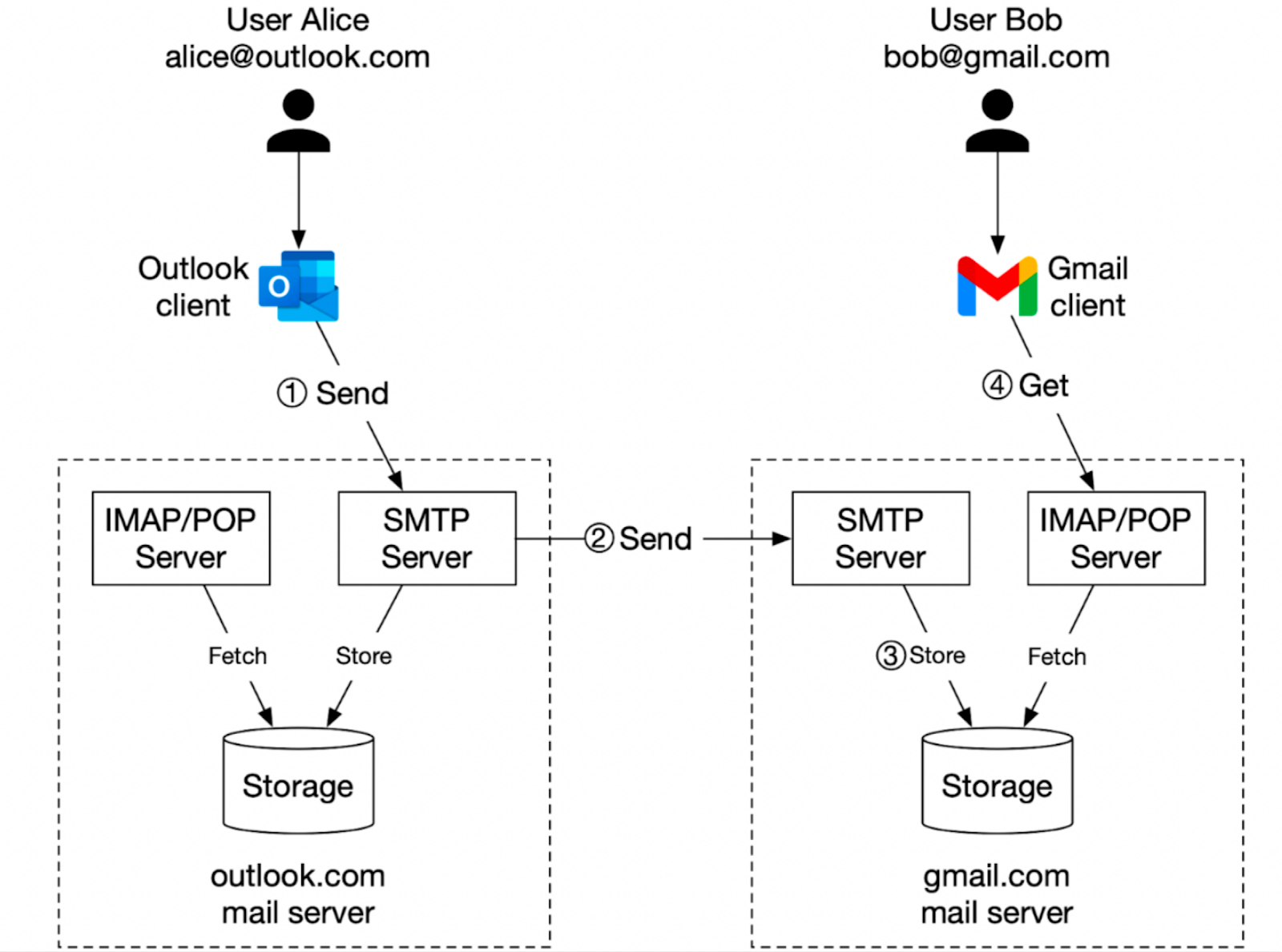
Let's explore how emails are sent and received, using the example of Alice sending an email to Bob via her Outlook account.
Step 1: Alice logs into her Outlook client, composes an email, and presses “send”. The email is sent to the Outlook mail server. The communication protocol between the Outlook client and the mail server is SMTP (Simple Mail Transfer Protocol).
SMTP is the standard protocol for email exchange between servers, acting as the internet’s postal service. It uses a series of commands like MAIL, RCPT, and DATA to transfer messages from one server to another.
Step 2: The Outlook mail server queries the DNS server (not shown in the diagram) to find the address of the recipient’s SMTP server. In this case, it is Gmail’s SMTP server. This process uses MX (Mail Exchanger) records in the DNS. Following this, it transfers the email to the Gmail mail server using the SMTP protocol.
Step 3: Once the email reaches the Gmail server, it’s stored and made available to Bob, the intended recipient. Gmail stores incoming messages in a mailbox that the recipient user can access.
Step 4: When Bob logs into his Gmail account, his client fetches new emails from the server using either the IMAP or POP protocol.
POP (Post Office Protocol) is a standard email protocol used to receive and download emails from a remote mail server to a local email client. Once emails are downloaded to our computer or phone, they are usually deleted from the email server. This means we can only access our emails on the device to which they were downloaded. POP3, the latest version of this protocol, is detailed in RFC 1939. A key limitation of POP is that it requires the entire email, including attachments, to be downloaded before it can be viewed, which can be time-consuming for emails with larger attachments.
IMAP (Internet Message Access Protocol), on the other hand, is also a standard email protocol for receiving emails, but it operates differently from POP. When using IMAP, the emails remain on the server and only get downloaded when we click to read them. This feature allows us to access our emails from multiple devices. IMAP is the most widely used protocol for individual email accounts, especially for users who access their email on multiple devices.
In addition to SMTP, POP, and IMAP, the process also involves security protocols such as TLS or SSL we discussed in our last issue to encrypt the communication and protect the data from being intercepted. This ensures that the email content remains confidential and hasn't been tampered with during transmission.
The ping command is often used for several purposes, including:
Testing the response time or latency between one server to another, which helps in assessing the speed of the network connection.
Checking the network connectivity between two hosts.
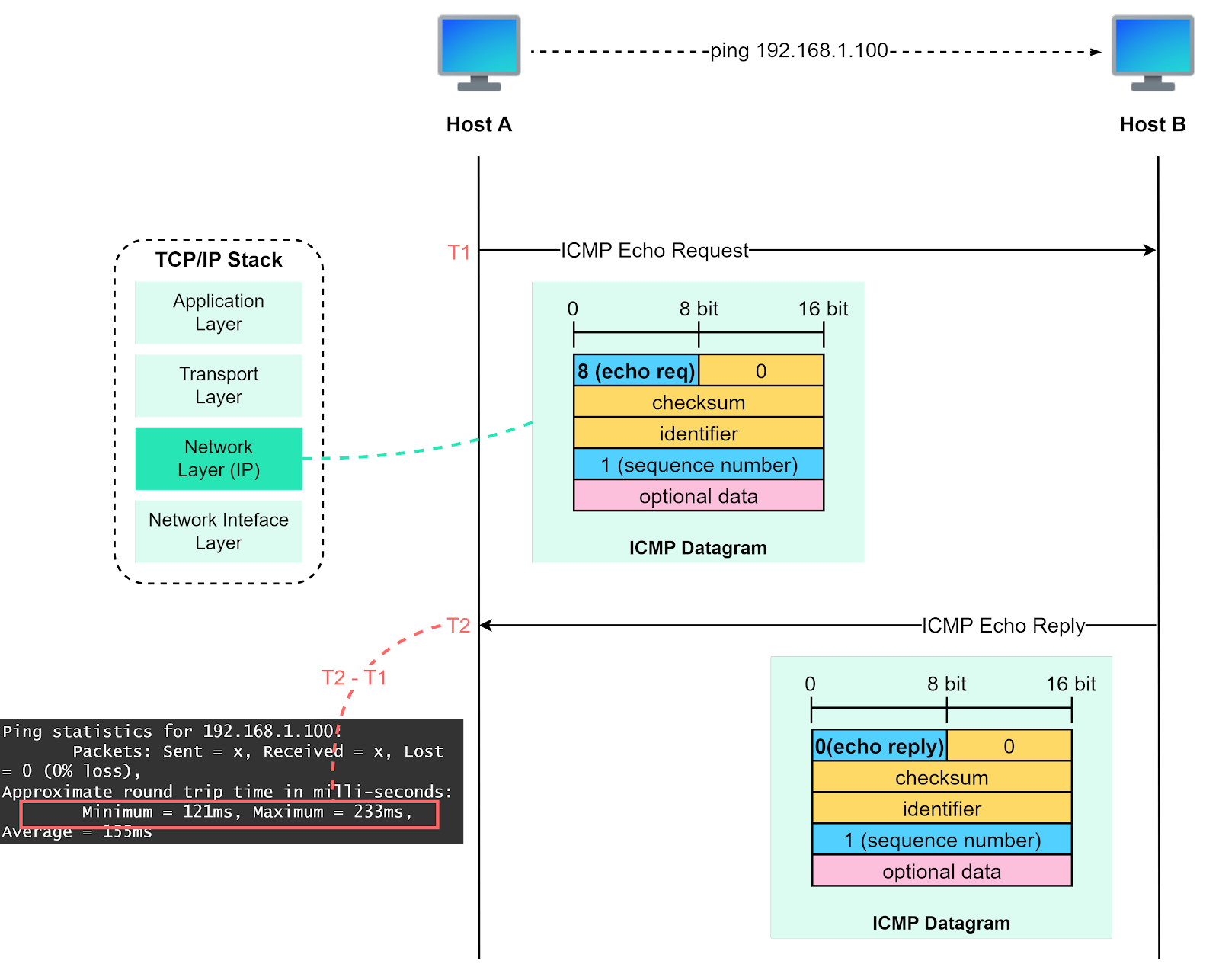
The diagram below illustrates how the “ping” command works.
At its core, the “ping” command runs on ICMP (Internet Control Message Protocol). ICMP is a network layer protocol that’s primarily used for network diagnostics and control.
ICPM has various types of messages. For the ping command, we mainly use “echo request” and “echo reply”.
Here’s how it works:
Host A initiates the process by sending an ICMP echo request (type = 8) along with a sequence number, typically starting with 1. The request is encapsulated with an IP header that specifies the source and destination IP addresses.
Upon receiving the echo request, host B responds by sending back an ICMP echo reply (type = 0), carrying the same sequence number that it received.
When host A receives the echo reply, it uses the sequence number to correlate the request and reply. It calculates the round-trip time, which is the time it takes for a packet to go from the source to the destination and back, using timestamps T1 (when the echo request was sent) and T2 (when the echo reply was received).
The sequence number and time stamp play a crucial role in calculating the round trip time and identifying if any packets are lost during transmission, which provides the ping statistics displayed to the user.
The process repeats for a predefined number of times or until manually stopped, providing a series of round trip times that can be used to assess the quality and reliability of the network connection.
We’ve covered an array of fundamental network protocols that developers frequently encounter, especially in a distributed environment. These protocols span DNS, TCP, HTTP, HTTPS, UDP, WebSocket, RPC, SMTP, ICMP, and many more. Through an understanding of these protocols, we’re better equipped to troubleshoot system issues and design more efficient systems.
We highly recommend using tools like Wireshark, a network protocol analyzer, to capture and inspect the packets transmitted over the network. This hands-on approach allows us to observe request-response interactions in action and deepens our understanding of how these protocols work in real-world scenarios. Remember, practice is key to mastery. Keep exploring, keep learning.