In this issue, we’re diving into the foundation of data communication for the World Wide Web - HTTP.
HTTP, or HyperText Transfer Protocol, owes its name to ‘hypertext’.
So, what exactly is hypertext?
Imagine a blend of text, images, and videos that are stitched together by the magic of hyperlinks. These links serve as portals that allow us to jump from one set of hypertext to another. HTML, or HyperText Markup Language, is a prime example of hypertext.
HTML is a plain text file. It’s packed with many tags that define links to images, videos, and more. After the browser interprets these tags, it transforms the seemingly ordinary text file into a webpage filled with text and images.
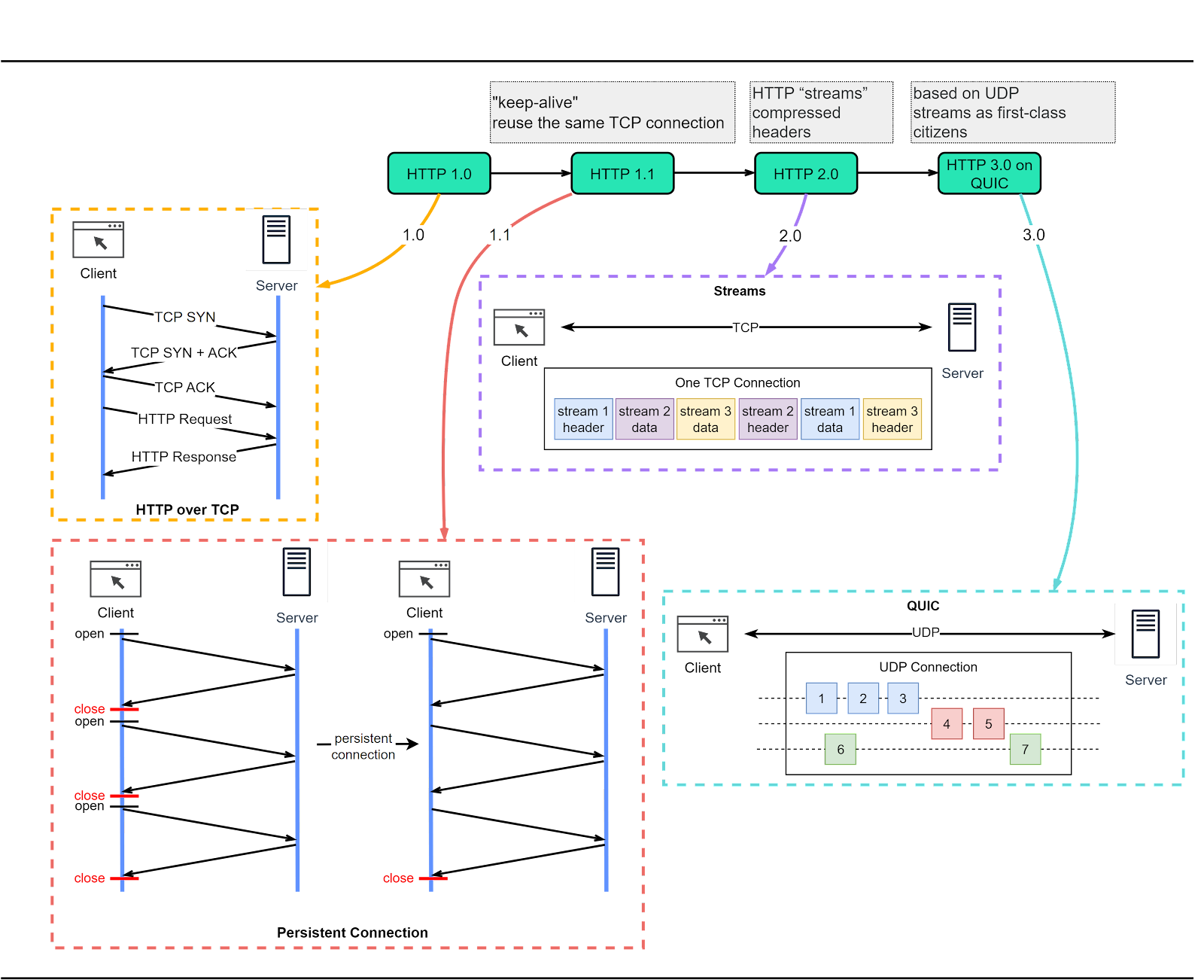
HTTP has undergone significant transformations since its inception in 1989 with version 0.9. Let’s take a walk down memory lane and see the problems each version of HTTP addresses. The diagram below shows the key improvements.
HTTP/1.0 was finalized and formally documented in 1996. This version had a key limitation: each request to the same server required a separate TCP connection.
HTTP/1.1 arrived next in 1997. It introduced the concept of a ‘persistent connection’, which means a TCP connection could be left open for reuse. Despite this enhancement, HTTP/1.1 couldn’t fix the issue of ‘Head-of-Line’ (HOL) blocking. In simple terms, HOL blocking happens when all parallel request slots in a browser are filled, forcing subsequent requests to wait until previous ones are complete.
HTTP/2.0, published in 2015, sought to tackle the HOL blocking issue. It implemented ‘request multiplexing’, a strategy to eliminate HOL blocking at the application layer. As illustrated in the diagram below, HTTP/2.0 introduced the concept of HTTP ‘streams’. This abstraction allows the multiplexing of different HTTP exchanges onto the same TCP connection, freeing us from the need to send each stream in order. However, HOL blocking could still occur at the transport (TCP) layer.
HTTP/3.0 made its debut with a draft published in 2020. Positioned as the successor to HTTP/2.0, it replaces TCP with QUIC as the underlying transport protocol. This effectively eliminates HOL blocking at the transport layer. QUIC is based on UDP. It introduces streams as first-class citizens at the transport layer. QUIC streams share the same QUIC connection, requiring no additional handshakes or slow starts to create new ones. QUIC streams are delivered independently. It means that in most cases packet loss in one stream doesn't impact others.
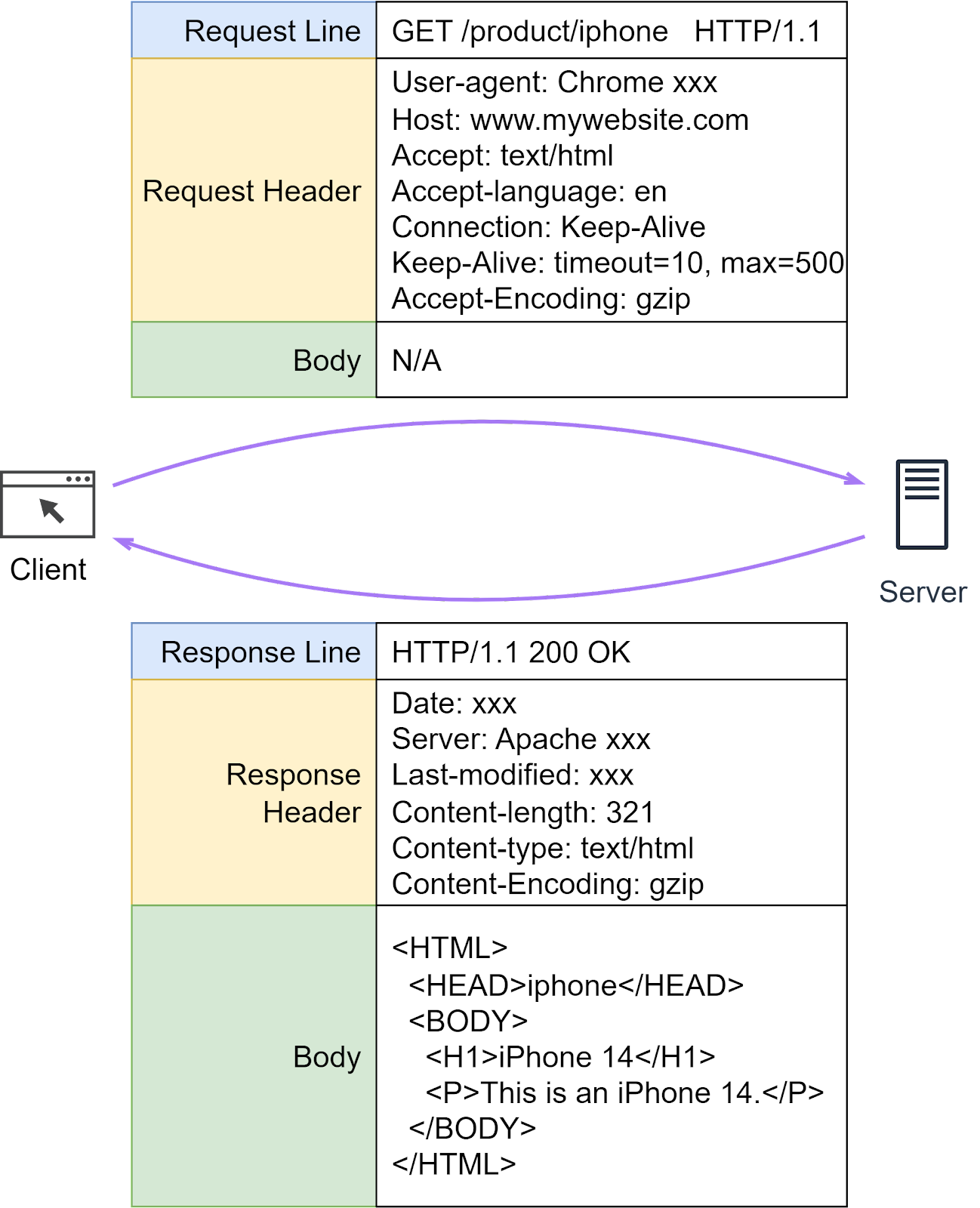
HTTP headers play a crucial role in how clients and servers send and receive data. They provide a structured way for these entities to communicate important metadata about the request or response. This metadata can contain various information like the type of data being sent, its length, how it's compressed, and more.
An HTTP header consists of several fields, each with a specific role and meaning. Now that we have an understanding of what HTTP headers are, let's dive deeper into some specific HTTP fields.
When we send HTTP requests to a server, several common fields play a critical role. Let’s dissect some of them.
Host: This is the domain name of the server.
Content-Length: This field in the request or response header plays a crucial role in data transfer. It specifically indicates the size of the body of the request or response in bytes. This helps the receiver understand when the current message ends and potentially prepare for the next one, especially in cases where multiple HTTP messages are being sent over the same connection.
Connection: This field is crucial in HTTP persistent connections, where a single TCP connection is used to send and receive multiple HTTP requests and responses. We will discuss this in more detail.
Content-type: This field tells the client the format of the data it’s receiving.
Content-encoding: This field indicates the compression format used for the data. For example, if the client sees ‘gzip’ encoding, it knows it needs to decompress the data.
HTTP protocols define various methods or ‘verbs’ to perform different actions on web resources. The commonly used ones are GET, POST, PUT, and DELETE, which are often used to read, create, update, and delete resources. Less common methods include HEAD, CONNECT, OPTIONS, TRACE, and PATCH, which we covered in our previous “API Design” issues.
One common interview question is: “What is the difference between GET and POST?” Let’s dive into their definitions.
HTTP GET: This method retrieves resources from the server via URLs without producing any other effect. As GET requests usually lack a payload body, they enable bookmarking, sharing, and caching of web pages.
HTTP POST: This method interacts with resources based on the payload body. The interaction varies depending on the resource type. For example, if we’re leaving a comment after purchasing an iPhone 14, clicking “submit” sends a POST request to the server with the comment in the message body. While there's no defined limit to the size of the message body in a POST request by the HTTP protocol itself, in practice, browsers and servers often impose their own limits.
HTTP methods have certain properties that define how they interact with server resources. Two such properties are whether they're 'non-mutating' and 'idempotent.'
A non-mutating method doesn't alter any server resources. On the other hand, an idempotent method produces the same result, regardless of how many times it's repeated.
HTTP GET: The GET method retrieves data without causing changes, making it non-mutating. Additionally, repeating a GET request won't change the outcome, making it idempotent.
HTTP POST: Unlike GET, the POST method sends data that can modify server resources, making it potentially mutating. Furthermore, if we repeat a POST request, it can create additional resources, making it non-idempotent.
However, it's important to note that actual behavior can depend on how the server implements these methods. While the standards suggest certain behaviors, developers sometimes use these methods in non-standard ways. For instance, a GET method might be used to delete data (making it both mutating and non-idempotent), or a POST method may be used to retrieve data (making it non-mutating and potentially idempotent).
One infamous example of non-standard usage involved a blogger who implemented post deletion operations with HTTP GET, assuming no one would visit the blog. But when Google crawled the blog, all posts were deleted!
It's also essential to remember that when it comes to security and preventing information leaks, neither GET nor POST is inherently secure. GET parameters are visible in the URL, while POST bodies, though not visible in the URL, can still be intercepted if not encrypted. To ensure secure data transmission, the use of HTTPS is advised, a topic we will discuss in more detail later.
We’ve discussed how HTTP can initiate a persistent connection using “Connection: Keep-Alive”. Recall that in the issue about TCP, we’ve also mentioned TCP’s keepalive mechanism. Are they the same? No, they’re quite different:
HTTP Keep-Alive, linked to HTTP persistent connections, operates at the application layer.
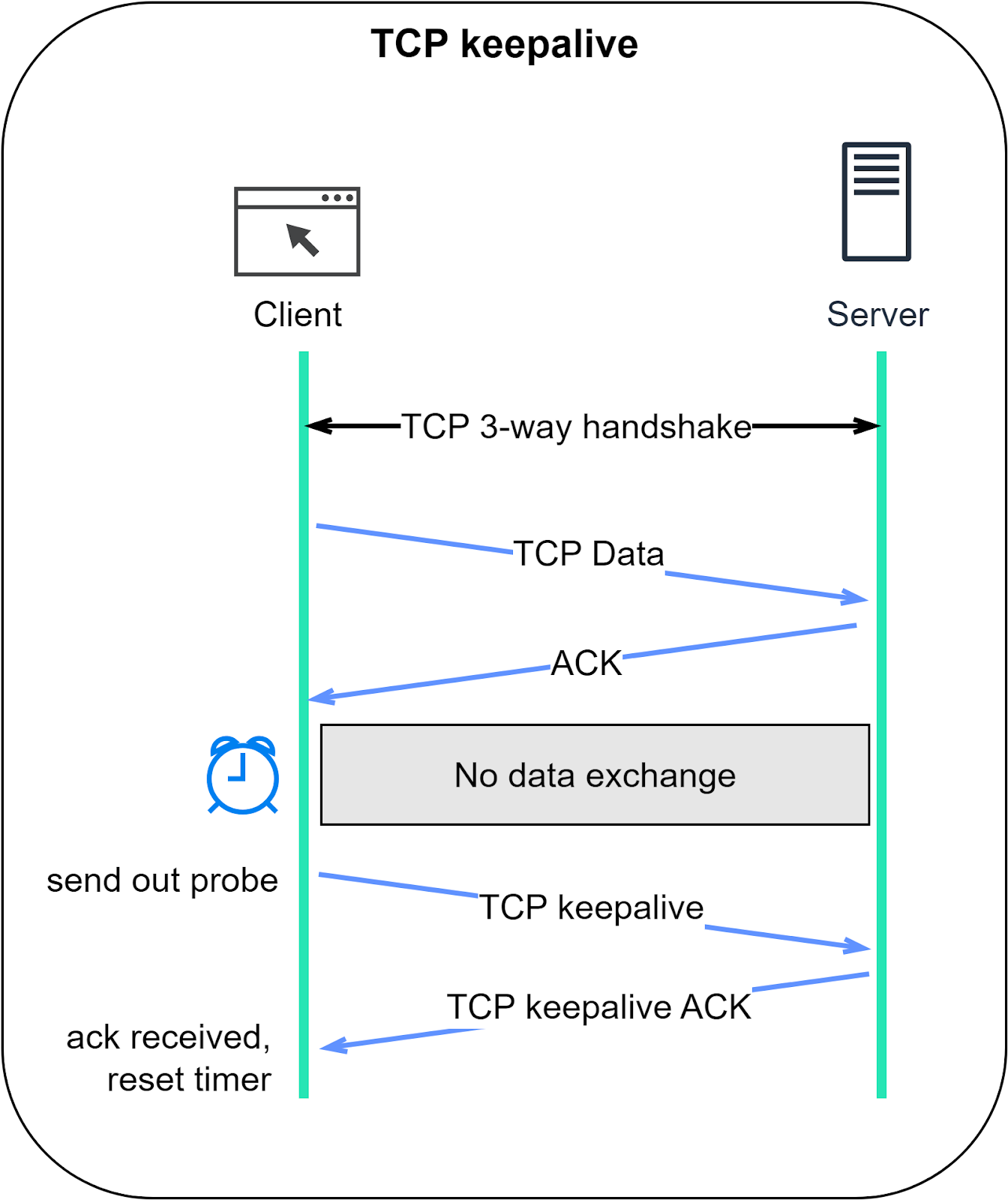
TCP keepalive, working at the transport layer, keeps a TCP connection alive during periods of data exchange inactivity.
Let’s dive deeper.
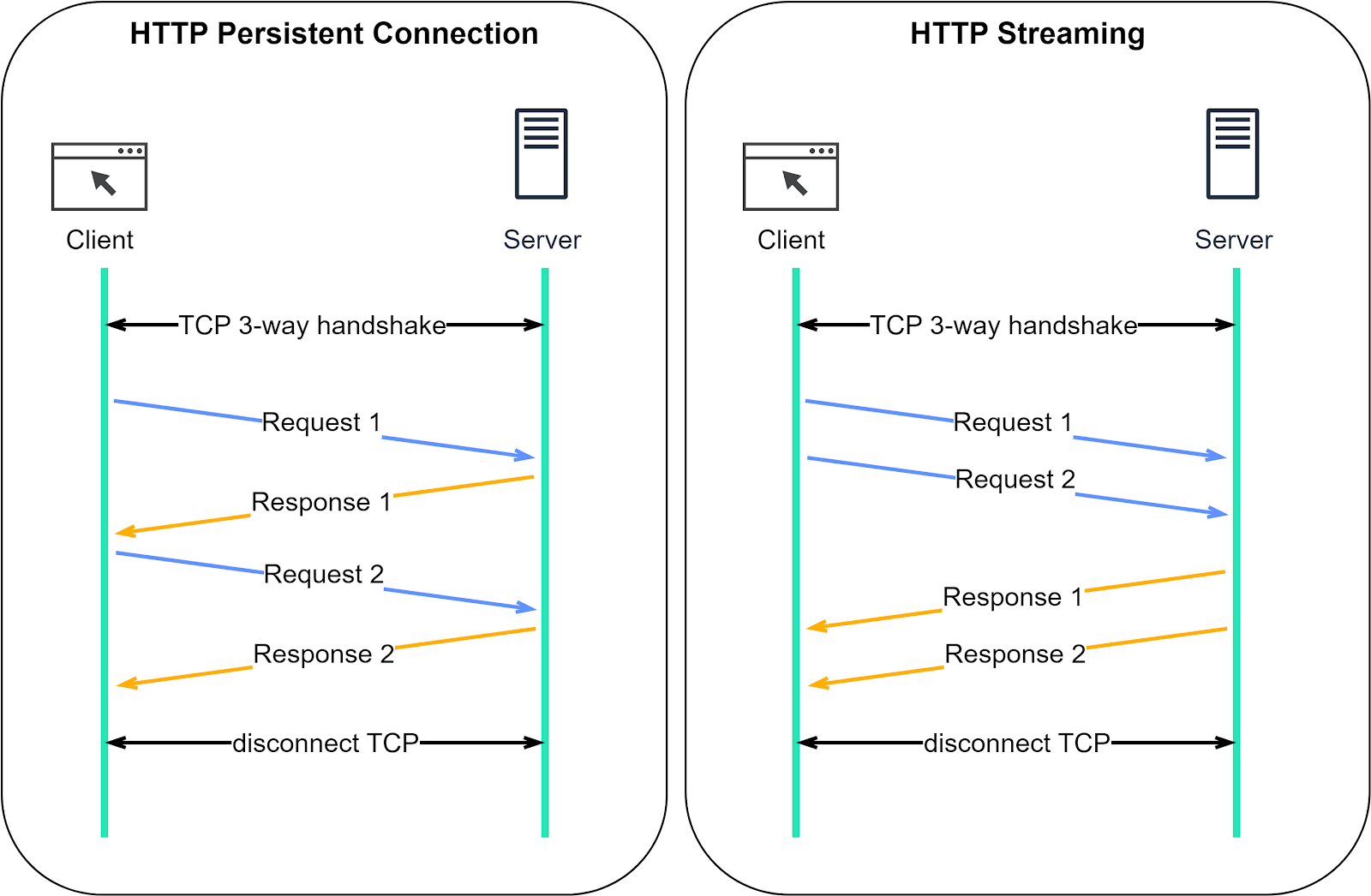
HTTP, except for HTTP/3, is built on TCP. Establishing an HTTP connection requires a 3-way TCP handshake. After sending an HTTP request and receiving a response, the TCP connection disconnects.
Sending multiple requests to the same server this way is quite inefficient. Wouldn’t it be better to reuse the same TCP connection? That’s the purpose of HTTP Keep-Alive. It maintains the TCP connection until either party requests disconnection.
HTTP/1.1 enables HTTP Keep-Alive by default.
HTTP Keep-Alive reduces the overhead of opening and closing TCP connections. It's even more powerful when combined with HTTP/2, which introduces the concept of “streams”.
Streams allow us to send multiple requests simultaneously without waiting for server responses. More importantly, these requests and responses can be handled out of order, which is not possible with only HTTP Keep-Alive.
The comparison diagram below shows the difference between HTTP Keep-Alive and HTTP/2 streams. Normally, we wait for the first response before sending a second request. With HTTP/2 streams, we can send multiple requests simultaneously without waiting for the first response, and the server can respond out of order.
Why is this important? This feature is crucial to avoid head-of-line (HOL) blocking. In earlier versions of HTTP, if the server takes a long time to process one request, subsequent requests have to wait, leading to delays. But with HTTP/2 streams, each request is independent. Even if a server takes longer to process one request, it can still respond to other requests. Responses can come back as soon as they're ready, even if that means they're not in the original request order.
TCP keepalive is unrelated to HTTP Keep-Alive. In a TCP connection, both parties remain in the ESTABLISHED state until one ends it. If one party disconnects without notifying the other, the remaining party wouldn’t know about it. TCP keepalive addresses this by periodically sending probes when there’s no data exchange. We discussed this in our previous TCP issue. The following diagram should serve as a refresher.
Browsers each implement their unique in-memory caching systems. By caching request-response pairs locally, data retrieval is quicker. While caching implementation can vary, it begins with HTTP caching directives: Cache-Control and Expires.
Cache-Control tells the browser how long it can cache the data. This is a relative time.
Expires sets an absolute date and time for data expiration.
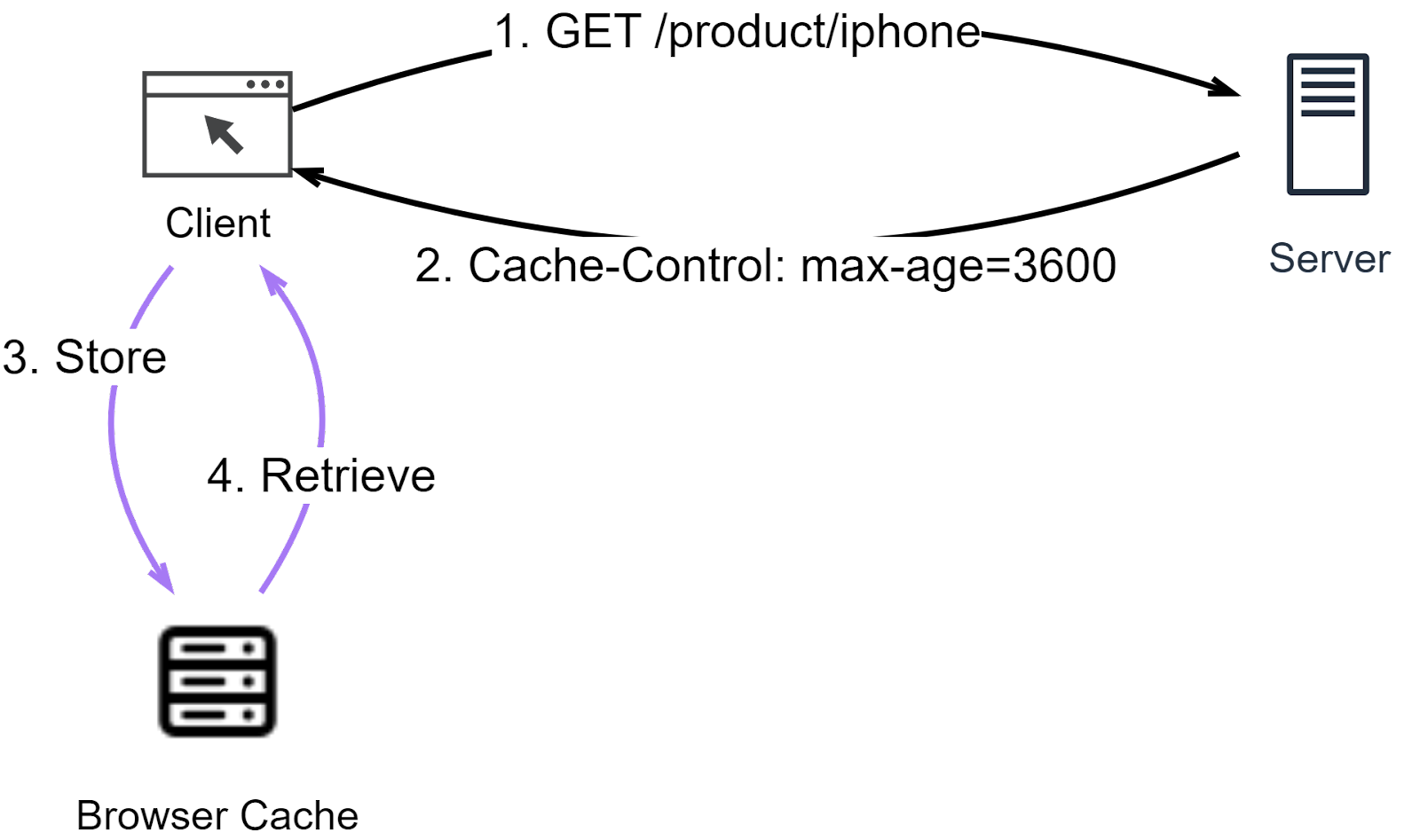
The diagram below explains how Cache-Control works.
Step1: The client sends a GET request for iPhone product information.
Step 2: The server responds with Cache-Control set to indicate how long the product info stays valid.
Step3: The product info is saved in the browser cache.
Step 4: When the client next requests the same product info, it checks the browser cache first. If the data is still valid, it’s immediately returned to the client.
Another caching method is the conditional request. A conditional request includes one or more header fields that specify a precondition to be met before the HTTP method semantics are applied to the target resource.
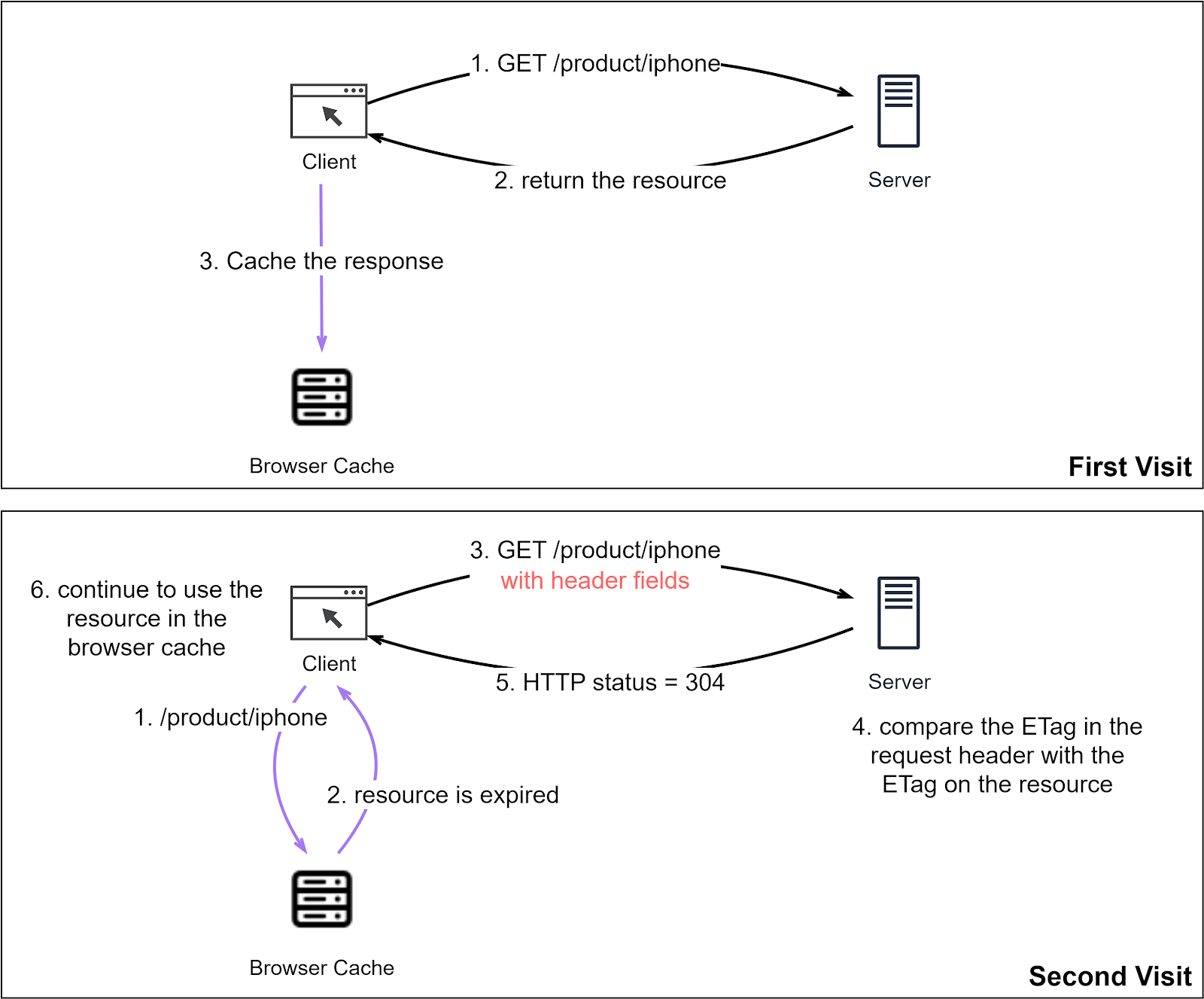
The diagram below illustrates how a conditional request works. The client and server negotiate the use of the resource cached in the browser.
- First Visit
Steps 1-3: As before, the client requests a resource. The server responds, and the resource is cached in the browser with an expiration.
- Second Visit
Steps 1-2: The client requests the same resource. Since the URL is cached, the client retrieves the resource from the browser cache. But the resource has expired.
Step 3: The client requests the resource from the server with header fields set. We will cover these header fields next.
Step 4: The server sees the header fields and tests the condition, e.g., by comparing the resource update time to determine if the locally cached resource is usable.
Step 5: If the cached resource has not changed since it is cached, the server returns HTTP status code 304, instructing the browser to use the local resource.
Step 6: The client receives HTTP status code 304 and continues to use the locally cached resource.
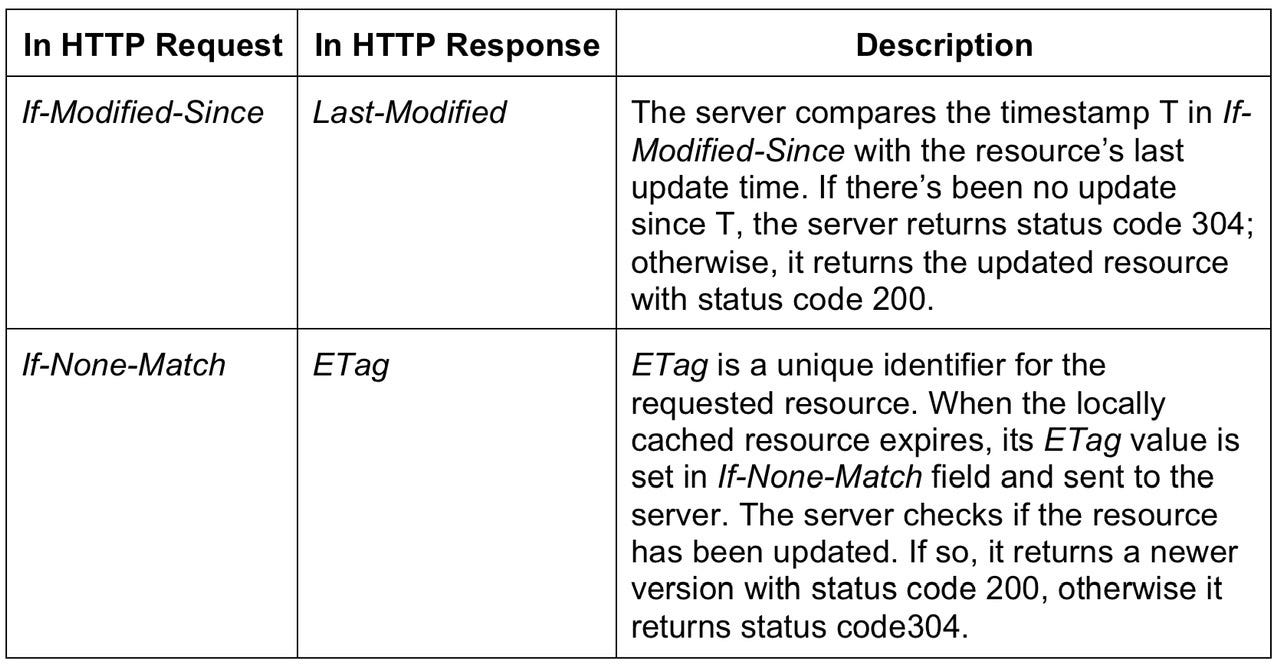
Two sets of header fields play crucial roles in conditional requests. Here’s how they work:
HTTP transfers plaintext over the network, posing a risk of information leakage. HTTPS (Hypertext Transfer Protocol Secure) mitigates this risk by incorporating TLS (Transport Layer Security) or SSL (Secure Sockets Layer) to encrypt messages. This means any intercepted data will be unreadable binary code.
What are the differences between HTTP and HTTPS?
Establishing an HTTP connection is straightforward, but HTTPS requires an SSL/TLS handshake after the TCP 3-way handshake before encrypted messages can be transmitted.
The default port for HTTP is 80, while for HTTPS it’s 443.
HTTPS requires a digital certificate from a CA (Certificate Authority) to verify the server’s trustworthiness.
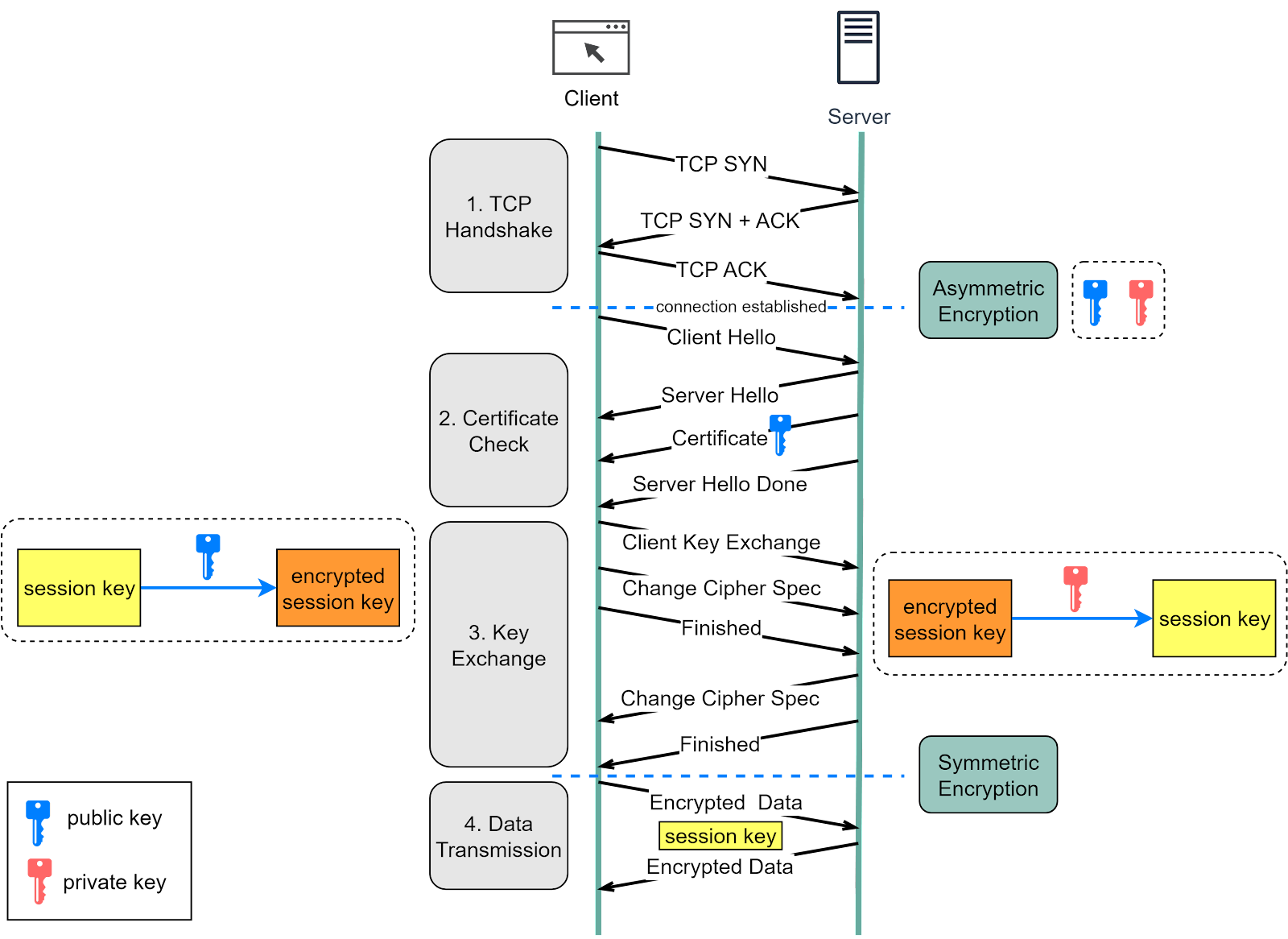
Let’s look at how HTTPS works in the diagram below.
Step 1 - The client (browser) and the server establish a TCP connection.
Step 2 - The client sends a “client hello” to the server. The message contains a set of necessary encryption algorithms (cipher suites) and the highest TLS version it can support. The server responds with a “server hello”, confirming compatibility with the algorithms and TLS version.
The server then sends its SSL certificate to the client for validation. The certificate contains the public key, hostname, expiry dates, etc.
Step 3 - After validating the SSL certificate, the client generates a session key, encrypts it using the public key, and sends it to the server. The server receives the encrypted session key and decrypts it using its private key.
Step 4 - Now that both the client and the server possess the same session key (symmetric encryption), they can securely exchange encrypted data in a bi-directional channel.
Why does HTTPS switch to symmetric encryption for data transmission? There are two main reasons:
1. Security: After the initial handshake, both the client and server switch to symmetric encryption using a shared secret key. This key is generated for that specific session and is known only to the client and server. Because this key is never transmitted across the network, it's virtually impossible for an eavesdropper to obtain it. Even if an attacker manages to decrypt one session's data, the next session will use a different key, limiting the potential damage.
2. Efficiency: Symmetric encryption algorithms are significantly more efficient than their asymmetric counterparts. Asymmetric encryption, which involves complex mathematical operations on large numbers, is computationally expensive and can slow down data transmission. Symmetric encryption uses simple operations (like XOR and bit shifting), making it much faster and more suitable for encrypting large amounts of data.
By using a combination of asymmetric and symmetric encryption, HTTPS takes advantage of the strengths of both: the ability of asymmetric encryption to securely exchange keys over a public network, and the efficiency and security of symmetric encryption for the actual data transfer.
Yes, HTTPS is reliable for securing data in transit. However, its reliability depends heavily on the trustworthiness of Certificate Authorities (CAs) and the security of the client's environment.
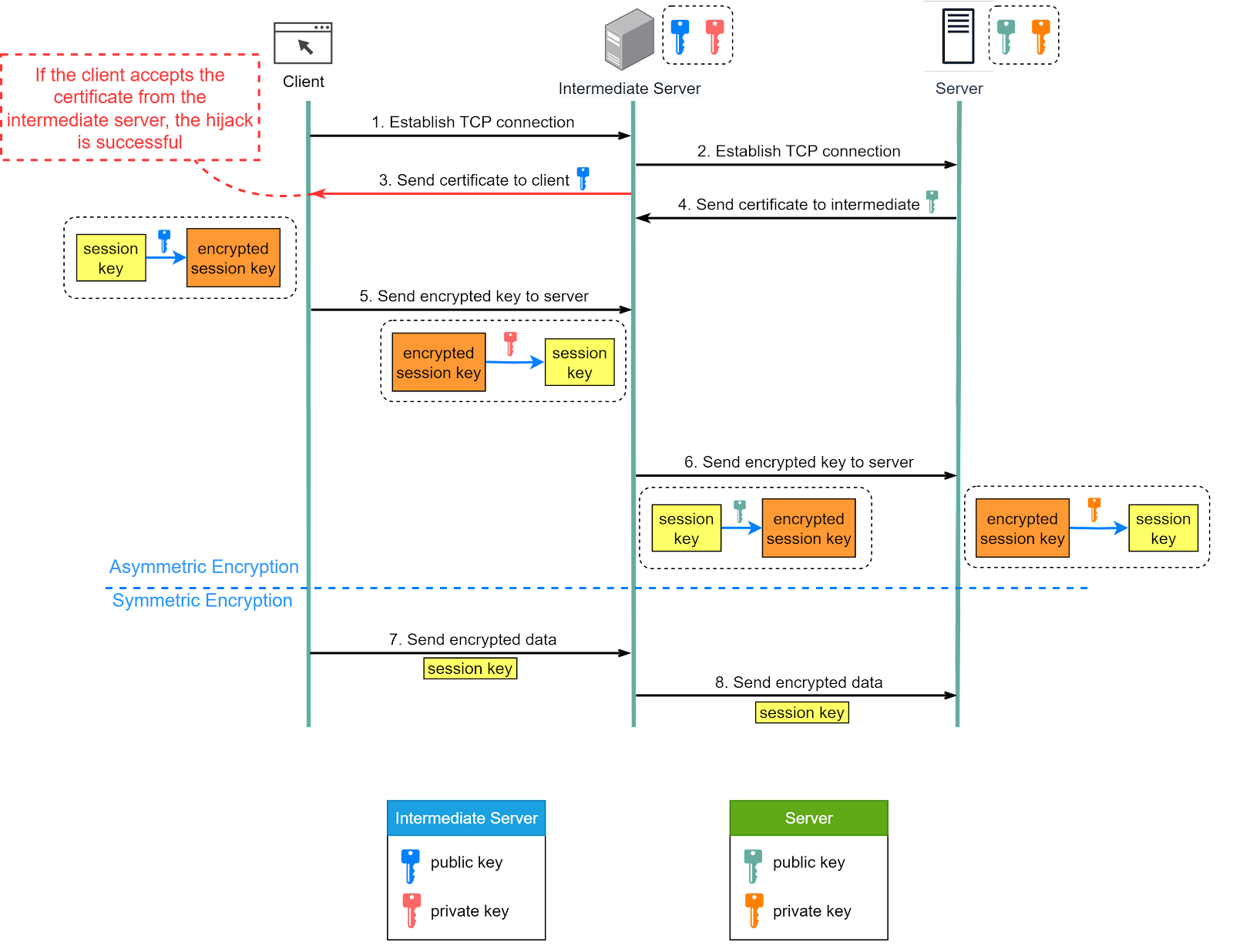
Tools like Fiddler work as a “main-in-the-middle” (MITM) by creating a bridge between the client and the server. It effectively creates two separate HTTPS connections: one with the client and another with the server.
The diagram below shows how tools like Fiddler (labeled as an intermediate server in the diagram) can intercept and read encrypted packets.
Prerequisite: root certificate of the intermediate server is present in the trust store.
Step 1 - When the client initiates a connection to the server, Fiddler intercepts this connection.
Step 2 - Fiddler then establishes a separate connection with the server on behalf of the client.
Step 3 - Fiddler presents its own self-signed certificate to the client. If this certificate is trusted (which is often the case when Fiddler is intentionally installed and configured on the client’s machine), the client will accept it and establish a secure connection with Fiddler.
Step 4 - Meanwhile, Fiddler establishes a legitimate HTTPS connection with the server using the server's true certificate.
Step 5 - The client generates a session key and encrypts it using the public key from Fiddler. Fiddler receives the encrypted session key and decrypts it with the private key.
Step 6 - Fiddler encrypts the same session key using the public key from the server and then sends it there. The server decrypts the session key with its private key.
Steps 7 and 8 - Now, Fiddler can decrypt the client's requests, read or modify them, and then re-encrypt them to send to the server. It can do the same with responses from the server before sending them back to the client.
It's important to note that this kind of interception can only happen if the client machine trusts the Fiddler certificate. This is why it's crucial to manage the trust store on your device and be aware of which certificates we’re trusting.
So, while HTTPS is a secure protocol, its security depends on the correct implementation, trusted certificates, and a secure client environment.
In this issue, we've explored the workings of HTTP and its evolution over the years. We've distinguished between HTTP Keep-Alive and TCP keepalive, and delved into HTTP caching. Lastly, we've discussed how HTTPS extends HTTP to enhance security.
HTTP underpins RESTful services, which leverage its simple, widely used request-response mechanism to facilitate communication between browsers and servers. Understanding HTTP internals is crucial for developers aiming to build secure, efficient websites.
Special thanks to the Chinese website xiaolincoding.com for authorizing us to use some of their diagrams.