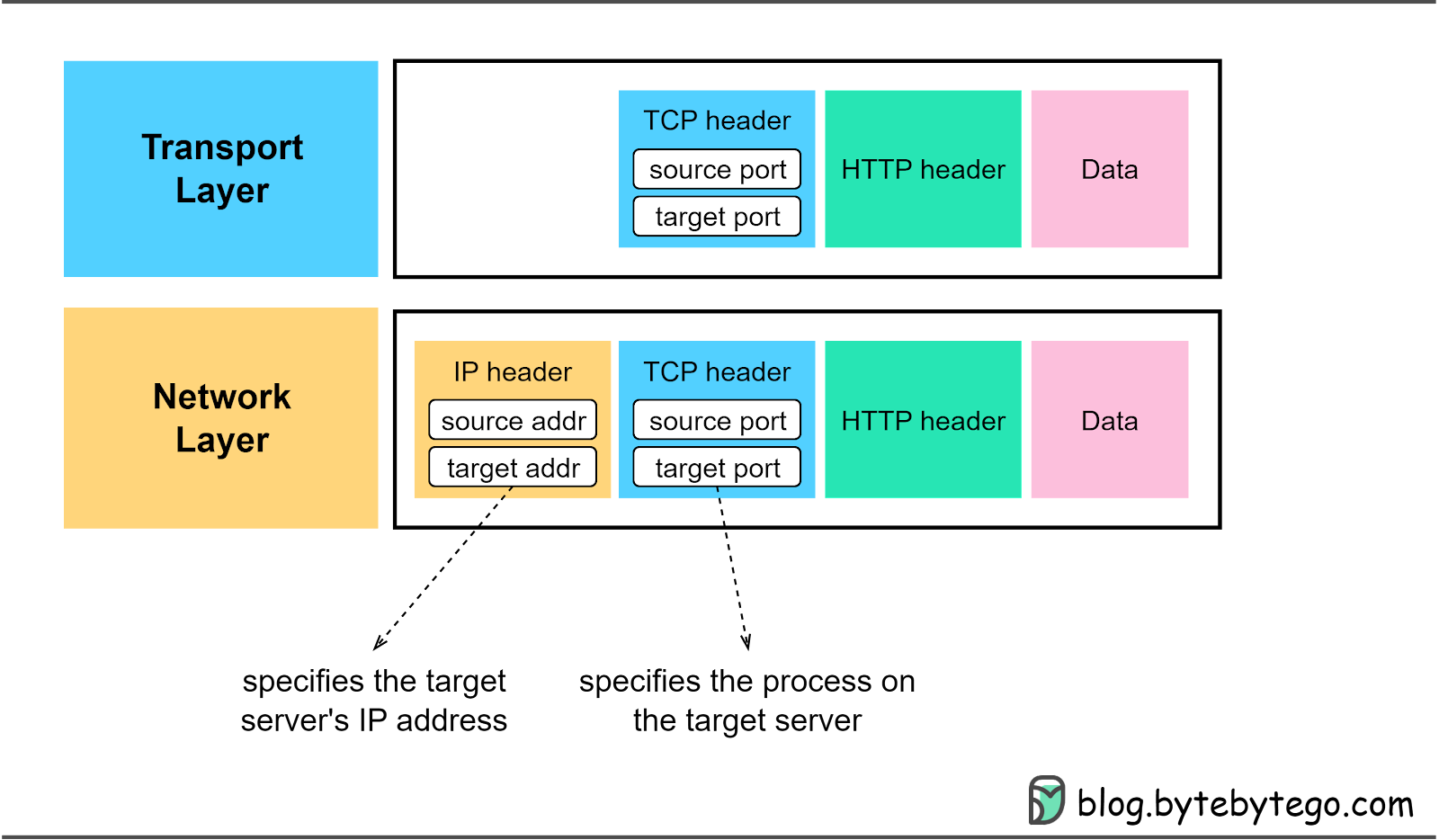
In this issue, we dive into one of the most important protocols - Transmission Control Protocol (TCP).
Recalling our previous issue, client-server communications rely on HTTP and WebSocket. While HTTP is used for stateless, request/response communication, WebSocket is used for persistent, bi-directional communication. Crucially, both rely on TCP.
The IP protocol at the network layer is inherently unreliable. It is responsible for delivering packets from one IP address to another without any guarantees for delivery, order, or even the completeness of the data in the packet. This is where TCP steps in to ensure reliable data transmission.
There are 3 important features of TCP:
TCP is connection-oriented. Unlike UDP which sends data from one server to multiple servers, TCP establishes a connection between two specific servers.
TCP is reliable. TCP guarantees the delivery of the segments, no matter what the network condition is.
TCP is bitstream-oriented. With TCP, application layer data is segmented. The transport layer remains oblivious to the boundary of a message. In addition, the segments must be processed sequentially, and duplicated segments are discarded.
To identify a unique TCP connection, we use the following fields, often referred to as a 4-tuple.
Source and destination IP addresses. Located in the IP header, these direct the IP protocol on data routing.
Source and destination ports. Found in the TCP header, these instruct the TCP protocol on which process should receive the segments.
We have already touched on the source and destination ports in the TCP header. Let’s further investigate other fields in the TCP header, especially those essential for TCP connection establishment. The diagram below highlights these significant fields.
Sequence number
When we establish a new TCP connection, a random 32-bit value is assigned as the initial sequence number. The receiving end uses this sequence number to send back an acknowledgment. The sequence number serves as a mechanism to ensure sequential processing of the segments at the receiving end.
Acknowledgment number
This 32-bit number is used by the receiver to request the next TCP segment. This value is the sequence number incremented by one. When the sender receives this acknowledgment, it can assume that all preceding data has been received successfully. This mechanism works to prevent any data losses.
Flags
Also known as control bits, flags indicate the purpose of a TCP message. As we will explore in the next section, there are different types of TCP messages. The control bits indicate whether the message is for establishing a connection, transmitting data, or terminating a connection.
ACK - Used for acknowledgments.
RST - Used to reset the connection when there are irrecoverable errors.
SYN - Used for the initial 3-way handshake. The sequence number field must be set.
FIN - Used to terminate the connection.
In the next section, we’ll see how these fields are used during TCP connection establishment.
Let's explore how TCP establishes a connection, a process known as a 3-way handshake, illustrated in the diagram below.
Step 0: Initially, both client and server are in a CLOSE state. The server starts by listening on a specific port for incoming connections.
Step 1: The client initiates a connection by sending a SYN segment to the server. It assigns a random number to the sequence number, known as the Initial Sequence Number (ISN). The SYN control bit is set to 1, transitioning the client into the SYN-SENT state.
Step 2: Upon receiving the SYN segment, the server assigns a random number to the sequence number and sets the acknowledgment number to client_isn+1. Then, it sets both the SYN and ACK control bits to 1 and sends this segment back to the client. At this point, the server enters the SYN-RECEIVED state.
Step 3: The client, after receiving the SYN+ACK segment, sends back an ACK segment, setting the acknowledgment number to server_isn+1. This segment can now carry application-layer data, and the client enters the ESTABLISHED state. Once the server receives the ACK segment, it too enters the ESTABLISHED state.
It’s worth noting that the first two handshakes cannot carry data, but the third one can. Following the 3-way handshake, the client and server can start exchanging data.

TCP is reliable, so what happens when a segment is lost?
If the SYN is lost
If the client doesn’t receive SYN+ACK within a set timeframe, it resends the SYN segment several times (the default is 5). If the SYN+ACK segment still doesn’t arrive, the client terminates the connection, transitioning from SYN_SENT to CLOSED state.
If the SYN+ACK is lost
The client cannot distinguish between the loss of a SYN segment or SYN+ACK segment, so it resends the SYN segment and closes the connection after several attempts.
If the server doesn’t receive the ACK within a certain time, it resends the SYN+ACK segment and closes the connection after several attempts.
If the ACK is lost
If the server doesn’t receive the ACK segment, it initiates a resend. Note that the client does not resend the ACK segment. If the server fails to receive the ACK segment even after resending, it closes the connection.
Let’s now move on to how a TCP connection is terminated. Both client and server can initiate the termination. In the diagram below, the client initiates the termination.
Step 1: The client initiates by sending a FIN segment to the server, transitioning into the FIN_WAIT_1 state.
Step 2: After receiving the FIN segment, the server responds with an ACK segment and enters the CLOSE_WAIT state. After receiving the ACK segment, the client enters the FIN_WAIT_2 state.
Step 3: Once the server finishes processing, it sends a FIN segment to the client and enters the LAST_ACK state.
Step 4: After receiving the FIN segment, the client sends an ACK segment and enters the TIME_WAIT state. The server, after receiving the ACK segment, moves to the CLOSED state. After waiting for a 2MSL (Maximum Segment Lifetime) duration, the client also transitions to the CLOSED state. The MSL is the longest period a TCP segment can exist in network, arbitrarily defined as 2 minutes.

To dive deeper into TCP handshake, let’s consider three edge cases:
The client is down
The server is down
The network cable gets damaged
Let’s consider a scenario where a TCP connection has been established between client and server, and then the client suddenly goes offline. What would happen?
If the server doesn’t attempt to send data to the client, there is no way for the server to know about the client’s status. The server would remain in the ESTABLISHED state. A solution to this issue is the implementation of TCP keepalive.
With TCP keepalive, a set of timers are associated with the established TCP connection. When the keepalive timer expires, the server sends a keepalive probe to the client. This probe is an ACK segment with no data. If several consecutive probe segments are sent without any response from the client, the server presumes the TCP connection is dead.
Now let’s dive deeper into TCP keepalive across four scenarios:
The client is functioning normally. The server sends a keepalive probe and receives a reply. The keepalive timer resets, and the server will send the next probe when the timer expires again.
The client process is down. The operating system on the client side sends a FIN segment to the server when it reclaims process resources.
The client machine goes offline and restarts. As the diagram below shows, when the client comes back online, it has no knowledge of the previous connection. When the server attempts to send data to the client over this dead connection, the client replies with an RST segment, which forces the server to close the connection.
The client's machine goes offline and doesn’t recover. We’ve talked about this scenario - after several unanswered probes, the server considers the connection as dead.
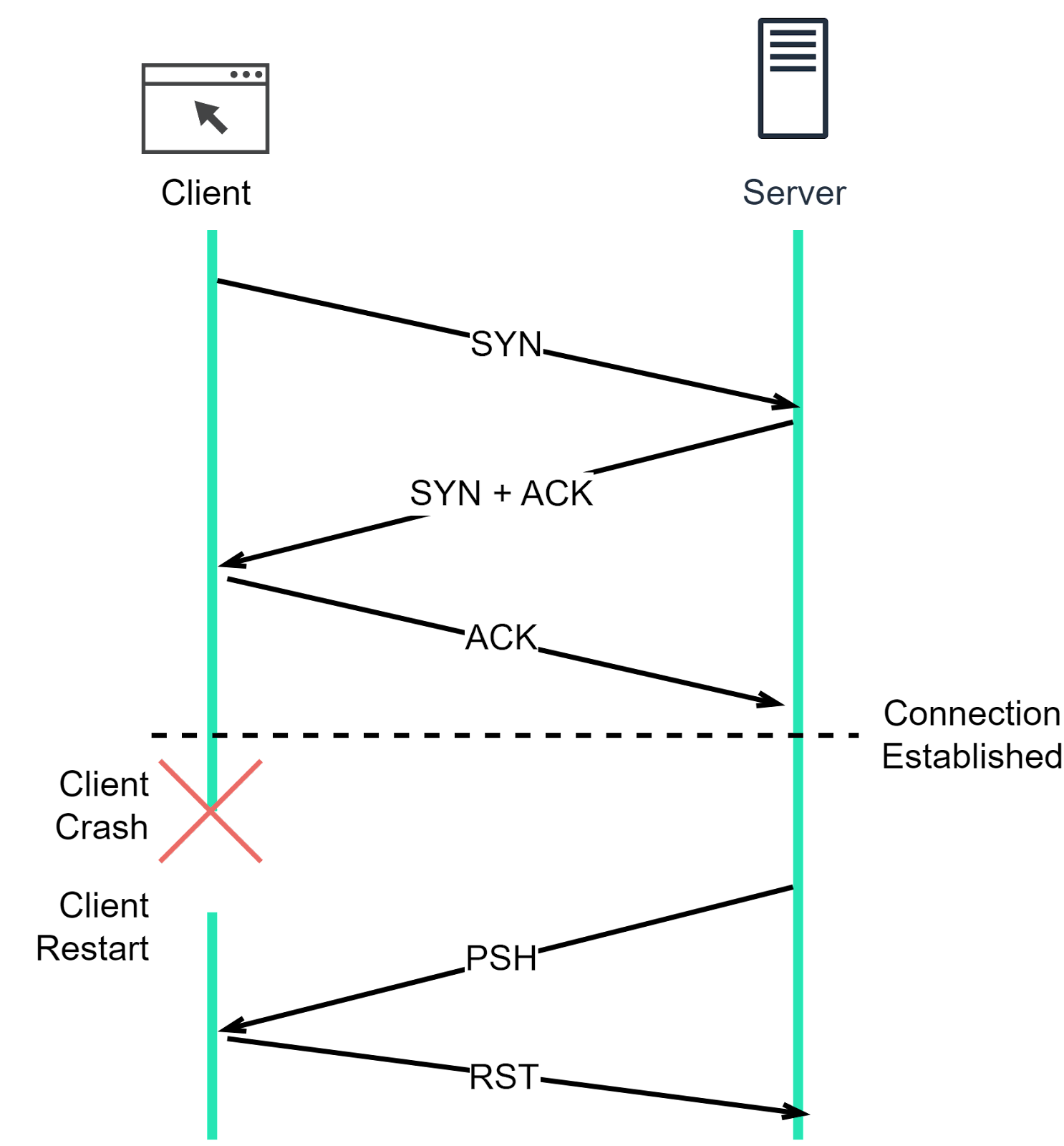
Similar mechanisms apply when the server goes down after a TCP connection is established, as TCP is a duplex protocol.
A SYN flood is a form of DDoS (Distributed Denial-of-Service) attack. In this attack, a hacker sends a large number of SYN segments from different IP addresses but never responds with any ACK segments, thus exhausting the server’s resources. Let’s understand why this happens.
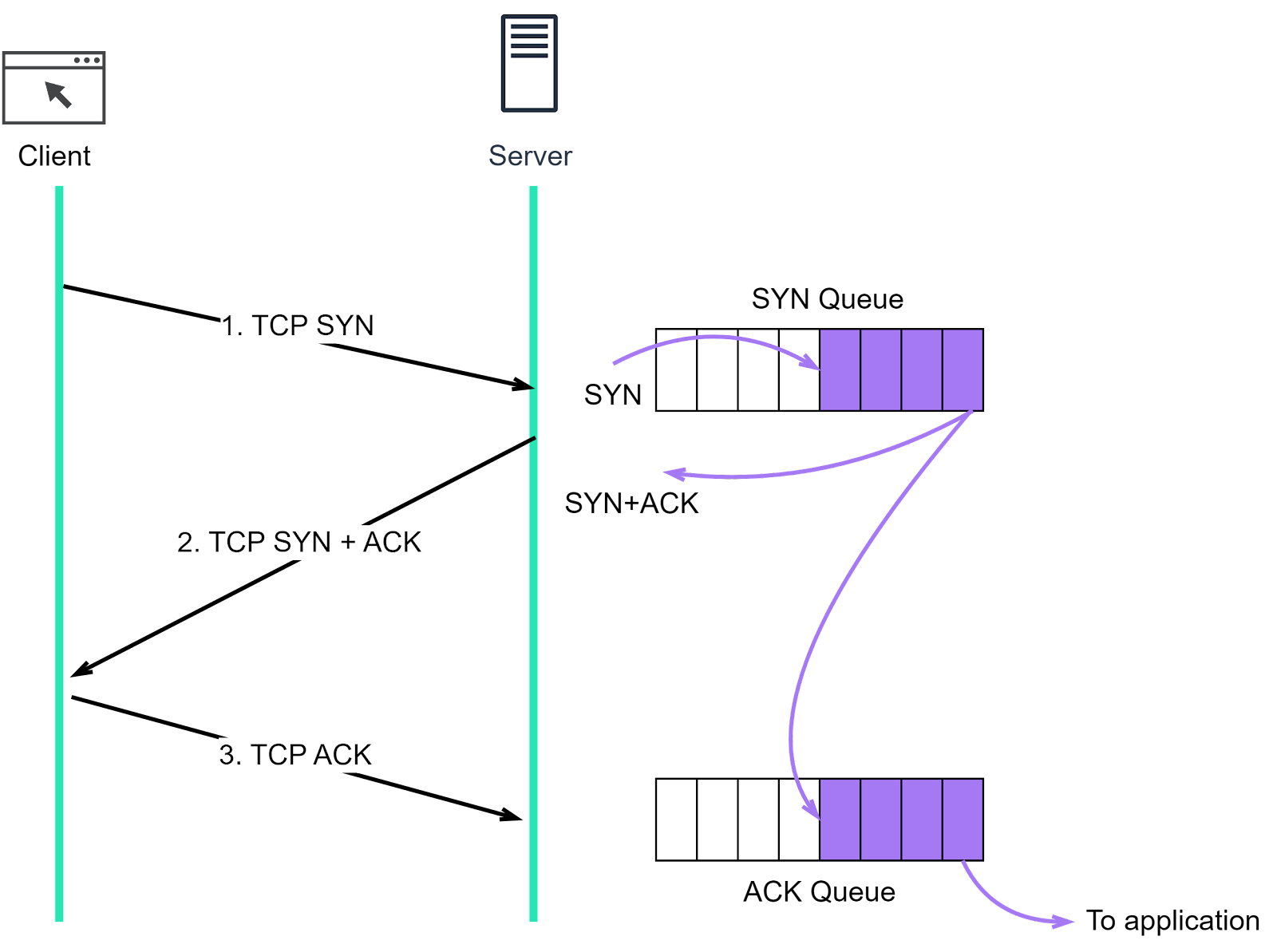
First, it’s important to understand that there are two queues maintained in the Linux kernel for TCP connections:
SYN queue (half-open queue). This queue stores SYN segments and dispatches them to send out SYN+ACK segments.
Accept queue. When the server receives an ACK segment, it removes an SYN segment from the SYN queue and places a new connection object in the accept queue. The application then calls the accept() function to dequeue the connection.
Both queues have a maximum capacity. If the limit is exceeded, the incoming segments will be dropped by default. A SYN flood fills the SYN queue, leading to the dropping of subsequent SYN segments, and new connections cannot be established. Consequently, services become unavailable to users.
How can we mitigate such attacks? There are generally four strategies:
Increase backlog queue (netdev_max_backlog)
When the Network Interface Card (NIC) receives packets faster than the kernel can process them, these packets are held in the operating system’s queue. Increasing the queue size allows more SYN segments to be accomodated.
Increase the maximum size of the SYN queue
Enable tcp_syncookies
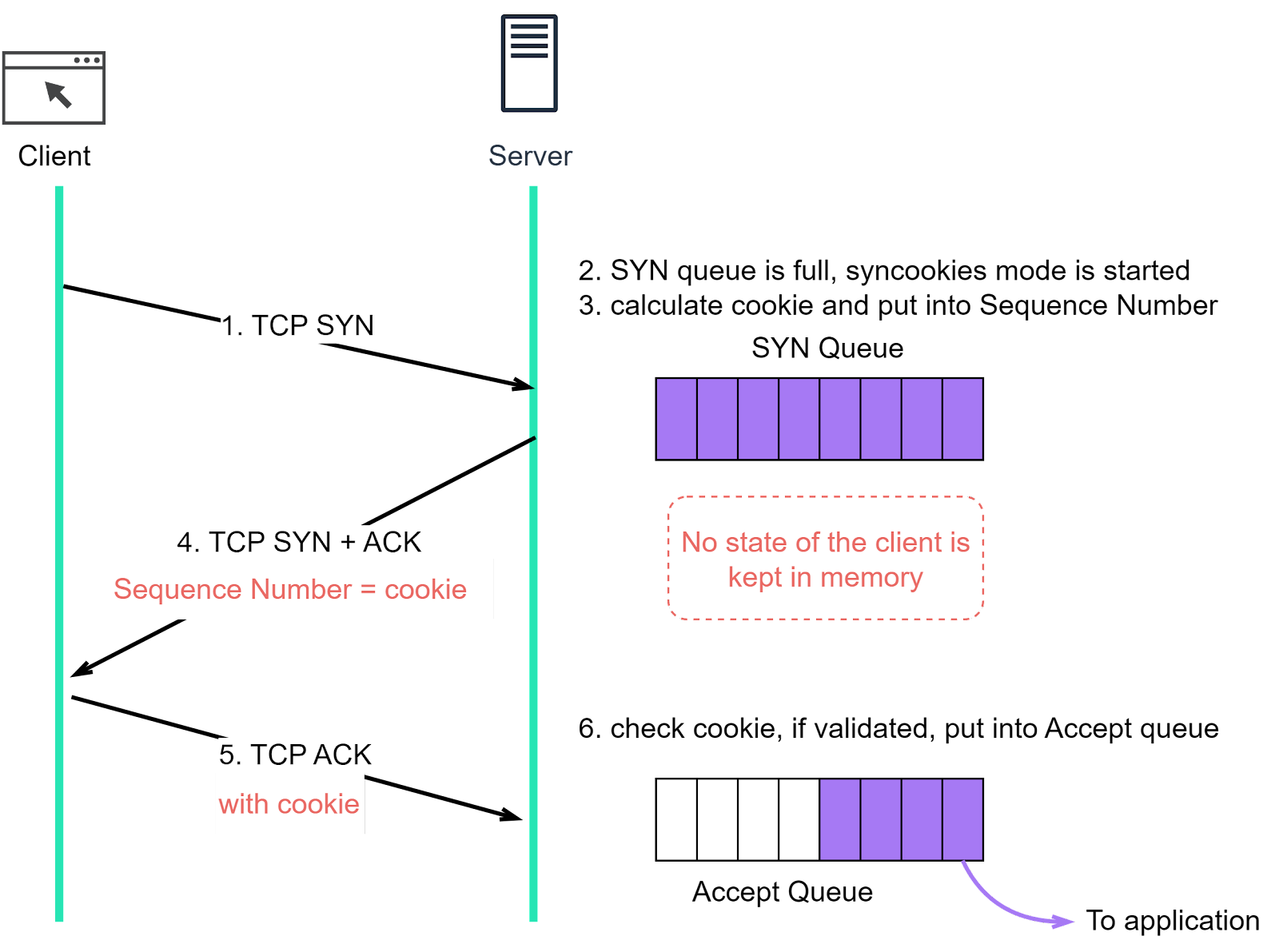
If net.ipv4.tcp_syncookies is enabled, the TCP connection can be established without using the SYN queue. The diagram below shows the difference when net.ipv4.tcp_syncookies is enabled.
Step 1: The client sends a SYN segment to the server, signaling its request to establish a TCP connection.
Step 2: If the server’s SYN queue is full, instead of refusing new SYN segments, it enters a mode called ‘syncookies’.
Step 3: In syncookies mode, rather than storing client information in the server’s memory, the server calculates an Initial Sequence Number (ISN), also known as a cookie. This cookie is then included in the sequence number field of the SYN+ACK segment that the server sends back to the client.
Step 4: The server sends the SYN+ACK segment back to the client. The segment includes the cookie calculated in step 3.
Step 5: Upon receiving the SYN+ACK segment, the client responds with an ACK segment which includes the cookie that was sent to it by the server.
Step 6: When the server receives the ACK segment, it verifies the cookie. If the cookie is valid, it means the client has proven its legitimacy, and the server will then enqueue the connection into the accept queue. In this way, the connection can be established even when the SYN queue is full, thereby mitigating potential SYN flood attacks
Reduce SYN+ACK retransmission
During a SYN flood attack, there are a large number of TCP connections in SYN_RECEIVED state. The server might think that the SYN+ACK or ACK segment is lost and will repeatedly send SYN+ACK until it reaches tcp_synack_retries. Reducing the number of retransmissions can accelerate the TCP disconnections and reduce demand on server resources.
Now, let’s compare TCP to another transport layer protocol - User Datagram Protocol (UDP). After understanding the complex mechanisms that TCP employs to ensure reliable connections, we will see why a simpler protocol like UDP is often used.
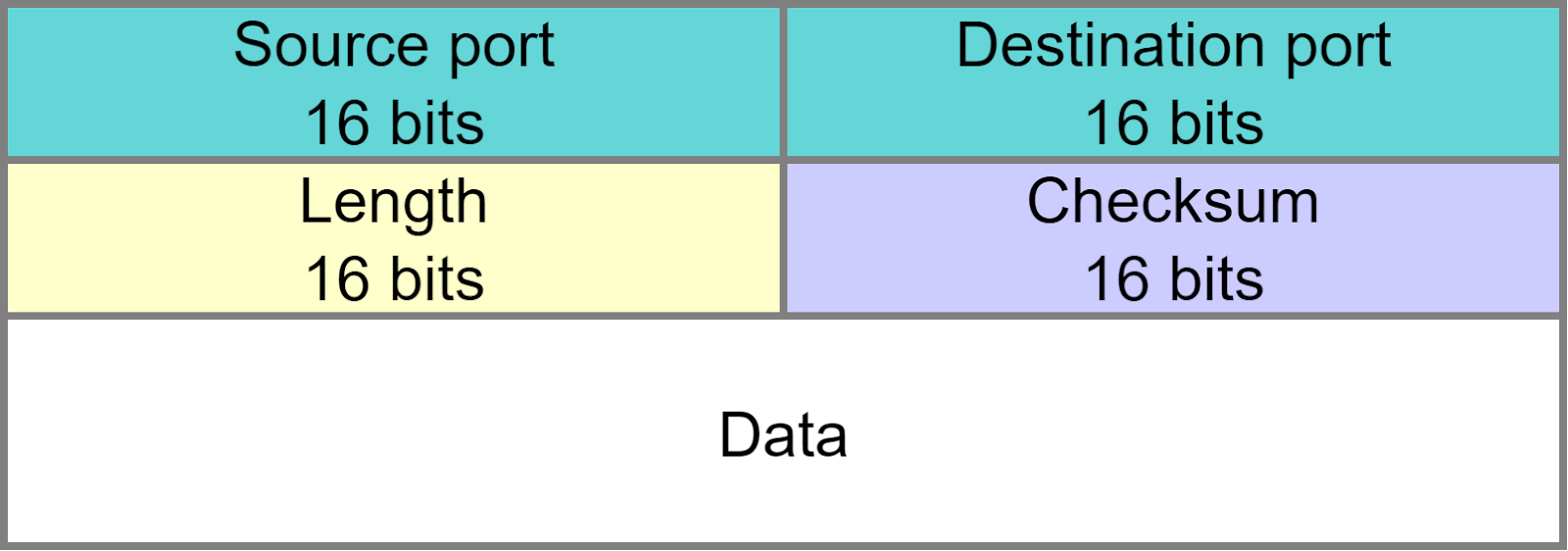
Let’s first look at the UDP header, which is much simpler.
Source port
This field identifies the sender’s port so that any reply knows where to be directed.
Destination port
This field identifies the receiver’s port so that UDP knows which process should receive the data.
Length
This field stores the length (in bytes) of the UDP header and UDP data.
Checksum
The checksum is used for error-checking of the UDP segment to prevent receiving corrupted data.
UDP doesn’t add much beyond the IP protocol. Its simplicity, however, brings certain advantages. Below is a comparison of UDP and TCP.
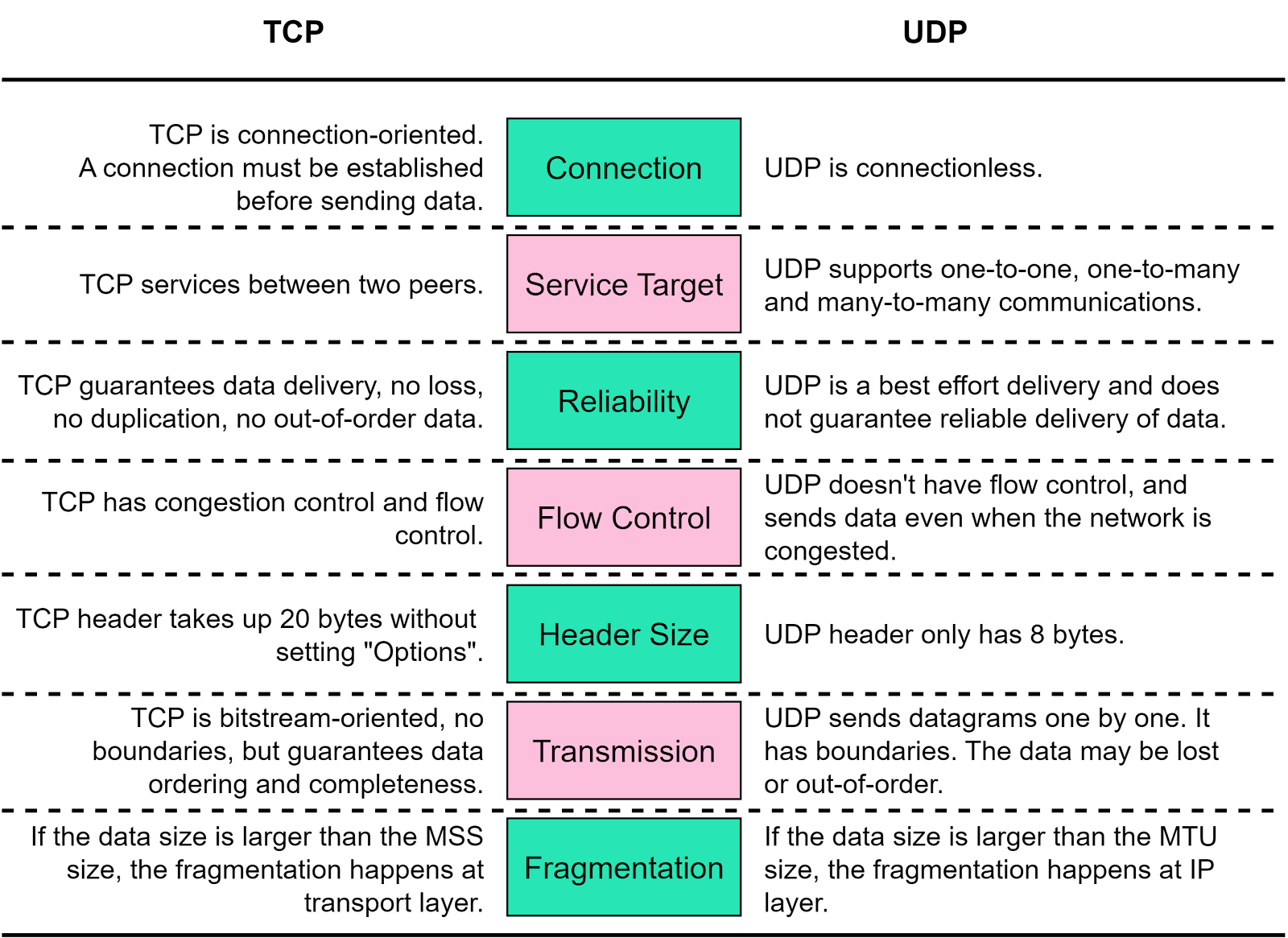
Due to their differences, TCP is used in application-layer protocols like FTP, HTTP, whereas UDP is used in DNS, SNMP, and video/audio communications.
The answer is yes. Let’s see how it works.
Both TCP and UDP have source port and destination port fields, which identify the processes on the server. Moreover, TCP and UDP are two entirely independent modules in the kernel. When a server receives data, it can identify the protocol from the protocol field in the IP header, and send the data to the corresponding module. The server then reads the destination port field from the TCP or UDP header and sends the data to the correct process. In this way, a port can be shared between TCP and UDP.
In this article, we have covered in detail how TCP works. While TCP is a reliable protocol, it only guarantees data delivery at the transport layer. If there are any issues at the application layer, we need additional logic to handle such situations. In addition, it’s important to recognize that the reliability provided by TCP comes at a cost, as it adds some overhead which, in some cases, might affect service responsiveness. For instance, if a service is slow to respond, one potential reason could be TCP retransmission triggered by packet loss.
Understanding these networking principles is essential for troubleshooting, optimizing, and designing efficient network-based applications and services. As we continue to rely more and more on digital and online platforms, having a firm grasp of these concepts becomes increasingly important. Stay tuned for more deep dives into the world of networking.
Special thanks to the Chinese website xiaolincoding.com for authorizing us to use some of their diagrams.