
This week’s system design refresher:
Top 5 Most-Used Deployment Strategies (Youtube video)
Linux file system explained
Cheatsheet for SQL and NoSQL databases
Vector databases
ByteByteGo Talent Collective
QA Wolf gets web apps to 80% automated end-to-end test coverage in weeks, not years. With unlimited, parallel runs on their infrastructure and their Zero Flake Guarantee.
Skeptical? Schedule a 90 day pilot and see how they will free up your time and reduce your QA cycles to just a few minutes, or learn more about their unique approach to scaling QA for even the most complex web apps.
They even have a challenge where you get a free pair of AirPods Max if they can't automate your web app's user flows.
In this video, we will talk about:
Big Bang Deployment
Rolling Deployment
Blue-Green Deployment
Canary Deployment
Feature Toggle
Linux file system used to resemble an unorganized town where individuals constructed their houses wherever they pleased. However, in 1994, the Filesystem Hierarchy Standard (FHS) was introduced to bring order to the Linux file system.
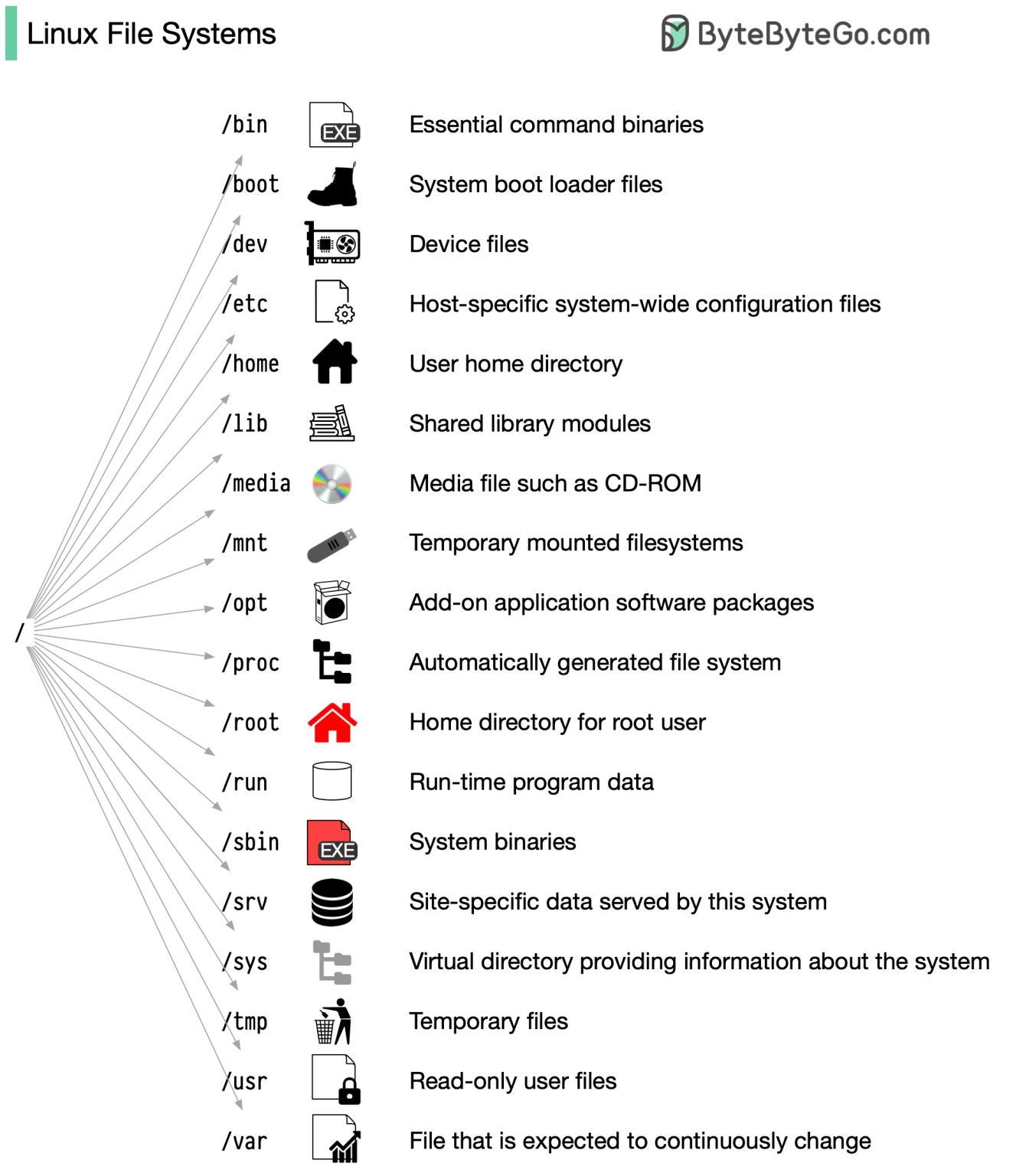
By implementing a standard like the FHS, the software can ensure a consistent layout across various Linux distributions. Nonetheless, not all Linux distributions strictly adhere to this standard. They often incorporate their own unique elements or cater to specific requirements.
To become proficient in this standard, you can begin by exploring. Utilize commands such as "cd" for navigation and "ls" for listing directory contents. Imagine the file system as a tree, starting from the root (/). With time, it will become second nature to you, transforming you into a skilled Linux administrator.
Have fun exploring!
Over to you: What Linux commands are useful for navigating and examining files?

Selecting the right database is crucial for project success. Here's a summary of key points:
- SQL databases offer structured data storage, SQL support, and relational capabilities.
- NoSQL databases provide flexibility, scalability, and distributed architectures.
- Specialized databases like columnar, graph, spatial, and time-series cater to specific needs.
- Evaluate key features, benefits, and providers to make an informed decision.
The diagram below shows a comparison between a vector database and other types of databases.

A vector database indexes and stores vector embeddings for fast retrieval and similarity search, with capabilities like CRUD operations, metadata filtering, and horizontal scaling.
Recent advances in AGI (Artificial General Intelligence) have made vector databases so popular.
A vector database stores high-dimensional vectors extracted from various unstructured data, like audio, video, image, and text. Then we can calculate the similarity among unstructured data. Typical use cases include:
- finding similar images or text
- recommending similar products
- detecting abnormalities
- temporarily store embeddings for large amounts of input
There has been a great deal of funding raised by vector database companies:
- Pinecone: $138 million
- Milvus: $113 million
- Weaviate: $67.7 million
- Chroma: $20 million
- Qdrant: $9.8 million
Over to you: Redis, ElasticSearch, and PostgreSQL support vector data processing. Are specialized vector databases necessary?
If you’re looking for a new gig, join the collective for customized job offerings from selected companies. Public or anonymous options are available. Leave anytime.
If you’re hiring, join the ByteByteGo Talent Collective to start getting bi-monthly drops of world-class hand-curated engineers who are open to new opportunities.