
This week’s system design refresher:
10 Key Data Structures We Use Every Day (Youtube video)
18 Most-used Linux Commands You Should Know
Database Selection Process
How do you become a full-stack developer?
list: keep your Twitter feeds
stack: support undo/redo of the word editor
queue: keep printer jobs, or send user actions in-game
hash table: cashing systems
Array: math operations
heap: task scheduling
tree: keep the HTML document, or for AI decision
suffix tree: for searching string in a document
graph: for tracking friendship, or path finding
r-tree: for finding the nearest neighbor
vertex buffer: for sending data to GPU for rendering
Which additional data structures have we overlooked?
Linux commands are instructions for interacting with the operating system. They help manage files, directories, system processes, and many other aspects of the system. You need to become familiar with these commands in order to navigate and maintain Linux-based systems efficiently and effectively. The following are some popular Linux commands:
ls - List files and directories
cd - Change the current directory
mkdir - Create a new directory
rm - Remove files or directories
cp - Copy files or directories
mv - Move or rename files or directories
chmod - Change file or directory permissions
grep - Search for a pattern in files
find - Search for files and directories
tar - manipulate tarball archive files
vi - Edit files using text editors
cat - display the content of files
top - Display processes and resource usage
ps - Display processes information
kill - Terminate a process by sending a signal
du - Estimate file space usage
ifconfig - Configure network interfaces
ping - Test network connectivity between hosts
Over to you: What is your favorite Linux command?
Choosing the right database is probably the most important technical decision a company will make.
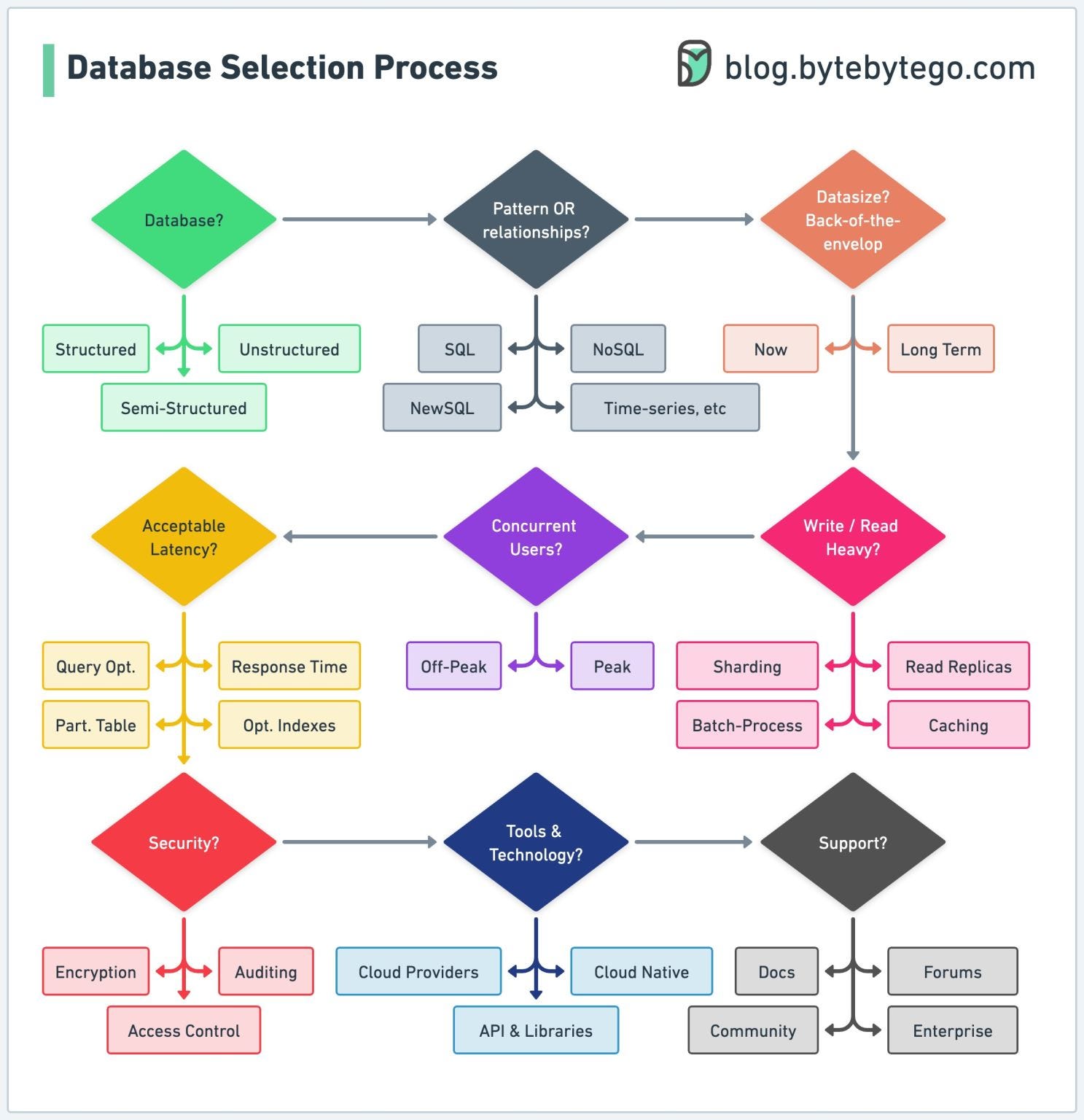
In our three-part paid newsletter series, we will dive deep into:
- Examining the types of data our project will handle.
- Considering the expected volume of data the project will generate.
- Evaluating the anticipated number of concurrent users or connections.
- Carefully assessing performance and security requirements.
- Considering any existing systems, tools, or technologies that will need to integrate with the chosen database.
The diagram shows a simplified possible full-stack tech stack.
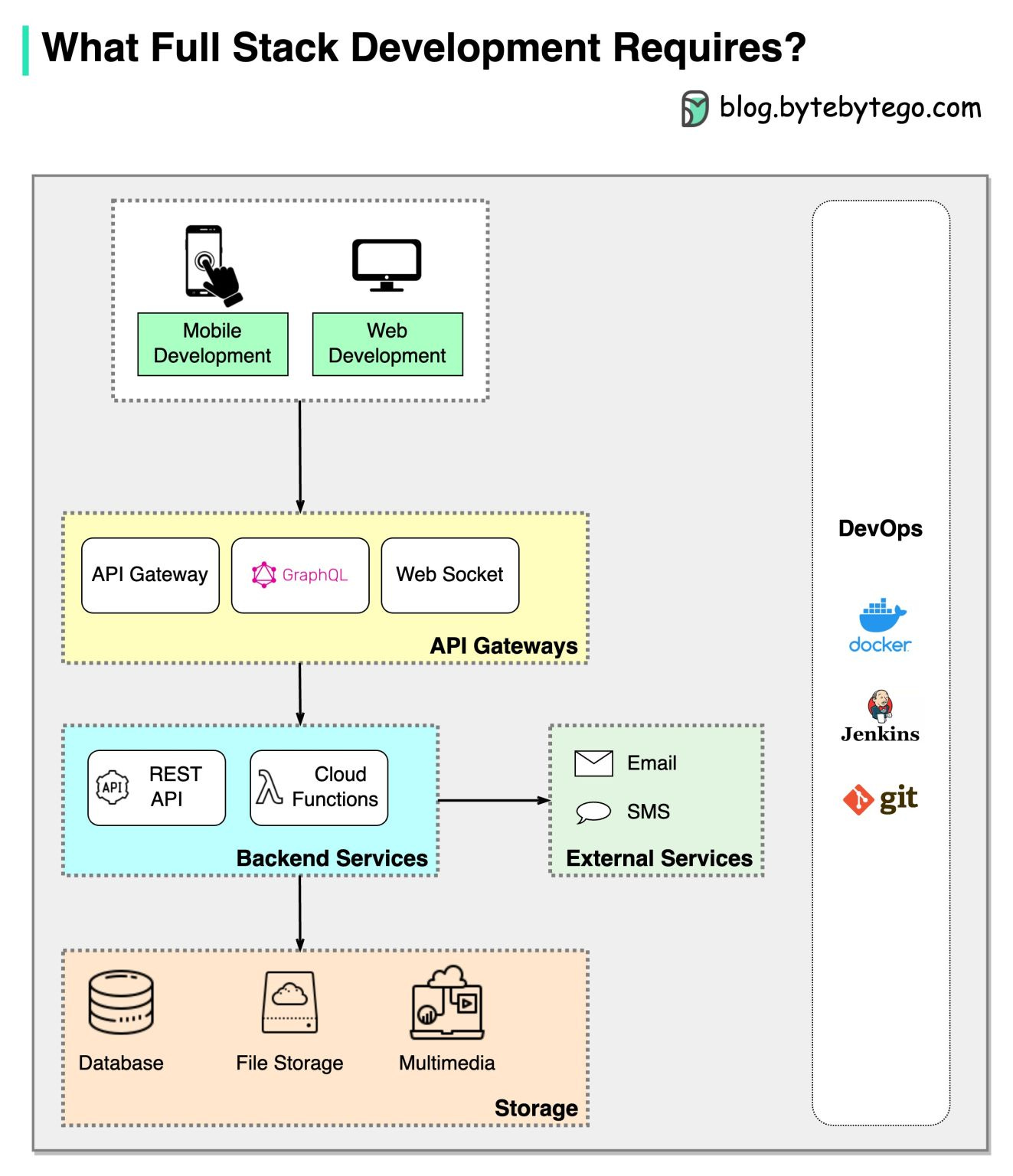
Full stack development involves developing and managing all layers of a software application, from user interfaces to storage.
Full-stack developers need to have a broad range of technical skills including:
Front-end development - HTML, Javascript, CSS, popular frameworks (React, Vue).
API gateways - REST API gateway, GraphQL, web socket, webhook. Basic knowledge of firewall, reverse proxy, and load balancer.
Backend development - Sever-side languages (Java, Python, Ruby), API designs, serverless cloud interactions.
Storage - Relational databases, NoSQL databases, file storage, multimedia storage.
External Services - Email and SMS interactions.
DevOps skills - Full stack developers need to take care of the full lifecycle of development, including testing, deployment, and troubleshooting.
Over to you: What’s your favorite full-stack setup?
If you’re looking for a new gig, join the collective for customized job offerings from selected companies. Public or anonymous options are available. Leave anytime.
If you’re hiring, join the ByteByteGo Talent Collective to start getting bi-monthly drops of world-class hand-curated engineers who are open to new opportunities.
(catch) Health: Senior Frontend Engineer, React + Typescript (United States, remote)