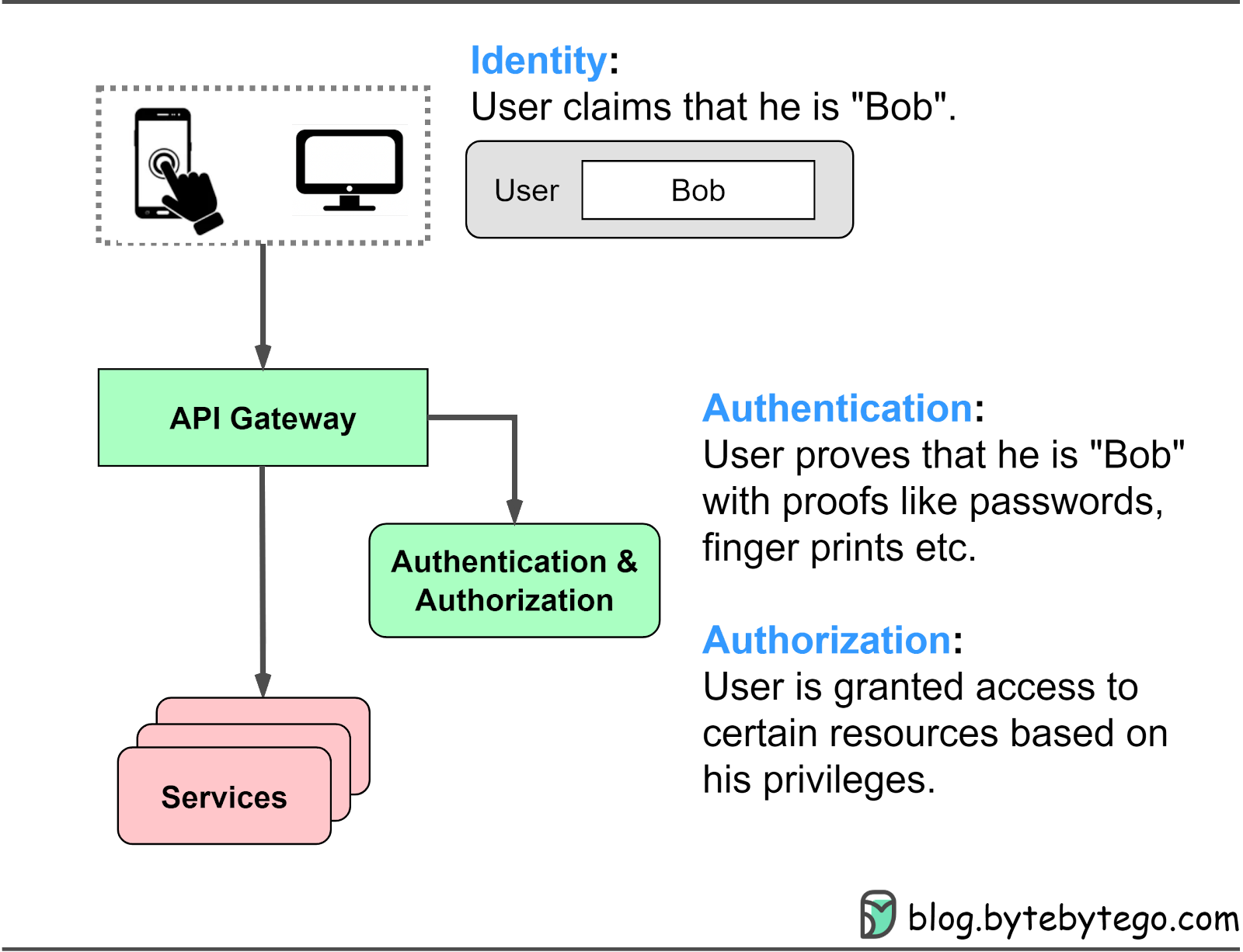
When we use various applications and websites, three essential security steps are continuously at play:
Identity
Authentication
Authorization
The diagram below shows where these methods apply in a typical website architecture and their meanings.
In this 2-part series, we dive into different authentication methods, including passwords, sessions, cookies, tokens, JWTs (JSON Web Tokens), SSO (Single Sign-On), and OAuth2. We discuss the problems each method solves and how to choose the right authentication method for our needs.
Password authentication is a fundamental and widely used mechanism for verifying a user's identity on websites and applications. In this method, users enter their unique username and password combination to gain access to protected resources. The entered credentials are checked against stored user information in the system, and if they match, the user is granted access.
While password authentication is a foundational method for user verification, it has some limitations. Users may forget their passwords, and managing unique usernames and passwords for multiple websites can be challenging. Furthermore, password-based systems can be vulnerable to attacks, such as brute-force or dictionary attacks, if proper security measures aren't in place.
To address these issues, modern systems often implement additional security measures, such as multi-factor authentication, or use other authentication mechanisms (e.g., session-cookie or token-based authentication) to complement or replace password-based authentication for subsequent access to protected resources.
In this section, we will cover password-based authentication first to understand its history and how it functions.
HTTP basic access authentication requires a web browser to provide a username and a password when requesting a protected resource. The credentials are encoded using the Base64 algorithm and included in the HTTP header field Authorization: Basic.
Here's how it typically works:
The client sends a request to access a protected resource on the server.
If the client has not yet provided any authentication credentials, the server responds with a 401 Unauthorized status code and includes the WWW-Authenticate: Basic header to indicate that it requires basic authentication.
The client then prompts the user to enter their username and password, which are combined into a single string in the format username:password.
The combined string is Base64 encoded and included in the "Authorization: Basic" header in the subsequent request to the server, e.g., Authorization: Basic dXNlcm5hbWU6cGFzc3dvcmQ=.
Upon receiving the request, the server decodes the Base64-encoded credentials and separates the username and password. The server then checks the provided credentials against its user database or authentication service.
If the credentials match, the server grants access to the requested resource. If not, the server responds with a 401 Unauthorized status code.
HTTP Basic Access Authentication has limitations. The username and password, encoded using Base64, can be easily decoded. Most websites use TLS (Transport Layer Security) to encrypt data between the browser and server, improving security. However, users' credentials may still be exposed to interception or man-in-the-middle attacks.
With HTTP Basic Access Authentication, the browser sends the Authorization header with the necessary credentials for each request to protected resources within the same domain. This provides a smoother user experience, without repeatedly entering the username and password. But, as each website maintains its own usernames and passwords, users may find it difficult to remember their credentials.
This authentication mechanism is obsolete for modern websites.

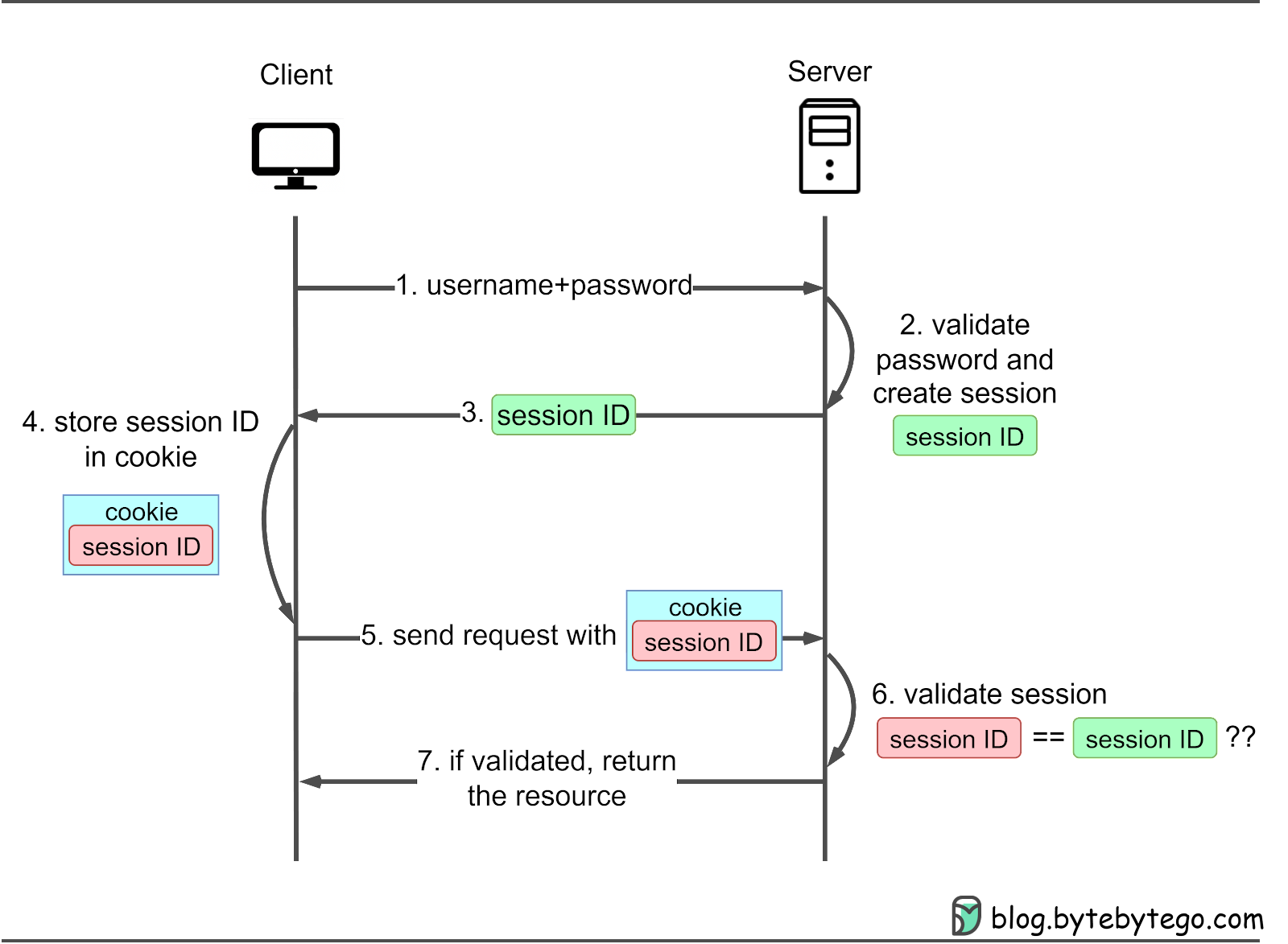
Session-cookie authentication addresses HTTP basic access authentication's inability to track user login status. A session ID is generated to track the user's status during their visit. This session ID is recorded both server-side and in the client’s cookie, serving as an authentication mechanism. It is called a session-cookie because it is a cookie with the session ID stored inside. Users must still provide their username and password initially, after which the server creates a session for the user's visit. Subsequent requests include the cookie, allowing the server to compare client-side and server-side session IDs.
Let’s see how it works:
The client sends a request to access a protected resource on the server. If the client has not yet authenticated, the server responds with a login prompt. The client submits their username and password to the server.
The server verifies the provided credentials against its user database or authentication service. If the credentials match, the server generates a unique session ID and creates a corresponding session in the server-side storage (e.g., server memory, database, or session server).
The server sends the session ID to the client as a cookie, typically with a Set-Cookie header.
The client stores the session cookie.
For subsequent requests, it sends the cookie along with the request headers.
The server checks the session ID in the cookie against the stored session data to authenticate the user.
If validated, the server grants access to the requested resource. When the user logs out or after a predetermined expiration time, the server invalidates the session, and the client deletes the session cookie.
Note that session information can be stored in the server memory or an independent session server, depending on the system's scalability and reliability requirements. Storing sessions in server memory can consume significant resources, impacting server performance. System metrics should be carefully monitored.
Session-cookie authentication has some limitations.
Session cookies can be vulnerable to session hijacking attacks where an attacker can steal the session cookie and use it to impersonate the user. This can happen if the session cookie is transmitted over an unsecured network or if the website is vulnerable to cross-site scripting (XSS) attacks.
Session cookies can be exposed to Cross-site request forgery (CSRF) attacks, where hackers deceive users' browsers into unknowingly executing actions on websites. Hackers create malicious sites or emails with links to the targeted site. When users click the link, their browser sends a request with their session cookie, making the site believe it's a genuine user request. To counter CSRF attacks, websites can use anti-CSRF tokens or demand re-authentication for sensitive tasks.
Session cookies can be difficult to scale to large numbers of users, as each session requires server-side storage of the session state. This can become a performance bottleneck as the number of users and sessions grows.
Session cookies are less convenient to use in mobile native applications compared to web applications. Although Android and iOS platforms offer APIs for handling cookies, the process is more complex than in web-based applications. Web browsers automatically manage cookies, simplifying the task for developers. In contrast, native mobile app developers must directly manage cookies using the available APIs, which increases the development complexity.
Token-based authentication is a modern approach to secure user access in web applications and native mobile apps. It addresses some limitations of session-cookie authentication and offers advantages such as stateless server-side handling and better compatibility with various platforms.
Token-based authentication addresses the limitations of session-cookie authentication. Instead of generating a session, the server issues a token and sends it to the client. The client stores the token in the local storage. Subsequent requests carry the token in the HTTP header for validation, allowing users to access protected resources for a specified period.
In basic token authentication, the client-server interaction typically follows these steps:
The client sends a request to access a protected resource on the server. If the client hasn't yet authenticated, the server responds with a login prompt. The client submits their username and password to the server.
The server verifies the provided credentials and, if valid, issues a unique token.
The token is sent back to the client.
The client stores the token in local storage.
Subsequent requests include the token in the HTTP header.
The server validates the received token.
The server grants access to the requested resource.
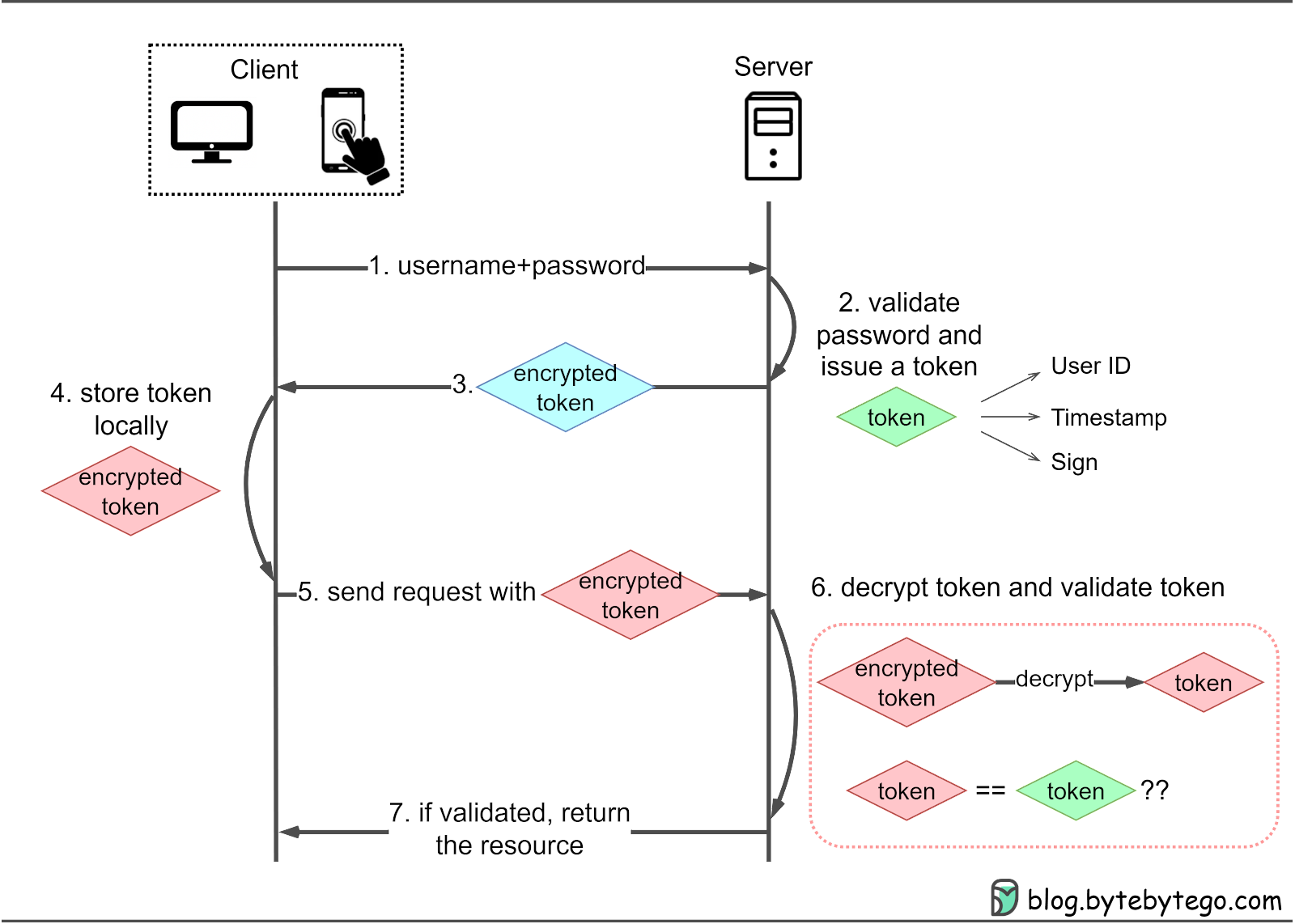
The primary differences between session and token authentication are:
Token-based authentication doesn’t rely on cookies, so it can be supported when cookies are restricted. It can be used in mobile native apps, as well as in web applications, and it can mitigate the limitations of cookie-based authentication, including cross-domain access and CSRF attacks since tokens are not subject to the same restrictions as cookies.
Tokens typically include a user ID, which is sent with each request, eliminating the need for the server to store token information in memory. This is why token-based authentication is often referred to as stateless authentication.
One limitation of basic token authentication is that tokens can be vulnerable to theft, especially if transmitted over insecure connections. Basic tokens may lack built-in mechanisms for expiration or revocation, which could lead to security risks if tokens are compromised.
High-quality token implementations offer enhanced security features. Many applications require periodic token refreshes and some even provide tiered token management.
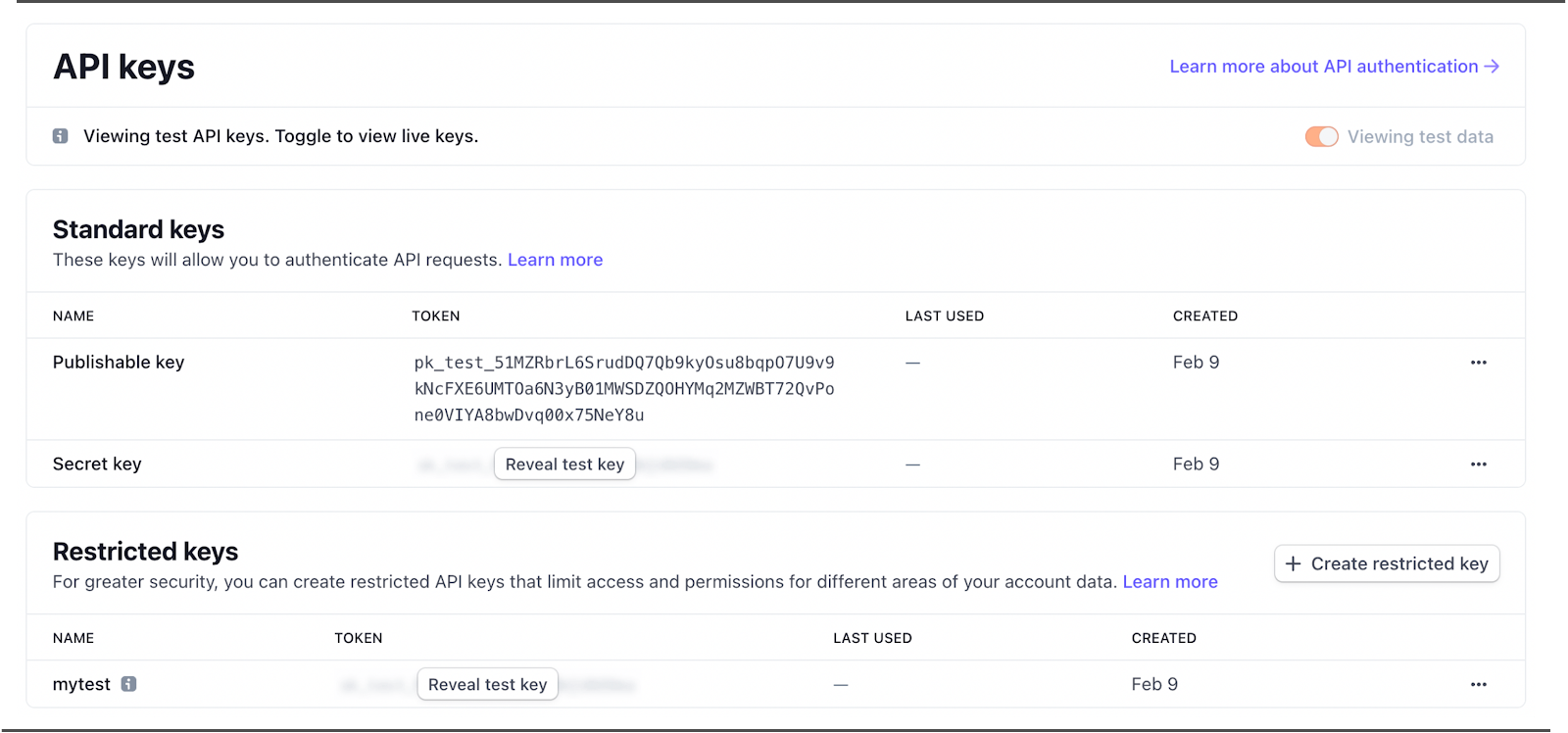
Consider Stripe's approach to managing its API keys, which includes three security levels:
Publishable key: Intended for use on public-facing websites, such as for displaying read-only metrics.
Secret key: Capable of performing any request, this key should be kept confidential. For instance, it can be used to check account balances.
Restricted key: Offers more granular control over various API calls. For example, a restricted key might permit read and write access to payment methods while limiting access to charges to read-only.
To enhance security, it's possible to roll the key, effectively refreshing it.
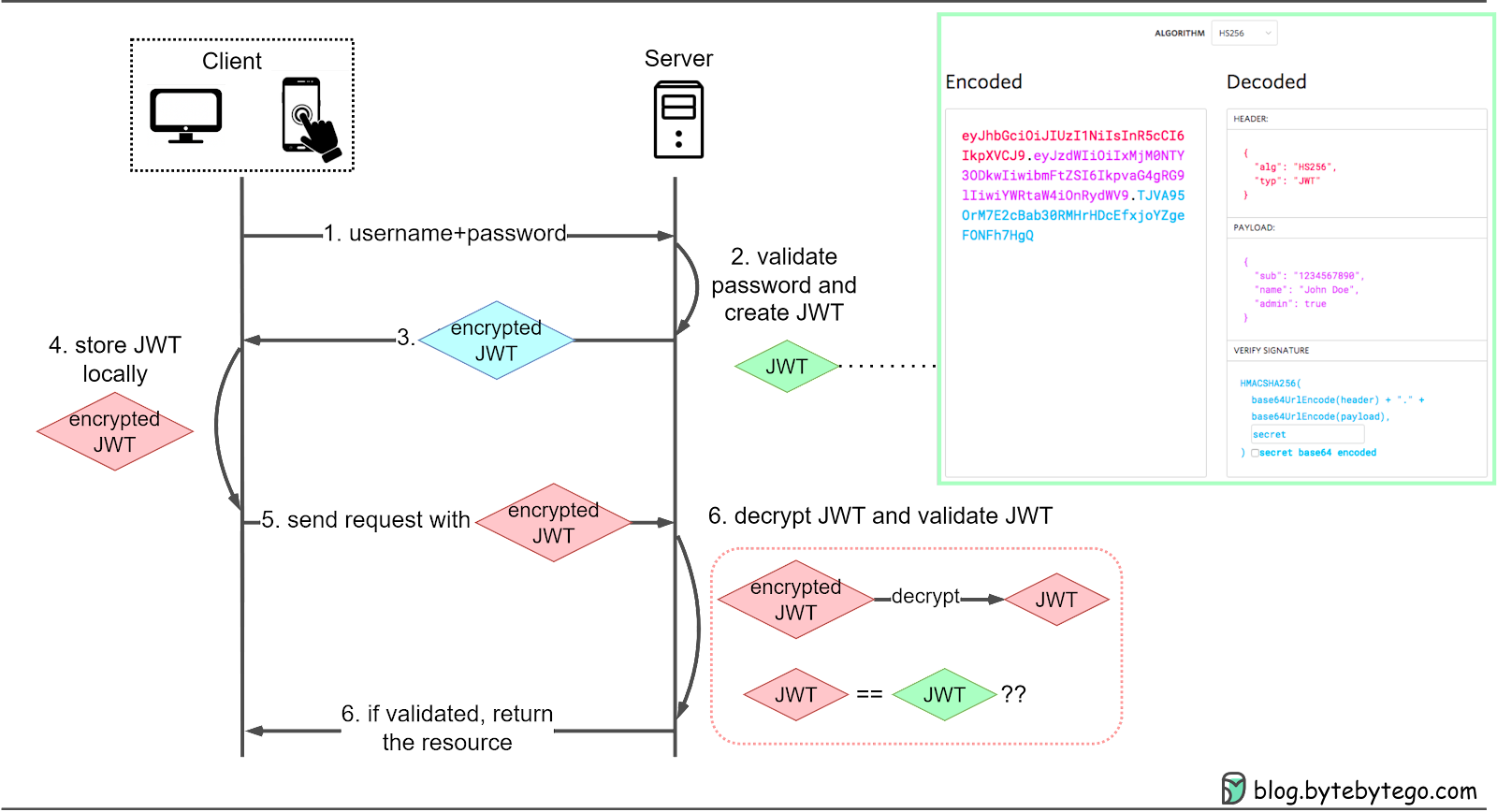
JWTs offer a more robust solution to token-based authentication by carrying additional information within the token itself. They provide a standardized format for token creation and validation, improving overall security and reducing the need for additional server-side queries.
JWTs are useful for both authentication and information exchange. They allow for more efficient communication between client and server. They can include claims, such as user roles and permissions, which can help to streamline authorization processes. This added functionality reduces the need for additional server-side queries, improving performance and reducing server load.
In JWT authentication, the client-server interaction typically follows these steps:
The client sends a request to access a protected resource on the server.
If the client hasn't yet authenticated, the server responds with a login prompt.
The client submits their username and password to the server.
The server verifies the provided credentials and, if valid, issues a JWT to the client.
The client stores the JWT in local storage and includes it in the HTTP header for subsequent requests.
The server validates the JWT and grants access to the requested resource.
JWT tokens consist of three parts:
Header: Contains the token type (typ) and hash algorithm (alg), such as HMAC SHA256 or RSA.
Payload: Includes seven predefined claims (not mandatory but recommended), public claims, and private claims.
Signature: Created using the encoded header, encoded payload, and a secret.
One limitation of JWTs is their potential for size-related issues. If too much information is embedded in the payload, the token size may increase, leading to performance problems and increased bandwidth usage. Additionally, JWTs can be vulnerable to attacks if not properly secured, such as through the use of weak signing keys or transmission over insecure connections.
The second part will be released next week.