
This week’s system design refresher:
New Machine Learning System Design Interview Book
What is Kubernetes? (Youtube video)
Microservice architecture
2-factor authentication
Wed assembly
Our new book, Machine Learning System Design Interview, will be available on Amazon on Feb/01.
Table of Content:
Chapter 1 Introduction and Overview
Chapter 2 Visual Search System
Chapter 3 Google Street View Blurring System
Chapter 4 YouTube Video Search
Chapter 5 Harmful Content Detection
Chapter 6 Video Recommendation System
Chapter 7 Event Recommendation System
Chapter 8 Ad Click Prediction on Social Platforms
Chapter 9 Similar Listings on Vacation Rental Platforms
Chapter 10 Personalized News Feed
Chapter 11 People You May Know
My co-author Ali Aminian and I have spent countless nights and weekends on the book. Our goal is to make complex ML systems easy to understand. Thanks to everyone who helped us make this happen.
There is no pre-order. If you are interested, please provide your email at the link below, and I will send you an email when the book is live. Thank you.
Notify me when the book is available: https://lnkd.in/eA_3FvUR
The diagram below shows why real-time gaming and low-latency trading applications should not use microservice architecture.
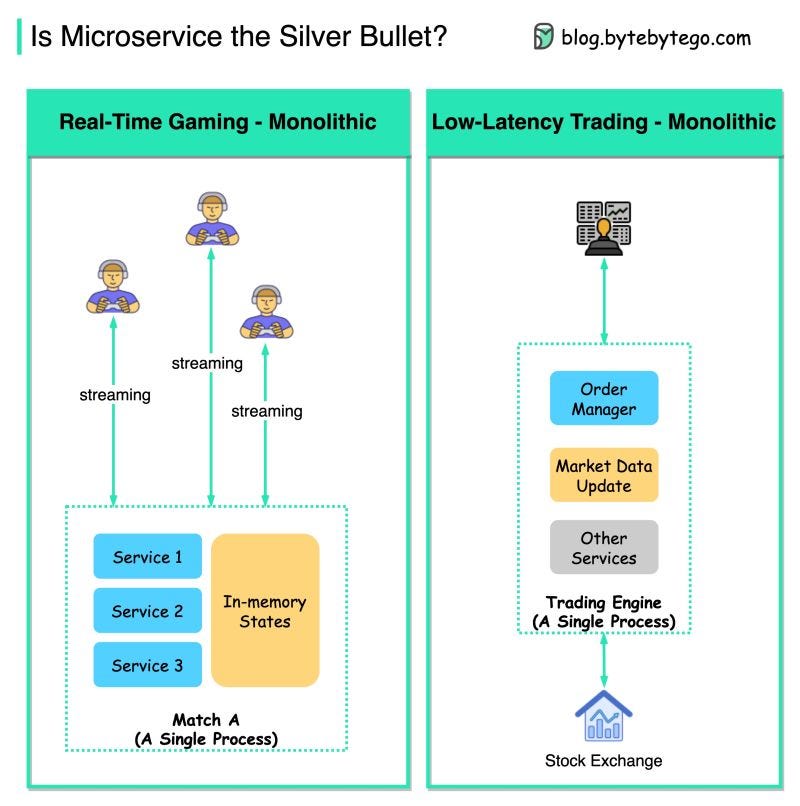
There are some common features of these applications, which make them choose monolithic architecture:
These applications are very latency-sensitive. For real-time gaming, the latency should be at the milli-second level; for low-latency trading, the latency should be at the micro-second level. We cannot separate the services into different processes because the network latency is unbearable.
Microservice architecture is usually stateless, and the states are persisted in the database. Real-time gaming and low-latency trading need to store the states in memory for quick updates. For example, when a character is injured in a game, we don’t want to see the update 3 seconds later. This kind of user experience can kill a game.
Real-time gaming and low-latency trading need to talk to the server in high frequency, and the requests need to go to the same running instance. So web socket connections and sticky routing are needed.
So microservice architecture is designed to solve problems for certain domains. We need to think about “why” when designing applications.
👉 Over to you: Have you met similar situations at work when you have to choose an architecture other than microservice?
Google authenticator is commonly used for logging into our accounts when 2-factor authentication is enabled. How does it guarantee security?
Google Authenticator is a software-based authenticator that implements a two-step verification service. The diagram below provides detail.
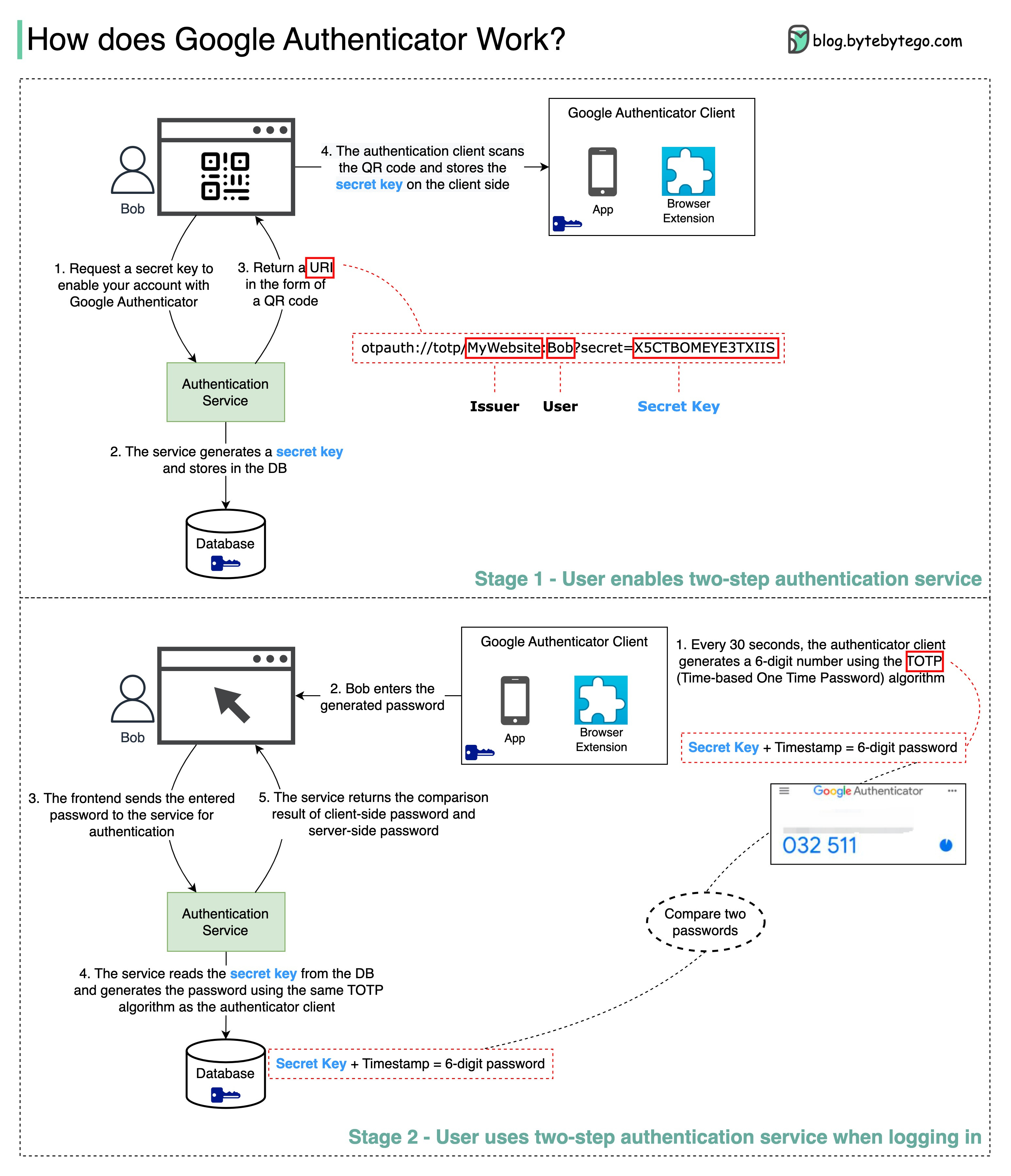
There are two stages involved:
Stage 1 - The user enables Google's two-step verification
Stage 2 - The user uses the authenticator for logging in, etc.
Let’s look at these stages.
Stage 1
Steps 1 and 2: Bob opens the web page to enable two-step verification. The front end requests a secret key. The authentication service generates the secret key for Bob and stores it in the database.
Step 3: The authentication service returns a URI to the front end. The URI is composed of a key issuer, username, and secret key. The URI is displayed in the form of a QR code on the web page.
Step 4: Bob then uses Google Authenticator to scan the generated QR code. The secret key is stored in the authenticator.
Stage 2
Steps 1 and 2: Bob wants to log into a website with Google two-step verification. For this, he needs the password. Every 30 seconds, Google Authenticator generates a 6-digit password using TOTP (Time-based One Time Password) algorithm. Bob uses the password to enter the website.
Steps 3 and 4: The front end sends Bob's password to the backend for authentication. The authentication service reads the secret key from the database and generates a 6-digit password using the same TOTP algorithm as the client.
Step 5: The authentication service compares the two passwords generated by the client and the server, and returns the comparison result to the front. Bob can proceed with the login process only if the two passwords match.
Is this authentication mechanism safe?
Can the secret key be obtained by others?
We need to make sure the secret key is transmitted using HTTPS. The authenticator client and the database store the secret key, and we need to ensure the secret keys are encrypted.
Can the 6-digit password be guessed by hackers?
No. The password has 6 digits, so the generated password has 1 million potential combinations. Plus, the password changes every 30 seconds. If hackers want to guess the password in 30 seconds, they need to enter 30,000 combinations per second.
👉 Over to you: What are some of the other 2-factor authentication devices you used?
What is web assembly (WASM)? Why does it attract so much attention?
The diagram shows how we can run native C/C++/Rust code inside a web browser with WASM.
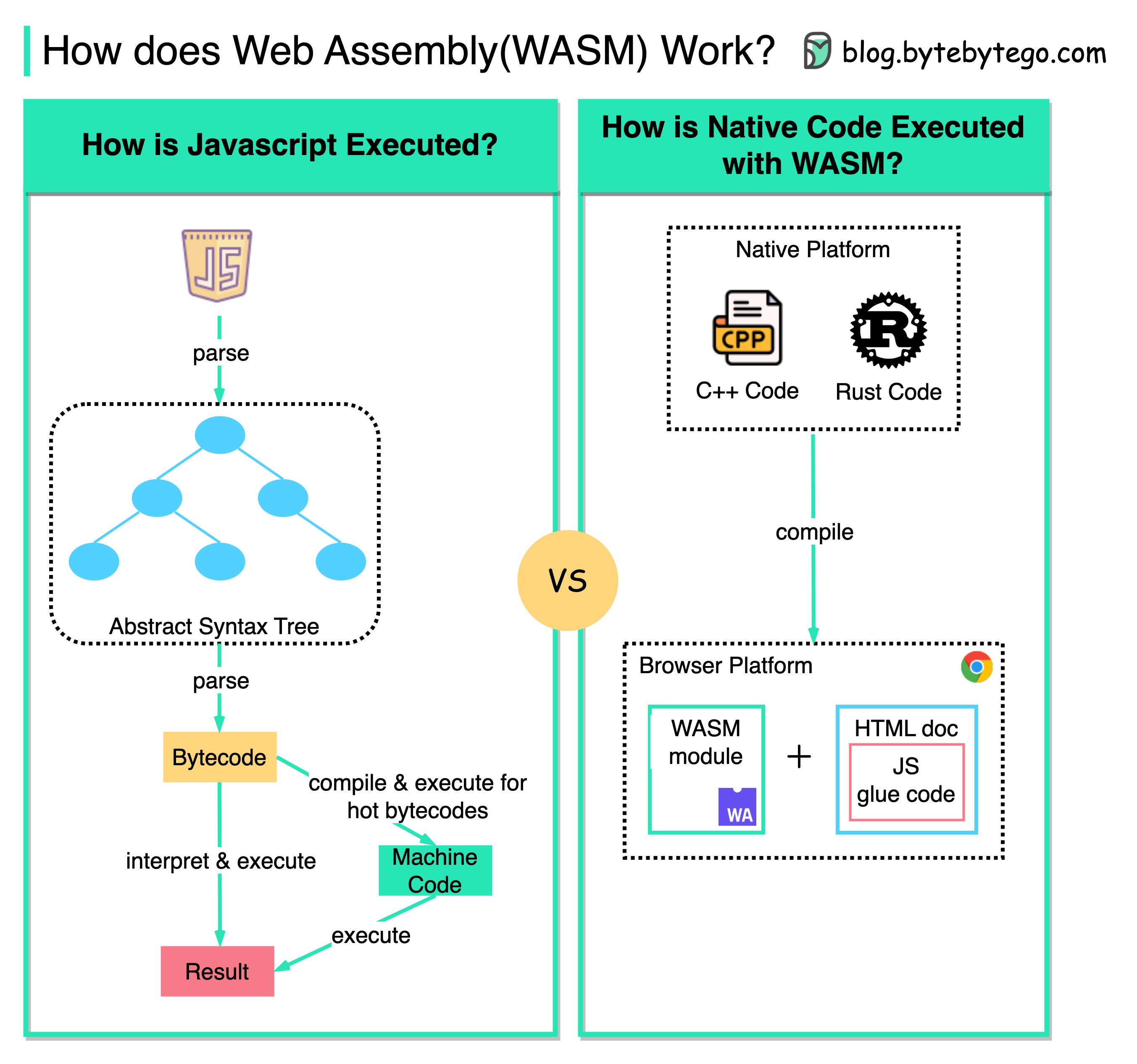
Traditionally, we can only work with Javascript in the web browser, and the performance cannot compare with native code like C/C++ because it is interpreted.
However, with WASM, we can reuse existing native code libraries developed in C/C++/Rust, etc to run in the web browser. These web applications have near-native performance.
For example, we can run the video encoding/decoding library (written in C++) in the web browser.
This opens a lot of possibilities for cloud computing and edge computing. We can run serverless applications with fewer resources and instant startup time.
Over to you: Are you familiar with WASM or have you used it in the workplace?